Free Lessons
Courses
Seminars
TechHelp
Fast Tips
Templates
Topic Index
Forum
ABCD
 
Home   Courses   TechHelp   Forums   Help   Contact   Merch   Join   Order   Logon  
 
Back to Access Forum    Comments List
Upload Images   @Reply   Bookmark    Link   Email   Next Unseen 
Formatting Report Phone Number
Katherine Bradshaw 
    
4 years ago
I've got an input mask on my tables so that phone numbers must be entered as 8885551234 and appear as (888)555-1234 in my forms and such.

I'm trying to export a report to Excel with the phone numbers showing up in the Excel file as 888-555-1234.

I've tried setting the format under field properties in both the query and the report generated from the query. The drop-down list of predefined formats is not available, so I tried ###-###-####.

Neither attempt resulted in the Excel export having the proper 888-555-1234 format. They are still in the raw data form of 8885551234.

When I go back and look at the saved query and report, the format appears other than how I typed it, as just #-#-#
The data type is plain text.

Could it be my complex queries striking again? Or am I missing a step in formatting?
Kevin Robertson  @Reply  
          
4 years ago
Is the a reason why you are trying to set the Format property instead of changing the Input Mask property of the report?
Scott Axton  @Reply  
        
4 years ago
Katherine -
The # symbol is usually interpreted by Access as Date.  You need to use the @ symbol instead.
           @@@-@@@-@@@@

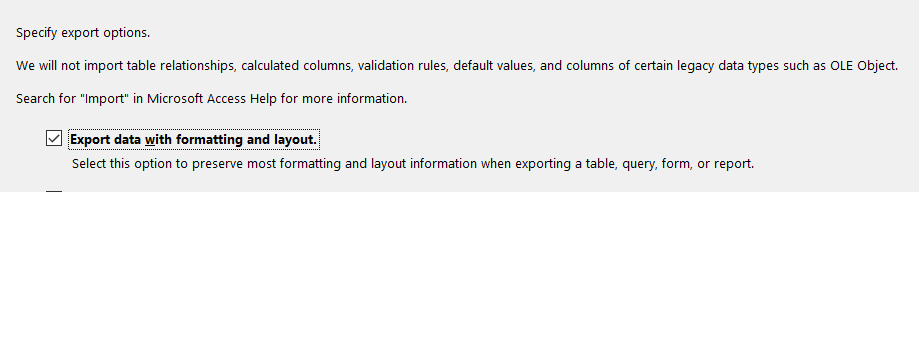
(You could choose Export with formatting and layout.  See screenshot)
Even that may not work for you. It will look correct in the query but the export sill only export the numbers.


So then if you add a field and alias the phone in the query like this:
       FP:  Format([Phone],@@@-@@@-@@@@)      'FormattedPhone
That should work when you export without worrying about export with layout.

Note if your Phone field is blank or is a NON USA or CANADA phone the formatting may not be what you want. (Canada uses the same format for phones as the US does)

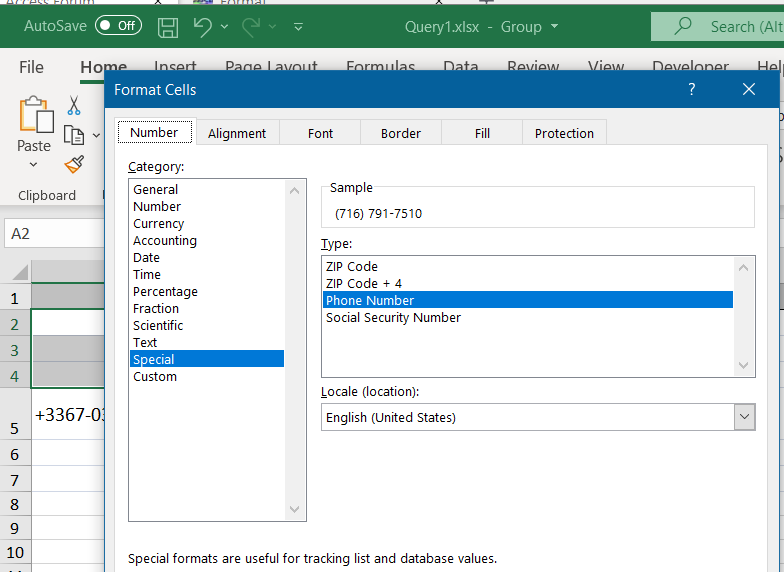
The other option you have is go into Excel and format the column as Phone Number (Pic 2).

Scott Axton  @Reply  
        
4 years ago

Scott Axton  @Reply  
        
4 years ago

Scott Axton  @Reply  
        
4 years ago
For MUCH more on the Format Property see the Format Page in the Glossary

Alex put together a GREAT page there.
Scott Axton  @Reply  
        
4 years ago
Kevin - Kathrine is only storing the numbers in her db, as she should.  She just wanted it to be formatted "pretty" for her report.
Katherine Bradshaw OP  @Reply  
    
4 years ago
Och! *facepalm* The @ symbol! I don't know how I managed to not be able to Google that properly.
I was already exporting with the formatting and layout, so all I needed to do is format the field in the report as @@@-@@@-@@@@, and it exports as 888-555-1234 into Excel and thus merges properly into my Word document.

(It wouldn't work to format the Excel document, as I'm setting up a button for a monthly batch of membership renewal letters, and the Excel document will get overwritten each month.)

Thanks for catching my error!

Kevin - Scott was right. I already had an input mask on the data table, so it was just a string of numbers in the database that would be hard to read as a phone number outside of the mask. :-)

This thread is now CLOSED. If you wish to comment, start a NEW discussion in Access Forum.
 

Next Unseen

 
New Feature: Comment Live View


The following is a paid advertisement
Computer Learning Zone is not responsible for any content shown or offers made by these ads.
 

Learn
 
Access - index
Excel - index
Word - index
Windows - index
PowerPoint - index
Photoshop - index
Visual Basic - index
ASP - index
Seminars
More...
Customers
 
Login
My Account
My Courses
Lost Password
Memberships
Student Databases
Change Email
Info
 
Latest News
New Releases
User Forums
Topic Glossary
Tips & Tricks
Search The Site
Code Vault
Collapse Menus
Help
 
Customer Support
Web Site Tour
FAQs
TechHelp
Consulting Services
About
 
Background
Testimonials
Jobs
Affiliate Program
Richard Rost
Free Lessons
Mailing List
PCResale.NET
Order
 
Video Tutorials
Handbooks
Memberships
Learning Connection
Idiot's Guide to Excel
Volume Discounts
Payment Info
Shipping
Terms of Sale
Contact
 
Contact Info
Support Policy
Mailing Address
Phone Number
Fax Number
Course Survey
Email Richard
[email protected]
Blog RSS Feed    YouTube Channel

LinkedIn
Copyright 2026 by Computer Learning Zone, Amicron, and Richard Rost. All Rights Reserved. Current Time: 5/8/2026 12:21:07 AM. PLT: 0s