Free Lessons
Courses
Seminars
TechHelp
Fast Tips
Templates
Topic Index
Forum
ABCD
 
Home   Courses   TechHelp   Forums   Help   Contact   Merch   Join   Order   Logon  
 
Back to Access Forum    Comments List
Upload Images   @Reply   Bookmark    Link   Email   Next Unseen 
Changing Background Colour
Colin Smyth 
      
4 years ago
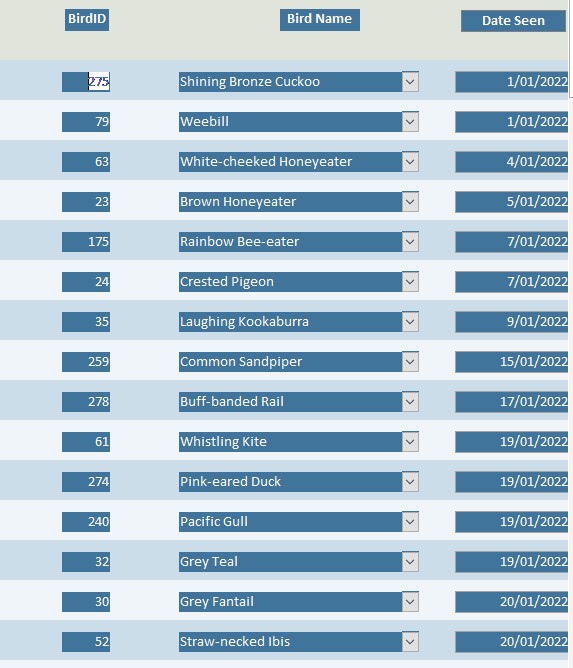
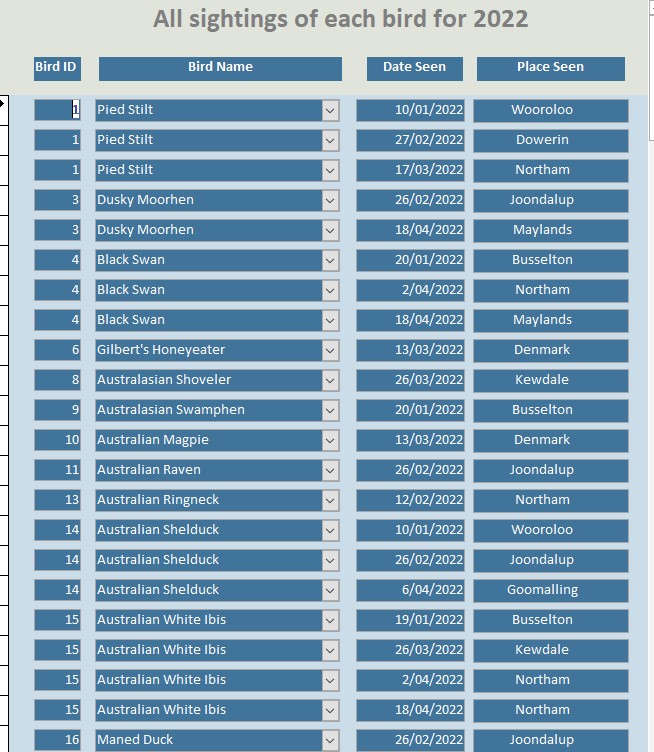
In a form, I know how to change the background for alternate lines using the alternate background colour as in the example labelled "Year List". Is there a way to change the colour when the ID changes so as to help the individual birds be more highlighted and then to alternate that colour change. For example "pied stilt" (Bird ID 1) background be one colour, but the next bird "Dusky Moorhen"(Bird ID 3) would all be a slightly different colour, but the next bird "Black Swan"(Bird ID 4) would revert to the same colour as Bird ID 1 and then continue to alternate through the form.
Thank you for your advice
Colin Smyth OP  @Reply  
      
4 years ago

Colin Smyth OP  @Reply  
      
4 years ago

Adam Schwanz  @Reply  
           
4 years ago
You could use conditional formatting with a math equation like dcount, if its an odd record make it one color and even another.
Colin Smyth OP  @Reply  
      
4 years ago
Hi Adam. Thank you but that wouldn't always work as sometimes there are two even ID numbers next to each other. I have a database of a lot of birds, but this form is just showing the ones that have been seen in 2022, hence the ID doesn't necessarily increase by one as there may be birds that I have seen in previous years which are part of the overall database but have not been seen this year.
Adam Schwanz  @Reply  
           
4 years ago
Thats why you need to use dcount. If your first record was id 2 and you did a dcount of all the records <= the id you would return 1, so the actual id number is irrelevant. It would still always alternate odd even
Adam Schwanz  @Reply  
           
4 years ago
You may need to add more criteria so it matches the form your using it on like 2022 only but it should always work
Adam Schwanz  @Reply  
           
4 years ago
Now that I'm at a PC, and can type a little more, you'd be looking for DCount with a combination of MOD to determine even/odd in the count

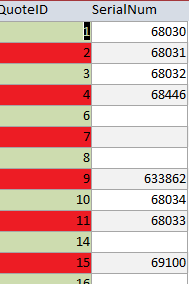
An expression is conditional formatting something along the lines of this will give you alternating colors
DCount("ID","Table","ID<=" & [ID]) Mod 2=0

Adam Schwanz  @Reply  
           
4 years ago

Adam Schwanz  @Reply  
           
4 years ago
Note how it always alternates even when skipping a number (in the image above 5 for instance is missing), but dcount is giving us the actual record count not the number itself.
Colin Smyth OP  @Reply  
      
4 years ago
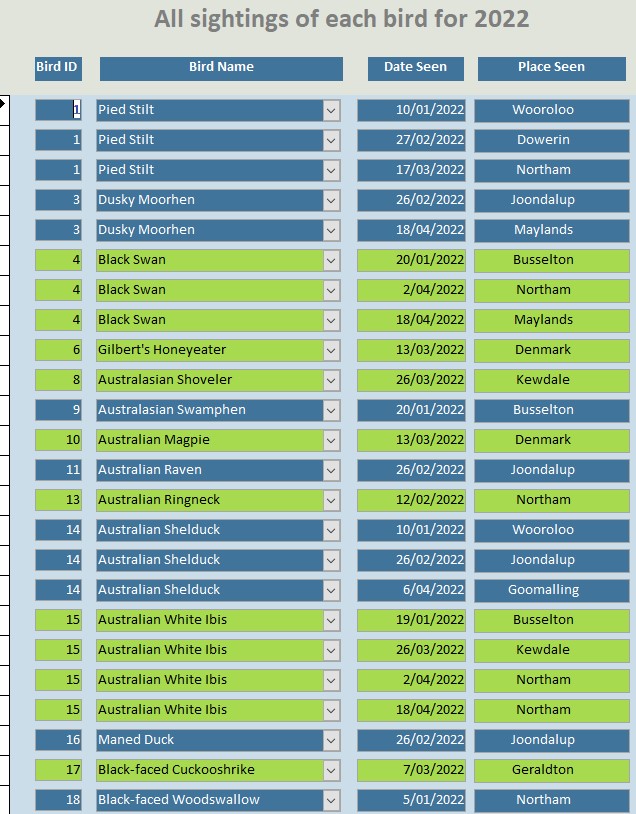
Hi Adam. Thank you. That sort of worked as per the attached photo. Sometimes there are two even ID's next to each other or two odd ID's next to each other and so it stays the same colour even though it is a different bird. Is there a way that I can change that. I would be grateful for any help.
Colin Smyth OP  @Reply  
      
4 years ago

Adam Schwanz  @Reply  
           
4 years ago
What do you have for your DCOUNT statement right now?
You could try making the DCOUNTs where clause pickier, a unique field would be ideal but maybe try with including the date field?

DCOUNT("ID","TABLE","ID<=" & ID & " and DateSeen<=" & DateSeen) Mod 2=0
Adam Schwanz  @Reply  
           
4 years ago
It might want

DCOUNT("ID","TABLE","ID<=" & ID & " and DateSeen<=#" & DateSeen & "#") Mod 2=0
Colin Smyth OP  @Reply  
      
4 years ago
Thanks Adam. My current statement is   DCount("BirdID","tblBirdData","BirdID<=" & [BirdID]) Mod 2=0   and that brings up the above chart. I tried your suggestion including Date Seen but then it only highlights the BirdID field and interestingly it doesn't save it in the conditional formating, so there is obviously something it doesn't like. The only unique field is the BirdID. Thank you for your suggestions.

This thread is now CLOSED. If you wish to comment, start a NEW discussion in Access Forum.
 

Next Unseen

 
New Feature: Comment Live View


The following is a paid advertisement
Computer Learning Zone is not responsible for any content shown or offers made by these ads.
 

Learn
 
Access - index
Excel - index
Word - index
Windows - index
PowerPoint - index
Photoshop - index
Visual Basic - index
ASP - index
Seminars
More...
Customers
 
Login
My Account
My Courses
Lost Password
Memberships
Student Databases
Change Email
Info
 
Latest News
New Releases
User Forums
Topic Glossary
Tips & Tricks
Search The Site
Code Vault
Collapse Menus
Help
 
Customer Support
Web Site Tour
FAQs
TechHelp
Consulting Services
About
 
Background
Testimonials
Jobs
Affiliate Program
Richard Rost
Free Lessons
Mailing List
PCResale.NET
Order
 
Video Tutorials
Handbooks
Memberships
Learning Connection
Idiot's Guide to Excel
Volume Discounts
Payment Info
Shipping
Terms of Sale
Contact
 
Contact Info
Support Policy
Mailing Address
Phone Number
Fax Number
Course Survey
Email Richard
[email protected]
Blog RSS Feed    YouTube Channel

LinkedIn
Copyright 2026 by Computer Learning Zone, Amicron, and Richard Rost. All Rights Reserved. Current Time: 5/2/2026 8:58:51 AM. PLT: 1s