Free Lessons
Courses
Seminars
TechHelp
Fast Tips
Templates
Topic Index
Forum
ABCD
 
Home   Courses   TechHelp   Forums   Help   Contact   Merch   Join   Order   Logon  
 
Back to Access Forum    Comments List
Upload Images   @Reply   Bookmark    Link   Email   Next Unseen 
SQL into Control Source
Dan Jackson 
            
4 years ago
Hi Guys,

Just spit balling here. I have a number of different reports. Different advisors, different statuses, different date ranges yada yada yada. I've managed to combine a standard query and a crosstab query to grab one particular "sum total". I now want to add this as a control source to a text box and edit the SQL code for each text box.

Problem is, i think the SQL is too long and complex for what i want. I wanted to reduce the number of queries in my database but trying this method i get a syntax error (Works perfect in a query). Am I out of my mind?! or does it make sense? Many thanks.

-------------------

This is the SQL code purely FYI

TRANSFORM Sum(Nz([GrossWrittenAMT],0)) AS WrittenAMT

SELECT StaffAdvisorsAllQ.STAFFNAME FROM SalesALLQ LEFT JOIN StaffAdvisorsAllQ ON SalesALLQ.AdvisorID = StaffAdvisorsAllQ.STAFFID
WHERE (((StaffAdvisorsAllQ.STAFFNAME)="Glen") AND ((SalesALLQ.GrossWrittenDate)>=DateSerial(Year(Date()),1,1) And <=Now() And (SalesALLQ.GrossWrittenDate)<=Now()) AND ((SalesALLQ.Status)<>"NPW") AND((StaffAdvisorsAllQ.StaffActive)=True))
GROUP BY StaffAdvisorsAllQ.STAFFNAME, StaffAdvisorsAllQ.StaffActive ORDER BY StaffAdvisorsAllQ.STAFFNAME PIVOT SalesALLQ.GrossWrittenDateDisplay;
Dan Jackson OP  @Reply  
            
4 years ago

Scott Axton  @Reply  
        
4 years ago
Dan -
Access tells you what the problem is.  Syntax error.

Almost always - without fail - for SQL like this you either
   Left out parenthesis
   Left out Operator
   Don't have spaces where you need them

The best way to tell is to set you SQL to a variable of String type.
Then use Statusbox, if you have it,  MsgBox, or Debug.Print.
Scott Axton  @Reply  
        
4 years ago

Go back to the developer lessons to learn more about Debugging.
See Developer 15 Lesson 2 for Debugging Level 2
Dan Jackson OP  @Reply  
            
4 years ago
I'm still on Expert... Just found it odd that error generated but running it in a query worked fine. Not a problem, can carry on using queries for now and cleanup another time when i'm more experienced
Scott Axton  @Reply  
        
4 years ago
I'm 99% certain I see the issue but that doesn't help you see the issue or learn how to figure out problems.
Trying to help you grow in your trouble shooting skills.  Super simple but most errors are.  See the "Almost always" above.

You say it works in a query but not in code.  So ask yourself - What is different?
Go look at the SQL for your query and then at the SQL you put in your code.

Open Note Pad and put them right one above the other.
What is the one that work vs the one that doesn't?
Kevin Robertson  @Reply  
          
4 years ago
Dan,
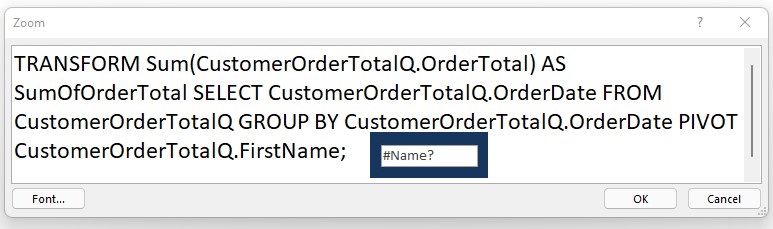
You can't put a Crosstab in a single Textbox. I just tried and got a #Name error (see screenshot).
Kevin Robertson  @Reply  
          
4 years ago

Dan Jackson OP  @Reply  
            
4 years ago
That'll be it! Was just experiementing and learned something new today.
Going to try for a general crosstab containing all the data and a simple WHERE clause in the control box

Many Thanks
Dan Jackson OP  @Reply  
            
4 years ago
Its because i have 4 "Types" of report, 2 of which have 2 "Sub Types" and 8 advisors so (2*2)+2*8 = 48 reports. Was trying to reduce the number of queries required I'll play. cheers
Scott Axton  @Reply  
        
4 years ago
Just so you know.  While Kevin let you know that it wouldn't work that WAS NOT your issue to solve the error message that you were getting.

Syntax:  
   Syntax refers to the rules that define the structure of a language. Syntax in computer programming means the rules that control the structure of the symbols, punctuation, and words of a programming language.


IOW you did not have the proper syntax of your SQL to work.
You had:
  ((SalesALLQ.Status)<>"NPW") AND((StaffAdvisorsAllQ.StaffActive)=True))

You needed to have a space after AND

((SalesALLQ.Status)<>"NPW") AND ((StaffAdvisorsAllQ.StaffActive)=True))

Even after you got the SQL correct you probably would have run into the issue of not being able to run the SQL on a single TextBox but that would have been a different error.
Dan Jackson OP  @Reply  
            
4 years ago
Good to know, thanks Scott. Real face palm moment!
Stefan Pinne  @Reply  
    
4 years ago
You can not take a SQL-Statement as ControlSource. The result of a SQL Select Statement is always a Recordset (a Table) and that does not fit the Textbox-Exspectations...

To put the result Value into a Textbox:
1. Use a Domain Function like Dlookup
or
2. Write code to handle the recordset.
Example: if you want to have the distinct number of records in a textbox:

Main Part:
set rst = currentdb.OpenRecordset("SELECT DISTINCT .....")
rst.movelast ' to be sure to get all records
txtNumberAllRecords = rst.RecordCount
rst.close

----------------------------------------------------
In your case you want to pick the value of a one Field SQL result:
Dim rst as DAO.Recordset
Dim WantedResult as String
set rst = currentdb.OpenRecordset("SELECT StaffAdvisorsAllQ.STAFFNAME FROM....")
with rst
.movefirst
WantedResult=![STAFFNAME]
.close
end with


use debug.print WantedResult to check
Stefan Pinne  @Reply  
    
4 years ago
I forgot the last Part:
txtYourTextbox = WantedResult

This thread is now CLOSED. If you wish to comment, start a NEW discussion in Access Forum.
 

Next Unseen

 
New Feature: Comment Live View


The following is a paid advertisement
Computer Learning Zone is not responsible for any content shown or offers made by these ads.
 

Learn
 
Access - index
Excel - index
Word - index
Windows - index
PowerPoint - index
Photoshop - index
Visual Basic - index
ASP - index
Seminars
More...
Customers
 
Login
My Account
My Courses
Lost Password
Memberships
Student Databases
Change Email
Info
 
Latest News
New Releases
User Forums
Topic Glossary
Tips & Tricks
Search The Site
Code Vault
Collapse Menus
Help
 
Customer Support
Web Site Tour
FAQs
TechHelp
Consulting Services
About
 
Background
Testimonials
Jobs
Affiliate Program
Richard Rost
Free Lessons
Mailing List
PCResale.NET
Order
 
Video Tutorials
Handbooks
Memberships
Learning Connection
Idiot's Guide to Excel
Volume Discounts
Payment Info
Shipping
Terms of Sale
Contact
 
Contact Info
Support Policy
Mailing Address
Phone Number
Fax Number
Course Survey
Email Richard
[email protected]
Blog RSS Feed    YouTube Channel

LinkedIn
Copyright 2026 by Computer Learning Zone, Amicron, and Richard Rost. All Rights Reserved. Current Time: 4/30/2026 5:28:41 PM. PLT: 1s