Hello everybody, I have a question about clearing a cell(s). How do I clear the content and reset the format of a cell(s) in one click without shifting the surrounding cells? I suppose I could select the cell(s), press the delete key and go to the ribbon and reset the number format to general and if it has bold, italic etc, I need to reset those too. Or I could select a blank cell, click the the format painter, select the cells I want to delete and then press the delete key. A bit faster still require more than one click.
Kevin Robertson
@Reply 4 years ago
You could record a Macro and set up a shortcut key to run that Macro. However, I would suggest getting all the basic down first.
Hendra GunawanOP
@Reply 4 years ago
Thanks Kevin, in what lesson does Richard cover macro for Excel 2010?
Kevin Robertson
@Reply 4 years ago
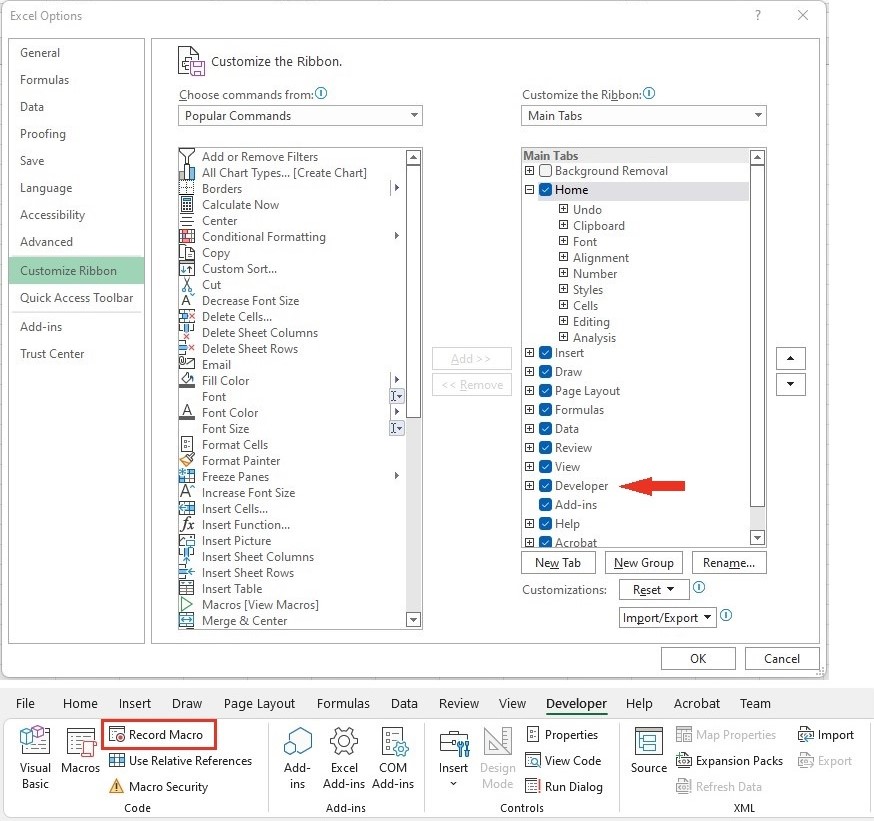
Macros haven't been covered yet. I would imagine they may be covered in an early Developer class. Not too difficult though. You'll need to turn on the Developer tab then you will be able to record your Macro. While the Macro is recording perform the steps you want automated (I suggest making a list in notepad before you begin). When you're finished stop recording, then test it.
Note: You will still have to select the required range.
Kevin Robertson
@Reply 4 years ago
Scott Axton
@Reply 4 years ago
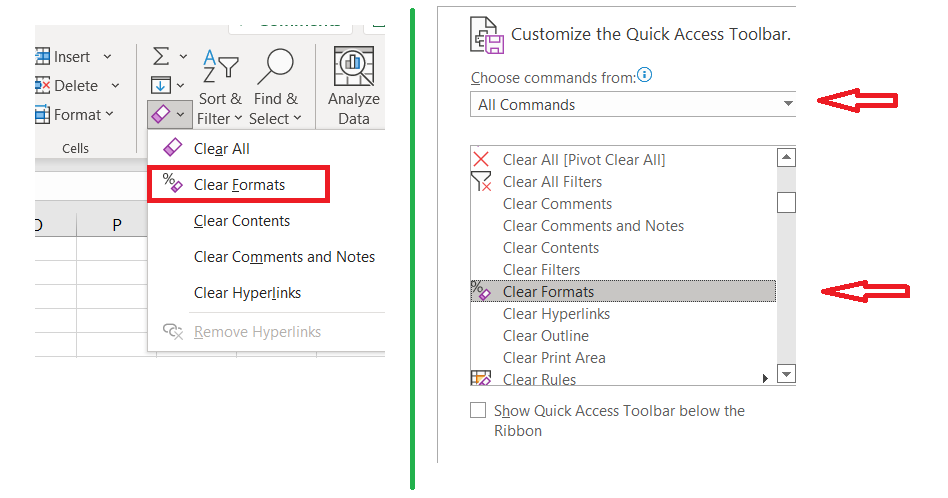
No need to do a macro. Try the Clear Formats on the Tool Bar.
Eraser under the Editing section.
If you do it quite a bit add it to your QAT.
Scott Axton
@Reply 4 years ago
Hendra GunawanOP
@Reply 4 years ago
Oh hei Scott, that's perfect :-) Clear Formats clear the format while Clear All clear both contents and format. Thank you!
Sorry, only students may add comments.
Click here for more
information on how you can set up an account.
If you are a Visitor, go ahead and post your reply as a
new comment, and we'll move it here for you
once it's approved. Be sure to use the same name and email address.
This thread is now CLOSED. If you wish to comment, start a NEW discussion in
Excel Beginner 2.