Free Lessons
Courses
Seminars
TechHelp
Fast Tips
Templates
Topic Index
Forum
ABCD
 
Home   Courses   TechHelp   Help   Contact   Merch   Join   Order   Logon   Forums   
 
Back to Access Forum    Comments List
Upload Images   @Reply   Bookmark    Link   Email   Next Unseen 
Downgrade Image Quality
James Chang 
     
4 years ago
Goodday, Teacher Richard,
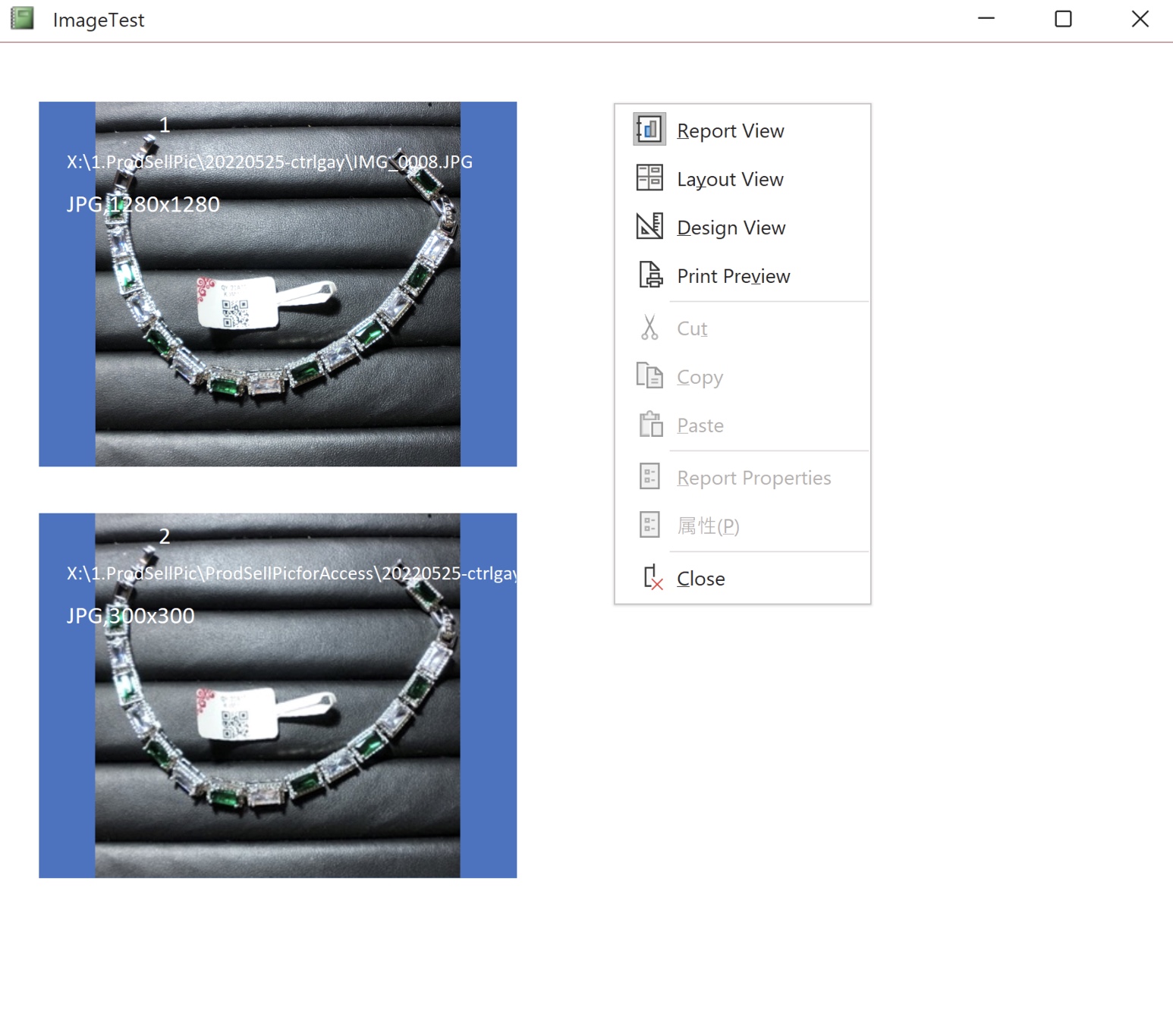
I have a Database for thousands of Images, used the linked file path to store and image control to show up. But in my report and print-preview, I found the image quality downgrade very obviously, what is the problem? is there any setting wrong? I used the attachment and not had not seen this situation before.
Thanks a lot!
James Chang OP  @Reply  
     
4 years ago

James Chang OP  @Reply  
     
4 years ago

James Chang OP  @Reply  
     
4 years ago
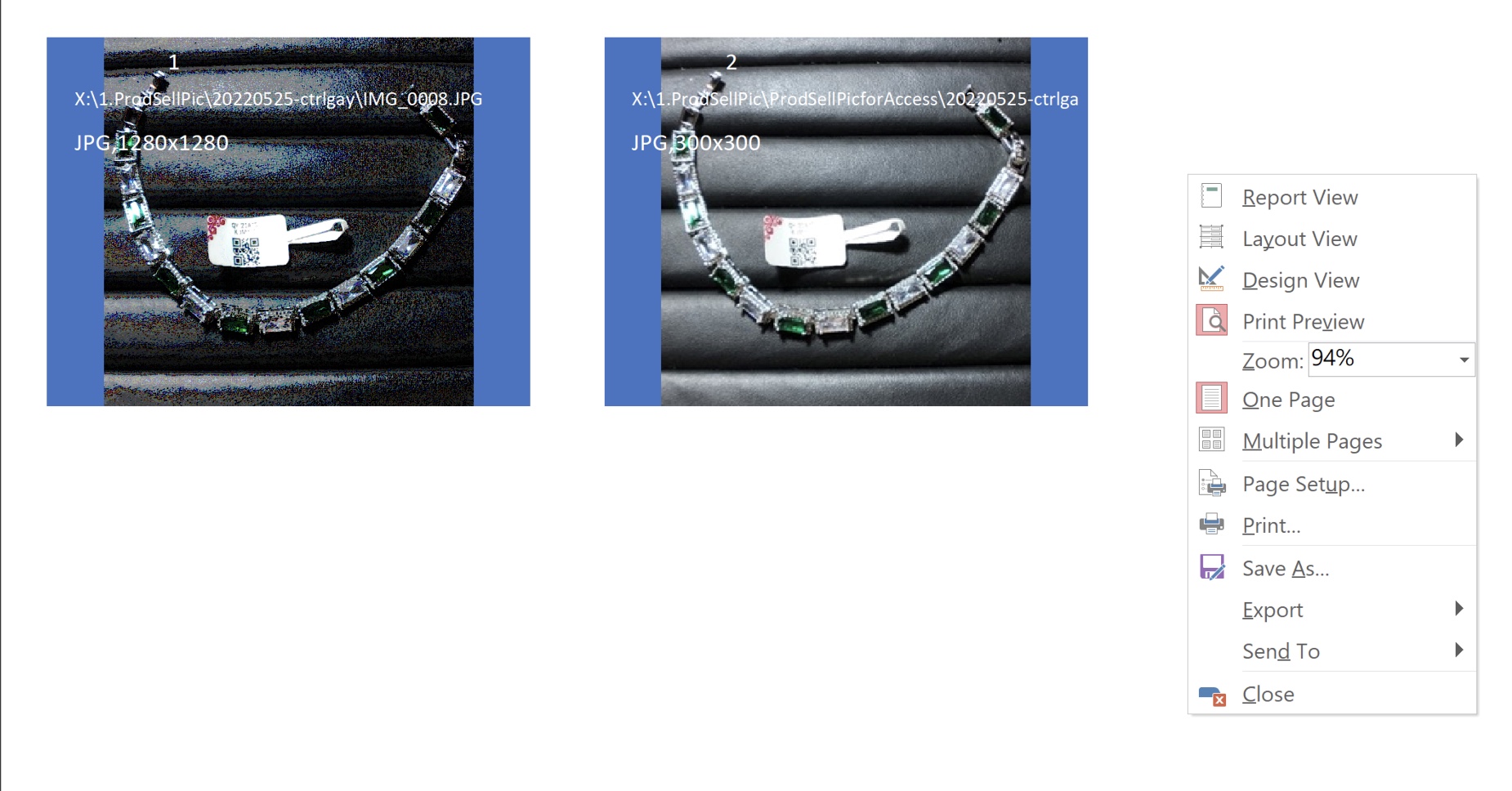
*Above Pics for these 2 view are 1. 1280x1280 2. 300x300
you could see the 1280x1280 is quality downgrade obviously.
**In the Print-Preview I use the 2-column print ( Actually I use 3 column in my actual preview, so the difference is almost turn to 16-bit pic quality), although I have use the lower resolution(see the 2.pic with 300x300 resolution) to make the appearance just a little bit improvement, but I have to do more step to change the resolution from 1280 to 300.
Richard Rost  @Reply  
          
4 years ago
Report view and print preview might reduce the image quality, but if you plan on actually printing this image (or making a PDF out of it) then you should get the original image quality.
James Chang OP  @Reply  
     
4 years ago
Hello, my Dear Teacher Richard,
I just let it on the print preview form and have it a snapshot for sending it out, so I need the quality might be clear up to the QR code on the label for scan.
As you check the both Pics I provide, First is the normal report view (it just could one by one on one column view), I would rather using the print preview to layout 3x3 pic for print out, so it would reduce the quality for 1280x1280..and I dont know the reason why, As I deduce the resolution to 300x300, it get better than use the original resolution.
Is there any way to improve it?
Thanks for your prompt reply and kindly help ^^
Richard Rost  @Reply  
          
4 years ago
I can't even recreate this problem in Access 365 (currently 2022) so this seems to be more of a problem with older versions of Access (esp 2007 and 2010) so upgrading Office would be the first thing I would recommend.

I've actually got a tip video coming out about this soon. Here are a few things to try...

1. Make sure your Size Mode is set to Zoom or Clip. Stretch can distort the image.
2. In the Report Properties, set Fast Laser Printing to No.
3. If these are embedded images, go to File > Access Options > Current Database and set "Convert all Picture Data to Bitmaps" to Yes. I don't recommend this option, but it works some of the time.

Also keep in mind that Zooming your view to anything other than 100% or larger may result in the image looking crappy on the screen.
Kevin Yip  @Reply  
      
4 years ago
James, preview is not really a representation of the final output.  It serves only as a "preview" to show you roughly what the printed output will look like.  Don't use the preview for any actual work.
James Chang OP  @Reply  
     
4 years ago
Dear Tearcher Richard,
1.I use the Access365 (latest version)

[Few things to try:]
1. Size mode : Zoom
2. Already Set [Fast Laser Printing] : No
3. File > Access Options > Current Database and set "Convert all Picture Data to Bitmaps": Yes
When 3rd step done the print preview output the wonderful solution~^^~
James Chang OP  @Reply  
     
4 years ago
I couldn't upload the image it popup the Error page..
Finally set the Bitmaps is the solution~
Thanks with Respect to my Teacher!
James Chang OP  @Reply  
     
4 years ago
Thanks Kevin Yip~
I use the preview to show the 3x3 output on the screen so that I could make a product brief to my customer. that's all.
The preview mode is just a method to show the 3x3 output, that's all I need
Thanks for your prompt reply^^
Richard Rost  @Reply  
          
4 years ago
Glad you got it working.
James Chang OP  @Reply  
     
4 years ago
Thanks my Teacher~
But something confused me~ I use the file path to Image control to show the pic, but why the image property-Picture type is [embedded]?  Is this Embedded the same as attachment?
Thanks a lot!
Richard Rost  @Reply  
          
4 years ago
The way I understand it, even though the image is not stored inside your database (which is a good thing) Access will convert your image to a BMP on the fly as it's reading it in to be displayed. There's not of information available online about this topic. I just spent a bit of time Googling it. But that's what I gather.
Richard Rost  @Reply  
          
4 years ago
This video will be available tomorrow morning: Poor Image Quality
James Chang OP  @Reply  
     
4 years ago
Hi my Dear Teacher Richard,
Thanks for your Prompt Reply,
Great~Hear from the video coming up
Thanks with Sincere.

This thread is now CLOSED. If you wish to comment, start a NEW discussion in Access Forum.
 

Next Unseen


What's This?


The following is a paid advertisement
Computer Learning Zone is not responsible for any content shown or offers made by these ads.
 

Learn
 
Access - index
Excel - index
Word - index
Windows - index
PowerPoint - index
Photoshop - index
Visual Basic - index
ASP - index
Seminars
More...
Customers
 
Login
My Account
My Courses
Lost Password
Memberships
Student Databases
Change Email
Info
 
Latest News
New Releases
User Forums
Topic Glossary
Tips & Tricks
Search The Site
Code Vault
Collapse Menus
Help
 
Customer Support
Web Site Tour
FAQs
TechHelp
Consulting Services
About
 
Background
Testimonials
Jobs
Affiliate Program
Richard Rost
Free Lessons
Mailing List
PCResale.NET
Order
 
Video Tutorials
Handbooks
Memberships
Learning Connection
Idiot's Guide to Excel
Volume Discounts
Payment Info
Shipping
Terms of Sale
Contact
 
Contact Info
Support Policy
Mailing Address
Phone Number
Fax Number
Course Survey
Email Richard
[email protected]
Blog RSS Feed    YouTube Channel

LinkedIn
Copyright 2026 by Computer Learning Zone, Amicron, and Richard Rost. All Rights Reserved. Current Time: 9/5/2026 3:41:49 PM. PLT: 0s