Free Lessons
Courses
Seminars
TechHelp
Fast Tips
Templates
Topic Index
Forum
ABCD
 
Home   Courses   TechHelp   Forums   Help   Contact   Merch   Join   Order   Logon  
 
Back to Access Forum    Comments List
Upload Images   @Reply   Bookmark    Link   Email   Next Unseen 
Trouble with Relational Combo
Dan Jackson 
            
4 years ago
Hi Guys,

I'm building a very small simple database to keep useful info while studying access.
It contains a table called ACCESST and a combo lookup table called TypesT.
I've also applied Search 2.0 stuff in there as well so theres a query containing the criteria, a continuous form for searching and single form for viewing/editing

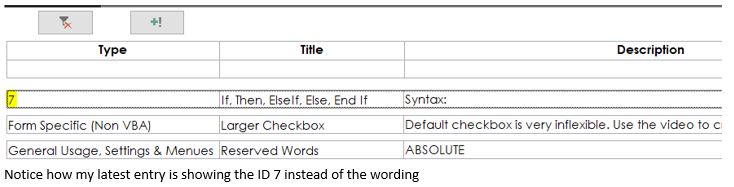
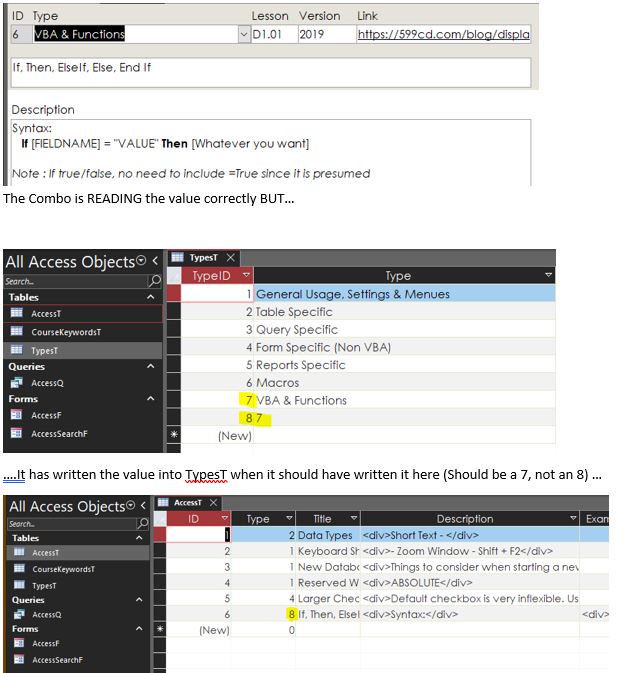
The problem I have, is a Combo on the Single Form is writing The TypeID into the TypesT as a new entry instead of storing it in the ACCESST as i have instructed. Its beginner steps but really weird, can't get my head around it.

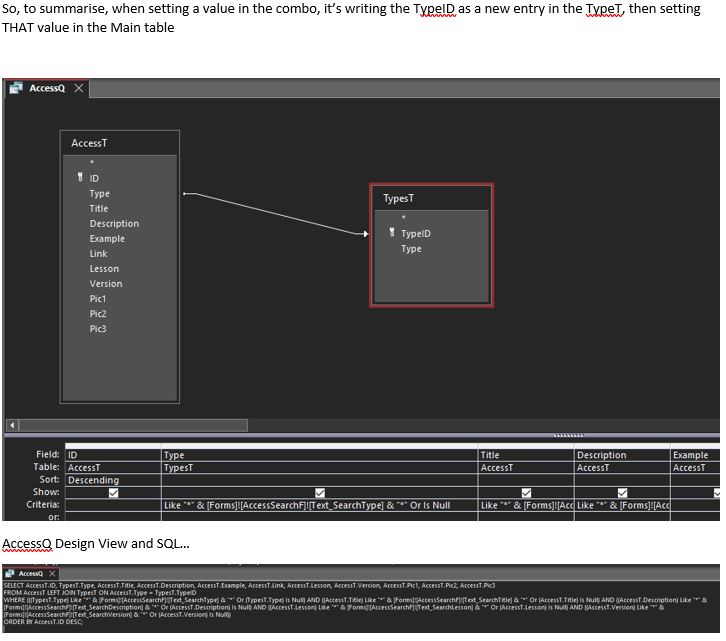
I've redone the combo, checked relationships (Only one - AccessT.Type --> TypesT.TypeID OUTER Join), compact and repair and even re-created the database, only importing the two forms, the rest was re-written.

Really appreciate any help, been at this for two days and even a new DB file with new tables and query hasn't helped.

Thanks
Dan Jackson OP  @Reply  
            
4 years ago

Dan Jackson OP  @Reply  
            
4 years ago

Dan Jackson OP  @Reply  
            
4 years ago

Dan Jackson OP  @Reply  
            
4 years ago

Adam Schwanz  @Reply  
           
4 years ago
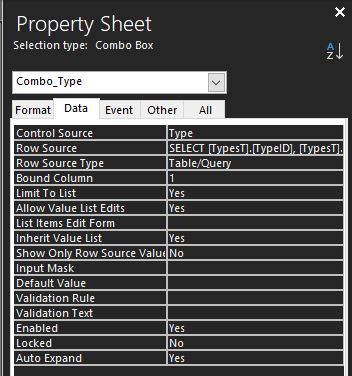
Change the bound column to column 2
Dan Jackson OP  @Reply  
            
4 years ago
Wow. ok. That's fixed it but leaves me with another question.... I always thought the bound column should be the ID?

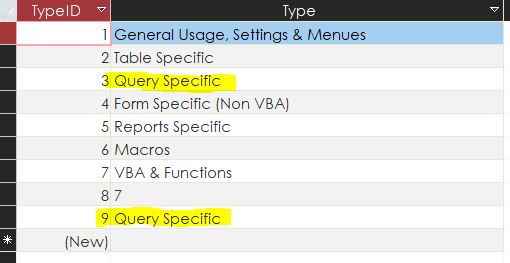
Also, I notice it has still created a new entry in the TypesT but that's fine, i can delete the old one. Just want to understand whats happened. I completed the wizard as i always do. Thanks mate
Dan Jackson OP  @Reply  
            
4 years ago

Dan Jackson OP  @Reply  
            
4 years ago
Yeah, its doing a new entry every time
Adam Schwanz  @Reply  
           
4 years ago
The bound column should be whatever you're trying to store, normally that is the ID, but it looks like in this case you were trying to store the Type(string) and not the ID? I could've just jumped at the first answer I seen too though you might have a different problem.

What is your Control Source/Row Source on the combo box?
Adam Schwanz  @Reply  
           
4 years ago
Also is Type in AccessT a Number or Short Text field?
Dan Jackson OP  @Reply  
            
4 years ago
Trying to store the ID as i should. Control source for the combo is

SELECT [TypesT].[TypeID], [TypesT].[Type]
FROM TypesT
ORDER BY [TypeID];

Type in AccessT is a number
Adam Schwanz  @Reply  
           
4 years ago
Just to verify, that should be your row source, your control source should be Type?
Dan Jackson OP  @Reply  
            
4 years ago
Yep
Dan Jackson OP  @Reply  
            
4 years ago

Dan Jackson OP  @Reply  
            
4 years ago
Looking at this subjectively, it seems that the combo box is unable to access the existing records so its creating a new one everytime
Adam Schwanz  @Reply  
           
4 years ago
If you don't mind, I don't normally do this but you can email it to me quick, [email protected] I'm having trouble visualizing this.
Dan Jackson OP  @Reply  
            
4 years ago
Of course. its really small and simple so should be a problem. Its now sent, be sure to check your spam as they usually end up there lol!
Dan Jackson OP  @Reply  
            
4 years ago
*Should be no problem!!!
Adam Schwanz  @Reply  
           
4 years ago
Got it give me a few
Adam Schwanz  @Reply  
           
4 years ago
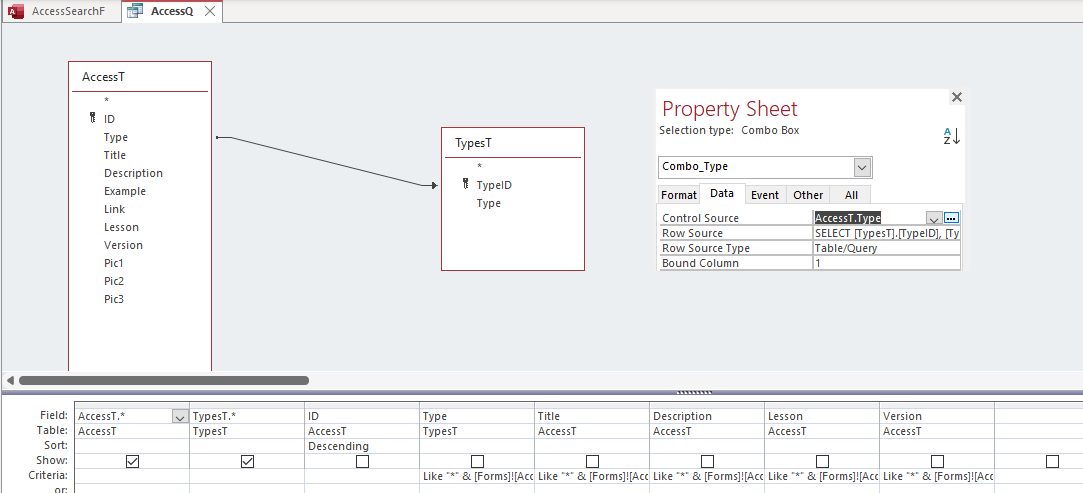
Yea this wouldve took me a while to figure out when not hands on. Problem appears to be you didn't have Type brought in from AccessT into the query that the form was based on. Fixed with two changes in image below.
Adam Schwanz  @Reply  
           
4 years ago

Dan Jackson OP  @Reply  
            
4 years ago
I see. So even though i'm using the Type from the Types table, the Type ID from the access table has to be included so it can write to it.... Awesome! I'll remember to add the asterix from the main table in all my future queries, just to play it safe.

Thanks again for your Adam
Adam Schwanz  @Reply  
           
4 years ago
Yea, because there was no Type in the query from the AccessT, your control source of "Type" was actually the Type in the TypeT table. So it was kind of just writing to itself. That's a lot of Type LOL. No problem

This thread is now CLOSED. If you wish to comment, start a NEW discussion in Access Forum.
 

Next Unseen

 
New Feature: Comment Live View


The following is a paid advertisement
Computer Learning Zone is not responsible for any content shown or offers made by these ads.
 

Learn
 
Access - index
Excel - index
Word - index
Windows - index
PowerPoint - index
Photoshop - index
Visual Basic - index
ASP - index
Seminars
More...
Customers
 
Login
My Account
My Courses
Lost Password
Memberships
Student Databases
Change Email
Info
 
Latest News
New Releases
User Forums
Topic Glossary
Tips & Tricks
Search The Site
Code Vault
Collapse Menus
Help
 
Customer Support
Web Site Tour
FAQs
TechHelp
Consulting Services
About
 
Background
Testimonials
Jobs
Affiliate Program
Richard Rost
Free Lessons
Mailing List
PCResale.NET
Order
 
Video Tutorials
Handbooks
Memberships
Learning Connection
Idiot's Guide to Excel
Volume Discounts
Payment Info
Shipping
Terms of Sale
Contact
 
Contact Info
Support Policy
Mailing Address
Phone Number
Fax Number
Course Survey
Email Richard
[email protected]
Blog RSS Feed    YouTube Channel

LinkedIn
Copyright 2026 by Computer Learning Zone, Amicron, and Richard Rost. All Rights Reserved. Current Time: 5/6/2026 2:40:20 PM. PLT: 1s