Free Lessons
Courses
Seminars
TechHelp
Fast Tips
Templates
Topic Index
Forum
ABCD
 
Home   Courses   TechHelp   Help   Contact   Merch   Join   Order   Logon   Forums   
 
Back to Access Forum    Comments List
Upload Images   @Reply   Bookmark    Link   Email   Next Unseen 
Run Access on Tablet
Harold Laski 
    
4 years ago
I recently went to my dentist's office. To sign in they give out tablets to use in the waiting room. The only thing on the tablet is a simple sign in form with name, DOB, and doctor to see. WHen the patient clicks the button a message comes up and tells thanks the patient and asks him or her to return the tablet to the front desk.  Once the person clicks te button on the tablet the information is sent to a table on the front desks database.   How can I do something similar with access.  No other program is on the tablet. I have created the tablet  with a split database, the back ebd is on the front desk computer. Can this be done.  I have seen the video called Access Database Cloud. That is really not for our small office.
Jon Capps  @Reply  
       
4 years ago
This is one example of why I was trying to get my data on DataVerse so that I could build a tablet based app and keep my MS Access desktop FE as well, while sharing the data tables in DataVerse. I found that even if the tablet was offline the data can be held in storage until internet connection was connected again.
https://docs.microsoft.com/en-us/power-apps/mobile/work-in-offline-mode
https://docs.microsoft.com/en-us/power-apps/mobile/run-powerapps-on-mobile
Adam Schwanz  @Reply  
           
4 years ago
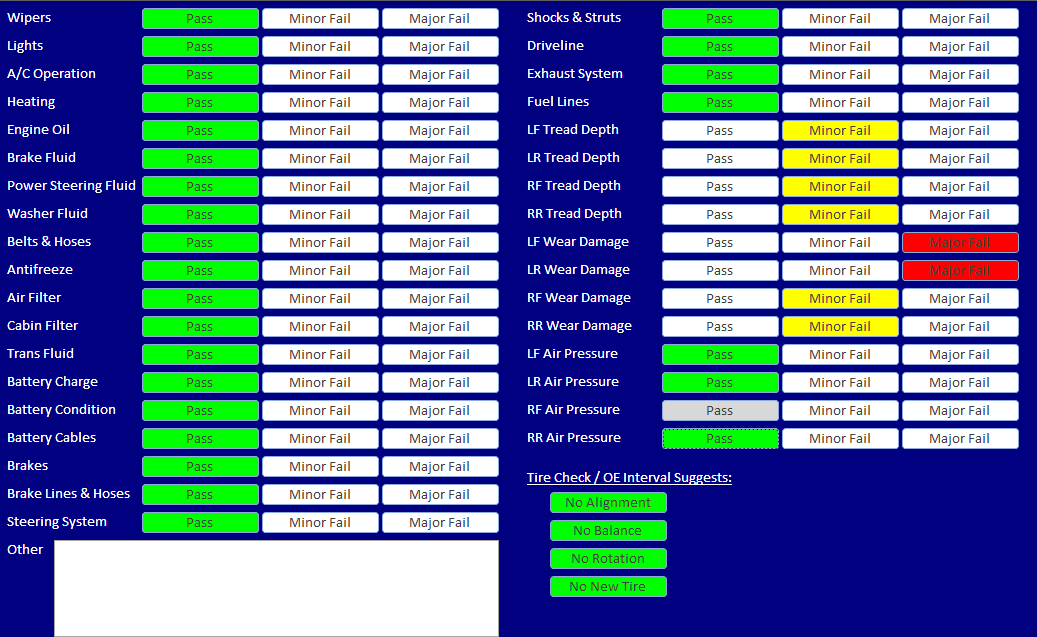
Yes, I use tablets at my location for mechanics to take out to vehicles and do inspections. They are windows tablets, running access directly on them just like any other machine. Nothing special you need to do to be able to do it, it's just like any other machine. Although you can do a little more with the touchscreen (like allow signatures). Just make the form with the resolution of a tablet in mind (don't need to make it huge).

Now if you're trying to do it on an ipad or something, there's going to be a lot more involved.
Mark Pierce  @Reply  
     
4 years ago
Adam,
Which tablets have you used and like?
Adam Schwanz  @Reply  
           
4 years ago
I've only tested with the Microsoft Surface Pros. So I can't really comment on what I like or what's best. There is a rare bug that can occur with the on screen keyboard and text to speech which kind of "locks" the keyboard on the screen, which I would prefer didn't happen, but I just give them an attachable keyboard if they need to do anything more than push stuff (almost everything is setup with  buttons, like how an actual app would be, all touch, made forms with using a tablet on in mind). That makes that issue not happen.
Dan Jackson  @Reply  
        
4 years ago
I'm thinking about replacing our current third party clocking machine in the office with something similar
Adam Schwanz  @Reply  
           
4 years ago
Yea, it works well for things like that. Honestly I'm pretty happy with how the buttons interact inside access on a tablet. The only downside is when they need to type, which takes the external keyboard, but perhaps they should just go back to their PC. It does really well with just button clicks. Ill post an example of one of our checklists below.
Adam Schwanz  @Reply  
           
4 years ago

This thread is now CLOSED. If you wish to comment, start a NEW discussion in Access Forum.
 

Next Unseen

 
New Feature: Comment Live View


The following is a paid advertisement
Computer Learning Zone is not responsible for any content shown or offers made by these ads.
 

Learn
 
Access - index
Excel - index
Word - index
Windows - index
PowerPoint - index
Photoshop - index
Visual Basic - index
ASP - index
Seminars
More...
Customers
 
Login
My Account
My Courses
Lost Password
Memberships
Student Databases
Change Email
Info
 
Latest News
New Releases
User Forums
Topic Glossary
Tips & Tricks
Search The Site
Code Vault
Collapse Menus
Help
 
Customer Support
Web Site Tour
FAQs
TechHelp
Consulting Services
About
 
Background
Testimonials
Jobs
Affiliate Program
Richard Rost
Free Lessons
Mailing List
PCResale.NET
Order
 
Video Tutorials
Handbooks
Memberships
Learning Connection
Idiot's Guide to Excel
Volume Discounts
Payment Info
Shipping
Terms of Sale
Contact
 
Contact Info
Support Policy
Mailing Address
Phone Number
Fax Number
Course Survey
Email Richard
[email protected]
Blog RSS Feed    YouTube Channel

LinkedIn
Copyright 2026 by Computer Learning Zone, Amicron, and Richard Rost. All Rights Reserved. Current Time: 8/17/2026 4:22:15 AM. PLT: 1s