Free Lessons
Courses
Seminars
TechHelp
Fast Tips
Templates
Topic Index
Forum
ABCD
 
Home   Courses   TechHelp   Forums   Help   Contact   Merch   Join   Order   Logon  
 
Back to Access Forum    Comments List
Upload Images   @Reply   Bookmark    Link   Email   Next Unseen 
Parenthese quotes in string
John Muir 
     
4 years ago
Always so confused when using concatenation in text box. here is the phrase i need to work:

   This Agreement and General Release of All Claims
   ("Agreement") is entered into as of this

So I've tried:

   ="This Agreement and General Release of All Claims
   ""("Agreement")"" is entered into as of "&[ContractDate]

Doesn't work.

Any suggestions?

Thanks,

John

Kevin Robertson  @Reply  
          
4 years ago
Try it like this:

="This Agreement and General Release of All Claims (""Agreement"") is entered into as of " & [ContractDate]
Adam Schwanz  @Reply  
            
4 years ago
Do you need that line break? If so

="This Agreement and General Release of All Claims" & Chr(13) & Chr(10) & "(""Agreement"") is entered into as of " & ContractDate
Scott Axton  @Reply  
        
4 years ago
John you aren't the first and certainly not the last to have issues with the double quotes.

The key is substitution.  To represent an actual quote you need to double it up.

So ("Agreement") would become (""Agreement"").

John Muir OP  @Reply  
     
4 years ago
Perfect! That works.

Thanks!

John
Dan Jackson  @Reply  
            
4 years ago
Here here! Its like Microsoft have a bunch of highly intelligent geeks and nerds building and upgrading Access, then THAT person went and said
'Hey Guys, you know what'll REALLY throw a wrench in the works?!'

About time they came out with some thing more intuitive and less like the Da Vinci Code!
Kevin Yip  @Reply  
     
4 years ago
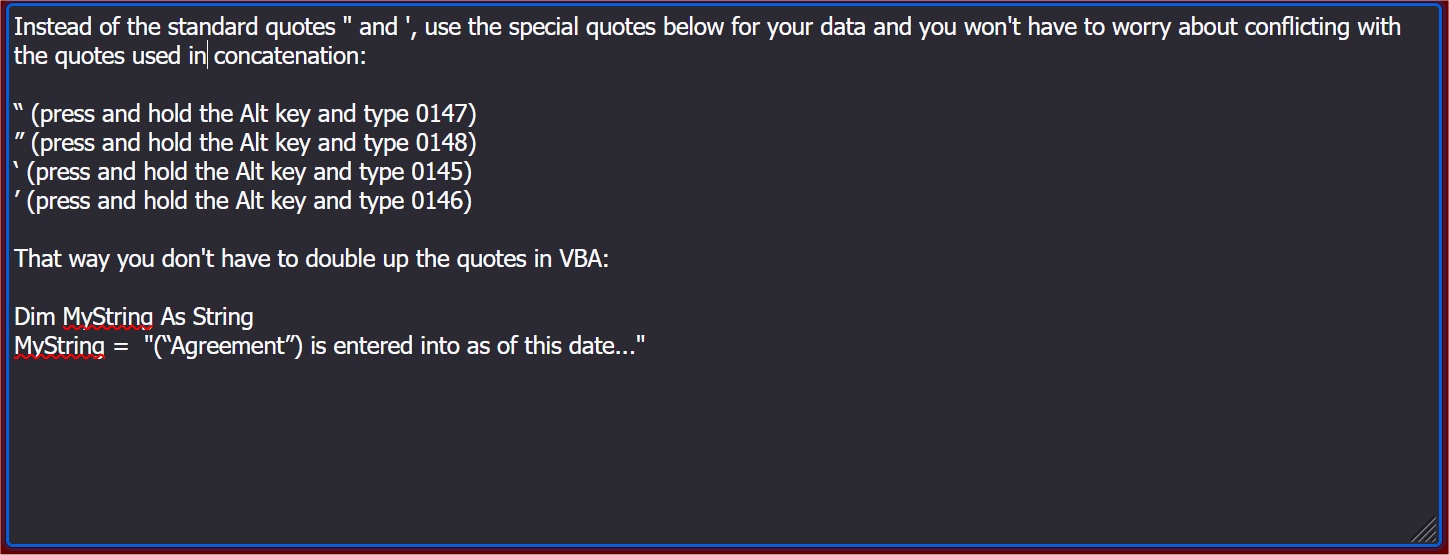
Instead of the standard quotes " and ', use the special quotes below for your data and you won't have to worry about conflicting with the quotes used in concatenation (see pic below).
Kevin Yip  @Reply  
     
4 years ago

Richard Rost  @Reply  
           
4 years ago
That's a good tip, but I personally hate those "funny" quotes. :)
Dan Jackson  @Reply  
            
4 years ago
Edit : oops, wrong Kevin

Kevin Yip - interesting idea. How on Earth do you come across such knowledge and, more importantly, how do store things like that?!
Kevin Yip  @Reply  
     
4 years ago
Hi Dan, oh that's nothing.  Windows has an app called "Character Map" that has existed since the 90s, and it shows you all the extra characters you can type with the Alt key.
Kevin Yip  @Reply  
     
4 years ago
Hi Richard, those special quotes look nicer and more professional than the standard quotes.  So if a document's appearance is important, I would consider using the special quotes.  Also, in Word, sometimes the standard quotes are auto-corrected to the special open and close quotes.
Dan Jackson  @Reply  
            
4 years ago
Oh good lord i remember character map from win xp days. oh my days!!!
Richard Rost  @Reply  
           
4 years ago
Flashback to the 90s
Dan Jackson  @Reply  
            
4 years ago
You having flashbacks, i was born in 90!

This thread is now CLOSED. If you wish to comment, start a NEW discussion in Access Forum.
 

Next Unseen

 
New Feature: Comment Live View


The following is a paid advertisement
Computer Learning Zone is not responsible for any content shown or offers made by these ads.
 

Learn
 
Access - index
Excel - index
Word - index
Windows - index
PowerPoint - index
Photoshop - index
Visual Basic - index
ASP - index
Seminars
More...
Customers
 
Login
My Account
My Courses
Lost Password
Memberships
Student Databases
Change Email
Info
 
Latest News
New Releases
User Forums
Topic Glossary
Tips & Tricks
Search The Site
Code Vault
Collapse Menus
Help
 
Customer Support
Web Site Tour
FAQs
TechHelp
Consulting Services
About
 
Background
Testimonials
Jobs
Affiliate Program
Richard Rost
Free Lessons
Mailing List
PCResale.NET
Order
 
Video Tutorials
Handbooks
Memberships
Learning Connection
Idiot's Guide to Excel
Volume Discounts
Payment Info
Shipping
Terms of Sale
Contact
 
Contact Info
Support Policy
Mailing Address
Phone Number
Fax Number
Course Survey
Email Richard
[email protected]
Blog RSS Feed    YouTube Channel

LinkedIn
Copyright 2026 by Computer Learning Zone, Amicron, and Richard Rost. All Rights Reserved. Current Time: 5/7/2026 10:09:18 AM. PLT: 1s