Free Lessons
Courses
Seminars
TechHelp
Fast Tips
Templates
Topic Index
Forum
ABCD
 
Home   Courses   TechHelp   Forums   Help   Contact   Merch   Join   Order   Logon  
 
Back to Access Forum    Comments List
Upload Images   @Reply   Bookmark    Link   Email   Next Unseen 
Machine Operating Times
Jenny Bisset 
    
4 years ago
Good day guys, I hope that everyone is doing very well?
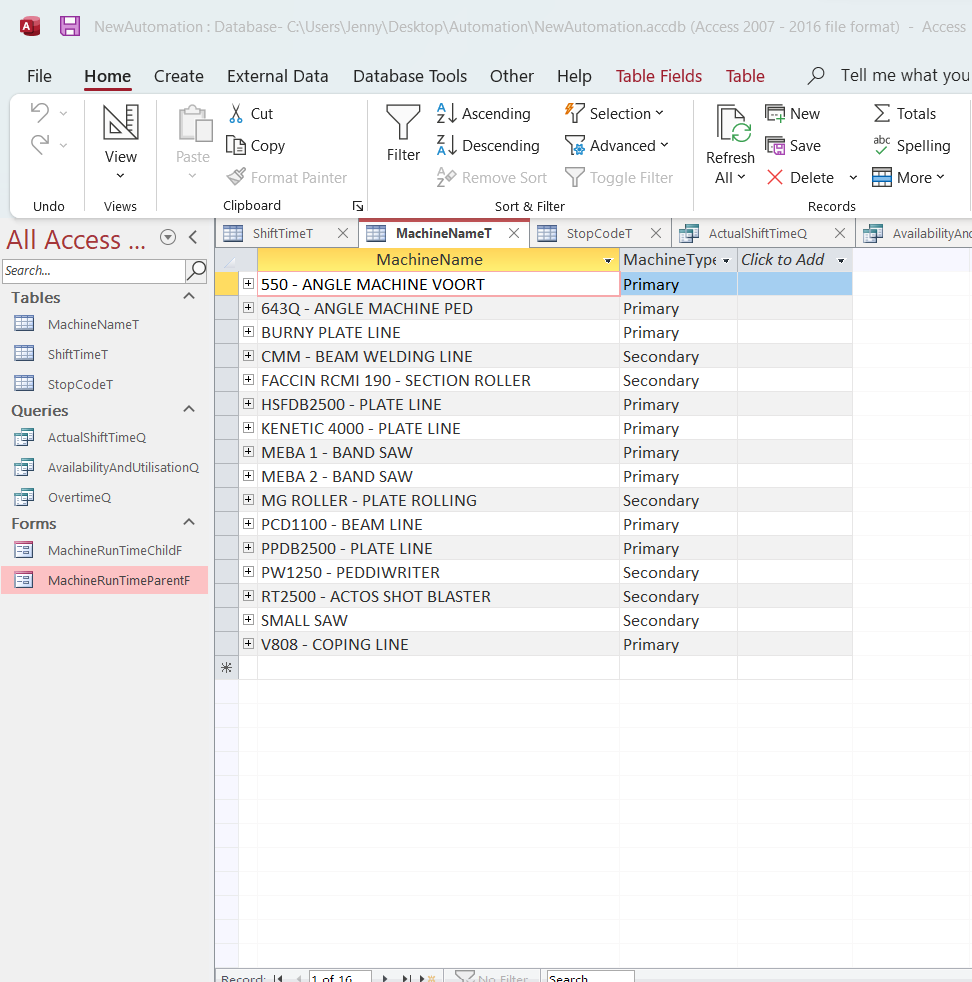
I have started a database for our company to keep track of the utilisation of our machines. We have a few machines that are used in the workshop. Some are Primary Machines (supposed to be running all the time) and some are Secondary Machines (which is okay to just run some of the time).
Essentially, the company would like to track which of the machines are not performing or being utilised to capacity.
Our guys work in shifts. So, it can happen that there is more than 1 shift on the same day - and also means that some of the machines can have multiple "Standing Time" incidents in a single shift for various reasons.
Okay so, I have set up a VERY BASIC database to track this data, but I ran into some problems.
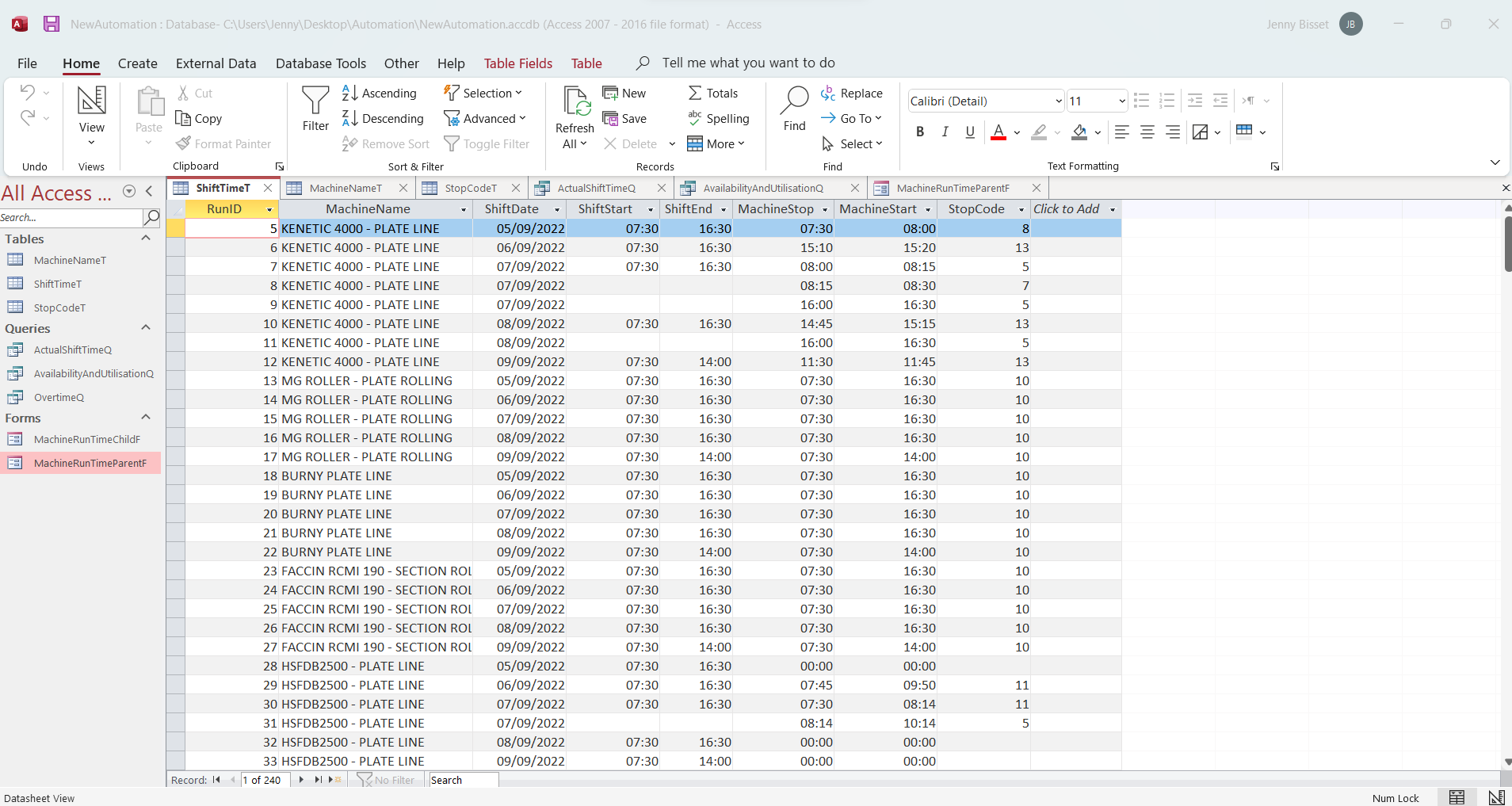
1. How do I "link" multiple shifts to a single day and multiple "staning times" in a shingle shift (that is then still linked to the same day). I have watched your videos on time calculation, incriments, timesheets and others - but I have not really seen an example of something like this.
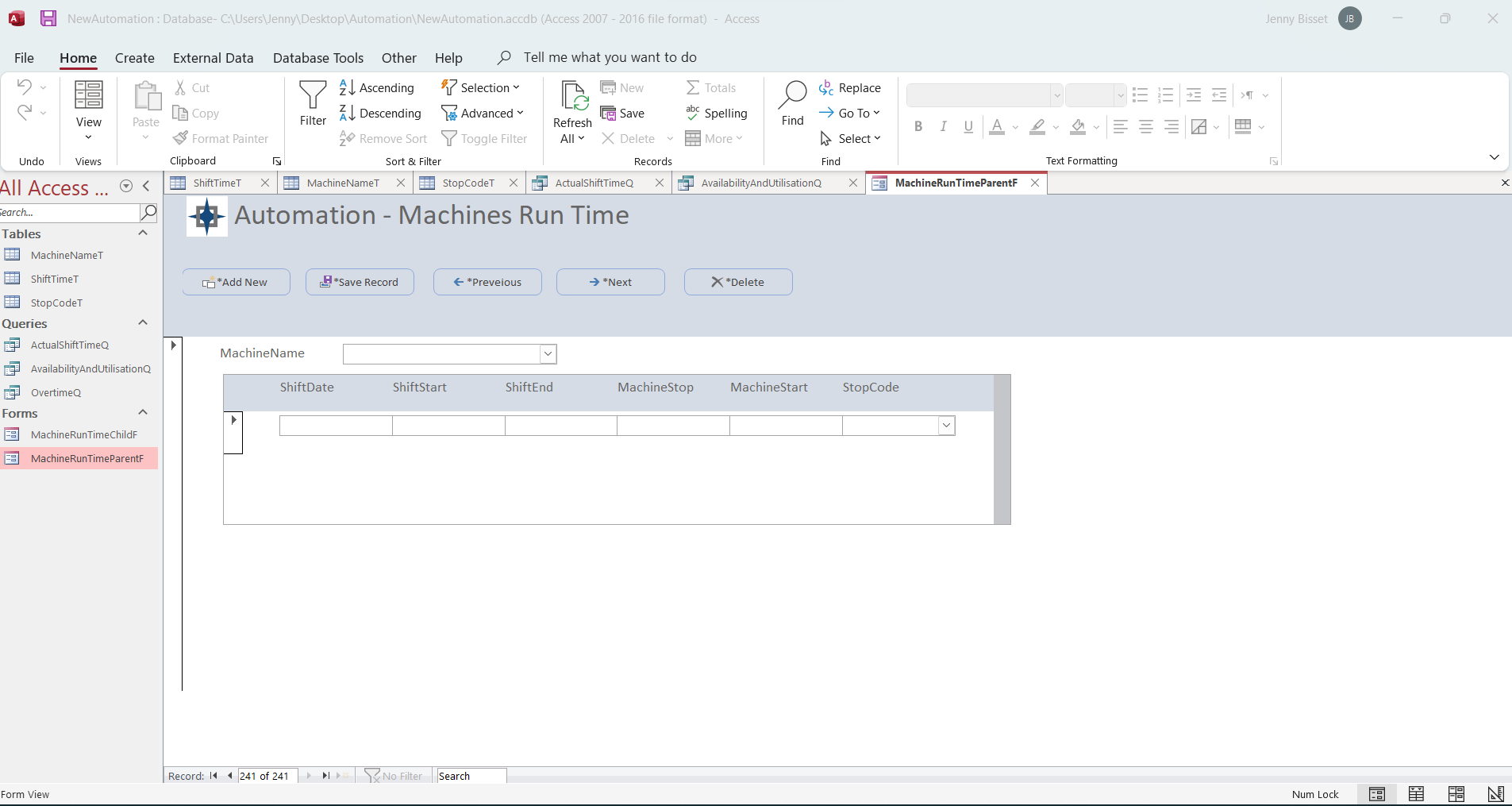
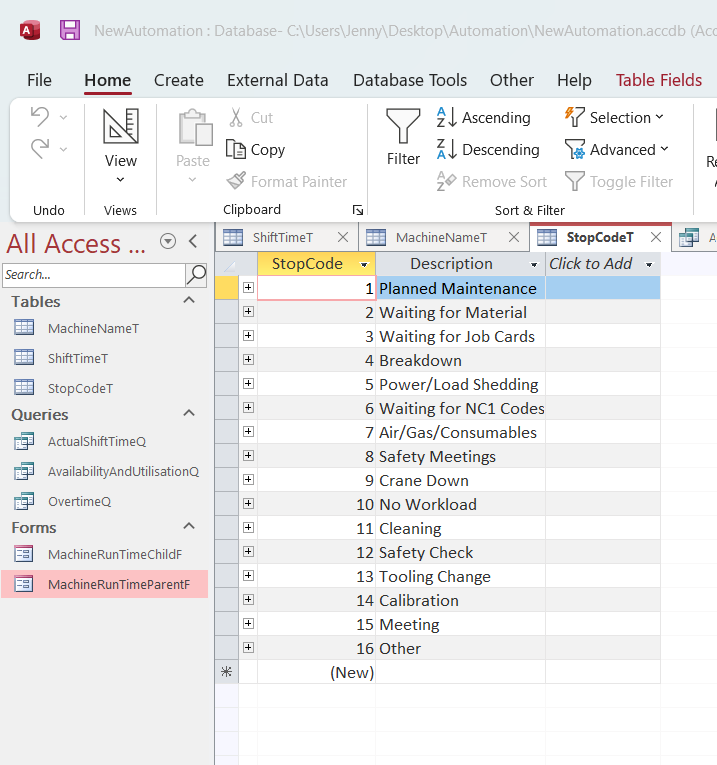
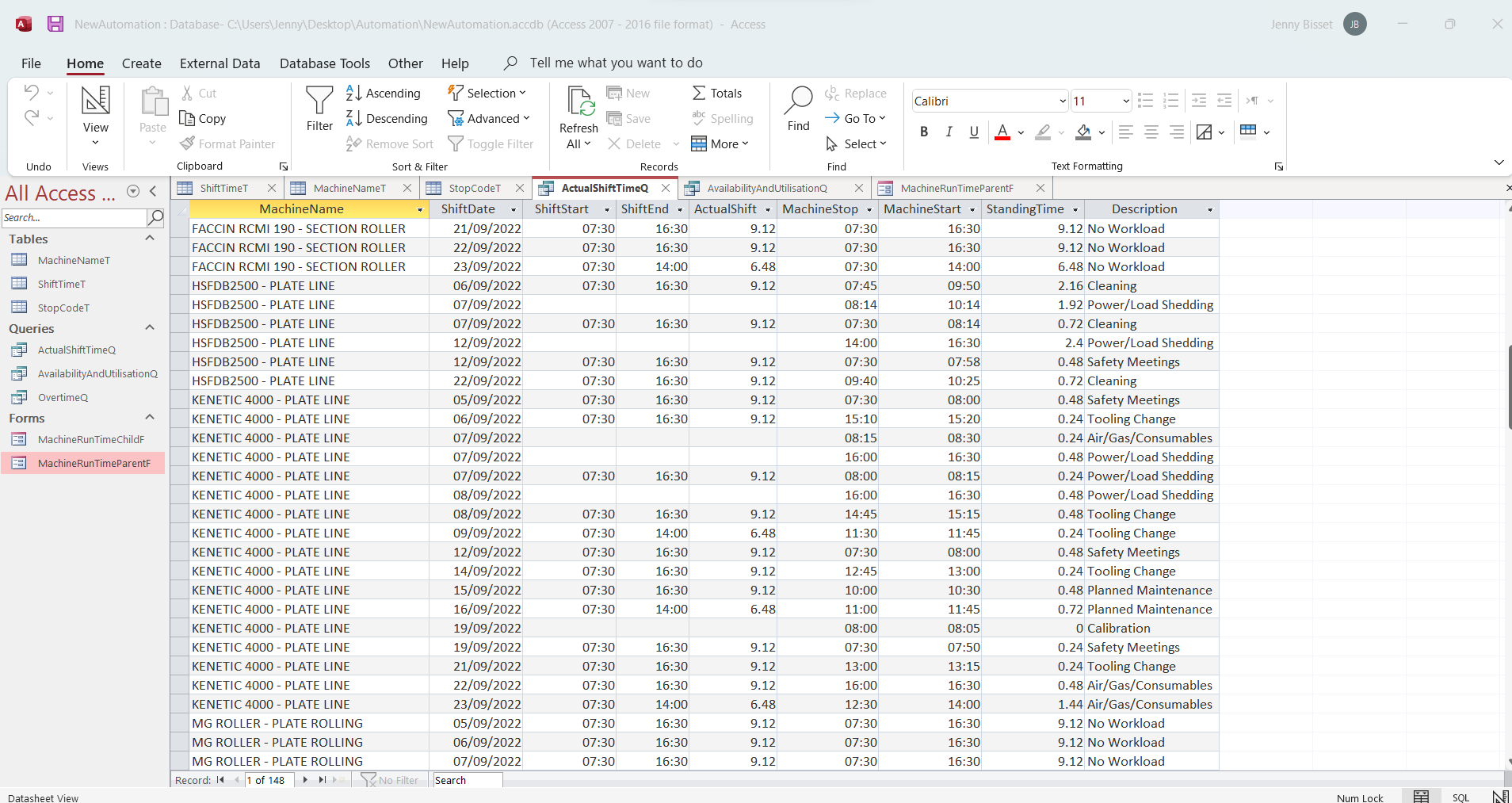
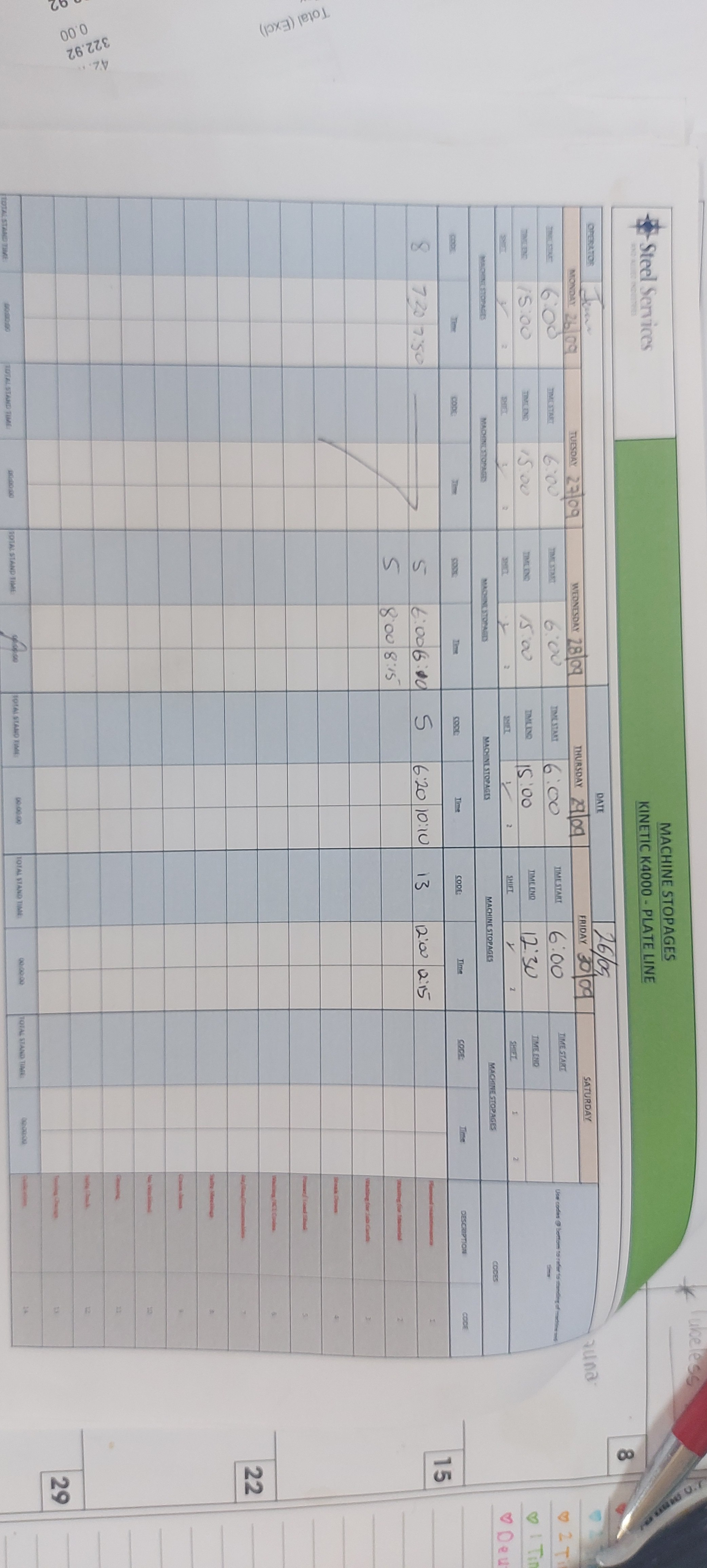



I will add some screenshots to better explain my conundrum. Maybe if you have a basic look of my forms, tables and queries, it may add some context to my questions.
When I have multiple shifts in day, then MS Access sees it as 2 seperate entries/days. Same goes for the standing times in a single shift. So, currently - when I enter the data into the system, I leave the shift times blank when I enter multiple stoppages in a single shift...and that works okay...until I start do do queries and calculation. Then it won't calculate the total standing time (for multiple entries) and subtract it from the total hours worked in a single shift. Can you please help?
Jenny Bisset OP  @Reply  
    
4 years ago

Jenny Bisset OP  @Reply  
    
4 years ago

Jenny Bisset OP  @Reply  
    
4 years ago

Jenny Bisset OP  @Reply  
    
4 years ago

Jenny Bisset OP  @Reply  
    
4 years ago

Jenny Bisset OP  @Reply  
    
4 years ago

Jenny Bisset OP  @Reply  
    
4 years ago

Jenny Bisset OP  @Reply  
    
4 years ago

Dan Jackson  @Reply  
            
4 years ago
Maybe Many-to-Many might have some tips to help?
Jenny Bisset OP  @Reply  
    
4 years ago
Hi Dan,

Thank you so much for your quick reply and the advice. However, I have watched the video - and I see why you thought of that. However, I honestly don't think that will work in my situation. Please don't think I'm arguing with you (as I am very grateful for your help) however, just follow my logic for a second...:
Think of my situation like this. You are the owner of a restaurant and you have a few employees working there and you need to track their hours worked like this:
You have waitresses, bar tenders and kitchen staff. These employees work different shifts (for example Shift 1 is from 06:00 until 13:00 and Shift 2 is from 12:00 until 20:00)
Now, some of your employees are off sick - so some of the other employees work both shifts on the same day. Also, because of the long hours - they take more breaks than usual. They would then essentially have 2 lunch breaks and say some of your employees are smokers - so every now and then they clock out and take 20min or 30min smoke breaks (we are short staffed and this is just an example, so we won't fire them just yet...haha) every 2 hours during each shift.
At the end of the day - I would like to calculate the total break time for each employee per day per shift and subtract that total from the total hours of the shift....
Does that explain a little mor clearly what I am aiming to do with my database? Would you be able to help with something like that?
Kevin Yip  @Reply  
     
4 years ago
Hi Jenny,

Before revising your query, I would make the following changes to your ShiftTimeT table first:

(1) You don't need two separate fields of ShiftStart and ShiftEnd, because they aren't really needed for calculations.  They are "theoretical" numbers for the user to see only.  The actual numbers you need are the actual times of your machines being used, i.e. MachineStart and MachineStop.  But having two separate fields of ShiftStart and ShiftEnd affects your ability to do a proper aggregate query, because your main goal is to see time duration PER SHIFT.  When you need to find results "per something," that something is best to be a single entity.  Use one field, say, ShiftPeriod, to identify a shift, which doesn't even have to be a date value.  It can be just a string that describes a shift with a UNIQUE description: "07:30-16:00", "Night Shift", "Sunday Shift", etc.

(2) Add a calculated field, say, MachineRunTime, in your ShiftTimeT, that equals to [MachineStop] - [MachineStart].  That way you don't need to calculate the time duration in your query, which will ease query designs and/or even speed up queries.  For that to work, [MachineStop] and [MachineStart] need to have *full date and time info*.  They can't be just the times as in your table now.  Again, this makes calculations easier, and also takes into account that your machines may run overnight (you need to consider all possilities).  If [MachineStart] is 8:00pm and [MachineStop] is 2:00am the next morning, Access will see 2am as a lesser value, and 2am minus 8pm and will give you a negative (and wrong) result.  But if you use full date and time, such a subtraction will always yield the correct result.

With the above in place, the query to find machine running time per shift would be quite trivial.  It would be a simple "group by" query:

SELECT Sum([MachineRunTime]) AS MachineRunTime FROM ShiftTimeT GROUP BY ShiftDate, ShiftPeriod
Jenny Bisset OP  @Reply  
    
4 years ago
Hi Kevin,

Thank you so much - I feel like I am moving in the right direction now.
I understand what you are saying in terms of using a shift column with a numeric value instead of date/time value.
However, the shift times aren't always the same. The guys in our workshop don't always have specific shift times. Also, as you know, we have "Load Shedding" in South Africa (very inconvenient) which also makes it difficult to stick to certain specific times. So, for example we don't have a set "Day Shift" from 08:00 until 16:00 and a "Night Shift" from 16:00 until 21:00 for example. I will attach the sheets that that some of the workshop guys have completed that I use for the data entry.
The actual shift times differ and the total hours per shift aren't always the same either. Also, management would like to track the amount of overtime per shift as well. So, for example - if one person had a shift running from 06:00 until 15:00, that is a 9hour shift - but a normal shift would only be 8 hours, so, in that particular shift, there would be 1 hour counted as overtime.
Then, in that same shift, the machine was stopped (for example) twice: 1. stopped from 08:00 - 08:25 for a Safety Meeting and again from 11:00 - 12:30 waiting for Material to be delivered from a supplier.
Would I still be able to do this in the way that you suggested above, and can you please give an example of how I might do this?
Oh - also, if it helps - I know that my director wants to pull the information from the queries into Power BI when he does presentations on our Automated Machines and Overtime worked to the CEO. That is why all the information is crucial and why I want to make sure that I get all the calculation right. PLEASE HELP.
Just FYI - I am very new in MS Access - started about a month ago just as a personal project at work...and I am quite new to coding and stuff to - I just know the BARE Basics....so, it's not like I'm some kind of wizz or anything. So, I don't completely understand all of this 100% just yet.
Jenny Bisset OP  @Reply  
    
4 years ago

Jenny Bisset OP  @Reply  
    
4 years ago

Jenny Bisset OP  @Reply  
    
4 years ago

Jenny Bisset OP  @Reply  
    
4 years ago

Kevin Yip  @Reply  
     
4 years ago
Hi Jenny,

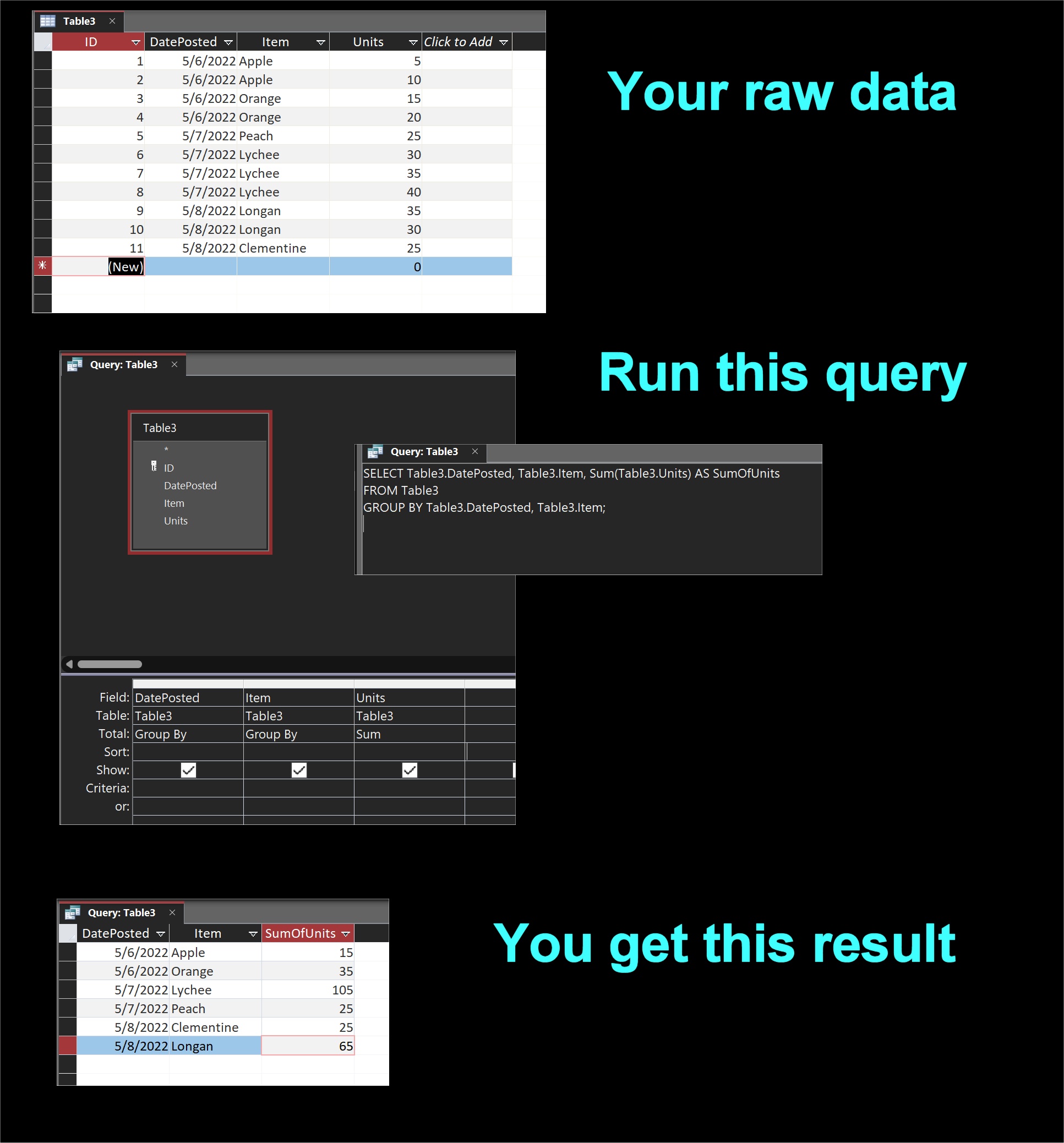
You need to use "aggregate queries" to accomplish your goal.  The query you posted in your picture is not one.  An aggregate query "aggregates" your raw data into sums and/or counts of the data.  Richard has some free and paid videos on them.  Search his site or his YouTube channel for "aggregate queries".  

To give you a short explainer of what they are, see the picture below.  If you have a daily assortment of fruits and units like this, run an aggregate query, and you get a "summation" of the data, which I think is what you need for your shifts.

To your other point about having many different shifts, that won't affect your result.  As my example shows, you can a million different fruits in your record, and an aggregate query will always give you the correct units per fruit per day.

Also, you can't have blank values for [ShiftStart] and [ShiftEnd] in your ShiftTimeT table.  Every value has to be filled in, or an aggregate query won't work.  Just like in my example.

As I said previously, find a way to treat "a shift" as a single entity (which it is, for your purpose), instead of two entities: ShiftStart and ShiftEnd.  You can set up a normalized table to store shifts, with the fields: ShiftID (as primary key), ShiftStart, ShiftEnd, ShiftDescription, etc.  Then use the ShiftID as a field in your ShiftTimeT.

Kevin Yip  @Reply  
     
4 years ago

Dan Jackson  @Reply  
            
4 years ago
Jenny Bisset OP  @Reply  
    
4 years ago
Kevin...my friend...haha! I have to be honest...when I saw your query above, I had serious doubts that this was going to work. In fact, I wanted to reply to you (giving a whole explanation of why I don't think this would work..hahahahaha) and decided to try it first ANYWAY...and to my absolute shock, it actually worked just fine...and I even got my Utilisation calculation to work 100%
And thank you for the pictures you added - you see, I am blonde and as a group we have a "I work better with pictures" rule...LoL! ☺☺
So, thank you SO VERY MUCH.
LoL....I did, however, not get the Availability calculation to work 100% (well, the calculation works, but the way that my database is set up, the calculation is correct, but gives inaccurate results) - and I am not sure if there is a way around that?
Would you be willing to attempt to assist me one more time?
Jenny Bisset OP  @Reply  
    
4 years ago
Hi Kevin - Nevermind, I got the Availability calculation figured out as well. But thank you so much for your help, it really is appreciated ☺
Kevin Yip  @Reply  
     
4 years ago
You're very welcome.  I only gave you a terse explanation of aggregate queries so you need to study it a bit more, such as with some of the videos here.  Power BI, Power Apps, Power Excel and the likes also require good query usage and some database knowledge as well, such as normalization.
Jenny Bisset OP  @Reply  
    
4 years ago
Hi Kevin,

I was wondering if maybe you could give some advice again?
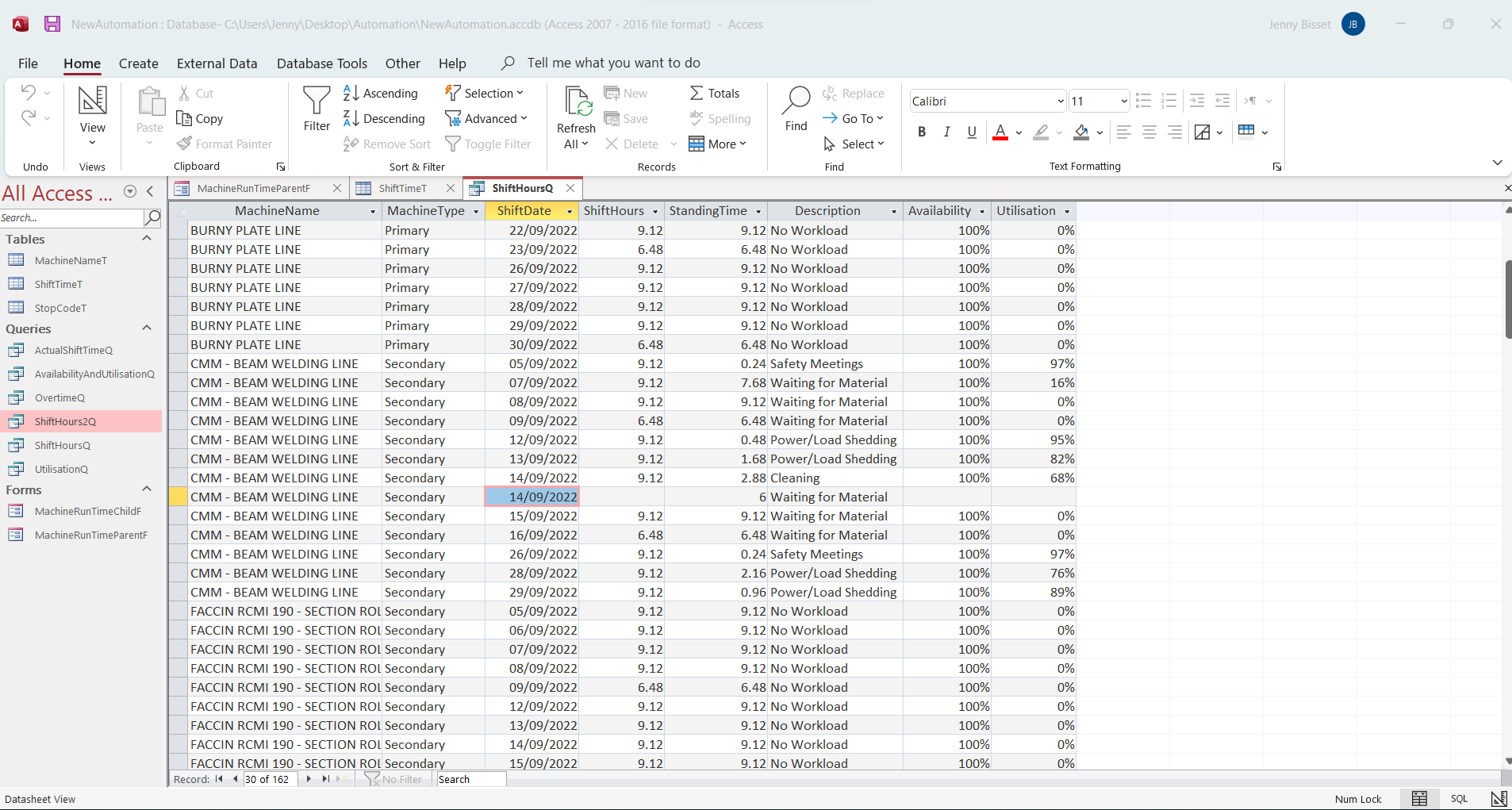
I am going to attach a screenshot of my (coming-along-nicely) database for the automated machines (many thanks to you and your infinite Access wisdom)
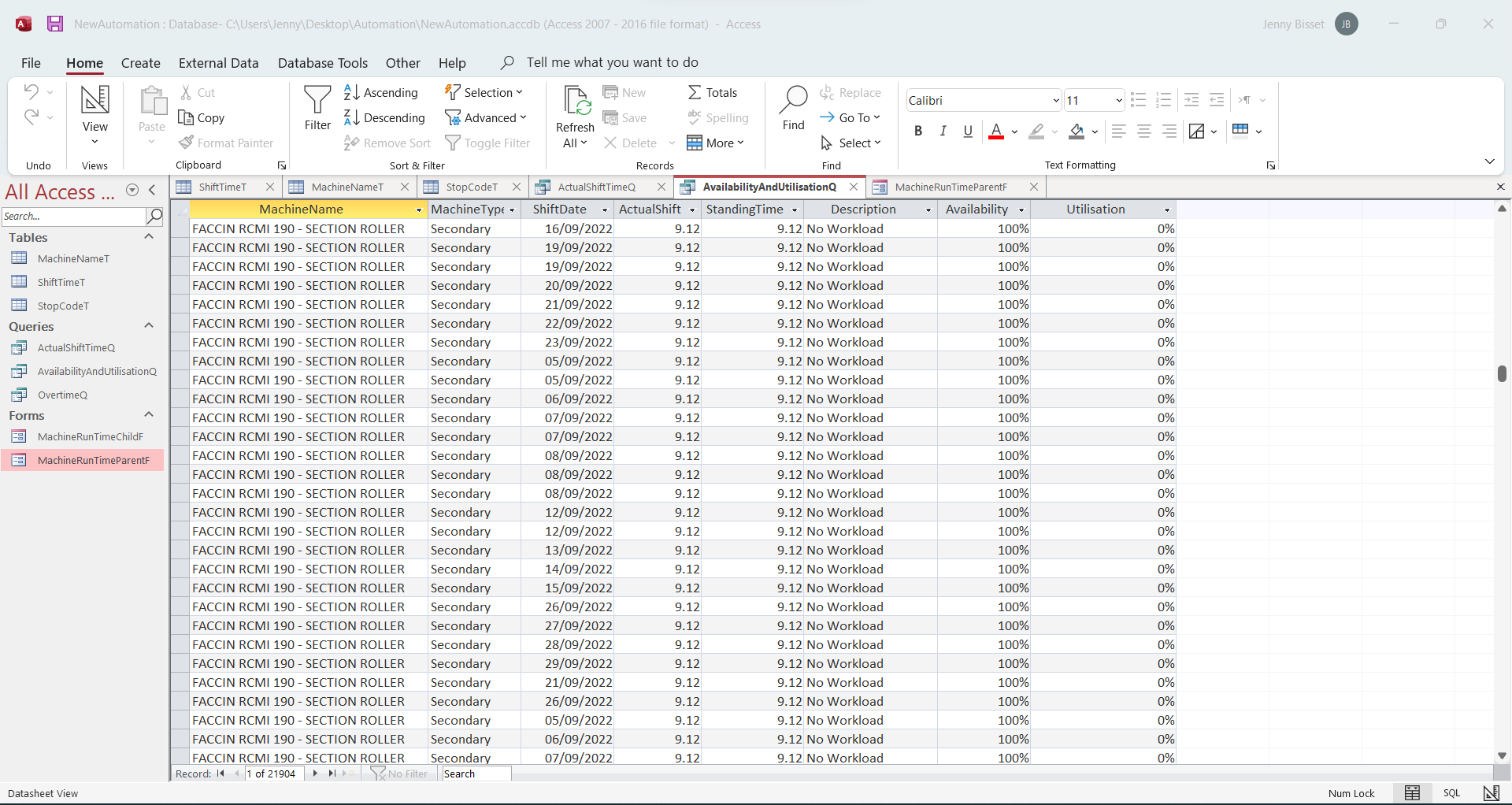
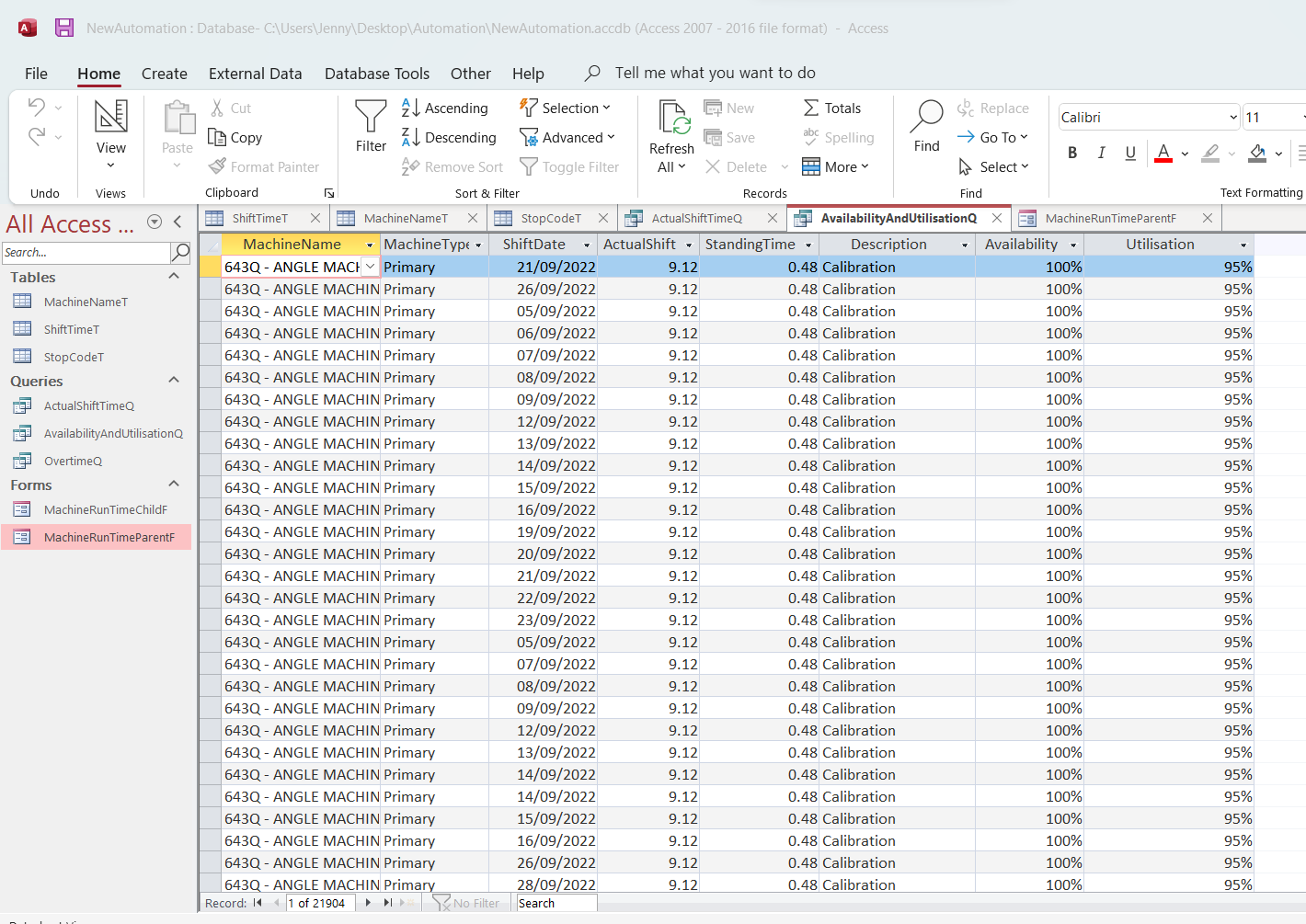
In the Query attached, you will note that there is a single line with a "Null" value....that is because there was more than one "standing time incident" during the same shift on the same day. So, You will see that I have not entered the shift time again, I have just left it blank. However, I am now getting 2 separate entries on the same day.
I want to know - is there some kind of an "IF Statement" that I can use (together with the NZ Function) that will enable me to make the shift value ZERO on the second entry and add it together with the first entry (actual shift time) and then add the standing time together for that entire shift?
Basically, what I want is this:
Look at the CCM-- BEAM WELDING LINE machine entries - and check the entry for 14/09/2022 - there are 2 entries...
I want there to be one entry on 14/09/2022 with a 9.12 hour shift and a total of 8.88hours of standing time
I must be honest, I don't see a way that I will be able to do this, because the "Stop Code" is what causes there to be two entries and I cannot take the stop code out of this.
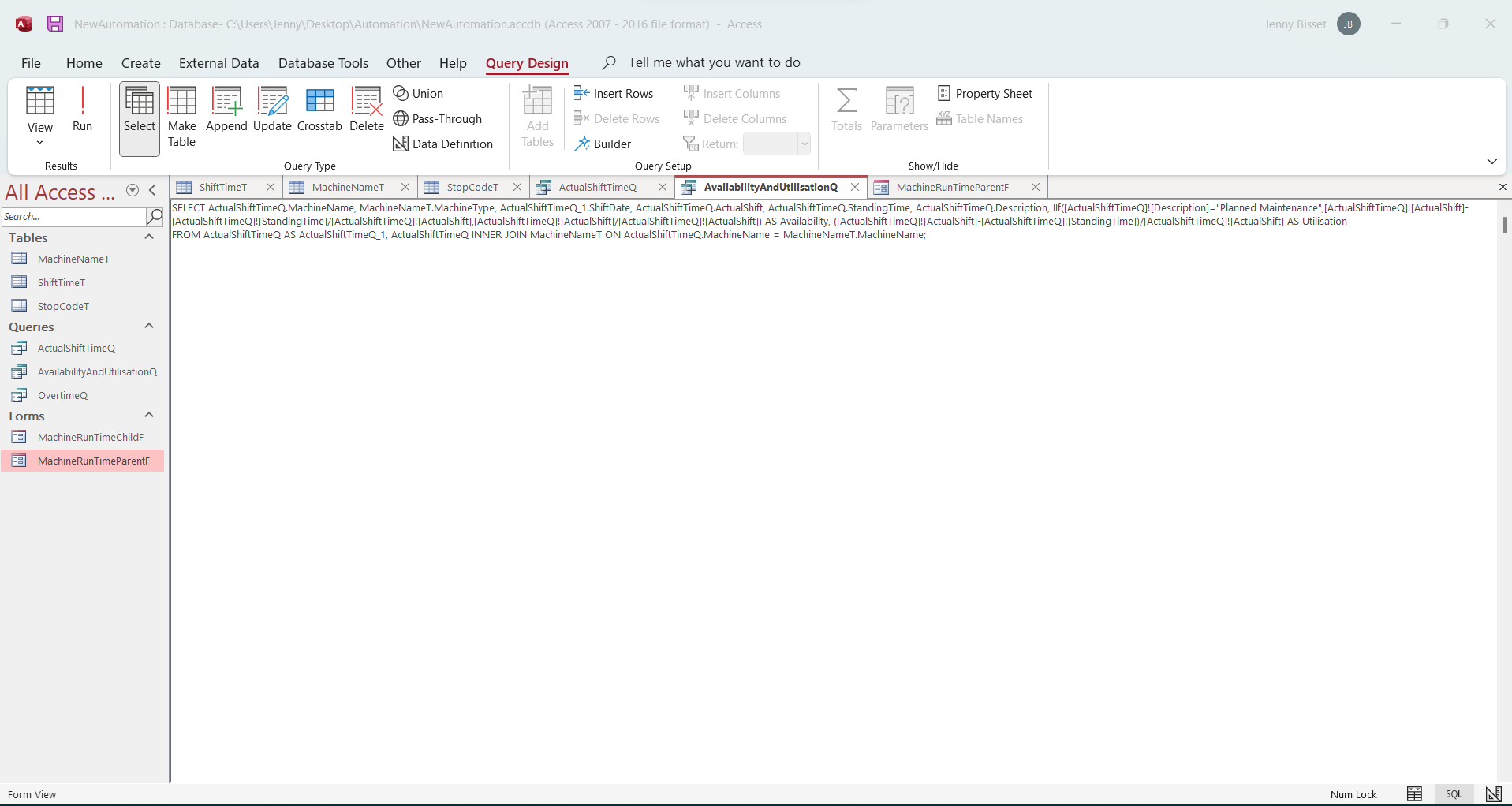
I have added the SQL below here, so that you can see what I have done.

SELECT ShiftTimeT.MachineName, MachineNameT.MachineType, ShiftTimeT.ShiftDate, Sum(Round([shiftend]-[shiftstart],2))*24 AS ShiftHours, Sum(Round([machinestart]-[machinestop],2))*24 AS StandingTime, ([shifthours]-[standingtime])/[shifthours] AS Utilisation
FROM MachineNameT INNER JOIN (StopCodeT INNER JOIN ShiftTimeT ON StopCodeT.StopCode = ShiftTimeT.StopCode) ON MachineNameT.MachineName = ShiftTimeT.MachineName
GROUP BY ShiftTimeT.MachineName, MachineNameT.MachineType, ShiftTimeT.ShiftDate;

If there is some advice that you can give to make this work, I would appreciate it.
Jenny Bisset OP  @Reply  
    
4 years ago

Kevin Yip  @Reply  
     
4 years ago
HI Jenny,

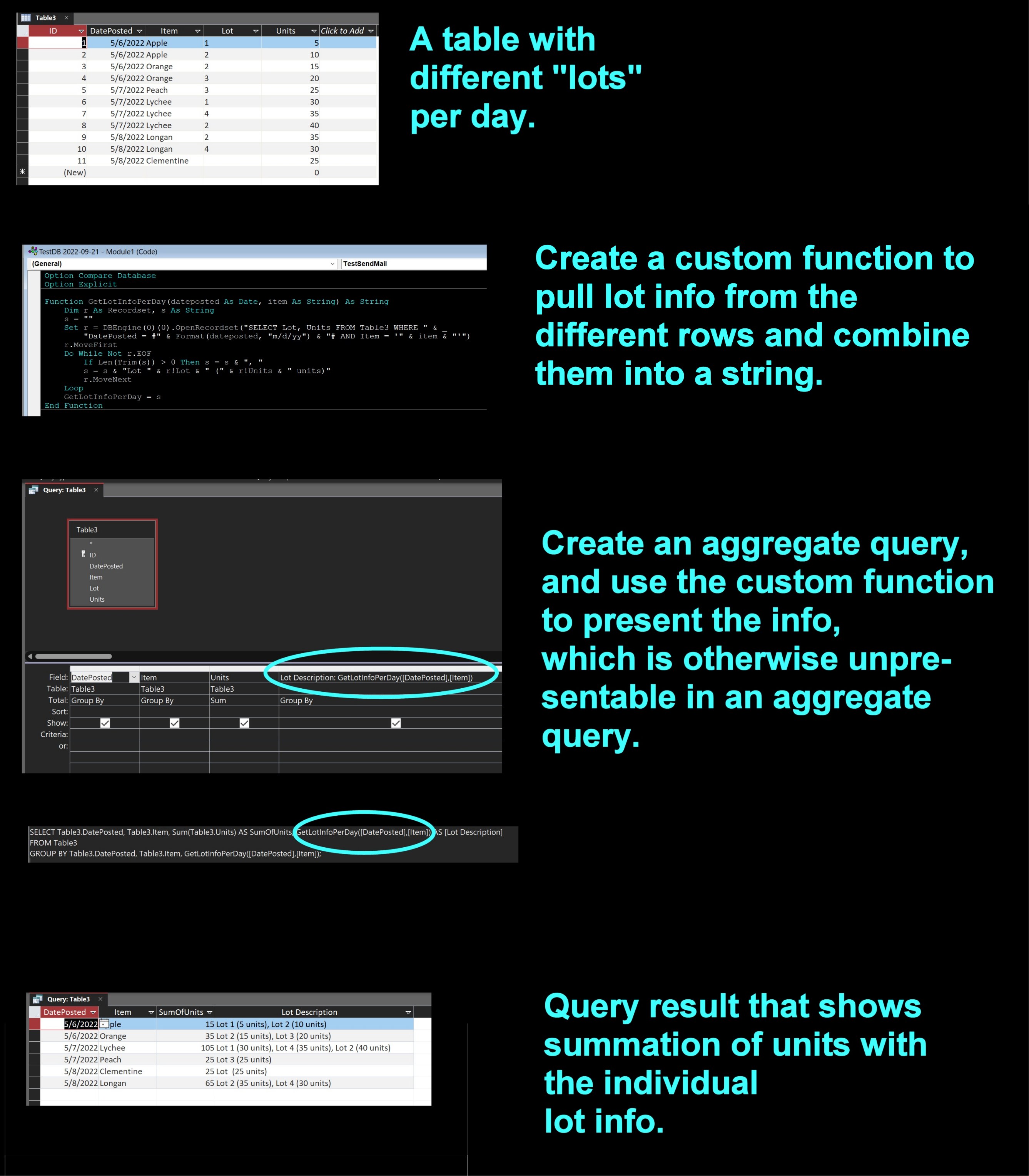
In order to get a sum of [StandingTime] in an aggregate query, you must get rid of the [Description] field.  In an aggregate query, you usually have to get rid of fields that cannot be aggregated, otherwise you will get the result you got.  

If you want to keep the [Description] field, you'll need to do some VBA programming.  Basically, you need to gather all the Description values from the different lines and present them in one line, so the result is presentable with your total [StandingTime] value.

Of course, it's always better to not have to do any programming or extra effort.  Perhaps you could find a way to not have to show the stop code description in this query, and show it somewhere else.  This seems like a decision to be based on your specific business practices.

In my example below, I received several lots of fruits day, and I want to show total units of fruits per day while still showing the lot info.

If this is (too) far from your skill level I apologize.  And the other posters are going to frown on me for teaching you how to run before you can walk.  But I always believe in showing students *what running looks like* first.
Kevin Yip  @Reply  
     
4 years ago

Richard Rost  @Reply  
           
4 years ago
Wow... Nice job, Kevin Yip.
Kevin Yip  @Reply  
     
4 years ago
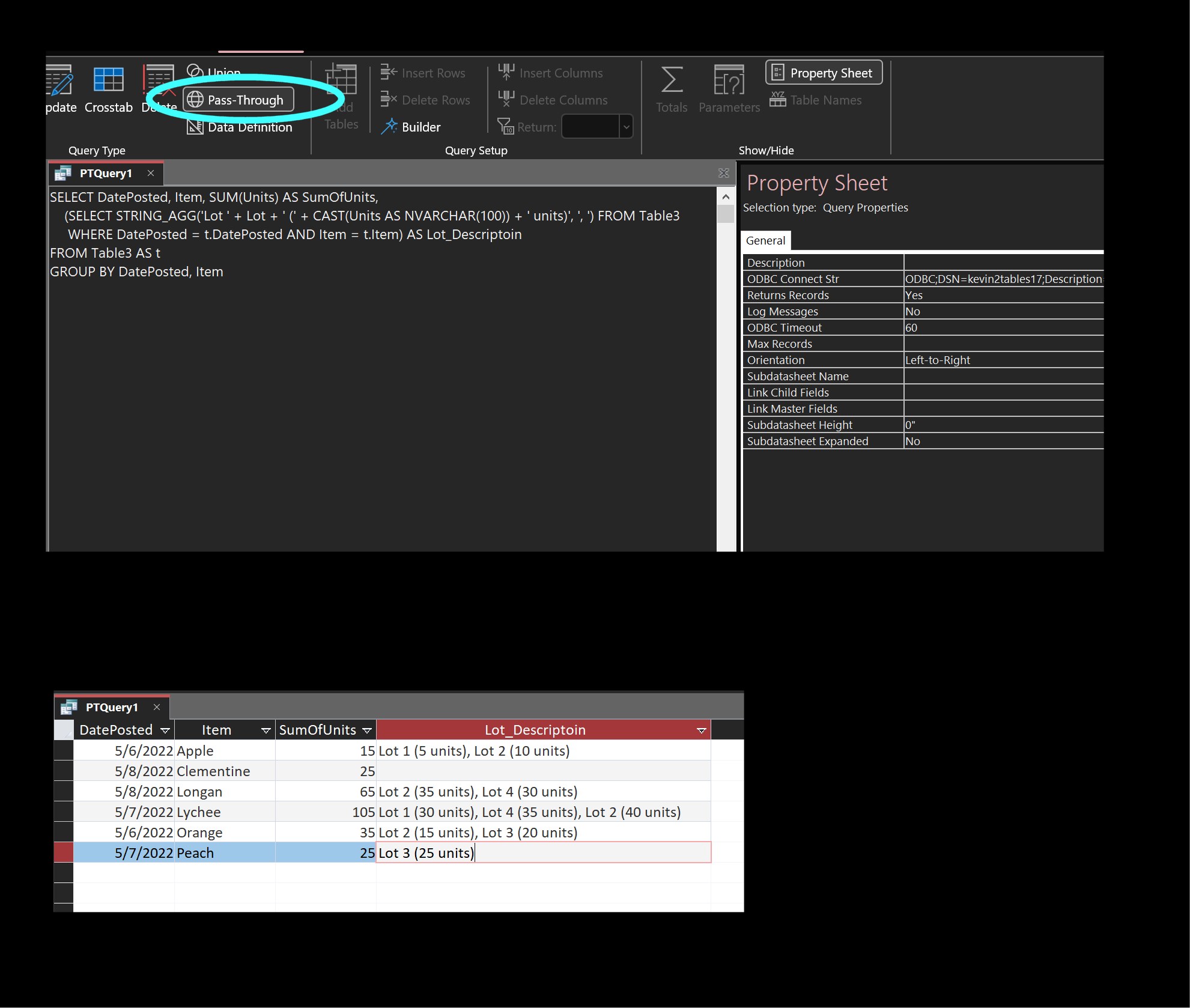
Thanks Richard.  I just to want to mention one thing that shows how much more powerful SQL Server is compared to Access.  This exact same task can be done with just one relatively simple SQL statement in SQL Server, with no additional programming at all.  It uses the STRING_AGG() function that does the kind of aggregation that is needed here.  It also allows a "nested" SQL structure that is also not supported in Access.  Access users can run this type of query with a "pass-through" query, if you already have SQL Server as a back end:
Kevin Yip  @Reply  
     
4 years ago

This thread is now CLOSED. If you wish to comment, start a NEW discussion in Access Forum.
 

Next Unseen

 
New Feature: Comment Live View


The following is a paid advertisement
Computer Learning Zone is not responsible for any content shown or offers made by these ads.
 

Learn
 
Access - index
Excel - index
Word - index
Windows - index
PowerPoint - index
Photoshop - index
Visual Basic - index
ASP - index
Seminars
More...
Customers
 
Login
My Account
My Courses
Lost Password
Memberships
Student Databases
Change Email
Info
 
Latest News
New Releases
User Forums
Topic Glossary
Tips & Tricks
Search The Site
Code Vault
Collapse Menus
Help
 
Customer Support
Web Site Tour
FAQs
TechHelp
Consulting Services
About
 
Background
Testimonials
Jobs
Affiliate Program
Richard Rost
Free Lessons
Mailing List
PCResale.NET
Order
 
Video Tutorials
Handbooks
Memberships
Learning Connection
Idiot's Guide to Excel
Volume Discounts
Payment Info
Shipping
Terms of Sale
Contact
 
Contact Info
Support Policy
Mailing Address
Phone Number
Fax Number
Course Survey
Email Richard
[email protected]
Blog RSS Feed    YouTube Channel

LinkedIn
Copyright 2026 by Computer Learning Zone, Amicron, and Richard Rost. All Rights Reserved. Current Time: 6/16/2026 1:43:54 PM. PLT: 0s