Free Lessons
Courses
Seminars
TechHelp
Fast Tips
Templates
Topic Index
Forum
ABCD
 
Home   Courses   TechHelp   Forums   Help   Contact   Merch   Join   Order   Logon  
 
Back to Relationship Seminar Lessons    Comments List
Upload Images   @Reply   Bookmark    Link   Email   Next Unseen 
Reverse Relationship Delete
David Pierce 
    
4 years ago
HI Rick
I know I am jumping back a few years but I would love to revisit this relationship and come up with a delete button that removes both records from the junction table. I am thinking a delete query but not real sure. It sure would be great to be able to delete a partnership or relationship on both ends with the click of one button. Any chance we can make that happen?
Thanks
Adam Schwanz  @Reply  
           
4 years ago
I'm sure you know about Don't Delete Data. But if you must...

This should be doable very easily with a delete query or SQL statement. Can you explain what you are trying to delete?

It should just be
CurrentDB.Execute "DELETE * FROM JUNCTIONTABLE WHERE ID=" & ID
to delete ALL records with that ID, if you use the same id in multiple records you would want to add a second criteria to the where condition there so you don't delete too much.
CurrentDB.Execute "DELETE * FROM TABLE WHERE ID=" & ID
to get rid of the original

As with anything with changes to the tables, make sure you backup before you try anything.
David Pierce OP  @Reply  
    
4 years ago
thanks Rick,
I use this as a Trade Partner relation ship in my businesses db. Such as if a business has a required subcontractor, approved vendor, and so on.... then if that relationship ends, I want to just hit delete and make both of the records go away with one click. I have played with it some, but haven't found a way to get rid of both records created with one click! I would like to click on the name or business in the list box, hit delete and it remove both records in the junction. And yes, a where would definitely be necessary to keep from removing additional records.
David Pierce OP  @Reply  
    
4 years ago
I am really thinking it would have to be two where combined to get a unique value of what to delete?
Adam Schwanz  @Reply  
           
4 years ago
Thanks, it's an honor to be mistaken for Rick ;P LOL

So you have a business table, when you go to delete it you're deleting the business ID from your table, correct? Then in the junction table you want to remove any subcontractors and any approved vendors from it, is that correct? Or what is the second record in make both records go away? If you want to delete all of the subcontractors/approved vendors in the junction table you would only need 1 criteria, if you want to only delete a specific subcontractor or vendor than you need to add more criteria.

Kevin Yip  @Reply  
     
4 years ago
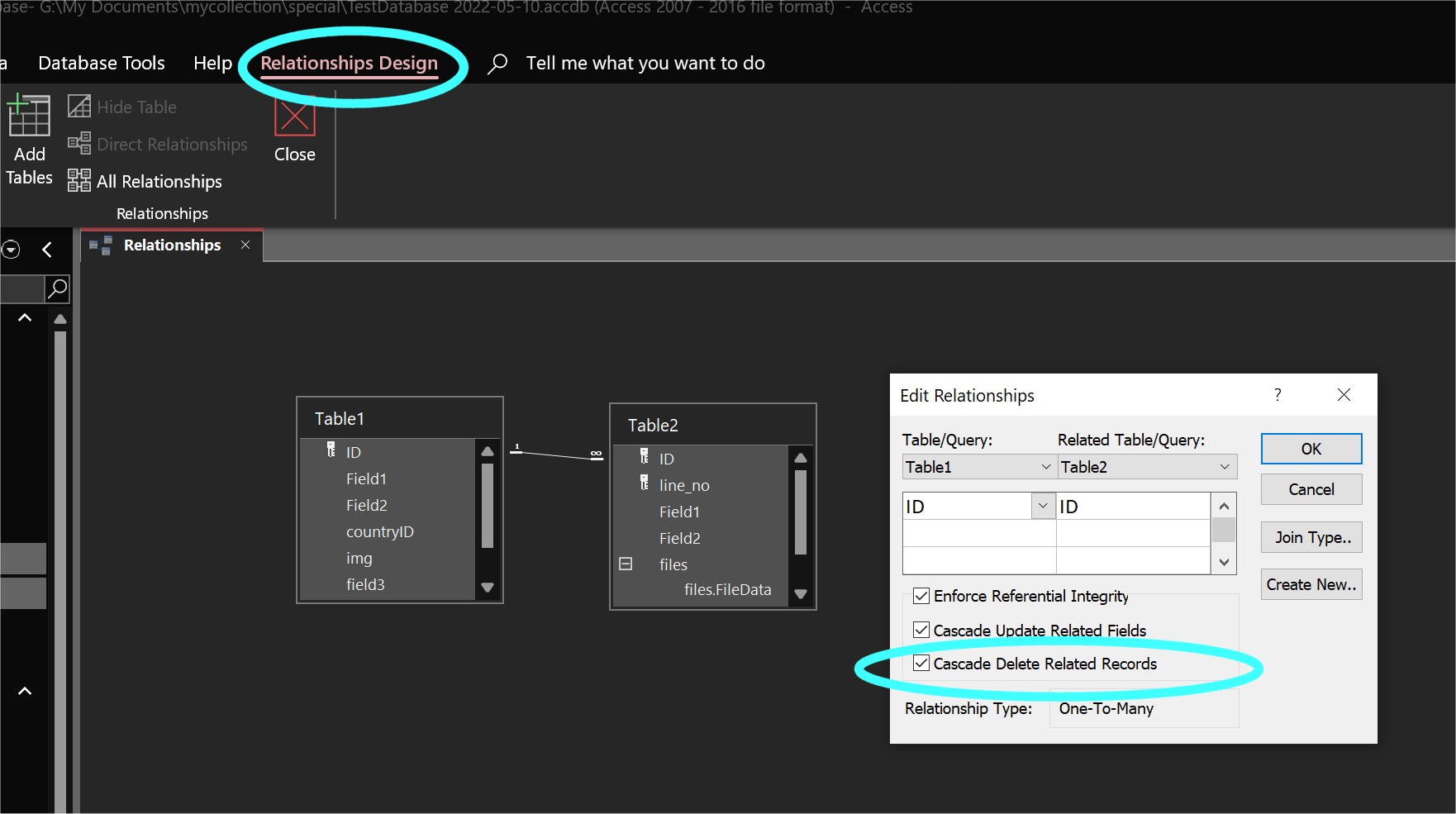
Access has this feature built-in, and it's called "cascade delete."  Go to Database Tools, Relationships, and set the cascade delete option as shown in the pic below.  In this one-to-many relationship, deleting a record in Table 1 will also delete ALL records in Table2 with the same ID.

In my 30+ years, I've never used cascade delete in Access, because this is rarely needed in real-life situations.  For instance, if a business stops using a subcontractor, OTHER businesses may still need to use it, so you still need that subcontractor to remain in your database.  You only need cascade delete if a subcontractor disappears from the face of the earth.

What usually happens is that a record may have a *foreign key* of a subcontractor.  If you delete that record, only the foreign key is gone.  The subcontractor's info (its own primary key in its own table) still remains.
Kevin Yip  @Reply  
     
4 years ago

Richard Rost  @Reply  
          
4 years ago
Just delete the record from the junction table. That's like saying you have cars and drivers, and each driver can be assigned to multiple cars, and each car can be driven by multiple drivers. If you want to say that "Chad" can't drive the "Ford Focus" then just delete that record from the junction table. Problem solved. It will appear to be gone from both sides. If you have a driver form with a car subform, it's gone form there. Likewise, if you have a car form with a driver subform, it's gone from there too.
Richard Rost  @Reply  
          
4 years ago
And yes, I'm usually against deleting REAL data (the cars and drivers) but a matchup like this, meh... you can if you want. Or mark it invalid if you might want to know who was assigned to that car at some point in the past. All up to you.
David Pierce OP  @Reply  
    
4 years ago
Thanks everyone and sorry Adam about name, wasn't paying enough attention, bad habits.
Just to recap, I will try to figure this out. When you create a reverse relationship, it puts two
records into the junction table. What I wanted to accomplish is that if I select a business from the list box
that has the relationship, then hit delete, it removes both records from the junction table, not the records in the
business table, just the junction table.

I have tried a delete but it only deletes the one record in the junction table. Then you have to go to the other record (business) and delete it from that also or it still exist in that business as a relationship. If you think back to that seminar, there is a list box that when you create a reverse relationship, it puts Name B into the listbox of current business, then it puts Name A in the other business. So when you go to one record, it has its relationships and then reverses on the other end. So basically I was seeking a way to delete both ends of that in the junction, not the actual businesses.

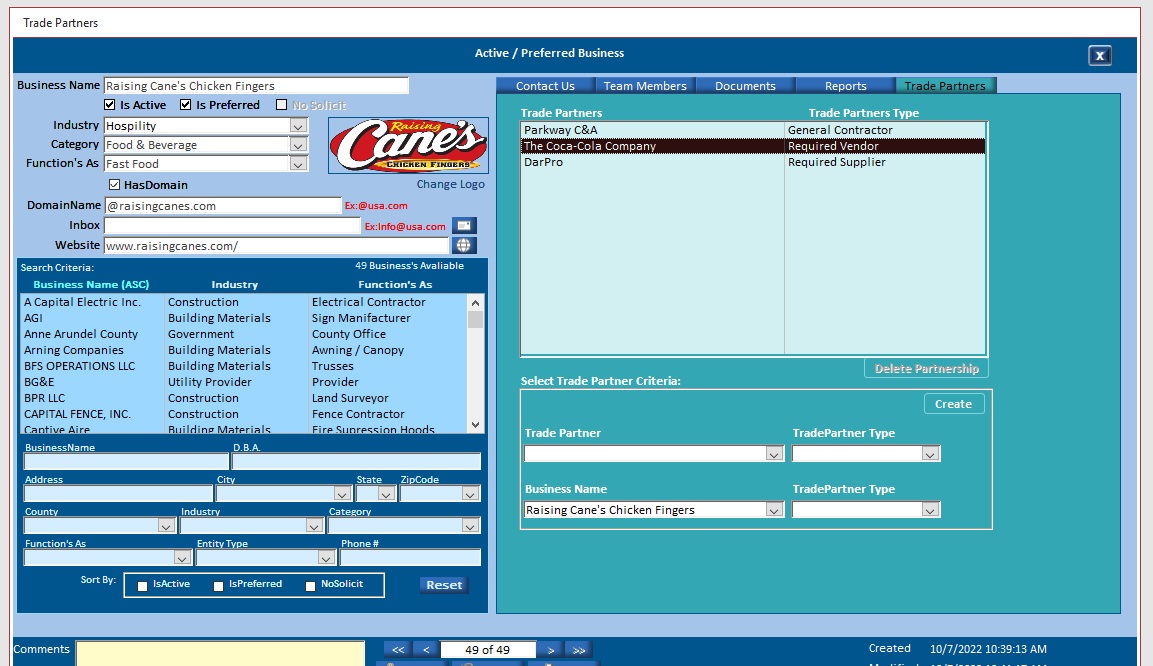
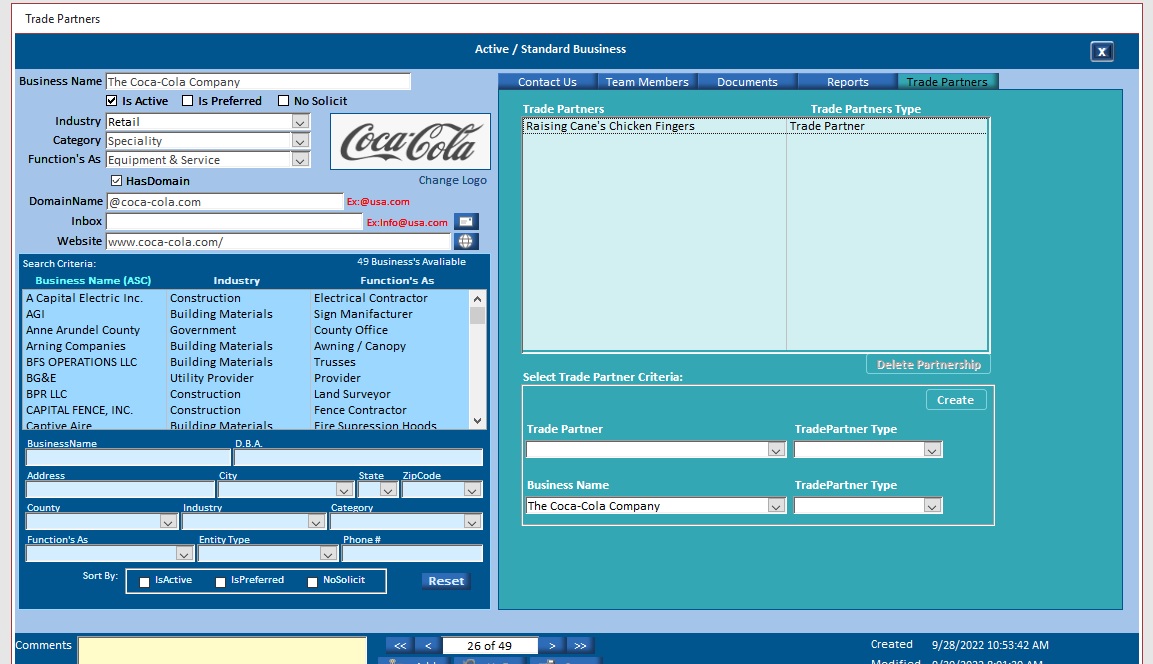
Fore instance, If Raising Canes is my Primary business (Main Form) and I create a relationship with Coca-Cola as a Required Vendor, then on main form where the business is Raising Canes, the listbox would show Coca in the listbox, and when you go to coca-cola as main form, then listbox would show Raising Canes. If I select one from the listbox and hit delete, I want to delete both sides of this in the junction table so that Raising Canes does not show a relation with Coca-Cola and that Coca-Cola does not show Raising Canes in their listboxes!
David Pierce OP  @Reply  
    
4 years ago

David Pierce OP  @Reply  
    
4 years ago

David Pierce OP  @Reply  
    
4 years ago
Hi guys,
I attached some screen shots. As you can see, the Raising Canes has a few relationships in it. If I select say Coca-Cola, then the delete partnership button would light up, and if I chose to delete that partner ship, then it would delete Raising Canes relationship with CocaCola, and CocaCola relationship with Raising Canes. All with one button click. Not deleting the businesses, just the relationship between them lets say if they went from Coca-Cola to Pepsi fore instance.
David Pierce OP  @Reply  
    
4 years ago
Hi all,
Have tried many things but yet to get this to delete both files in table?
In photo of table, I need to somehow match the BusinessID with the (BusinessID in the TradePartnerID Field) and the TradePartnerID  with the (BusinessID in the BusinessID Field) so that when I hit delete button, it removes both files from table that match the ID's...

Now, I have not been able to write this Sql or UpdateQry to accomplish this. I would love a solution and willing to pay for someone to write this code for me if anyone is willing. I would love to put this behind me.
Thanks
Dave
David Pierce OP  @Reply  
    
4 years ago

Adam Schwanz  @Reply  
           
4 years ago
Backup before trying this

CurrentDB.Execute "Delete * From tblBusiness2Business WHERE BusinessID=" & BusinessID & " and ReverseID=" & ReverseID
CurrentDB.Execute "Delete * From tblBusiness2Business WHERE BusinessID=" & ReverseID & " and ReverseID=" & BusinessID

Adam Schwanz  @Reply  
           
4 years ago
If you can't get it, I'd be glad to do it for you in the AccessDev.NET

My email is there if you want to send it over.
David Pierce OP  @Reply  
    
4 years ago
Thanks Adam,
I will try out in the morning

Thank you so much. I believe I can do this. I am just really bad as WHERE statements
David Pierce OP  @Reply  
    
4 years ago
Hi Adam,
I sent over db in zip format to you in AccessDev.net. Let me know what else you need please
I got compile error with that code so in any event, please fix if you can

Thanks
Dave
David Pierce OP  @Reply  
    
4 years ago
Thanks again Adam, it worked like a charm! Left feedback and sent you a paypal!

This thread is now CLOSED. If you wish to comment, start a NEW discussion in Relationship Seminar Lessons.
 

Next Unseen

 
New Feature: Comment Live View


The following is a paid advertisement
Computer Learning Zone is not responsible for any content shown or offers made by these ads.
 

Learn
 
Access - index
Excel - index
Word - index
Windows - index
PowerPoint - index
Photoshop - index
Visual Basic - index
ASP - index
Seminars
More...
Customers
 
Login
My Account
My Courses
Lost Password
Memberships
Student Databases
Change Email
Info
 
Latest News
New Releases
User Forums
Topic Glossary
Tips & Tricks
Search The Site
Code Vault
Collapse Menus
Help
 
Customer Support
Web Site Tour
FAQs
TechHelp
Consulting Services
About
 
Background
Testimonials
Jobs
Affiliate Program
Richard Rost
Free Lessons
Mailing List
PCResale.NET
Order
 
Video Tutorials
Handbooks
Memberships
Learning Connection
Idiot's Guide to Excel
Volume Discounts
Payment Info
Shipping
Terms of Sale
Contact
 
Contact Info
Support Policy
Mailing Address
Phone Number
Fax Number
Course Survey
Email Richard
[email protected]
Blog RSS Feed    YouTube Channel

LinkedIn
Copyright 2026 by Computer Learning Zone, Amicron, and Richard Rost. All Rights Reserved. Current Time: 4/30/2026 4:50:52 AM. PLT: 0s