Free Lessons
Courses
Seminars
TechHelp
Fast Tips
Templates
Topic Index
Forum
ABCD
 
Home   Courses   TechHelp   Forums   Help   Contact   Merch   Join   Order   Logon  
 
Back to Access Forum    Comments List
Upload Images   @Reply   Bookmark    Link   Email   Next Unseen 
Query problem
Maarten Brusselers 
   
4 years ago
When I create a select query where one of the fields does not have data in all records it only shows me the query results for those records where all the fields all have data, instead of showing all the fields with the empty records showing as empty.  Field 1,2 and 3 all the fields have full records, in field 4 only some records do.  The query then only shows the records where field 4 has data. How do I get the query to show all the records, including the empty records. I have not set any criteria.
Dan Jackson  @Reply  
            
4 years ago
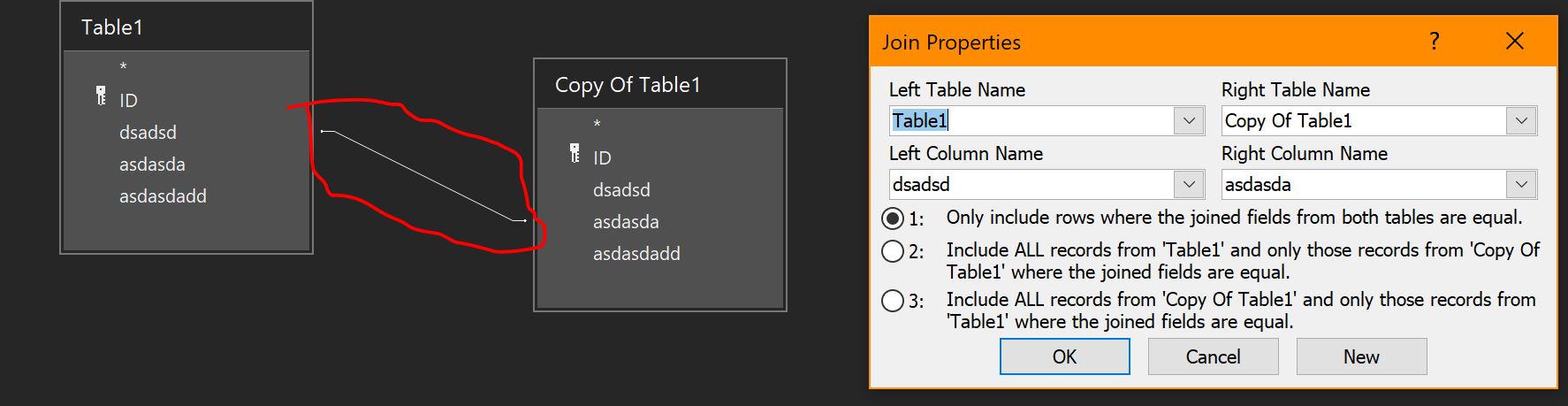
I'm assuming your query has multiple tables and a relationship. Double click on the line that forms the relationship and select option 2 or 3 depending on your requirements
Dan Jackson  @Reply  
            
4 years ago

Maarten Brusselers OP  @Reply  
   
4 years ago
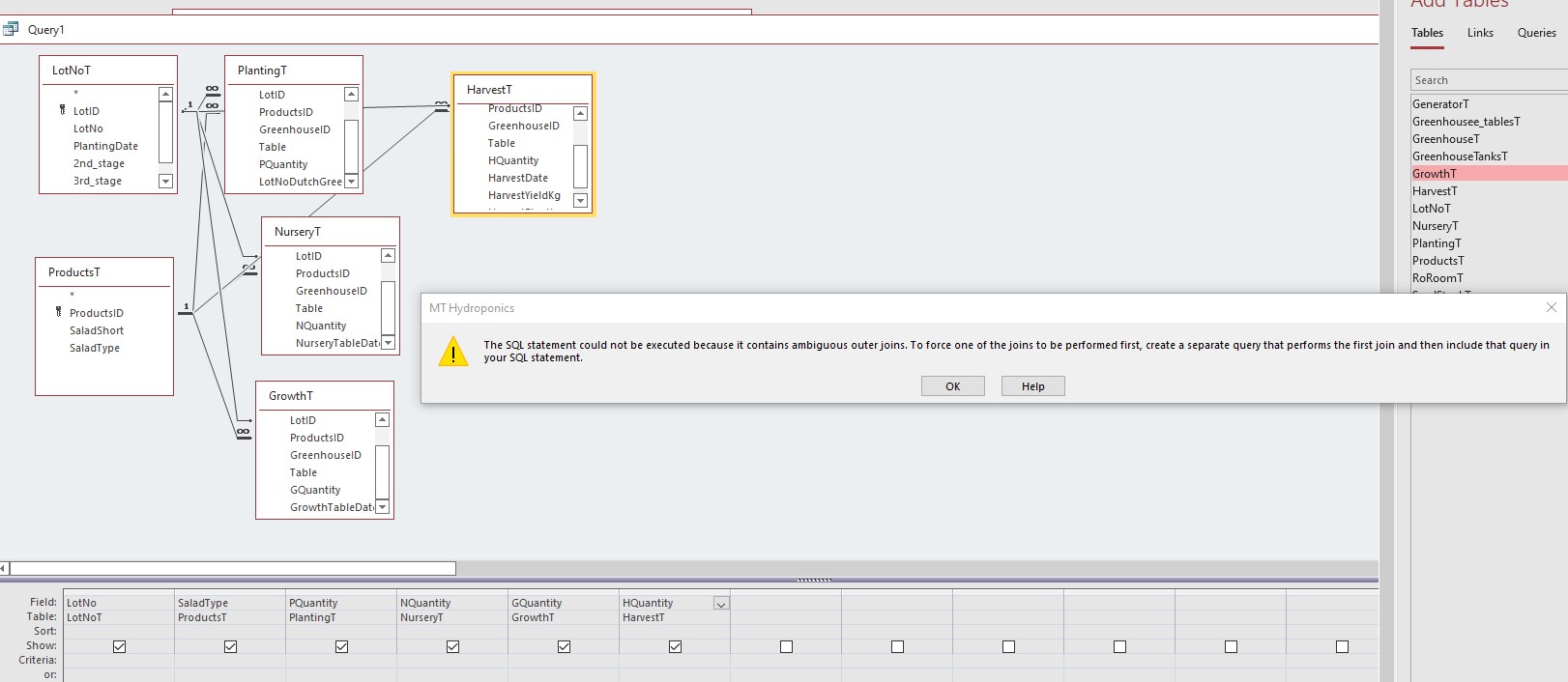
6 Tables in fact.  As soon as I change to option 2 or 3 on any of the relationship it refuses to run. See screenshot.  I am trying to calculate the plant loss throughout the growing process, from planting to nursery to growth stage to harvest.
Maarten Brusselers OP  @Reply  
   
4 years ago

Maarten Brusselers OP  @Reply  
   
4 years ago
LotNoT and ProductT have a connection to all 4 other tables that are not connected to each other.
Kevin Yip  @Reply  
     
4 years ago
Hi Maarten,

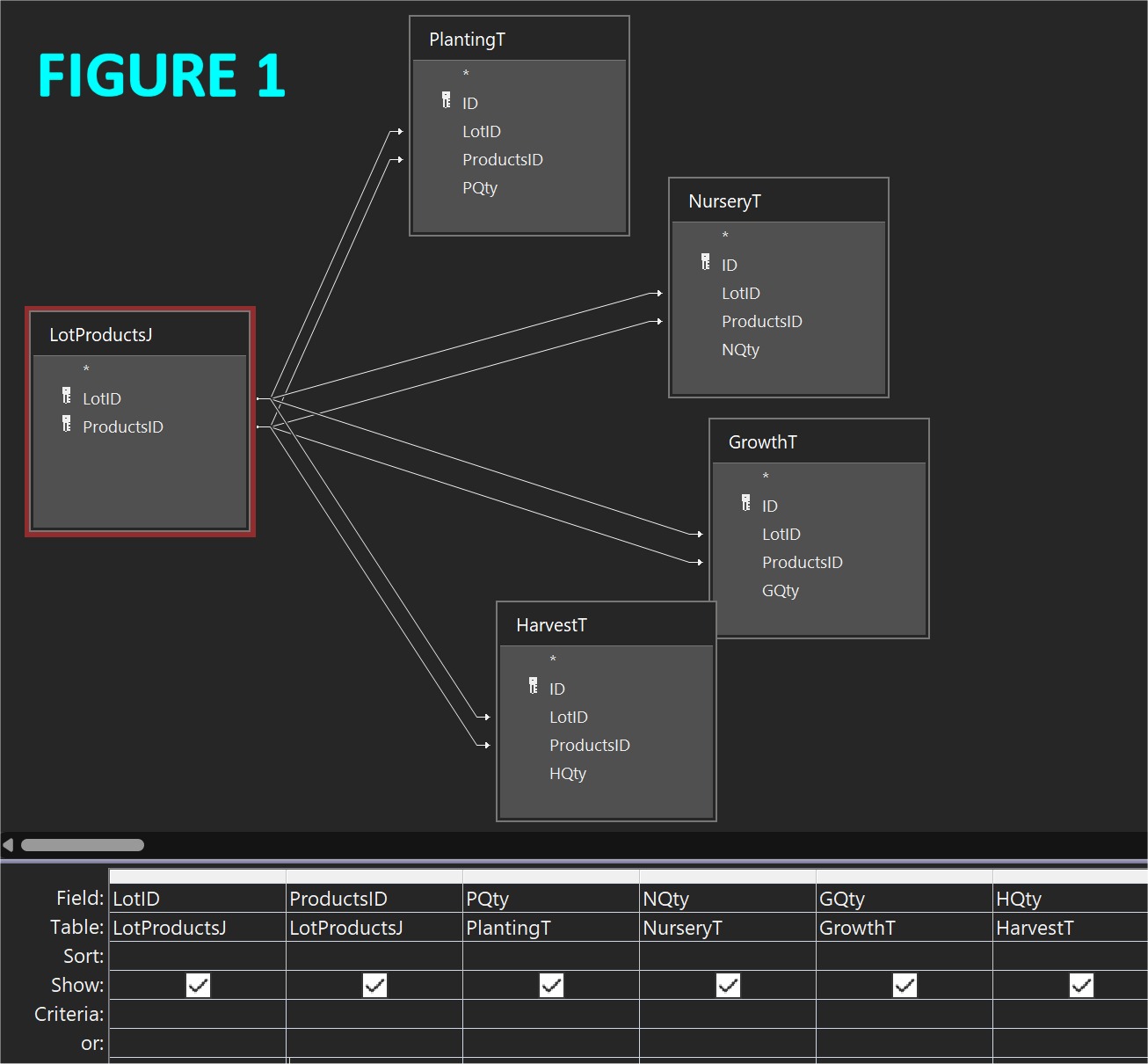
You seem to be missing a junction table to connect all 4 tables.  A junction table usually consists of fields that are present in all the tables that need to be joined.  In your case, all 4 tables have 2 fields in common: LotID and ProductsID.  And that's what your junction table should have.  See Figure 1 as an example.

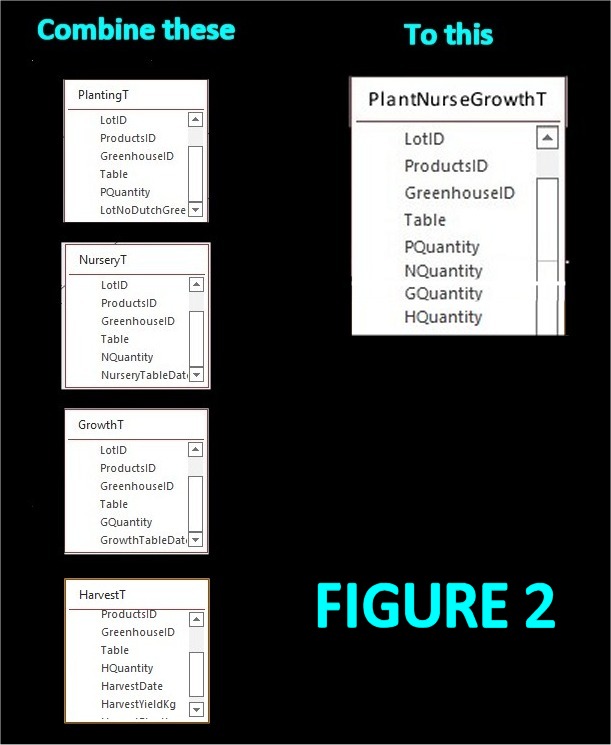
In my old job I avoided junction tables whenever I could.  If I had your job, I would consider combining all 4 tables (see Figure 2).  That way I would directly control which fields to fill in and which to leave blank, and I wouldn't need a junction table.
Kevin Yip  @Reply  
     
4 years ago

Kevin Yip  @Reply  
     
4 years ago

Maarten Brusselers OP  @Reply  
   
4 years ago
Hi Kevin,
Thanks a lot for spending the time to help me.
Originally I set Planting, Nursery, Growth and Harvest all up in one table.  In there I had a Stage field indicating whether is was P,N,G or H.  I then changed it to the present tables as several fields were only used in one stage, such as Kg and HarvestPlantLoss (this field reflects the working practice) for the Harvest stage and LotNoDutchGreenery for the Suppliers Lot number.  Also, I thought it would be easier in queries having different tables but that seems to be a mistake (I was at Expert Level 1 or 2 when I started this database, I'm now at Expert 11).  I don't know if I can now change it back easily as there is already a fair amount of data in the database.  See the attached figure for the complete structure.
Maarten Brusselers OP  @Reply  
   
4 years ago

Maarten Brusselers OP  @Reply  
   
4 years ago
Thinking about it I presume I could add a stage field to the 4 stage tables, fill in the Stage data in them with an update query and then combine the tables into one new table.  Is that correct? I need the  stage information not just for the quantities but also for growing times versus weights, among other info.
Kevin Yip  @Reply  
     
4 years ago
Your last idea sounds great.  I had a similar decision to make when I was working a movie collection database: should I put actors, crew, etc. in separate tables?  I finally put them on one table with a "role" field indicating what role ("actor", "director", "composer", etc.) each person plays.

Also, watch Richard's video on "Too Many Tables."  Sometimes, even two tables are too many.
Maarten Brusselers OP  @Reply  
   
4 years ago
Hi Kevin,
Thanks, I'm going to try that.  I also realized I can just use Find and Replace to put the correct numbers in the tables first before merging them.

This thread is now CLOSED. If you wish to comment, start a NEW discussion in Access Forum.
 

Next Unseen

 
New Feature: Comment Live View


The following is a paid advertisement
Computer Learning Zone is not responsible for any content shown or offers made by these ads.
 

Learn
 
Access - index
Excel - index
Word - index
Windows - index
PowerPoint - index
Photoshop - index
Visual Basic - index
ASP - index
Seminars
More...
Customers
 
Login
My Account
My Courses
Lost Password
Memberships
Student Databases
Change Email
Info
 
Latest News
New Releases
User Forums
Topic Glossary
Tips & Tricks
Search The Site
Code Vault
Collapse Menus
Help
 
Customer Support
Web Site Tour
FAQs
TechHelp
Consulting Services
About
 
Background
Testimonials
Jobs
Affiliate Program
Richard Rost
Free Lessons
Mailing List
PCResale.NET
Order
 
Video Tutorials
Handbooks
Memberships
Learning Connection
Idiot's Guide to Excel
Volume Discounts
Payment Info
Shipping
Terms of Sale
Contact
 
Contact Info
Support Policy
Mailing Address
Phone Number
Fax Number
Course Survey
Email Richard
[email protected]
Blog RSS Feed    YouTube Channel

LinkedIn
Copyright 2026 by Computer Learning Zone, Amicron, and Richard Rost. All Rights Reserved. Current Time: 5/6/2026 4:30:45 AM. PLT: 1s