Free Lessons
Courses
Seminars
TechHelp
Fast Tips
Templates
Topic Index
Forum
ABCD
 
Home   Courses   TechHelp   Forums   Help   Contact   Merch   Join   Order   Logon  
 
Back to Access Forum    Comments List
Upload Images   @Reply   Bookmark    Link   Email   Next Unseen 
Too Few Parameters Expected 1
Warren Lovegrove 
     
4 years ago
Hi again,

I'm running into the above error again and my fix before doesn't work.
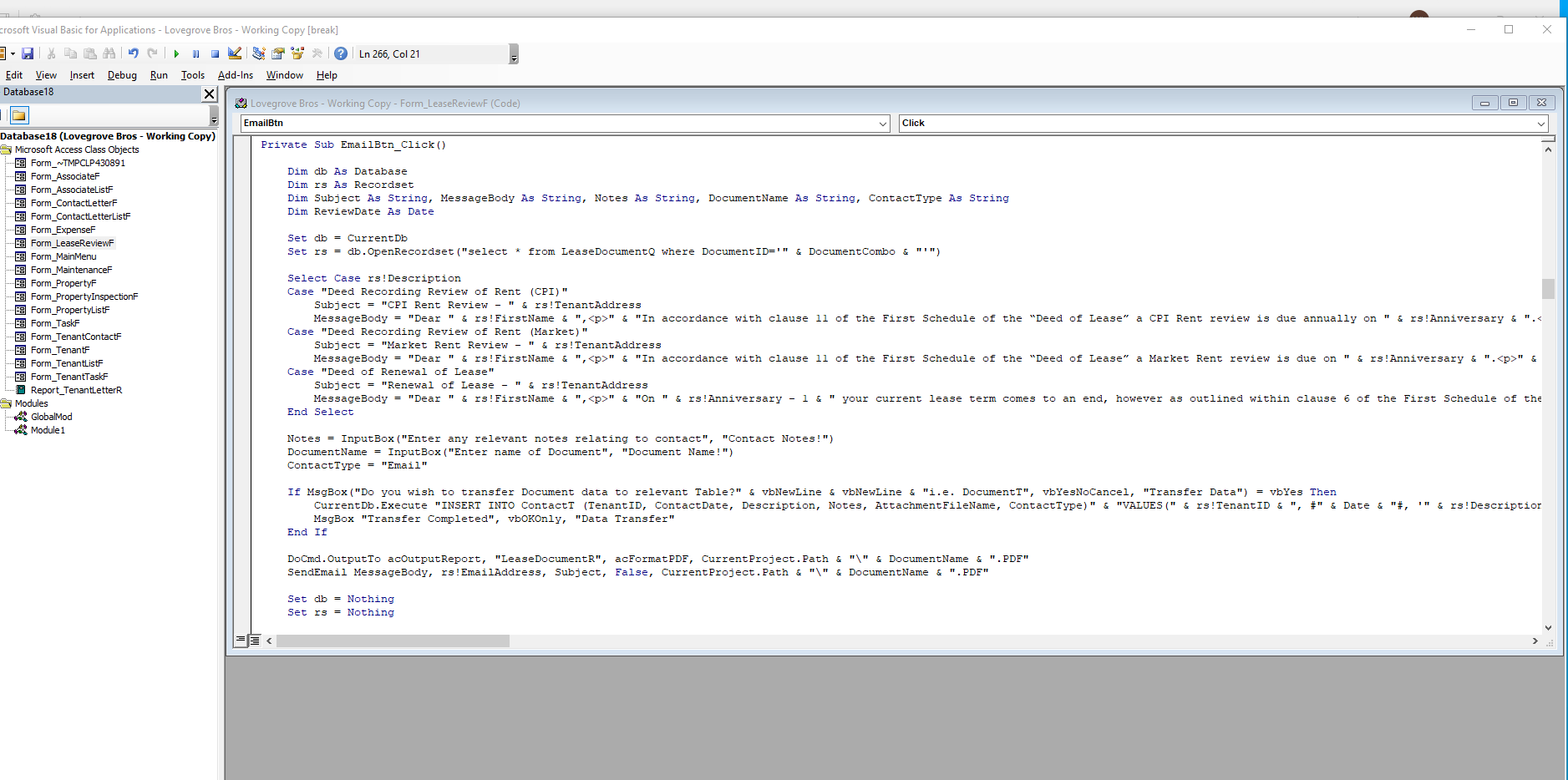
Line error is occuring on:
Set rs = db.OpenRecordset("select * from LeaseDocumentQ where DocumentID=" & DocumentCombo)
Query paramater: [Forms]![LeaseReviewF]![TenantCombo]
Query parameter filters data to a client and openrecordset targets a specific document defined in DocumentCombo.
When debugging, and you hoover over DocumentCombo it is coming up with correct document ID, however still comes up with this error, what am i missing?
Richard Rost  @Reply  
          
4 years ago
Does LeaseDocumentQ have any other criteria? If so, that's your problem.
Warren Lovegrove OP  @Reply  
     
4 years ago
No other criteria within that query
Kevin Robertson  @Reply  
          
4 years ago
Are you referring to the correct Combo Box in the criteria of your Query?
Warren Lovegrove OP  @Reply  
     
4 years ago
Yes have double check names and spelling
Kevin Robertson  @Reply  
          
4 years ago
What is it you are trying to accomplish? What happens if you remove the criteria from the query? Screenshots?
Warren Lovegrove OP  @Reply  
     
4 years ago
First i'm trying to save data into a Contact table, then use the recordset to populate a report and email
Warren Lovegrove OP  @Reply  
     
4 years ago

Richard Rost  @Reply  
          
4 years ago
Let's see the SQL for your query
Kevin Yip  @Reply  
     
4 years ago
Hi Warren, the reason for this happening is quite involved, but the short answer is that when you run db.OpenRecordset, etc., the VBA code has no awareness of the form's field value of [TenantCombo], hence the "missing parameter" error.  To fix this, you need:

STEP ONE: Combine everything into one query.  You need to rewrite LeaseDocumentQ to include the other criterion: WHERE DocumentID=" & DocumentCombo .

STEP TWO: Rewrite LeaseDocumentQ to include an actual parameter, because [Forms]![LeaseReviewF]![TenantCombo] is *not* a parameter per se.  It is the value of a form's combo box.  An actual query parameter is a unique name enclosed in square brackets, such as:

     SELECT * FROM MyTable WHERE TenantID = [Tenant parameter]

Access says "missing parameter" because it thinks that any unknown name enclosed in square brackets is a parameter.  But as I said, [Forms]![LeaseReviewF]![TenantCombo] is not a parameter per se.  It is merely a user entry on a form whose value is unknown to your VBA code.

STEP FOUR:  This is how you pass a parameter value to a query in VBA, and create a recordset from it:

    Dim db As Database, q As QueryDef, r As Recordset
    Set db = CurrentDb
    Set q = db.QueryDefs("LeaseDocumentQ")
    q.Parameters("Tenant parameter") = [Forms]![LeaseReviewF]![TenantCombo]
    Set r = q.OpenRecordset

Note that the parameter referred to in such a manner does *not* have square brackets, i.e. "Tenant parameter".
Warren Lovegrove OP  @Reply  
     
4 years ago
Thanks all, I'll run Kevin's solution and see how I get on.
Richard Rost  @Reply  
          
4 years ago
I covered this in one of my Developer lessons somewhere... unfortunately I didn't put "too few parameters" in the keywords, so I can't tell you which one. There are a couple of different ways you can handle this, including Kevin Yip's method. I'll add this to my TechHelp list. It could use a video.
Warren Lovegrove OP  @Reply  
     
4 years ago
That would be awesome, thanks Richard
Warren Lovegrove OP  @Reply  
     
4 years ago
Hi Kevin,
Sorry i'm not understanding some of what you are saying.  I can understand what you are saying regarding the combo box not being a parameter as such, however i'm not getting what to replace it with, and assume it'll apply to both parameters relating to the combo boxs.
If it's easier can anyone direct me to Developer lesson Richard refers to?
Kevin Yip  @Reply  
     
4 years ago
Hi Warren, basically you need to rewrite LeaseDocumentQ to incorporate both combo boxes' values (TenantCombo and DocumentCombo).  If you show me the SQL for LeaseDocumentQ I may be able to show you how to rewrite it.  If you want to keep LeaseDocumentQ unchanged (since you may want to use it elsewhere), then you need to construct the whole SQL statement in VBA and use it with OpenRecordset.
Warren Lovegrove OP  @Reply  
     
4 years ago
Hi Kevin,

That would be very much appreciated.  I've included both combo boxs and would like to retain LeaseDocumentQ as it is used elsewhere, however could copy and rename if necessary.

SELECT DocumentT.DocumentID, DocumentT.TenantID, DocumentT.Description, DocumentT.Notes, DocumentT.Cover, DocumentT.DocumentDate, TenantT.TenantName, TenantT.CommencementDate, DateSerial(Year(Date()),Month([CommencementDate]),Day([CommencementDate])) AS Anniversary, TenantT.SubLease, PropertyT.Unit, PropertyT.StreetName, PropertyT.[Town/City], IIf([SubLease] Is Null,IIf([Unit] Is Null,[StreetName] & ", " & [Town/City],"Unit " & [Unit] & ", " & [StreetName] & ", " & [Town/City]),"Unit " & [Unit] & [SubLease] & ", " & [StreetName] & ", " & [Town/City]) AS TenantAddress, AssociateT.FirstName, AssociateT.LastName, AssociateT.FullName, AssociateT.EmailAddress
FROM ((DocumentT INNER JOIN TenantT ON DocumentT.TenantID = TenantT.TenantID) INNER JOIN PropertyT ON TenantT.PropertyID = PropertyT.PropertyID) INNER JOIN AssociateT ON TenantT.AssociateID = AssociateT.AssociateID
WHERE (((DocumentT.DocumentID)=Forms!LeaseReviewF!DocumentCombo) And ((DocumentT.TenantID)=forms!LeaseReviewF!TenantCombo));

Thanks
Kevin Yip  @Reply  
     
4 years ago
Hi Warren, you create a new query, and name it, say, LeaseDocumentQ2.  In it, rewrite the SQL as below.  Note the two newly added parameters near the end: [TenantCombo parameter] and [DocumentCombo parameter].  My picture below shows what it should look like.  

SELECT DocumentT.DocumentID, DocumentT.TenantID, DocumentT.Description, DocumentT.Notes, DocumentT.Cover, DocumentT.DocumentDate, TenantT.TenantName, TenantT.CommencementDate, DateSerial(Year(Date()),Month([CommencementDate]),Day([CommencementDate])) AS Anniversary, TenantT.SubLease, PropertyT.Unit, PropertyT.StreetName, PropertyT.[Town/City], IIf([SubLease] Is Null,IIf([Unit] Is Null,[StreetName] & ", " & [Town/City],"Unit " & [Unit] & ", " & [StreetName] & ", " & [Town/City]),"Unit " & [Unit] & [SubLease] & ", " & [StreetName] & ", " & [Town/City]) AS TenantAddress, AssociateT.FirstName, AssociateT.LastName, AssociateT.FullName, AssociateT.EmailAddress
FROM ((DocumentT INNER JOIN TenantT ON DocumentT.TenantID = TenantT.TenantID) INNER JOIN PropertyT ON TenantT.PropertyID = PropertyT.PropertyID) INNER JOIN AssociateT ON TenantT.AssociateID = AssociateT.AssociateID
WHERE (((DocumentT.DocumentID)=[DocumentCombo parameter]) And ((DocumentT.TenantID)=[TenantCombo parameter]));


Then you write VBA code in the manner I showed earlier:

    Dim db As Database, q As QueryDef, r As Recordset
    Set db = CurrentDb
    Set q = db.QueryDefs("LeaseDocumentQ2")
    q.Parameters("TenantCombo parameter") = Forms!LeaseReviewF!TenantCombo
    q.Parameters("DocumentCombo parameter") = Forms!LeaseReviewF!DocumentCombo
    Set r = q.OpenRecordset

r the recordset should have all the data you need.
Kevin Yip  @Reply  
     
4 years ago

Kevin Yip  @Reply  
     
4 years ago
Just want to add that OpenRecordset belongs to the Database object, which has no access to information about forms.  And that is what caused Warren's original problem.

Only the "Application" object has access to forms.

When you write Forms!LeaseReviewF!DocumentCombo, it implicitly means:

     Application.Forms!LeaseReviewF!DocumentCombo

When you run queries manually on the navigation pane, it is the "Application" that runs them, and that's why expressions like "Forms!LeaseReviewF!DocumentCombo" work.

When you run queries with OpenRecordset in VBA, it is the Database object that runs them, so no info on forms is available to it.

The Database object has access to tables and queries, but not forms.
Warren Lovegrove OP  @Reply  
     
4 years ago
Hi Kevin,

Thanks very much for this, all makes sense and is now up and running.

Warren

This thread is now CLOSED. If you wish to comment, start a NEW discussion in Access Forum.
 

Next Unseen

 
New Feature: Comment Live View


The following is a paid advertisement
Computer Learning Zone is not responsible for any content shown or offers made by these ads.
 

Learn
 
Access - index
Excel - index
Word - index
Windows - index
PowerPoint - index
Photoshop - index
Visual Basic - index
ASP - index
Seminars
More...
Customers
 
Login
My Account
My Courses
Lost Password
Memberships
Student Databases
Change Email
Info
 
Latest News
New Releases
User Forums
Topic Glossary
Tips & Tricks
Search The Site
Code Vault
Collapse Menus
Help
 
Customer Support
Web Site Tour
FAQs
TechHelp
Consulting Services
About
 
Background
Testimonials
Jobs
Affiliate Program
Richard Rost
Free Lessons
Mailing List
PCResale.NET
Order
 
Video Tutorials
Handbooks
Memberships
Learning Connection
Idiot's Guide to Excel
Volume Discounts
Payment Info
Shipping
Terms of Sale
Contact
 
Contact Info
Support Policy
Mailing Address
Phone Number
Fax Number
Course Survey
Email Richard
[email protected]
Blog RSS Feed    YouTube Channel

LinkedIn
Copyright 2026 by Computer Learning Zone, Amicron, and Richard Rost. All Rights Reserved. Current Time: 4/30/2026 3:44:37 PM. PLT: 2s