Free Lessons
Courses
Seminars
TechHelp
Fast Tips
Templates
Topic Index
Forum
ABCD
 
Home   Courses   TechHelp   Forums   Help   Contact   Merch   Join   Order   Logon  
 
Back to Access Forum    Comments List
Upload Images   @Reply   Bookmark    Link   Email   Next Unseen 
Selecting DataQuery Design
Timothy Havlusch 
      
4 years ago
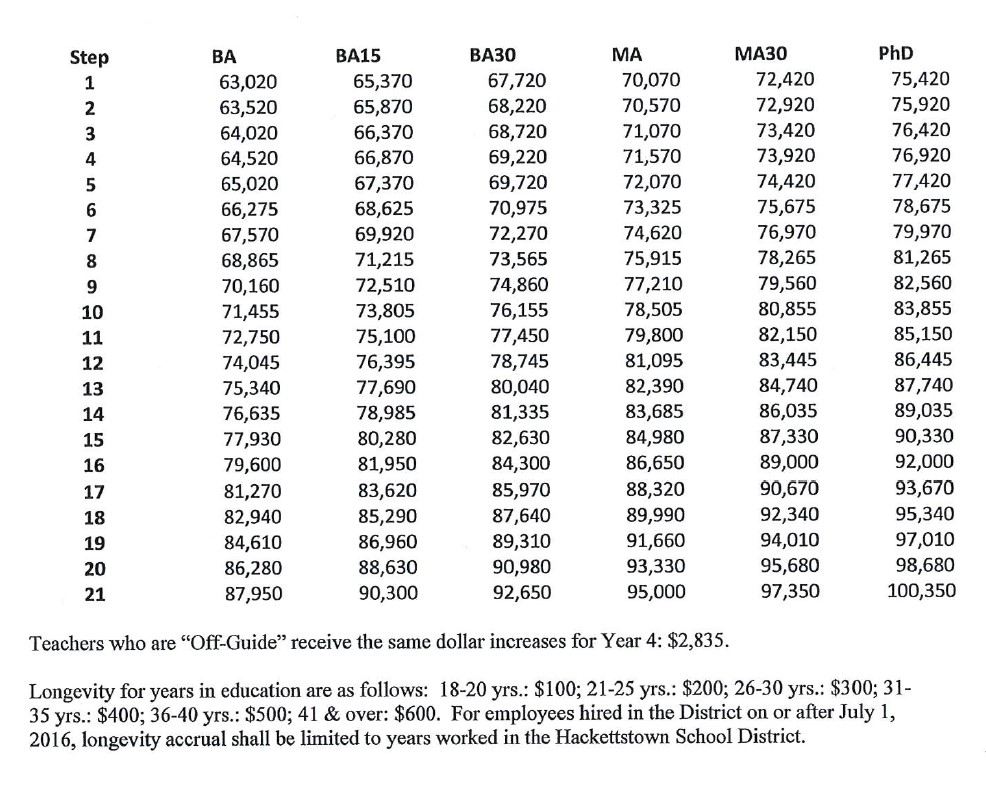
I am looking direction in query design that would look a two pieces of data in a record and select the output in response to the information contained in the record.  While I am familiar with this in Excel, I am now in the process of negotiation of a new contract I feel access may be more powerful once I can overcome this basic part. For example I want to work with a salary guide that has 6 columns and 21 Steps.  Is my only option one table for each column or is there a better way to place all 126 (6 x 21) of those individual salaries in a single location.
Kevin Yip  @Reply  
     
4 years ago
Please show what the salary guide looks like.  I may know where this is leading to.  The answer is (likely) that yes, you can have one table storing all the data, but your table needs to be designed the right way, mostly to conform to normalization.
Timothy Havlusch OP  @Reply  
      
4 years ago

Timothy Havlusch OP  @Reply  
      
4 years ago
At the end of the day I will need to produce a scattergram of the 200+ teachers I currently have on this guide as part of negotiating a new Collective Bargaining Agreement (CBA).  The records in my database currently lists the Degree, (BA, BA+15, BA+30) and the Step for each employee.   WIth that information I want to be able to reference the salary for that individual based on this layout.
Kevin Yip  @Reply  
     
4 years ago
You need a table that looks like this:

Step     Degree    Salary
1         BA          63020
1         BA15       65370
1         BA30       67720
1         MA          70070
1         MA30       72420
1         PhD         75420
2         BA          63520
2         BA15       65870
2         BA30       68220
2         MA          70570
2         MA30       72920
2         PhD         75920
3         BA          64020
3         BA15       66370
3         BA30       68720
3         MA          71070
3         MA30       73420
3         PhD         76420
...
And so on.

This is the one major difference between Excel and Access.  In Excel, you wouldn't even think of storing data like that.  But in Access you sort of have to in order to create a "normalized" table.  

"Normalized" basically means (in simplified terms) each info is stored in one place only.  In my table above, each step-degree combination occurs only once.  There is only one place in the entire table where you find Step 1, Degree BA, for instance.  Thus, the step-degree combination is the "primary key" fields for this table

To look up a salary for Step 20, Degree BA with this table, you only need a simple SQL statement:

     SELECT Salary FROM SalaryGuideT WHERE Step=20 AND Degree="BA"
Timothy Havlusch OP  @Reply  
      
4 years ago
Got it.   Getting started.

This thread is now CLOSED. If you wish to comment, start a NEW discussion in Access Forum.
 

Next Unseen

 
New Feature: Comment Live View


The following is a paid advertisement
Computer Learning Zone is not responsible for any content shown or offers made by these ads.
 

Learn
 
Access - index
Excel - index
Word - index
Windows - index
PowerPoint - index
Photoshop - index
Visual Basic - index
ASP - index
Seminars
More...
Customers
 
Login
My Account
My Courses
Lost Password
Memberships
Student Databases
Change Email
Info
 
Latest News
New Releases
User Forums
Topic Glossary
Tips & Tricks
Search The Site
Code Vault
Collapse Menus
Help
 
Customer Support
Web Site Tour
FAQs
TechHelp
Consulting Services
About
 
Background
Testimonials
Jobs
Affiliate Program
Richard Rost
Free Lessons
Mailing List
PCResale.NET
Order
 
Video Tutorials
Handbooks
Memberships
Learning Connection
Idiot's Guide to Excel
Volume Discounts
Payment Info
Shipping
Terms of Sale
Contact
 
Contact Info
Support Policy
Mailing Address
Phone Number
Fax Number
Course Survey
Email Richard
[email protected]
Blog RSS Feed    YouTube Channel

LinkedIn
Copyright 2026 by Computer Learning Zone, Amicron, and Richard Rost. All Rights Reserved. Current Time: 4/30/2026 8:45:38 AM. PLT: 1s