Free Lessons
Courses
Seminars
TechHelp
Fast Tips
Templates
Topic Index
Forum
ABCD
 
Home   Courses   TechHelp   Help   Contact   Merch   Join   Order   Logon   Forums   
 
Back to Access Forum    Comments List
Upload Images   @Reply   Bookmark    Link   Email   Next Unseen 
Button to Cycle Combo
Dan Jackson 
        
4 years ago
Hi all,

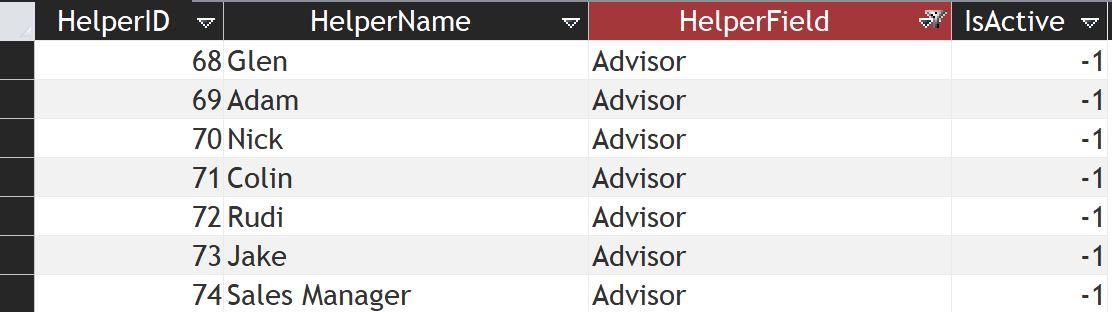
I have a combo box listing 8 people with an associated key

1 Glen
2 Adam
3 Colin
etc...

I'd like to have a button move through the list of people, set that as the value and cycle the list.

Problem is, 50% of the time, the combo box will be set manually so i don't want it cycling based on whats in the box but rather by its own list. I'm thinking maybe a single field table which tracks the history of entries?

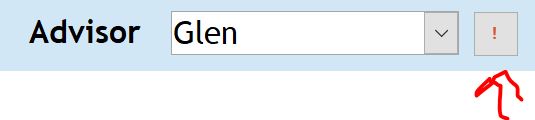
This is the combo and the button. Currently showing Glen


Click the button and it moves to Adam


Once it gets to Sales Manager, it then moves back up to Glen


The key point is i don't want it to cycle based on whats in the combo but rather by its own list, so if the combo is changed manually, it wont affect the cycling.

Thank You
Dan Jackson OP  @Reply  
        
4 years ago
Hmm Thinking

I could use a hidden combo and write that value to the visible one. That would also resolve the issue of if another person is ever added in the future.

Thoughts?
Kevin Robertson  @Reply  
          
4 years ago
Give this a go Dan.

Private Sub btnNextName_Click()

    Dim X As Long
    X = cboNames.ListIndex
    
    If X = cboNames.ListCount - 1 Then
       cboNames = cboNames.Column(0, 0)
    Else
       cboNames = cboNames.Column(0, X + 1)
    End If

End Sub
Juan C Rivera  @Reply  
            
4 years ago
I also like the set date example that Richard did by using the arrow buttons up and down to move this can be used to move back and forward with the names.  Don't know if you wanted to go there but thinking it will give it a bit more functionality (leggo blocks to play with)

Date Buttons
Kevin Robertson  @Reply  
          
4 years ago
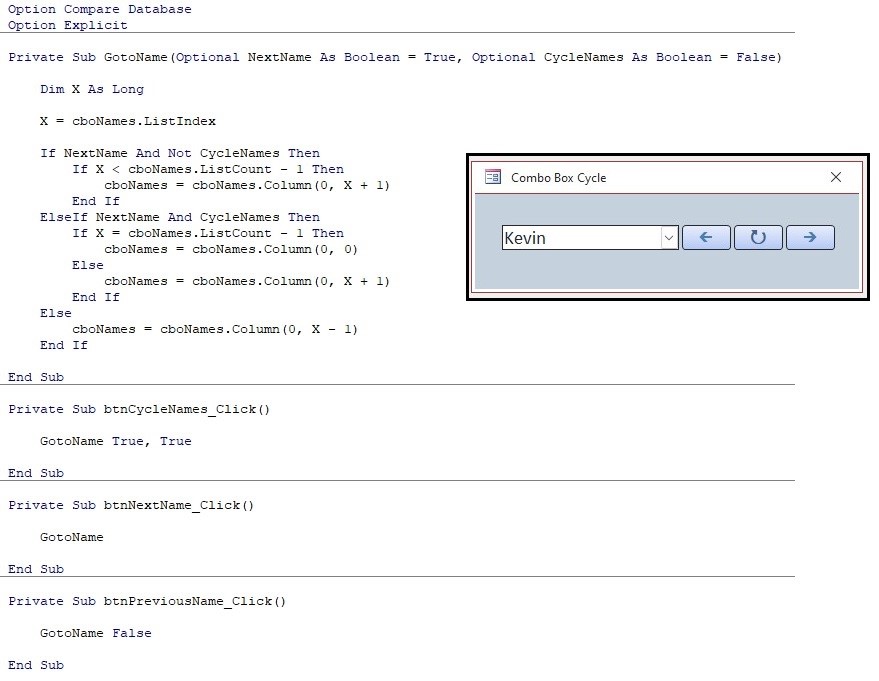
I had fun with this, so I added more buttons - Previous, Cycle (like you wanted) and Next.
Kevin Robertson  @Reply  
          
4 years ago

Juan C Rivera  @Reply  
            
4 years ago
NICE!
Dan Jackson OP  @Reply  
        
4 years ago
Hmm. Most interesting. Ill look forward to having a play with this today, thank you!

Ill probably set this on an invisible combo, then have that write the value to the actual combo. That should get around the manual entry issue.

Just one thing i wanted to check. In your code
cboNames = cboNames.Column(0, X + 1)
You are applying the +1 to the second column in your combo. Is this by design? I would have thought the +1 would relate to the key column rather than the name column, or am i missing something? Cheers
Kevin Robertson  @Reply  
          
4 years ago
The +1 is incrementing the row of the Combo Box.
Combo.Column(column, row)
Dan Jackson OP  @Reply  
        
4 years ago
Just been playing with this. I've got the combo called "Combo_NextAdvisor" which is hidden and cycles as your code does.

1st it looks up the value from table to get the last used value.
2nd it writes the value from the invisible "Combo_NextAdvisor" to the visible combo "Combo_Advisor"
3rd it then cycles to the next one.
4th it writes the new value to the table

I'm assuming i use Dlookup, but two questions are:

1. How do I lookup, specifically the last record in the table?
2. How do i write the current value to a new record? I'm assuming I need to do a SQL INSERT but i haven't yet had the chance to research the SQL seminar yet.

Here is what i have so far.

'   <<<<<  1st. Read Last Used Value From NextAdvisorT (Dlookup) _
                2nd. Write Value From Combo_NextAdvisor To Combo_Advisor _
                3rd. Move the value on one (Kevins Code) _
                4th. SQL Write The Value as a New Record in NextAdvisorT >>>>>

'   <<<<< 1st >>>>>


'   <<<<< 2nd >>>>>
    Combo_Advisor = Combo_NextAdvisor

'   <<<<< 3rd >>>>>
Dim X As Long
X = Combo_NextAdvisor.ListIndex

    If X = Combo_NextAdvisor.ListCount - 1 Then
        Combo_NextAdvisor = Combo_NextAdvisor.Column(0, 0)
    Else
        Combo_NextAdvisor = Combo_NextAdvisor.Column(0, X + 1)
    End If
  
'   <<<<< 4th >>>>>


As always, a huge thank you for any help received
Dan Jackson OP  @Reply  
        
4 years ago
Almost there. I've managed to work out the 1st question but don't have a clue on the 2nd. This is what I did to lookup the last value (My first use of a variable that i'd written myself yay!)
Dim Y As Long
Y = DMax("ID", "NextAdvisorT")
Combo_NextAdvisor = DLookup("NextAdvisor", "NextAdvisorT", "ID=" & Y)


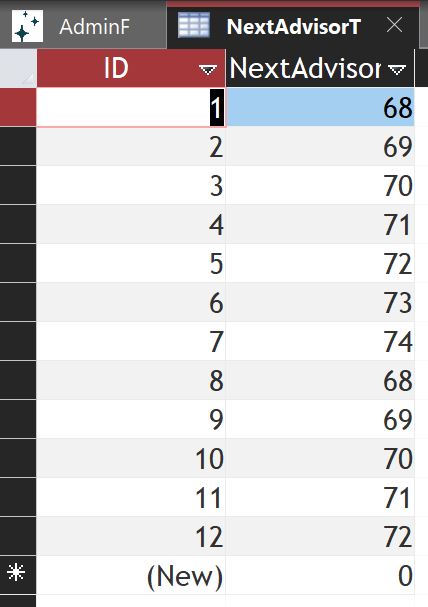
This is the table. It'll just keep a historical list going, which is fine!


All i need now is to be able to write the value back to the table at the end of the routine. How would I achieve this (SQL INSERT?)
Kevin Robertson  @Reply  
          
4 years ago
Here's how I wrote the value to the table in my sample:

If Not IsNull(cboNames) Then
    CurrentDb.Execute "INSERT INTO NameT (FirstName) " & _
                                "VALUES (""" & cboNames.Column(1) & """)"
    MsgBox cboNames.Column(1) & " added!", vbInformation, "Success"
End If


Since inserting a number you won't need the quotes.
CurrentDb.Execute "INSERT INTO YourTable (YourFieldName) " & _
                            "VALUES (" & YourComboBox & ")"
Dan Jackson OP  @Reply  
        
4 years ago
You absolute legend, thanks Kevin!


Kevin Robertson  @Reply  
          
4 years ago
You're welcome.

This thread is now CLOSED. If you wish to comment, start a NEW discussion in Access Forum.
 

Next Unseen

 
New Feature: Comment Live View


The following is a paid advertisement
Computer Learning Zone is not responsible for any content shown or offers made by these ads.
 

Learn
 
Access - index
Excel - index
Word - index
Windows - index
PowerPoint - index
Photoshop - index
Visual Basic - index
ASP - index
Seminars
More...
Customers
 
Login
My Account
My Courses
Lost Password
Memberships
Student Databases
Change Email
Info
 
Latest News
New Releases
User Forums
Topic Glossary
Tips & Tricks
Search The Site
Code Vault
Collapse Menus
Help
 
Customer Support
Web Site Tour
FAQs
TechHelp
Consulting Services
About
 
Background
Testimonials
Jobs
Affiliate Program
Richard Rost
Free Lessons
Mailing List
PCResale.NET
Order
 
Video Tutorials
Handbooks
Memberships
Learning Connection
Idiot's Guide to Excel
Volume Discounts
Payment Info
Shipping
Terms of Sale
Contact
 
Contact Info
Support Policy
Mailing Address
Phone Number
Fax Number
Course Survey
Email Richard
[email protected]
Blog RSS Feed    YouTube Channel

LinkedIn
Copyright 2026 by Computer Learning Zone, Amicron, and Richard Rost. All Rights Reserved. Current Time: 8/17/2026 5:47:38 PM. PLT: 0s