Free Lessons
Courses
Seminars
TechHelp
Fast Tips
Templates
Topic Index
Forum
ABCD
 
Home   Courses   TechHelp   Forums   Help   Contact   Merch   Join   Order   Logon  
 
Back to Access Forum    Comments List
Upload Images   @Reply   Bookmark    Link   Email   Next Unseen 
Combo Box Requery
Caleb Hansen 
        
4 years ago
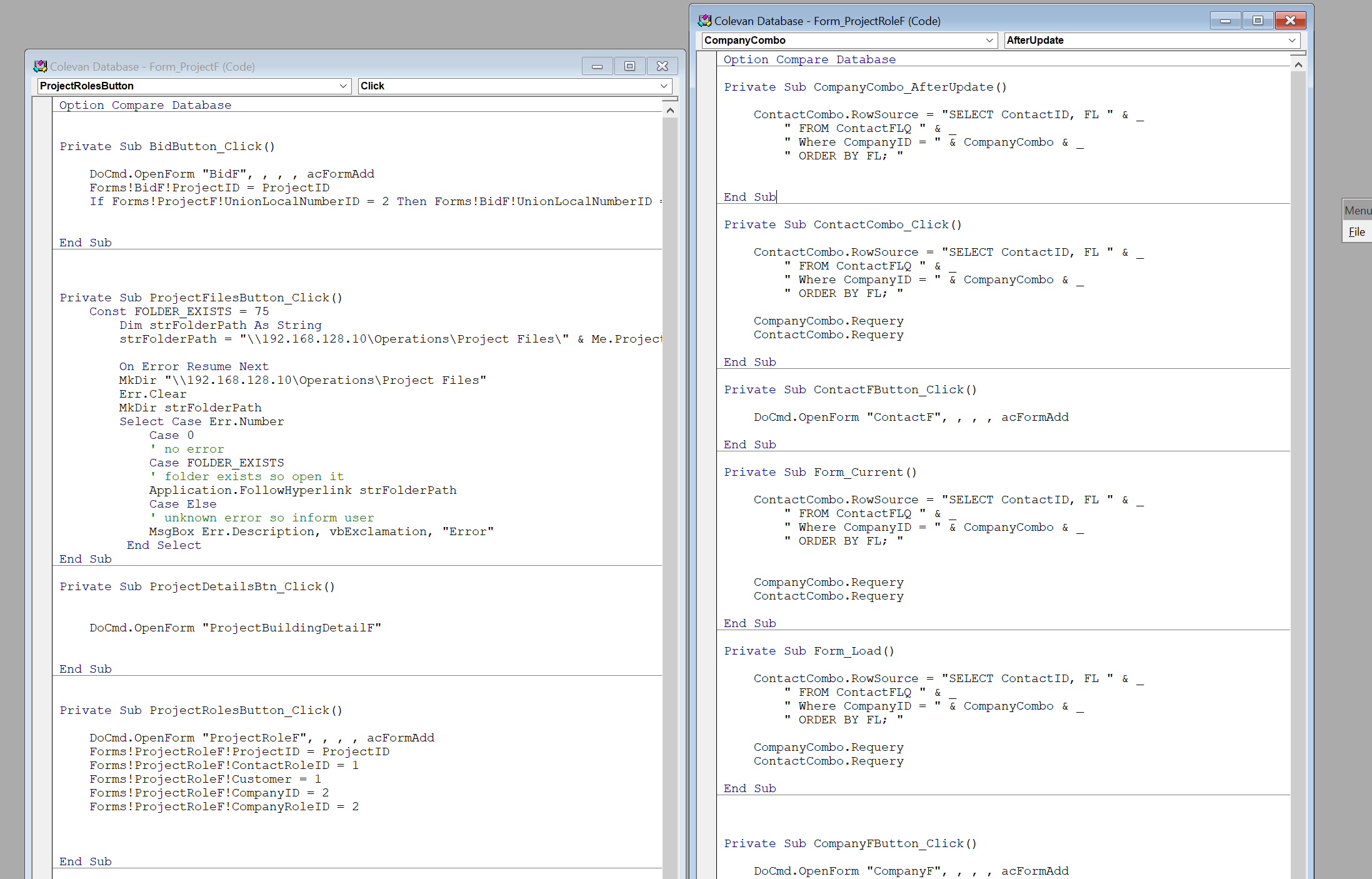
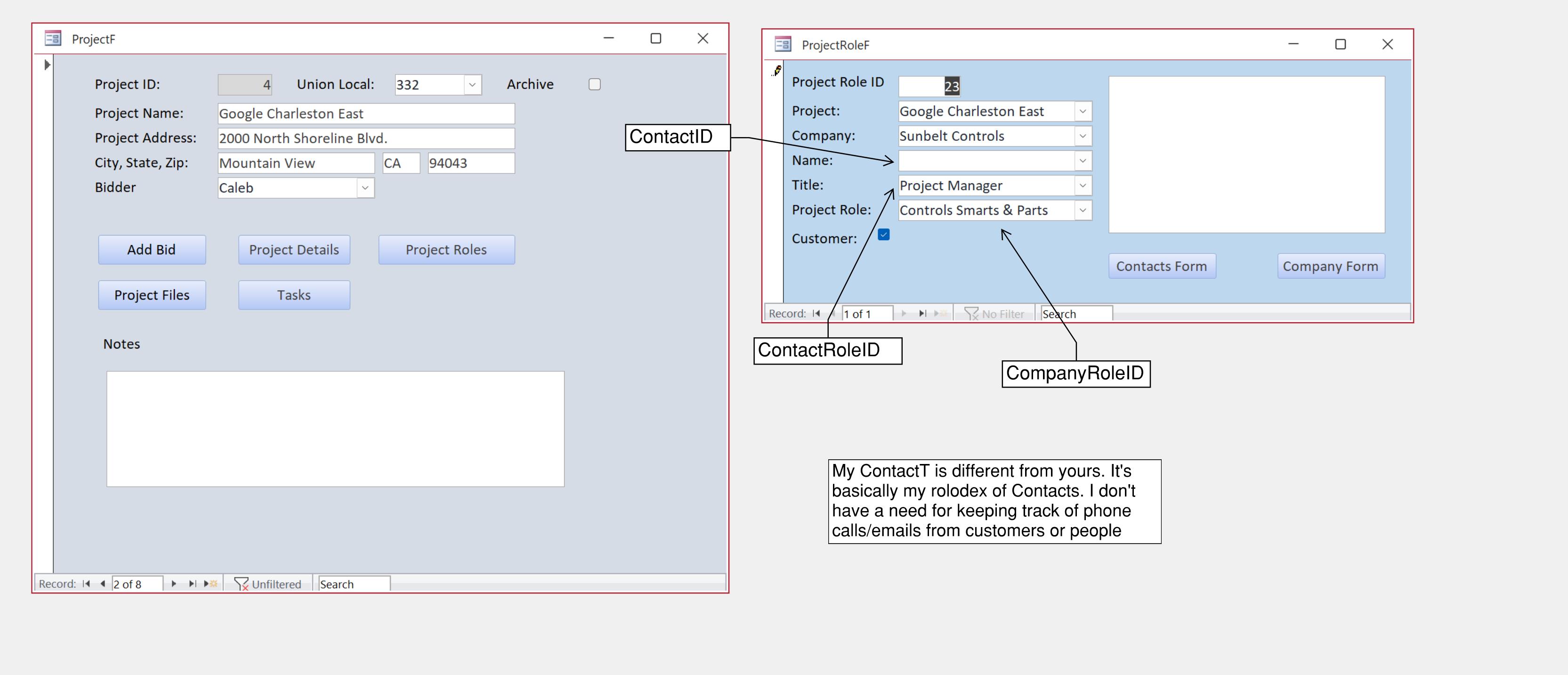
I have a form with a button to open a another form. I set up some of the fields on the opened form to be prefilled with the button "click." One of the fields that gets filled is the Company Name combo box. I have the opened form CompanyCombo set to filter the list of Customers in the CustomerCombo just below it. On Form open and/or load from the side panel the filter works fine. If I click the button on the preceding form the form opens with all the fields prefilled correctly. However, the CustomerCombo is blank when I click on it. I have to select the Company again to refresh the CustomerCombo. I've added CompanyCombo.Requery and CustomerCombo.Requery with the button click and on the form load and open. Not working.
Richard Rost  @Reply  
          
4 years ago
Hard to picture without... uh... pictures. How about some screen shots?
Caleb Hansen OP  @Reply  
        
4 years ago
Sorry, I should have included that.
Caleb Hansen OP  @Reply  
        
4 years ago

Richard Rost  @Reply  
          
4 years ago
Much easier if I can see the actual forms too. Design view and form view. Right now it's just a whole buncha code. :)
Richard Rost  @Reply  
          
4 years ago
What's the rowsource for the CompanyCombo and where does it get its value?
Caleb Hansen OP  @Reply  
        
4 years ago

Caleb Hansen OP  @Reply  
        
4 years ago
Richard, Thank you very much for your patience.

CompanyCombo Row Source: SELECT [CompanyT].[CompanyID], [CompanyT].[CompanyName] FROM CompanyT ORDER BY [CompanyName];

The Forms!ProjectRolesF!CompanyID = 2 is set for our biggest customer. Sunbelt Controls.

Since I've got you on the hook here I might as well ask you to answer the 2nd part of my question, or direct me to one of your videos if you don't mind. When we initially start a project we have to fill in the customer info and other project entities via the ProjectRoles button. Once this is filled out I don't want the button to allow any more additional Form additions. Perhaps just open up the form to allow viewing of the various records that relate to the ProjectID from the ProjecF. I will create a separate button to add or edit the project roles. Thanks
Richard Rost  @Reply  
          
4 years ago
One problem at a time. LOL. So when you say "CustomerCombo is blank" does that mean there's no RECORDS in it when you open it up (drop it down) or it's just not storing the value when you pick one?
Caleb Hansen OP  @Reply  
        
4 years ago
It is blank. So, for instance the form is loaded with the CompanyCombo already set to Sunbelt Controls. When I click on the CustomerCombo it's blank. When I go back to CompanyCombo and select Sunbelt Controls again it populates the list of Contacts from that company in the CustomerCombo, or ContactCombo in my case
Richard Rost  @Reply  
          
4 years ago
So you have Cascading combo boxes? One requeries the other?
Richard Rost  @Reply  
          
4 years ago
I assume your ContactFLQ has records in it?

Have you tried going direct to the table instead of using a query? (Shouldn't matter, but at this point it's try anything).
Caleb Hansen OP  @Reply  
        
4 years ago
Yes. Sorry. I called it a filter, but yes. It's cascading.
Caleb Hansen OP  @Reply  
        
4 years ago
It does have records in the ContactFLQ. An then I tried going direct to the tables with an SQL statement with the same result. Good news though!  I figured out a workaround through Default Values and a Add Button that would clear out all of the fields I want cleared for additional Project Role records. I really appreciate your help on this, though. I'm learning so much, I feel like I might just get the hang of this thing. Happy New Year!
Richard Rost  @Reply  
          
4 years ago
Awesome. Glad you got it. It's so hard to troubleshoot databases I can't play with, but it takes too long to play with everyone's database, so... catch 22. :)

This thread is now CLOSED. If you wish to comment, start a NEW discussion in Access Forum.
 

Next Unseen

 
New Feature: Comment Live View


The following is a paid advertisement
Computer Learning Zone is not responsible for any content shown or offers made by these ads.
 

Learn
 
Access - index
Excel - index
Word - index
Windows - index
PowerPoint - index
Photoshop - index
Visual Basic - index
ASP - index
Seminars
More...
Customers
 
Login
My Account
My Courses
Lost Password
Memberships
Student Databases
Change Email
Info
 
Latest News
New Releases
User Forums
Topic Glossary
Tips & Tricks
Search The Site
Code Vault
Collapse Menus
Help
 
Customer Support
Web Site Tour
FAQs
TechHelp
Consulting Services
About
 
Background
Testimonials
Jobs
Affiliate Program
Richard Rost
Free Lessons
Mailing List
PCResale.NET
Order
 
Video Tutorials
Handbooks
Memberships
Learning Connection
Idiot's Guide to Excel
Volume Discounts
Payment Info
Shipping
Terms of Sale
Contact
 
Contact Info
Support Policy
Mailing Address
Phone Number
Fax Number
Course Survey
Email Richard
[email protected]
Blog RSS Feed    YouTube Channel

LinkedIn
Copyright 2026 by Computer Learning Zone, Amicron, and Richard Rost. All Rights Reserved. Current Time: 5/7/2026 5:17:01 AM. PLT: 1s