Free Lessons
Courses
Seminars
TechHelp
Fast Tips
Templates
Topic Index
Forum
ABCD
 
Home   Courses   TechHelp   Forums   Help   Contact   Merch   Join   Order   Logon  
 
Back to Access Forum    Comments List
Upload Images   @Reply   Bookmark    Link   Email   Next Unseen 
Merge Duplicate Records
Tom Murphy 
    
3 years ago
I run a database of donations for a local non-profit.  And I just noticed that there are about 88 duplicate records in the 1200 record database.  This has come about perhaps because the data entry person misspelled or incorrectly entered a persons surname.  McCarthy vs. MacCarthy or O'Leary versus Oleary.

So one record will have their 2021 donation in a record for O'Leary and another record will have their 2022 donation in a record for Oleary.

Is there an automated way to merge these into just one record which would then show both their 2021 and 2022 donation?

Obviously I can do it manually, but that means handling all 88 records, one-by-one.

As always, TIA, this is a great Forum and has helped me a lot!
Kevin Yip  @Reply  
     
3 years ago
Access doesn't see them as duplicates unless they are identical.  Also, these misspellings seem to occur in unpredictable ways.  If you don't have other fields to help you differentiate the people such as addresses and phone numbers, you may have to fix this manually, I'm afraid.  Not only that, you need to find ways to prevent or least minimize these data entry errors in the future, due to the (possibly growing) size of your table.  For instance, before a name is entered, there should be a way to check if the name already exists in the table or not.  Also consider ways to handle people changing names (due to marriage or whatever), different people having identical names.  You don't want to delete a person you mistakenly think is a duplicate, or add what appears to be a new person who is not.
Tom Murphy OP  @Reply  
    
3 years ago
Excellent points Kevin Yip, I shall take those into consideration as I work thru this.

Do you have a tip or can you point me to a Richard Rost video about "checking to see if the name already exists in the table?"  Actually, I prefer to see if the street address already exists but I assume once I figure out one.. I can change it to the other.

Thanks
Kevin Yip  @Reply  
     
3 years ago
Richard has a few videos on handling duplicates, but they pertain to identical data only: https://www.youtube.com/@599CD/search?query=duplicate

Your "duplicate" data, however, are not identical, and there is no easy way to flag them.

For instance, Access considers these identical:

O'Leary
o'leary
O'LEARY

But Access considers these all different:

O'Leary
OLeary
O Leary
O'Leery

And it is the latter case that is your concern right now.  Misspellings, typos, and malformed words can occur in a number of different ways, and they most likely result in something Access would consider different from the original, hence undetectable.

Addresses are, unfortunately, susceptible to issues of their own that make it hard to auto-check for duplicates.  Addresses may look different but are the same.  The two addresses below point to an identical location, yet they have two different company names (one short-handed, one complete), different compositions of street names (N. and North, Dr. and Drive), and even different city names, all due to a lack of any standard requirements of how addresses should be.  Access would have no way to do any meaningful comparison for these:

Birdies
4978 N. University Dr.
Lauderhill, FL 33351

Birdies Fashions Inc.
4978 North University Drive
Fort Lauderdale, FL 33351-2468.

Vice versa is also true.  Addresses may look identical but are different.  For instance, people who live in different floors in a high-rise building all share the same street address.

Phone numbers are slightly better for identifying people.  But then, nowadays a person many have several phone numbers (work, home, etc.).  If a person is entered with two different names due to misspellings, but also has two different phone numbers, Access has no way to tell if they are the same person.

To prevent duplicates, it has to start from the moment data entry is made.  When you first get a person's name and address, does the address already exist in your database?  Is the address even valid?  You can't check for duplicates if the info isn't even what it is supposed to be.  You can verify addresses online with Google or USPS, for instance.  Is the address complete (missing floor, building, etc.)?  You may not know if it is missing info just by looking at it.  Any misspelled words?  You said your data entry person created misspellings, but maybe she just typed what was given to her.  And catching misspelled words is not as easy as it sounds.  Names and addresses are full of proper nouns, words of non-English origins, words with multiple valid spellings, or totally different words altogether as in my address example above, etc.  

In short, this is NOT a job for any low-level data entry person (for the lack of a better term).  It requires pretty considerable skills, all things considered.  The person in charge needs to pro-actively figure out a "system" to do this.  Without such a system, now you see the consequence in your database.  Duplicate entries may be a issue, but a bigger one is that you can't even know if the info in your database is even correct to begin with, if there is no system to validate user entries at an acceptable level.

In terms of Access skills, it would help greatly if you had a "normalized" customer table.  "Normalized" generally means each name can only appear in one place in the entire database.  Each name can only appear once, identified by a unique ID, in a customer table.  That way, you already won half the battle against duplicate entries.  But you still need a diligent data entry person to do the required manual work: validating names and addresses, and such.
Tom Murphy OP  @Reply  
    
3 years ago
Gulp!  a lot to consder here... but thank you for taking the tme to spell it all out.  I will print and read.. several times perhaps... to get the full understanding of what you have said.

Thank you.
Scott Axton  @Reply  
        
3 years ago
Huge thumbs up Kevin.  You are absolutely spot on.  I ran my own mailing service for  20 years and one of the hardest things I did was to scrub customers data.  Ultimately like you indicated, the best front line defense is good data entry people.

I would also add to what you mentioned is that a standardized entry rules / method will cut down on errors.
Dr not Drive,  St not Street.  No punctuation in an address
The PO publishes a list of preferred and acceptable abbreviations and standards that will help reduce dupes.

Ultimately Tom, you will never totally eliminate duplicates.  You can reduce it greatly by implementing standardized  policy and data entry methods.
Kevin Yip  @Reply  
     
3 years ago
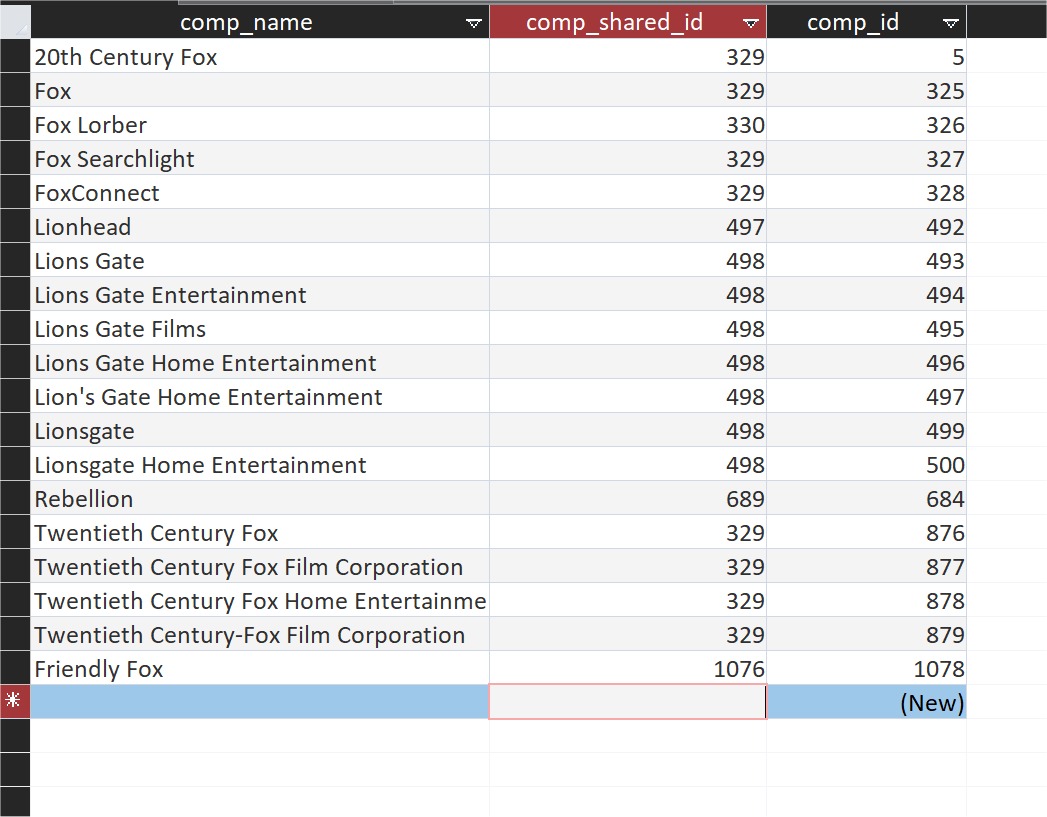
Thanks, Scott.  I just want to mention a possible way to deal with duplicate addresses.  I've seen banks do it, and I've done it myself.   I'll use a database I'm working on as an example.  In my movie database, there are often multiple names for the same movie companies (see picture below).  20th Century Fox is also called Fox, FoxConnect, and any number of names.  I want to retain all these variations because they are actual, valid brand names that shouldn't be removed.  Yet I also want to them to be identified as one entity in my database.  So I created a "shared ID" for those names, in addition to the unique ID that each name has.  In the picture below, for instance, all the variations of Fox, 20th Century Fox, Fox Home Entertainment, etc., all have a shared ID of 329.  This doesn't eliminate duplicates, but I can still reference each "entity" as onee because of the shared ID.  And this also saves time, because adding these IDs to all the duplicates is a lot faster and easier to do than to actually edit or remove every duplicate.  

In my old job, I was able to enter customer addresses directly into our bank (Well Fargo) 's system, as part of its factoring service.  Other companies that used the same factoring service could also do the same.  Unsurprisingly, I saw tons of duplicate addresses entered by different people.  Yet the bank kept them all, and assigned a "shared ID" to all those duplicates.
Kevin Yip  @Reply  
     
3 years ago

This thread is now CLOSED. If you wish to comment, start a NEW discussion in Access Forum.
 

Next Unseen

 
New Feature: Comment Live View


The following is a paid advertisement
Computer Learning Zone is not responsible for any content shown or offers made by these ads.
 

Learn
 
Access - index
Excel - index
Word - index
Windows - index
PowerPoint - index
Photoshop - index
Visual Basic - index
ASP - index
Seminars
More...
Customers
 
Login
My Account
My Courses
Lost Password
Memberships
Student Databases
Change Email
Info
 
Latest News
New Releases
User Forums
Topic Glossary
Tips & Tricks
Search The Site
Code Vault
Collapse Menus
Help
 
Customer Support
Web Site Tour
FAQs
TechHelp
Consulting Services
About
 
Background
Testimonials
Jobs
Affiliate Program
Richard Rost
Free Lessons
Mailing List
PCResale.NET
Order
 
Video Tutorials
Handbooks
Memberships
Learning Connection
Idiot's Guide to Excel
Volume Discounts
Payment Info
Shipping
Terms of Sale
Contact
 
Contact Info
Support Policy
Mailing Address
Phone Number
Fax Number
Course Survey
Email Richard
[email protected]
Blog RSS Feed    YouTube Channel

LinkedIn
Copyright 2026 by Computer Learning Zone, Amicron, and Richard Rost. All Rights Reserved. Current Time: 5/2/2026 8:29:16 AM. PLT: 1s