Free Lessons
Courses
Seminars
TechHelp
Fast Tips
Templates
Topic Index
Forum
ABCD
 
Home   Courses   TechHelp   Forums   Help   Contact   Merch   Join   Order   Logon  
 
Back to Access Forum    Comments List
Upload Images   @Reply   Bookmark    Link   Email   Next Unseen 
Editing record through subform
Mark Budinger 
     
3 years ago
I have a form for our purchase orders and there is also a subform attached to this. The main form is just for chooseing the customer, Purchase Order,
Purchase order date, contact.

The subform is where we type in the part, Revision Ordered Qty, Unit_Price. We also have a field for shipped parts with a qty, date of delivery.

I have a report that when I open the report and choose the date. I will then see what we delivered to the customer for that day. Now if I edit the Unit_Price of the shipped record in the subform and then look at the report again, I now will end up with two lines of the same part with both prices now showing and all I did was just change the price because I had the wrong price in to begin with.

This is the SQL of the query

SELECT DISTINCT CUSTOMER_SHIPMENTS.SHIP_RECORD_NO, CUSTOMER_SHIPMENTS.SHIP_PO, CUSTOMER_SHIPMENTS.SHIP_DATE, CUSTOMER_SHIPMENTS.SHIP_PART_NO, CUSTOMER_SHIPMENTS.SHIP_PLATING, CUSTOMER_SHIPMENTS.SHIP_DESCRIPTION, CUSTOMER_SHIPMENTS.SHIP_QUANTITY, Customer_PO_Details.PO_Unit_Price, CUSTOMER_SHIPMENTS.SHIP_CUSTOMER
FROM CUSTOMER_SHIPMENTS INNER JOIN Customer_PO_Details ON CUSTOMER_SHIPMENTS.SHIP_PART_NO = Customer_PO_Details.PO_Part_No
WHERE (((CUSTOMER_SHIPMENTS.SHIP_DATE)=[What Day 01/01/2005]) AND ((Customer_PO_Details.PO_Unit_Price) Is Not Null) AND ((CUSTOMER_SHIPMENTS.SHIP_CUSTOMER)="THOR"));

How can I get the report to only show the part number once and with the editied Unit_Price?
Kevin Yip  @Reply  
     
3 years ago
You may have the same part number entered twice (perhaps erroneously) on the main table.  Each is linked to a different child record of its own.  If you only changed the price on one child record, then the other child would have an unchanged price.  That is my guess on why you see both the old price and new price on the report.

As a simplified example, say we have an order main table and order detail table that look like:

OrderID     CustomerID   OrderNum
1     Fashion Store     1001
2     Fashion Store     1001

OrderID    LineNum   ProductID   UnitPrice
1     1     Prod1234     $5.00
2     1     Prod1234     $5.00

In the above, the same order is erroneously entered twice.  Their OrderIDs are unique, so the user has no idea a duplicate has been made.  He looks at the form and and sees OrderNum 1001, Prod1234, $5, and thinks everything looks alright, but he doesn't see the other subform item -- because it is under a different OrderID.  So when he changes the price from $5 to $4, he ends up with the same item listed twice at $5 and $4, and so will the report.

Mark Budinger OP  @Reply  
     
3 years ago
Looking further into this I have realized that the person who originally created this database that he did this section totally wrong. I can work around this if I can just figure out one more issue.  In the purchase order table for the quantity that needs to be filled we have 3 seperate qty fields and date fields.

PO_Quan_Partial1
PO_Quan_Partial2
PO_Quan_Partial3

PO_Date_Partial1
PO_Date_Partial2
PO_Date_Partial3

In the query of the report I was able to create an expression:
Field: PD: [PO_Date_Partial1] & "," & [PO_Date_Partial2] & "," & [PO_Date_Partial3]
Criteria: Like "*" & [Enter Date] & "*"

This will allow me to search all 3 of the date fields for the date I need. Now this works fine on the report except I end up seeing the , that is used to separate each field.  I have tried the same thing with the PO_Quan_Partial fields but instead of showing the correct line I just end up getting a -1 as a response. Or if I do it exactly as I did with the PD field and add the & "," & to it I end up getting all of the Quan fields and I am not able to sum my totals correctly due to the , making it a larger number than it is.

I must be going about this the wrong way. Any suggestions?

Regards,
Mark

Kevin Yip  @Reply  
     
3 years ago
Your method turns dates into strings, which isn't necessary, nor is it desirable.  String comparisons require exact matches to work.  If the user enters "1-1-2023" instead of "1/1/2023", it may not work.

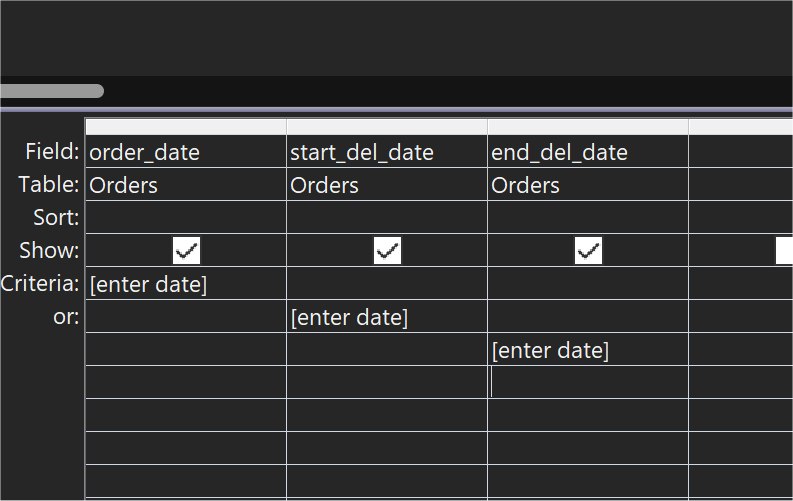
You can compare dates in date format with no conversion needed.  To check if the user entry matches any of the 3 dates, use the OR operation.  In the query designer, it looks like the picture below.  In SQL, the WHERE clause looks something like:

    WHERE PO_Date_Partial1 = [Enter Date] OR PO_Date_Partial2 = [Enter Date] OR PO_Date_Partial3 = [Enter Date]

To check if the user entered a valid date, use the IsDate() function.  Change [Enter Date] above to:

    IIf(IsDate([Enter Date]),[Enter Date],Null)

Comparing numerals can be done in a similar fashion.
Kevin Yip  @Reply  
     
3 years ago

This thread is now CLOSED. If you wish to comment, start a NEW discussion in Access Forum.
 

Next Unseen

 
New Feature: Comment Live View


The following is a paid advertisement
Computer Learning Zone is not responsible for any content shown or offers made by these ads.
 

Learn
 
Access - index
Excel - index
Word - index
Windows - index
PowerPoint - index
Photoshop - index
Visual Basic - index
ASP - index
Seminars
More...
Customers
 
Login
My Account
My Courses
Lost Password
Memberships
Student Databases
Change Email
Info
 
Latest News
New Releases
User Forums
Topic Glossary
Tips & Tricks
Search The Site
Code Vault
Collapse Menus
Help
 
Customer Support
Web Site Tour
FAQs
TechHelp
Consulting Services
About
 
Background
Testimonials
Jobs
Affiliate Program
Richard Rost
Free Lessons
Mailing List
PCResale.NET
Order
 
Video Tutorials
Handbooks
Memberships
Learning Connection
Idiot's Guide to Excel
Volume Discounts
Payment Info
Shipping
Terms of Sale
Contact
 
Contact Info
Support Policy
Mailing Address
Phone Number
Fax Number
Course Survey
Email Richard
[email protected]
Blog RSS Feed    YouTube Channel

LinkedIn
Copyright 2026 by Computer Learning Zone, Amicron, and Richard Rost. All Rights Reserved. Current Time: 5/6/2026 5:19:20 AM. PLT: 0s