Free Lessons
Courses
Seminars
TechHelp
Fast Tips
Templates
Topic Index
Forum
ABCD
 
Home   Courses   TechHelp   Forums   Help   Contact   Merch   Join   Order   Logon  
 
Back to Access Forum    Comments List
Upload Images   @Reply   Bookmark    Link   Email   Next Unseen 
Including Internal ID on add
James Swanson 
   
3 years ago
I have a table of phone numbers with a link to the customer via a customer ID field (i.e. one-to-many relationship). I'd like to add a new phone number in the phone number subform. How do I include the Customer ID value in that new record?
Kevin Robertson  @Reply  
           
3 years ago
The CustomerID field should get the ID automatically because of the Parent/Subform relationship.
James Swanson OP  @Reply  
   
3 years ago
First, thankyou VERY much for responding. I appreciate your help.

In this case, it is not working. I have two other similar subforms that work just fine. This one I created without the wizard.

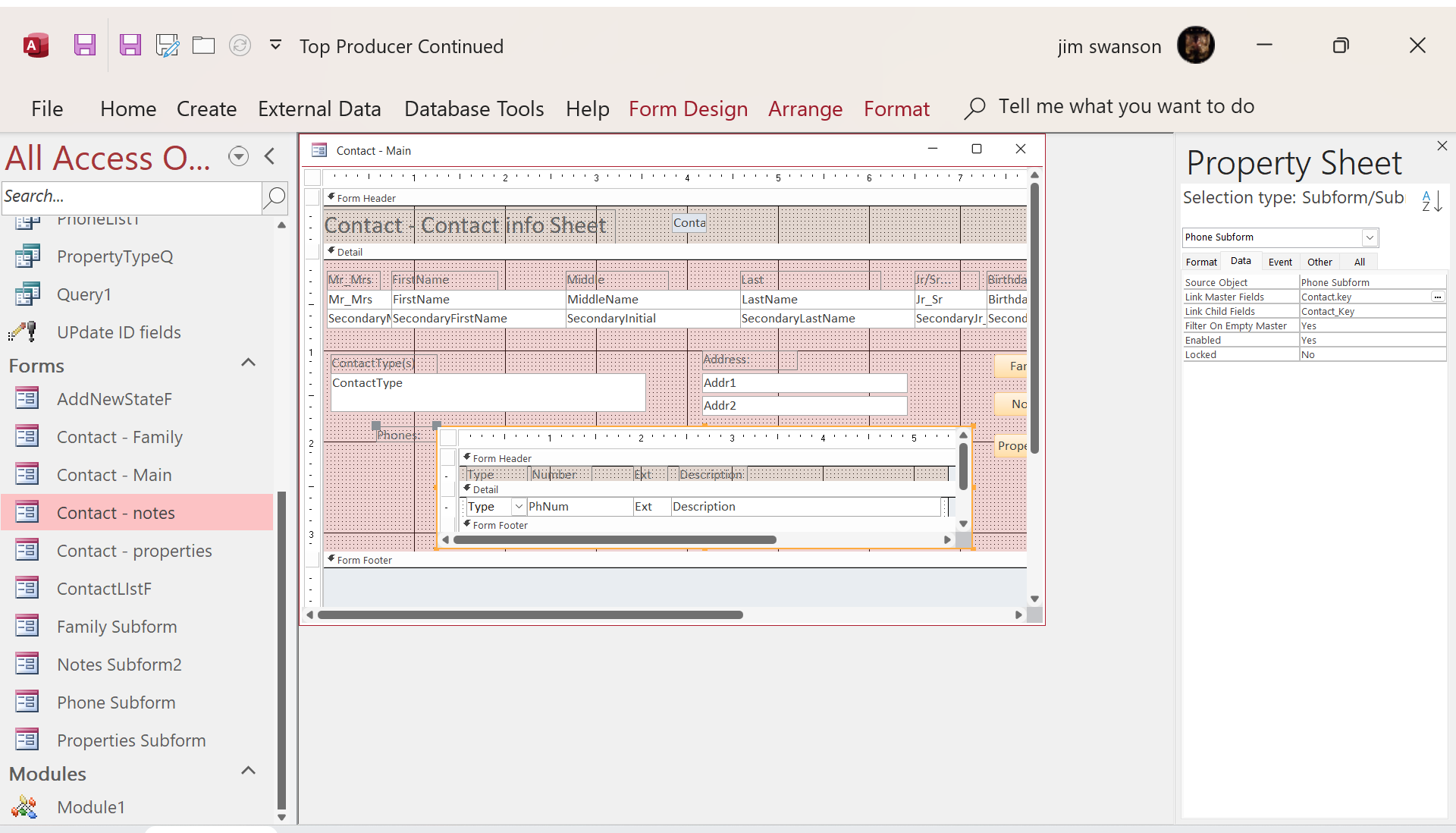
I get the following error when I try to add a record: " The LinkMasterFields property setting had produced this error: 'The object doesn't contain the Automation object 'Contact.''

I looked at that attribute at the ohter forms that ARE working and they are blank, as is this one.
James Swanson OP  @Reply  
   
3 years ago

James Swanson OP  @Reply  
   
3 years ago

James Swanson OP  @Reply  
   
3 years ago
I uploaded my form showing the LinkMaster/ChildFields and the error message. I have two other form/subform situations with the same master and different sub-records that work fine. Their fields all look the same.
James Swanson OP  @Reply  
   
3 years ago
There is ONE other difference between this form and the others. This form was created from a query because it needs to bring in the address for the contact:

"SELECT Contact.*, Properties.HouseNumber & " " & Properties.DirectionPrefix & " " & Properties.Street & " " & Properties.StreetType & " " & Properties.DirectionSuffix & " " & Properties.SuiteNo AS Addr1, Properties.City & ", " & Properties.State & "  " & Properties.Zip AS Addr2, Contact.key
FROM Contact INNER JOIN Properties ON Contact.Key = Properties.Contact_Key
WHERE (((Properties.PropertyType)="primary"));"
Kevin Robertson  @Reply  
           
3 years ago
I think the problem may be the dot (.) in the field name for the Link Master Fields.
James Swanson OP  @Reply  
   
3 years ago
The above message relates to the MAIN form to which the SUBFORM is related. I don't think I made that clear.
James Swanson OP  @Reply  
   
3 years ago
Thanks for that suggestion. The full name of the field is <tablename>.<field>, which in this case is "Contact.Key" I removed the "Contact." part, and when I saved it, access rewrote it to "Contact.Key". I think that must be because the initial data was from an INNER JOIN including another table. But, I really don't know. It is obviously trying to "help me out" somehow, but I can't figure out what.

When I click on the three dots it brings up the "Subform Field LInker". The pulldown list provides me with "contact.key" on the Master side and "contact_key" on the Child side, resulting in the same settings. Still, I get the same error.

Very mysterious.
James Swanson OP  @Reply  
   
3 years ago
I figured it out. Thank you, Kevin, for making me look elsewhere. I had added a redundant reference "contact.key" to the SQL SELECT statement earlier to try to fix something. When I removed it, then the field "Key" was presented in the "Subform Field Linker" pulldown. I used that, and everything worked.

Very Grateful,

Jim
Kevin Robertson  @Reply  
           
3 years ago
That's great. Glad you got it working.

This thread is now CLOSED. If you wish to comment, start a NEW discussion in Access Forum.
 

Next Unseen

 
New Feature: Comment Live View


The following is a paid advertisement
Computer Learning Zone is not responsible for any content shown or offers made by these ads.
 

Learn
 
Access - index
Excel - index
Word - index
Windows - index
PowerPoint - index
Photoshop - index
Visual Basic - index
ASP - index
Seminars
More...
Customers
 
Login
My Account
My Courses
Lost Password
Memberships
Student Databases
Change Email
Info
 
Latest News
New Releases
User Forums
Topic Glossary
Tips & Tricks
Search The Site
Code Vault
Collapse Menus
Help
 
Customer Support
Web Site Tour
FAQs
TechHelp
Consulting Services
About
 
Background
Testimonials
Jobs
Affiliate Program
Richard Rost
Free Lessons
Mailing List
PCResale.NET
Order
 
Video Tutorials
Handbooks
Memberships
Learning Connection
Idiot's Guide to Excel
Volume Discounts
Payment Info
Shipping
Terms of Sale
Contact
 
Contact Info
Support Policy
Mailing Address
Phone Number
Fax Number
Course Survey
Email Richard
[email protected]
Blog RSS Feed    YouTube Channel

LinkedIn
Copyright 2026 by Computer Learning Zone, Amicron, and Richard Rost. All Rights Reserved. Current Time: 6/16/2026 4:29:24 PM. PLT: 1s