Free Lessons
Courses
Seminars
TechHelp
Fast Tips
Templates
Topic Index
Forum
ABCD
 
Home   Courses   TechHelp   Forums   Help   Contact   Merch   Join   Order   Logon  
 
Back to Access Forum    Comments List
Upload Images   @Reply   Bookmark    Link   Email   Next Unseen 
1 Criterion to Multi Fields
Ahmad Tayeh 

3 years ago
Hey everyone!

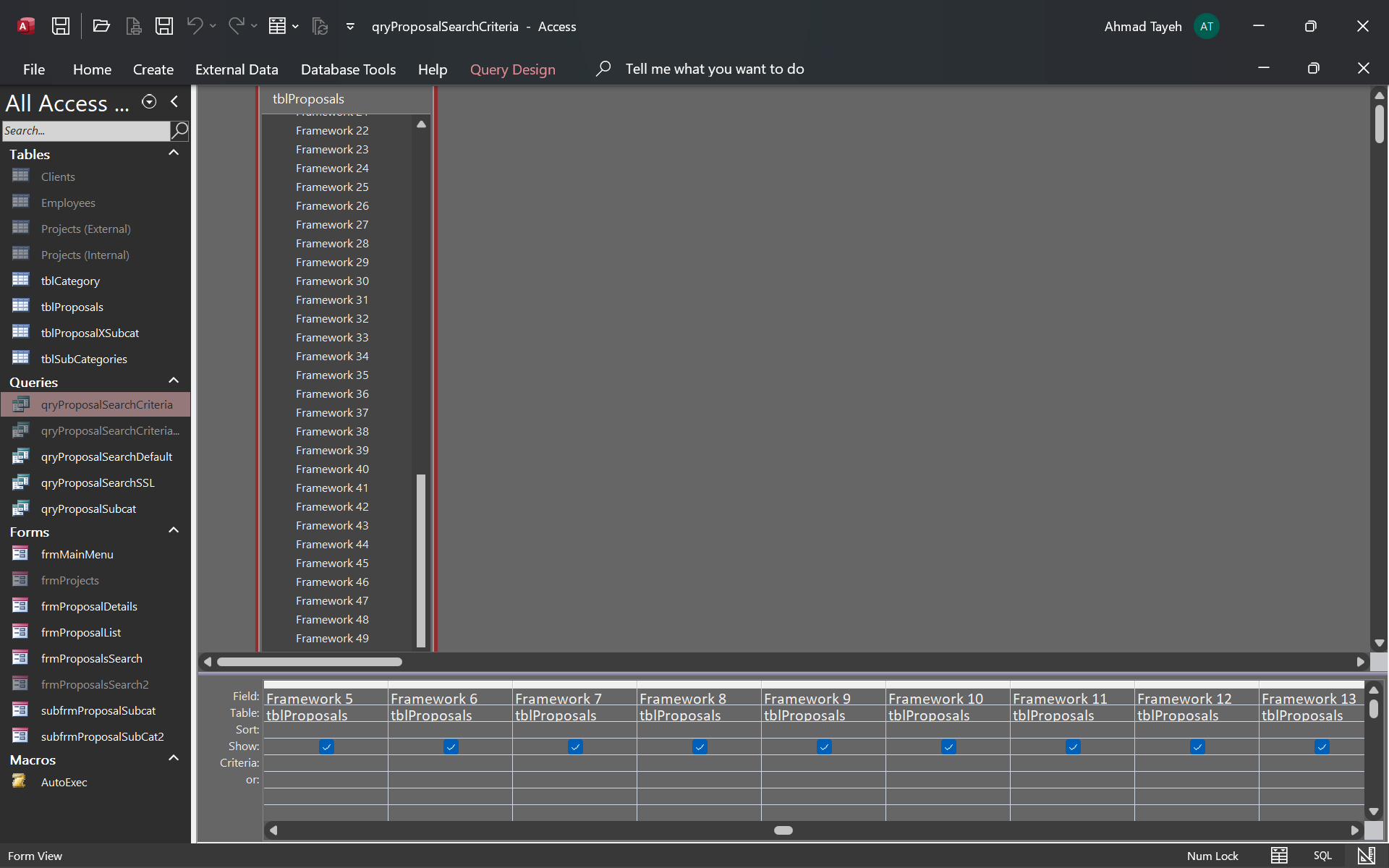
My database has almost 80 fields and to many of them need the same criteria.
Is there a way to use a query search criterion for many fields without all the copy-pasting?
Juan C Rivera  @Reply  
            
3 years ago
Not sure how to help can you provide an snapshot?  not to sure but i thinkyou need a query with one field init with alias and add the fields you wish to search as SearchString: [field1]&[field2] this way what ever you type in as cirterion all the fields in the SearcgString will be looked at...  let me know always happy to help

V/r
Juan
Ahmad Tayeh OP  @Reply  

3 years ago

Ahmad Tayeh OP  @Reply  

3 years ago
Firstly, thanks for taking the time to help Juan! Secondly, as you can see I have 50 different fields for different frameworks. I am trying to make a search form and so i want the user to be able to type the search criteria into one FrameworksSearch textbox in the search form and be able to look through all the frameworks fields ... Do I absolutely have to do it manually for each one or is there a smarter way you can help with ? Thanks anyway!
Juan C Rivera  @Reply  
            
3 years ago
No way around it you have to do the work. there is several ways to get it done but no short cuts... coding is a tideaus job.
Kevin Yip  @Reply  
     
3 years ago
Hi Ahmad, is your criteria an "Or" criteria or an "And" criteria?

For instance, does your WHERE clause look like this:

     WHERE [Framework 1]="user entry" OR [Framework 2]="user entry" OR [Framework 3]="user entry" ...

or this:

     WHERE [Framework 1]="user entry" AND [Framework 2]="user entry" AND [Framework 3]="user entry" ...

or a mixture of both?

Each scenario would require a different method.  You may need VBA to deal with some of the repetitiveness.
Ahmad Tayeh OP  @Reply  

3 years ago
Hey Kevin, it's a sort of a large table / query that the search form is based on so it's a mixture of both like so :


     WHERE [Framework 1] ="user entry" OR [Framework 2]="user entry" ... OR [Framework 50]="user entry"

     AND [ServiceLine] = "User Entry 2 "

     AND ...

In conclusion, this probably explains why I was trying to look for a shorter way of going about doing this, but nonetheless, I will ask it in another way. Is there an SQL command that works like an inverted SQL 'IN' command in that it allows for searching of multiple fields using 1 criterion ? Thanks everyone
Juan C Rivera  @Reply  
            
3 years ago
Ahmad I think I found a quick way.  I took and made a query with all the fields in what is needed I used about 15 dirent fields.  I then switched it to sql view and copy it to notepad. I was able to modify everything in about 2 to 3 minutes.  It works real good.  I was surprised how fast that was.  try it.

the last box use an alias I used X: framework1 & framework2 & .....

put all 50 on one line this way when the user types in anything it will requery by the all fields.  now unless you want something diffrent, then I have to tap out and let someone else help.


V/r
Juan
Kevin Yip  @Reply  
     
3 years ago
Hi Ahmad, the 50 OR operations can be done with VBA, which will simplify the SQL, and may even improve performance.  The VBA code will search all fields one by one, starting with [Framework 1].  When it finds one equal to the user entry, it stops searching, because you only need to find one a true result.  Here is the VBA code.  Put this in a stand-alone VBA module, if one hasn't been created yet:

Function IsAnyTrue(ID As Long, UserEntry As String) As Boolean
    ' Check if any field among [Framework 1], [Framework 2], ... and [Framework 50] equals to UserEntry.
    Dim r As Recordset, i As Integer, b As Boolean
    b = False
    Set r = CurrentDb.OpenRecordset("SELECT * FROM Table1 WHERE ID=" & ID)
    r.MoveFirst
    For i = 1 To 5
        If r("Framework " & i) = UserEntry Then b = True: Exit For
    Next i
    IsAnyTrue = b
End Function

It creates a custom function called IsAnyTrue, which checks the user entry against the framework fields identified by the ID field.  The For-Next loop is used to check the 50 fields one by one until it finds one equal to the user entry, or not.  Note that I use "Exit For" above.  That means as soon as I find one true instance, I exit the search.  If the true instance occurs in [Framework 1], then it only needs to search that one time, not 50 times.  This is how performance can be improved.  This code uses the Recordset object, For-Next loop, and a custom function that returns true or false.  Note that I also use string concatenation ("Framework " & i) to refer to those repetitious field names.  If you are unfamiliar with these topics, this site should have courses on them.

WIth the custom function above, your SQL can be simplified to:

     SELECT ..... WHERE IsAnyTrue([ID], "user entry")

instead of:

     SELECT ..... WHERE [Framework 1] ="user entry" OR [Framework 2]="user entry" OR [Framework 3]="user entry" OR [Framework 4]="user entry" ..... OR [Framework 49]="user entry" OR [Framework 50]="user entry"
Ahmad Tayeh OP  @Reply  

3 years ago
Kevin I genuinely appreciate the effort mate but it's a bit above my level to truly understand how that works fully and implement it ( although i will definitely keep trying in the next few days) .

Juan, I thought of the same thing before and i never tried it so i will go ahead and try it now ( my original idea involved using copy paste and find and replace in  ms word to help with the process ) . I have yet to work with aliases so i am not sure how the result will look like but i will keep tinkering and let u know how it goes.

In all cases, I sincerely appreciate the help both you of are offering me and I can't thank you enough for even trying. Have a wonderful day and I will update u when i have the time to try and implement both methods
Ahmad Tayeh OP  @Reply  

3 years ago
For extra information as to why I am a bit hesitant about trying your method kevin, I have many search criteria as u may have seen and it's not that I want it to find only one answer and then stop, I want to bring in every record in which a framework that matches the search pops up and I think as you said your code let's it stop as soon as it finds a match. Thanks anyways !
Ahmad Tayeh OP  @Reply  

3 years ago
For extra information as to why I am a bit hesitant about trying your method kevin, I have many search criteria as u may have seen and it's not that I want it to find only one answer and then stop, I want to bring in every record in which a framework that matches the search pops up and I think as you said your code let's it stop as soon as it finds a match. Thanks anyways !
Juan C Rivera  @Reply  
            
3 years ago
Create Aliases for Field Names in Access Queries

Try this tech help video.  Richard has a video for everything.
Ahmad Tayeh OP  @Reply  

3 years ago
both of you guys thank you so very much for the help i sincerely appreciate it and I apologize for the late update but I response initially and it transferred me back to the login page cus it timed out and i forgot to repost this message.

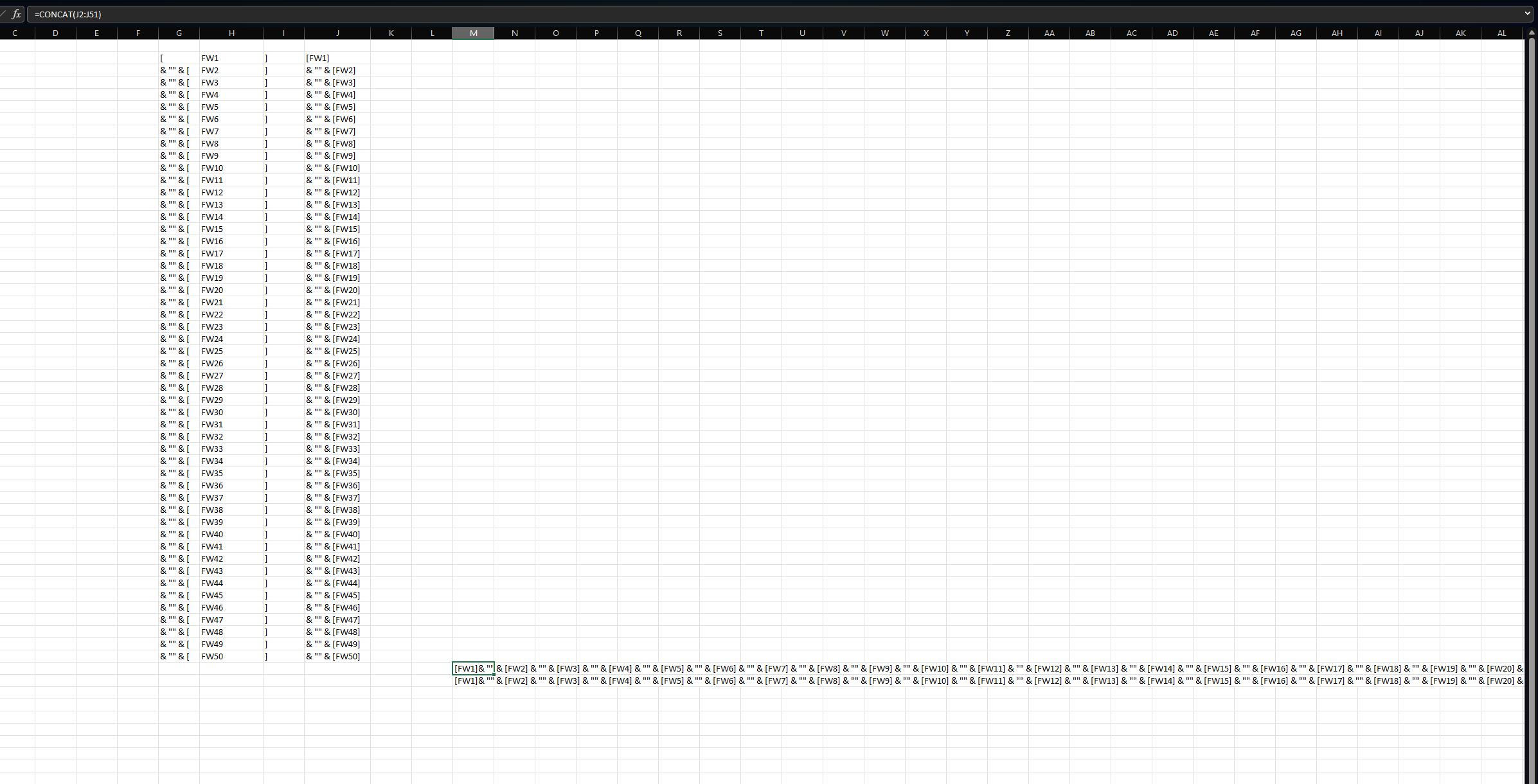
For update: yes the simplest way i found to make it work is Juan's Aliasing method although I had to readjust the field names to make them shorter as they were crossing the character limit of a query I believe. To make things easier for anyone reading this however i also made an excel file I called the 'Search criteria concatenator 9000' which basically just increments the field name numbering and concatenates the square brackets, ampersands, and '*'s .

Thanks again for all the help guys, couldnt have done it without your generous help ! much love
Ahmad Tayeh OP  @Reply  

3 years ago

Ahmad Tayeh OP  @Reply  

3 years ago
for anyone wondering how to do the concat thing to save time, the screenshot above shows how i did it and all u have to do is copy and paste the value of the equation below it to get it as text so u can directly input it in your query. Cheers !
Scott Axton  @Reply  
        
3 years ago
Late to the party but I'm sticking my nose in the middle here.  

Seeing the repeating fields fw1, fw2, ..., fw80 is screaming at me saying "Improper normalization" or  "Second Table".

You may want to consider the way your tables are structured.
Normalizing Data
Many-to-Many

This thread is now CLOSED. If you wish to comment, start a NEW discussion in Access Forum.
 

Next Unseen

 
New Feature: Comment Live View


The following is a paid advertisement
Computer Learning Zone is not responsible for any content shown or offers made by these ads.
 

Learn
 
Access - index
Excel - index
Word - index
Windows - index
PowerPoint - index
Photoshop - index
Visual Basic - index
ASP - index
Seminars
More...
Customers
 
Login
My Account
My Courses
Lost Password
Memberships
Student Databases
Change Email
Info
 
Latest News
New Releases
User Forums
Topic Glossary
Tips & Tricks
Search The Site
Code Vault
Collapse Menus
Help
 
Customer Support
Web Site Tour
FAQs
TechHelp
Consulting Services
About
 
Background
Testimonials
Jobs
Affiliate Program
Richard Rost
Free Lessons
Mailing List
PCResale.NET
Order
 
Video Tutorials
Handbooks
Memberships
Learning Connection
Idiot's Guide to Excel
Volume Discounts
Payment Info
Shipping
Terms of Sale
Contact
 
Contact Info
Support Policy
Mailing Address
Phone Number
Fax Number
Course Survey
Email Richard
[email protected]
Blog RSS Feed    YouTube Channel

LinkedIn
Copyright 2026 by Computer Learning Zone, Amicron, and Richard Rost. All Rights Reserved. Current Time: 5/6/2026 4:18:21 AM. PLT: 0s