Free Lessons
Courses
Seminars
TechHelp
Fast Tips
Templates
Topic Index
Forum
ABCD
 
Home   Courses   TechHelp   Forums   Help   Contact   Merch   Join   Order   Logon  
 
Back to Access Forum    Comments List
Upload Images   @Reply   Bookmark    Link   Email   Next Unseen 
Input Mask
Sandra Truax 
         
3 years ago
I found the following, but cannot get it to work. Do you have a video, or some guidance on how to get this to work?

"In Visual Basic you use a string expression to set this property. For example, the following specifies an input mask for a text box control used for entering a phone number:"

Forms!Customers!Telephone.InputMask = "(###) ###-####"
Kevin Robertson  @Reply  
          
3 years ago
Where are you entering the code?
Do you get any error messages?

Richard has a couple of videos on Input Masks.

Input Mask
Input Masks Varying Length
Sandra Truax OP  @Reply  
         
3 years ago
I didn't know where to put it, so I tried putting it in the forms On Load Event, but it kept giving me an error.  I'll check out those videos again.  Thanks.
Sandra Truax OP  @Reply  
         
3 years ago
I'm getting closer, but it's acting weird.  Below is my code.

When I open my database the Filter_Year defaults to this year, and when I open the form to enter the receipts, the code works perfect. I have SetDateInputMask in the On Current Event.

I can change the Filter_Year to 2022, and the code works perfect letting me enter the year.

HOWEVER, if I change the Filter_Year BACK to 2023, and open the form again, it still gives me the input mask for previous years.

The only way I have been able to get it to work again is to close the dabase, and reopen it.
I also tried putting SetDateIputMask in the On Load Event but that didn't help.
Can you tell me what I am doin wrong?
-------------------------------------------------------------
Private Sub SetDateInputMask()
    
    If Year(Date) = Forms!Shortcuts!Filter_Year Then
        TransactionDate.InputMask = "99/99;_"
    Else
        TransactionDate.InputMask = "99/99/9999;_"
    End If

End Sub
Kevin Robertson  @Reply  
          
3 years ago
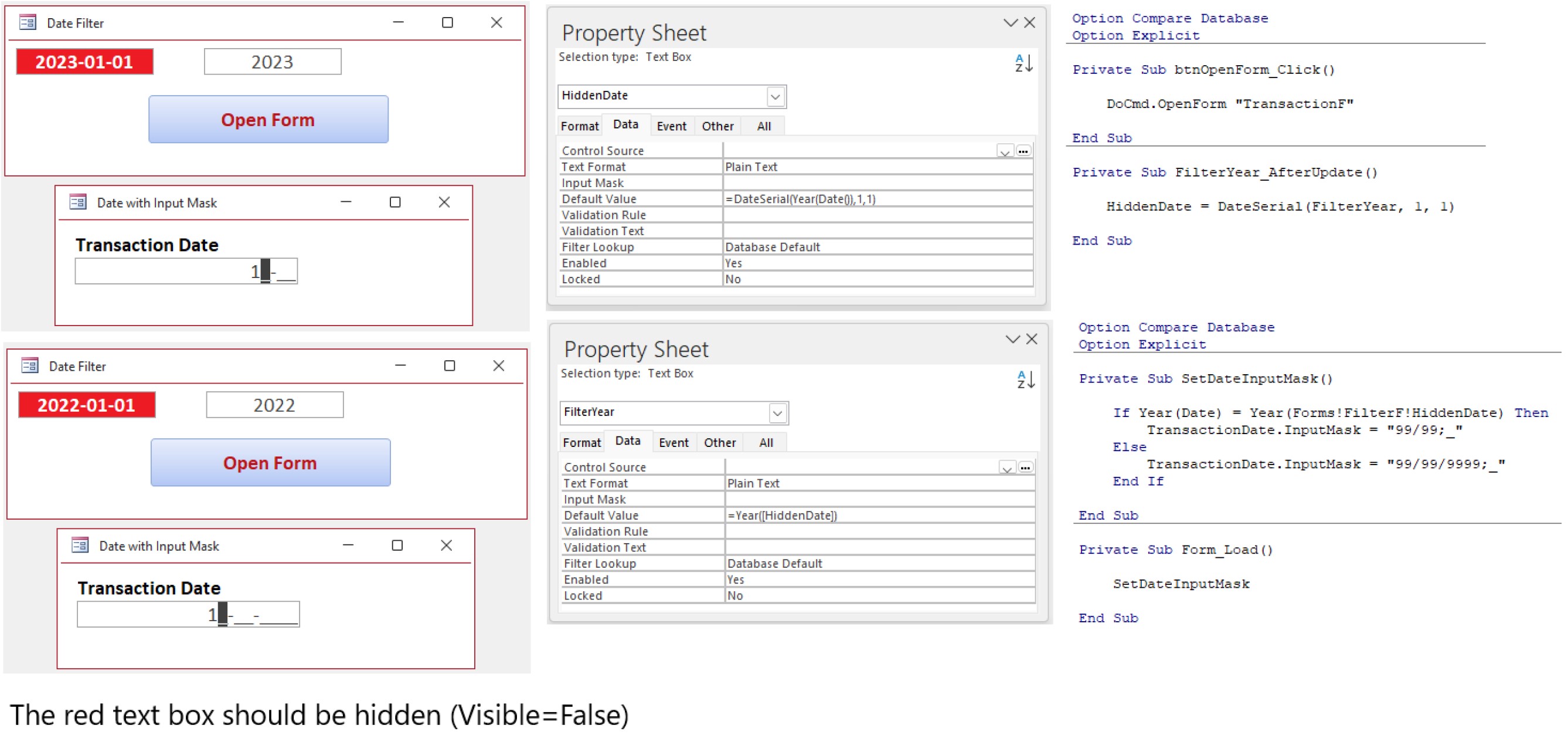
Try setting a hidden text box to a date in the current year and a visible text box that shows the year from the hidden box.
The image below shows how to do this and the input mask changes correctly each time the year is changed.
Kevin Robertson  @Reply  
          
3 years ago

Kevin Robertson  @Reply  
          
3 years ago
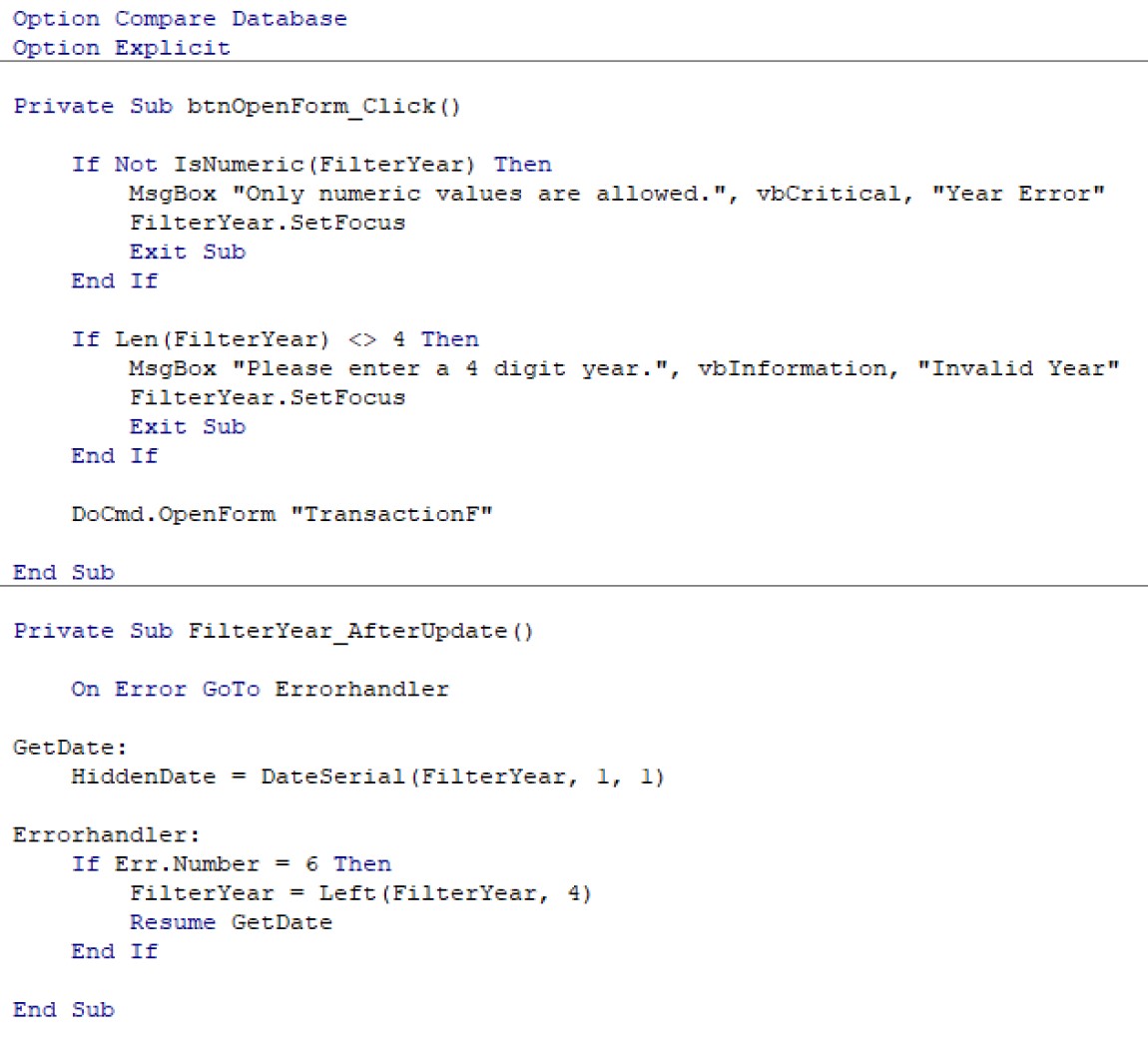
In case you are interested I added some error handling to the date filter (see screenshot).
Kevin Robertson  @Reply  
          
3 years ago

Sandra Truax OP  @Reply  
         
3 years ago
@Kevin Robertson, you are a genius!  It took me a couple of tries following your lead to fully understand and get it right, but it now works perfect!  Thank you so much and for the Error handler also.  This is going to make entering my tax receipts so much easier and eliminate duplicate forms just  to set the date!  Tips on the way! Wish I could afford more.

This thread is now CLOSED. If you wish to comment, start a NEW discussion in Access Forum.
 

Next Unseen

 
New Feature: Comment Live View


The following is a paid advertisement
Computer Learning Zone is not responsible for any content shown or offers made by these ads.
 

Learn
 
Access - index
Excel - index
Word - index
Windows - index
PowerPoint - index
Photoshop - index
Visual Basic - index
ASP - index
Seminars
More...
Customers
 
Login
My Account
My Courses
Lost Password
Memberships
Student Databases
Change Email
Info
 
Latest News
New Releases
User Forums
Topic Glossary
Tips & Tricks
Search The Site
Code Vault
Collapse Menus
Help
 
Customer Support
Web Site Tour
FAQs
TechHelp
Consulting Services
About
 
Background
Testimonials
Jobs
Affiliate Program
Richard Rost
Free Lessons
Mailing List
PCResale.NET
Order
 
Video Tutorials
Handbooks
Memberships
Learning Connection
Idiot's Guide to Excel
Volume Discounts
Payment Info
Shipping
Terms of Sale
Contact
 
Contact Info
Support Policy
Mailing Address
Phone Number
Fax Number
Course Survey
Email Richard
[email protected]
Blog RSS Feed    YouTube Channel

LinkedIn
Copyright 2026 by Computer Learning Zone, Amicron, and Richard Rost. All Rights Reserved. Current Time: 5/6/2026 10:18:33 PM. PLT: 1s