Free Lessons
Courses
Seminars
TechHelp
Fast Tips
Templates
Topic Index
Forum
ABCD
 
Home   Courses   TechHelp   Forums   Help   Contact   Merch   Join   Order   Logon  
 
Back to Access Forum    Comments List
Upload Images   @Reply   Bookmark    Link   Email   Next Unseen 
Will you ever screen cast
Gary James 
      
3 years ago
Rich, I love your videos but I have a couple problems with them.  If I watch them on YouTube I'm inundated with commercials, and I can't watch the Extended video's with my Gold membership.  

If I watch them from your website, your player doesn't support screen casting.  I like watching your videos on my 60" TV so my ancient eyes can see the details that would otherwise go missing.

Will you ever support Screen Casting in your online player?
Alex Hedley  @Reply  
           
3 years ago
It's just a standard HTML VIDEO tag, it allows casting,
Is this on a phone? iOS/Android?
Gary James OP  @Reply  
      
3 years ago
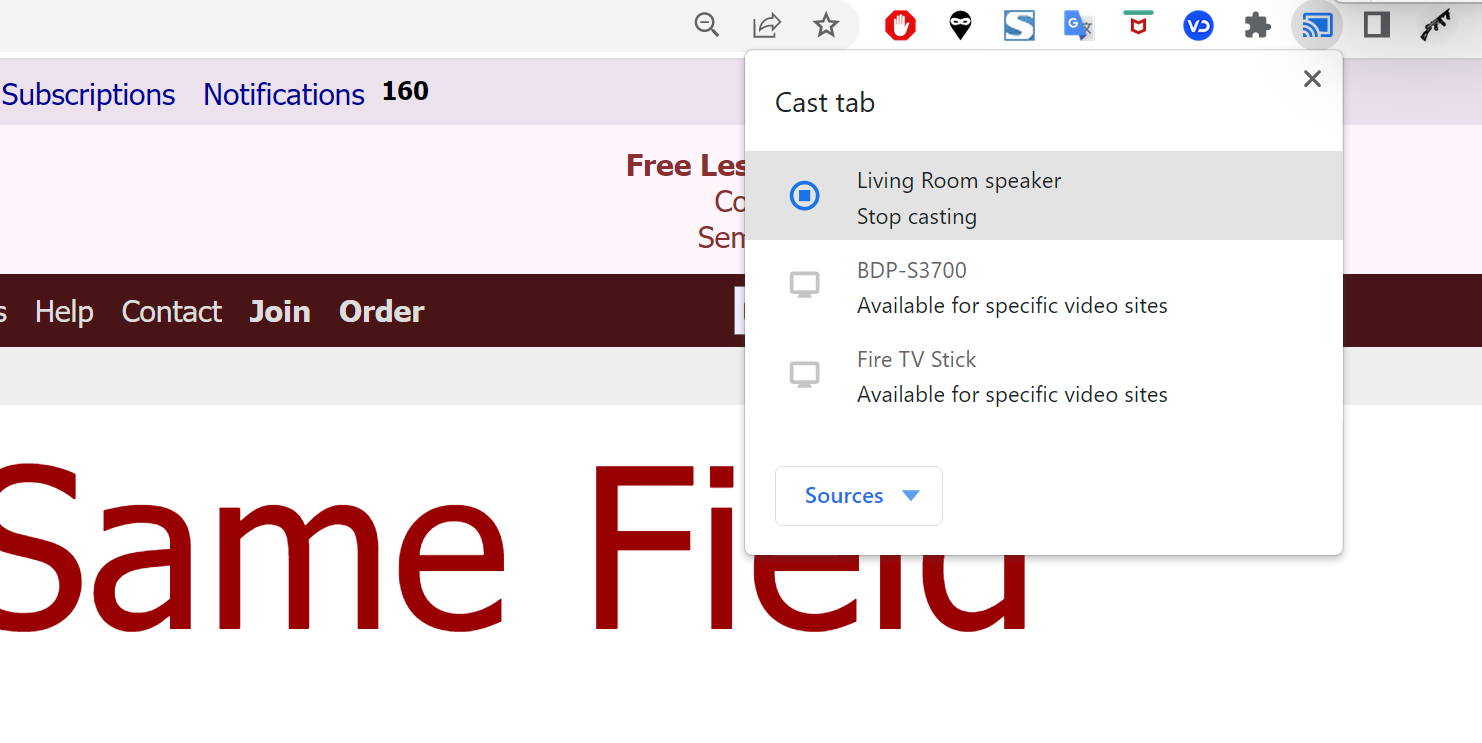
I tried it on both my Dell XPS Laptop running Windows 11, and my iPad Air  3.   Neither shows the option for screen casting when I run the videos from the 599cd website.   If I run them from YouTube both devices show the screen casting option that shows my Amazon Firestick, my Blu-ray player, and my Sony TV as screen cast targets.
Alex Hedley  @Reply  
           
3 years ago

Alex Hedley  @Reply  
           
3 years ago

Gary James OP  @Reply  
      
3 years ago
What don't you understand that needs clarification?
Alex Hedley  @Reply  
           
3 years ago
(There was an issue with image upload)

Do you not have the Airplay icon?
Kevin Yip  @Reply  
     
3 years ago
Both iPhone and Android have screen-mirroring features that can mirror your mobile device's content to your TV.  That is one way to watch Internet content on a big screen if an app isn't available for that content.  Another way is to download and save Richard's videos on a portable USB storage, then plug it to a streaming device like Roku, which connects to a TV, has a USB port, and can play content from a USB device.
Kevin Yip  @Reply  
     
3 years ago
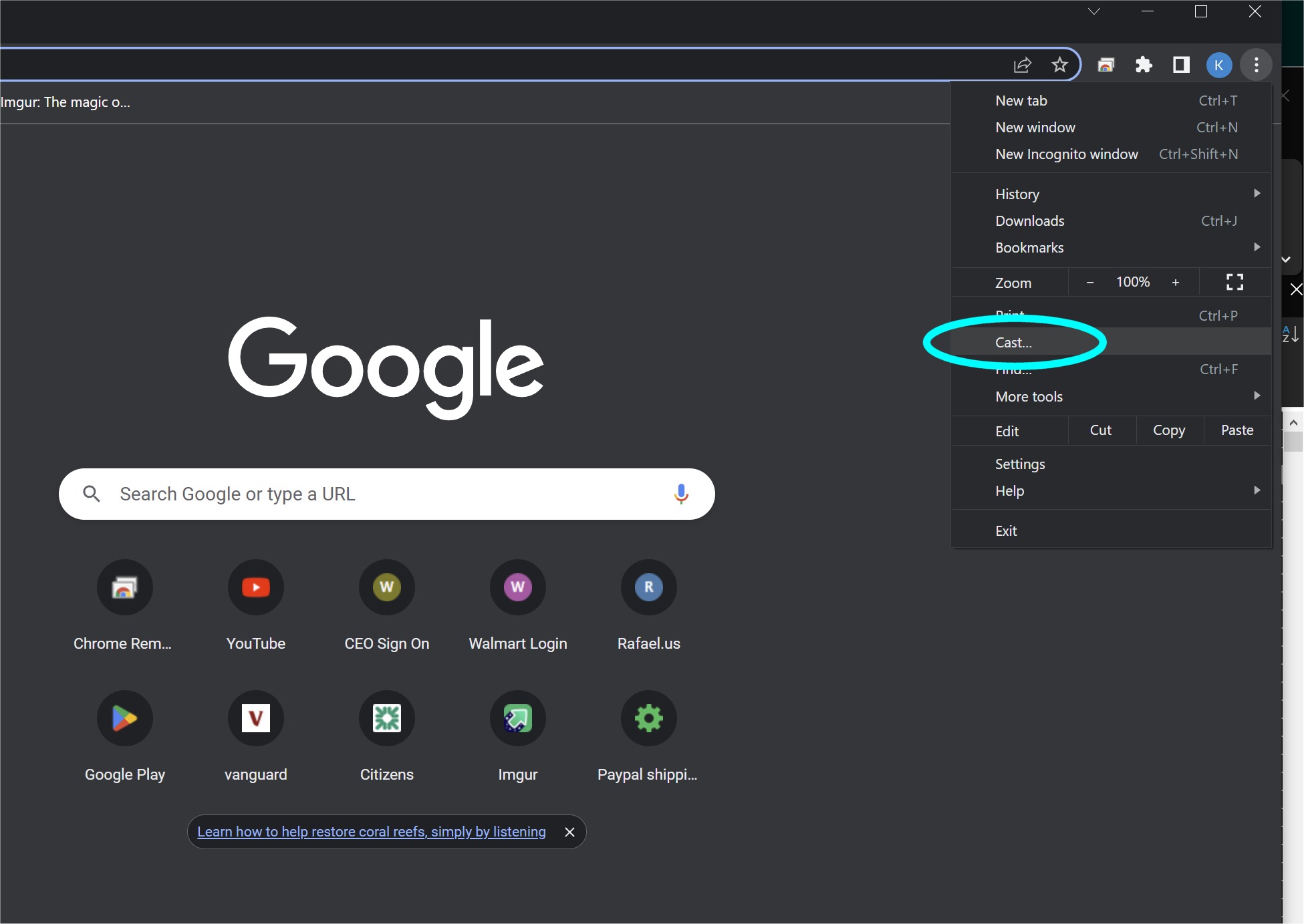
If you have the Chromecast streaming device, plug it to your TV, then choose "Cast" on your PC Chrome Browser (picture below) to see the browser's content on your TV.
Kevin Yip  @Reply  
     
3 years ago

Gary James OP  @Reply  
      
3 years ago

Gary James OP  @Reply  
      
3 years ago
Alex, my iPad shows a disabled Airplay icon.  So that isn't an option.   Kevin, I don't have a Chromecast streaming device.  I listed my available casting devices above.  I'm able to screen cast on YouTube because the Amazon Firestick has a Youtube app that will accept a casting connection.   Running Chrome on my Dell Laptop PC shows a Firestick icon in its casting devices, but it's not enabled.  Only the Living Room Speaker is enabled because it's an Amazon Alexa device.

There is one option that's available but I haven't explored, and that's connect to my 60" TV via the Firestick as a WIFI external video monitor.   Windows 11 supports WIFI display connections.   The problem there is my TV is much lower screen resolution that what I run my Laptop at.  So, I'd have to play with adjusting the laptop resolution to match the TV.   I wish Microsoft would have made the multiple Desktop options include different screen resolutions in each Desktop.
Kevin Yip  @Reply  
     
3 years ago
Hi Gary, if the ads are what's holding you back, you may consider just watching the ads, while supporting Richard's channel in the process.  The most reliable way to cast is having the same app (YouTube) on your casting device casting to the same app on your destination device.  That way you are sure they can talk to each other.  Many of Richard's videos aren't that long, so the ads should be minimal.  Also, you can always click "Skip ads."
Gary James OP  @Reply  
      
3 years ago
Kevin, yes that's what I've been doing (watch the ads until I can press skip).  I just seems they've doubled the number of ads that I used to see.  Or maybe it's just that I want to watch Richards train8ng videos that bad😄
Kevin Yip  @Reply  
     
3 years ago
The Youtube channel owner (ie. Richard) is actually the one who sets what type of ads you see (skippable, non-skippable, etc.),  how frequently they are shown, and at which points in time in a video they are shown.  Channels with lots of views can customize their own ad settings.  For the smaller channels, YouTube sets the ad settings.

The viewers can also set their own ad preferences in their accounts so you can see the kinds of ads you prefer to see, such as tech ads, etc.
Richard Rost  @Reply  
          
2 years ago
You should be able to cast to your TV from my website on any PC or Android device. However if you want to watch from YouTube I suggest subscribing to their YouTube Premium service (used to be called YouTube Red). I think it's $9.99 / mo and the. You don't have to watch commercials on ANY channel. I pay for it myself and it's more than worth it.
Richard Rost  @Reply  
          
2 years ago
And yeah... I just use the default option for ads. It's a pain to set them every time I upload a video. Again, get Premium. Soooooo worth it if you watch a lot of YouTube. I watch mostly science documentaries, astronomy, nature shows, etc.
Kevin Yip  @Reply  
     
2 years ago
If I were to pay, I would be more willing to pay to the channels I like, such as via a membership, and put money directly into the YouTuber's pocket (which I'm sure, Richard, you would much prefer) instead of to YouTube.  But sadly, a YouTube membership does not remove ads.
Richard Rost  @Reply  
          
2 years ago
Yeah that's the thing is that there's paying a YouTube channel creator who you want to support and then there's paying YouTube for advertising. I actually pay for a couple of other channel creators like science channels that I follow because I want to support their work as well. One of them is Kosmo. Absolutely love their stuff. But I also like to watch their stuff when I go to sleep because he's got a very calm voice and the music is calming and it's just a very relaxing series of videos and if a commercial comes on that ruins it so I do also pay for the YouTube premium so that I don't have to watch commercials anywhere on YouTube. Plus if I am watching something else like a documentary or whatever I don't want to be bothered with commercials and it's not that expensive.

This thread is now CLOSED. If you wish to comment, start a NEW discussion in Access Forum.
 

Next Unseen

 
New Feature: Comment Live View


The following is a paid advertisement
Computer Learning Zone is not responsible for any content shown or offers made by these ads.
 

Learn
 
Access - index
Excel - index
Word - index
Windows - index
PowerPoint - index
Photoshop - index
Visual Basic - index
ASP - index
Seminars
More...
Customers
 
Login
My Account
My Courses
Lost Password
Memberships
Student Databases
Change Email
Info
 
Latest News
New Releases
User Forums
Topic Glossary
Tips & Tricks
Search The Site
Code Vault
Collapse Menus
Help
 
Customer Support
Web Site Tour
FAQs
TechHelp
Consulting Services
About
 
Background
Testimonials
Jobs
Affiliate Program
Richard Rost
Free Lessons
Mailing List
PCResale.NET
Order
 
Video Tutorials
Handbooks
Memberships
Learning Connection
Idiot's Guide to Excel
Volume Discounts
Payment Info
Shipping
Terms of Sale
Contact
 
Contact Info
Support Policy
Mailing Address
Phone Number
Fax Number
Course Survey
Email Richard
[email protected]
Blog RSS Feed    YouTube Channel

LinkedIn
Copyright 2026 by Computer Learning Zone, Amicron, and Richard Rost. All Rights Reserved. Current Time: 5/7/2026 5:16:41 AM. PLT: 1s