Just finished going over Advanced lesson 2 several times. Good lesson. I enjoyed it. I'm having some trouble adapting this to my database. My issue is I don't have a date on the page I want to add details to my subforms. I've tried creating a RecordCreated Yes/No box, with a SetValue macro with the value set to True to see if that creates a parent and assigns it record ID, but no luck. Can you create a stand-alone macro that creates a record ID for a new record in the parent table? --Kent Jamison
Scott Axton
@Reply 3 years ago
Kent
More detail please. Perhaps even a screen shot. There has to be something that you are entering into that parent record if doing it manually that would cause it to become "dirty" (issue the ID for the AutoNumber).
Honestly since you are at the Developer Level I don't understand the Macro usage unless you are just trying yo learn it. But...
While I've paid for many developer classes, I realized when going through the early classes, I somehow skipped over the Advanced courses. And since I paid for them, I might as well learn and apply those lessons. I haven't caught up to all the developer classes yet.
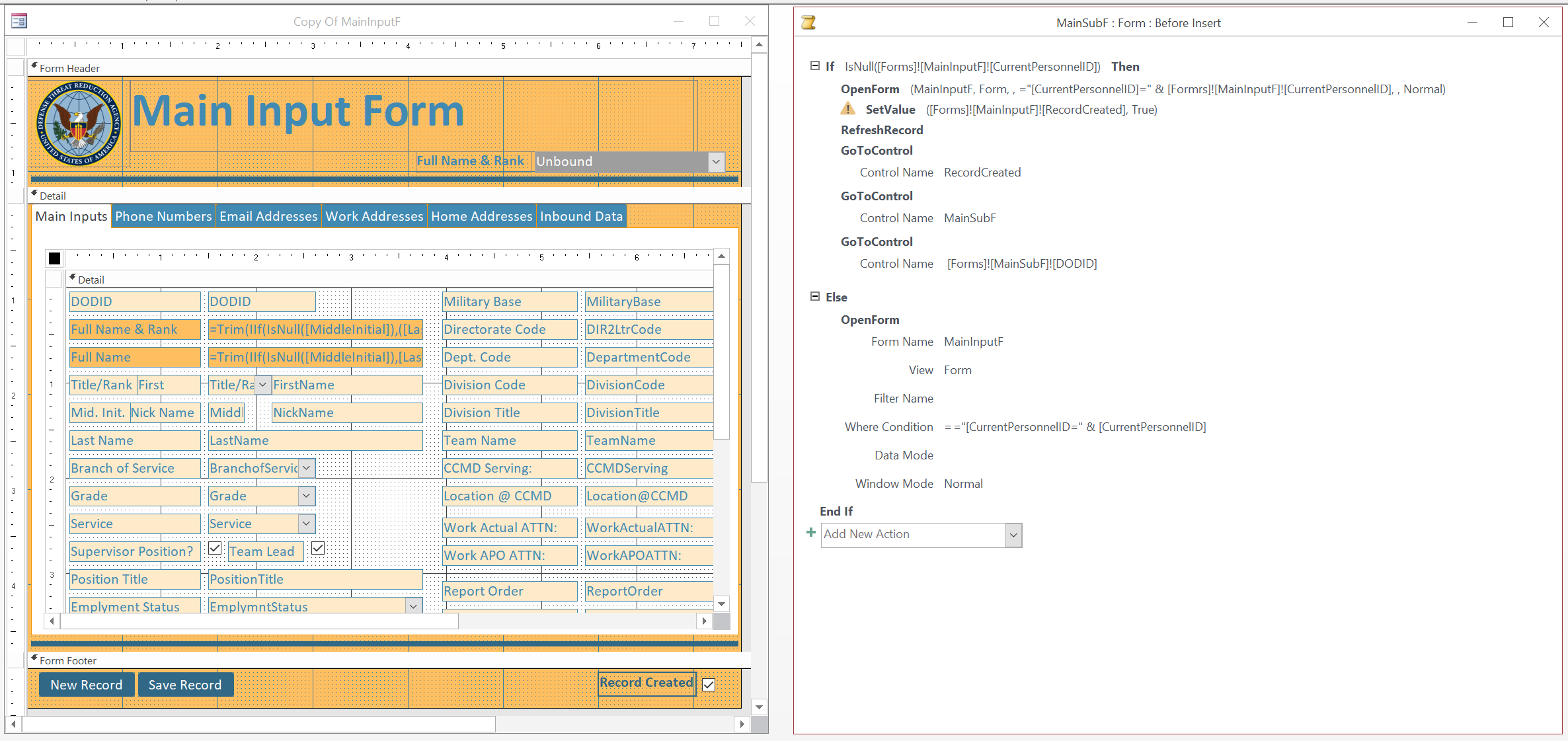
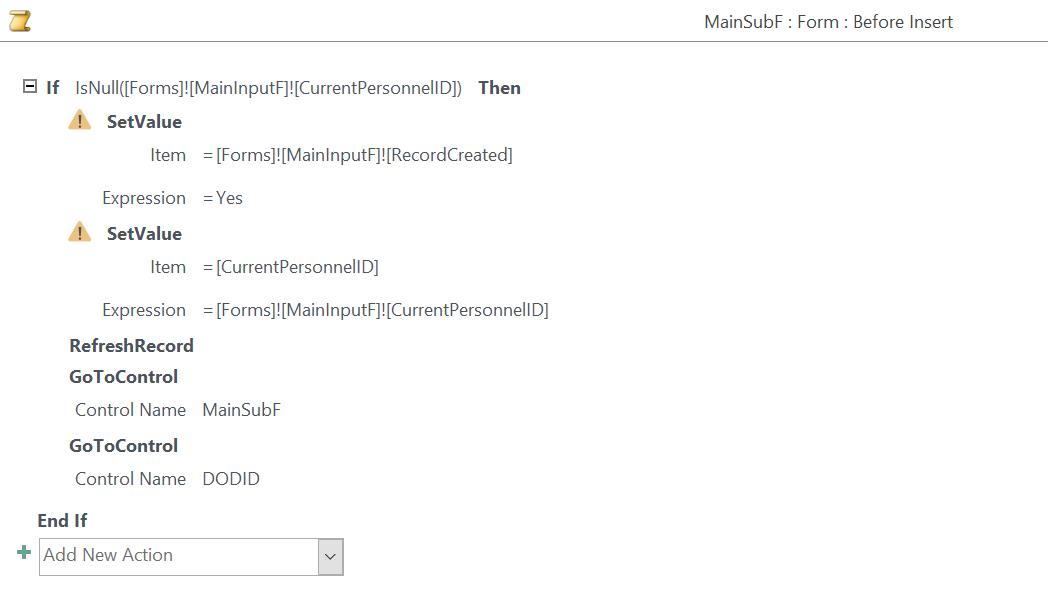
I've attached a screenshot of the many fields. You'll see tabs, each with subforms inserted. Before you go knit picking about using tabs--I know many here don't like them--but that's what the boss wanted. Mr. Rost helped me develop them too. With that said, I've tried creating a "RecordCreated" yes/no box in the footer, but that didn't work. The macro next to the form is the MainSubF Before Insert macro. Uploading the New Record macro next.
Kent JamisonOP
@Reply 3 years ago
Kevin Robertson
@Reply 3 years ago
In the first half of the If block you are checking if the ID is null and if it is you are using it as criteria to open the form. How if it is null? Unless I'm not understanding it somehow? Are there any error messages?
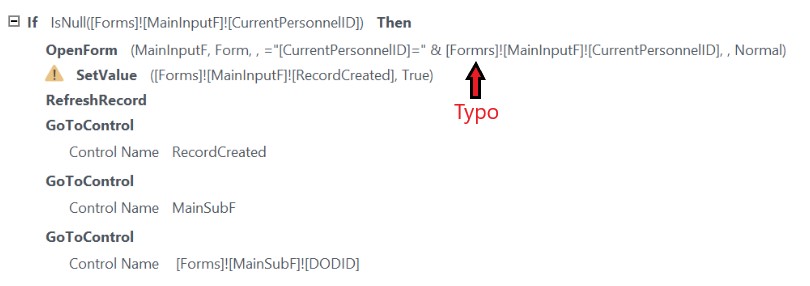
Also, I see a typo in that same OpenForm command (see screenshot).
Kevin Robertson
@Reply 3 years ago
Kevin Robertson
@Reply 3 years ago
I just notice the RefreshRecord command. I don't believe you can use Refresh or Requery in the Before Insert event as that record has not been created yet.
Is the Create Record Check Box bound or unbound?
Kent JamisonOP
@Reply 3 years ago
Type-O fixed in OpenForm box. RecordCheck box is bound to one-side table. Deleted refresh command. The intent is to change the value in RecordCreated box to Yes/True so a record ID is created. The video of Advanced 2 changes a date to make that happen. I don't have a date in my form. So, I'm trying to adapt to RecordCreated, as suggested in lesson 2 of that course.
Kevin Robertson
@Reply 3 years ago
The screenshot below is a simplified Macro which should achieve what you are trying to do (at least it worked for me when I tested it).
Kevin Robertson
@Reply 3 years ago
Kent JamisonOP
@Reply 3 years ago
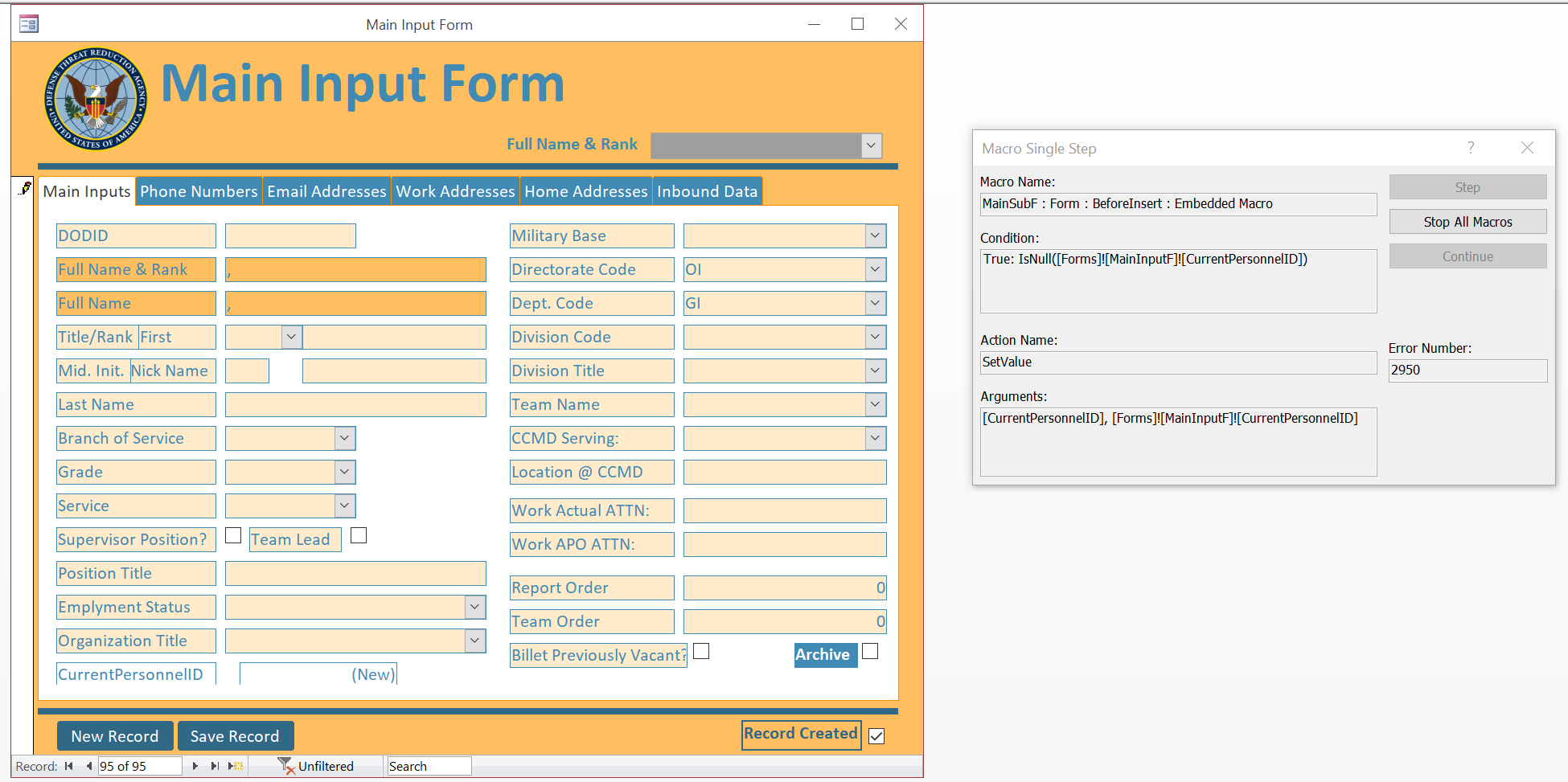
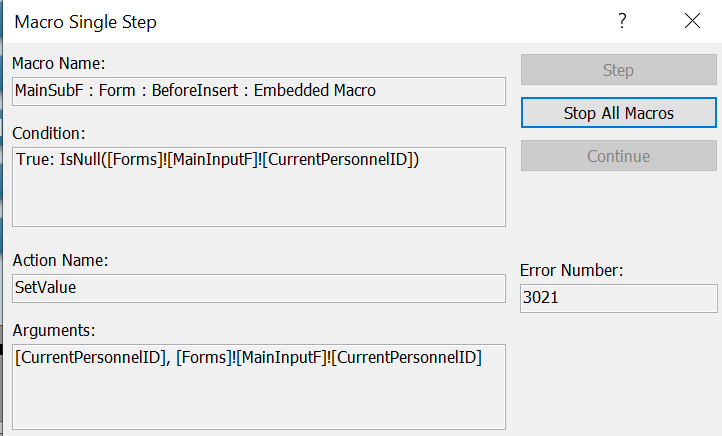
I've simplified the macro as you outlined.... Now I'm getting the following error. See new screenshot. It flips the value of the RecordCreated box, but apparently doesn't like the IsNull expression now.
Kent JamisonOP
@Reply 3 years ago
Kevin Robertson
@Reply 3 years ago
Do you have the ID on the Parent form?
Kent JamisonOP
@Reply 3 years ago
Yes. I double checked too.
Kent JamisonOP
@Reply 3 years ago
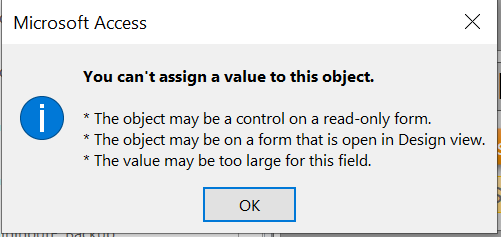
Still having trouble. Despite setting the code as above it won't set the value in RecordCreated to Yes/True. I get the two attached errors, which don't seem to apply to my situation.
Kent JamisonOP
@Reply 3 years ago
Kent JamisonOP
@Reply 3 years ago
Kevin Robertson
@Reply 3 years ago
Is the database in a Trusted Location?
Is Allow Edits set to Yes?
Can you post a screenshot of the Macro?
Scott Axton
@Reply 3 years ago
It looks to me, based on the last picture, that you are trying to set the AutoNumber field CurrentPersonnelID.
If that is so, you can't do that. You have to change ANY field other than the ID field in the Parent Record in order to have Access create the ID. In the video Richard used the date because that was the most obvious choice.
If you take the macro out of the mix and you manually click the RecordCreated check box does the ID get issued?
Kent JamisonOP
@Reply 3 years ago
@ScottAxton Yes, I'm trying to create a new record, which requires a new record number in the CurrentPersonnelT before I can add values to other subforms. When I click the RecordCreated tab, it says I need to have a record for my other subforms to relate to.
Posting current macro code for MainSubF | BeforeEvent. I've tried to model it after what Richard covers in his Advanced2 course, but.... getting the issues aforementioned.
Kent JamisonOP
@Reply 3 years ago
Kent JamisonOP
@Reply 3 years ago
@KevinRobertson Yes. The database is in a trusted location. I'll review the video to make sure I've set everything correctly. Allow additions, deletions, edits, filters are all set to Yes.
Scott Axton
@Reply 3 years ago
As I said before - you can't set the ID. Just the act of changing the RecordCreated will cause Access to issue the ID.
Remove the SetValue statement for the ID and test it.
Kevin Robertson
@Reply 3 years ago
Check the Data Type of CurrentPersonnelID. Is that the correct ID field?
Shouldn't that be the AutoNumber on the main form (Primary Key) and a Number on the Subform (Foreign Key)?
Kent JamisonOP
@Reply 3 years ago
If I click the RecordCreated checkbox Access tries to create a record, but I still get the error "You cannot add or change a record because a related record is required in table X [associated with a different subform]." That was the whole reason I thought this lesson could be adapted to my database, using a BeforeEvent macro. But so far no luck. I find it curious, when I click on the New Record button--which only has code GoToRecord:New macro in it--the RecordCreated Yes/No box doesn't get checked. That means the BeforeEvent macro for the MainSubF is not working.
The Primary Key (CurrentPersonnelID) in CurrentPersonnelT is set to AutoNumber, and set to number for all foreign keys listed in CurrentPersonnelT.
Scott Axton
@Reply 3 years ago
Backing up a bit just to be clear.
Main Inputs is the parent form and the CurrentPersonnelID is your AutoNumber. Correct?
All of the other "tabs" (Phone Numbers, Emails, both Addresses (I would combine those BTW and add an AddreesType to your db), and Inbound Data are the subforms. For all of those tables you should have a CurrentPersonnelID of type Number - Long Integer NOT and auto number. Each of the subform tables needs their own AutoNumber field. That makes the CurrentPersonnelID the Foreign Key in the subform tables.
Is that how you are set up?
Kent JamisonOP
@Reply 3 years ago
Yes. The subforms are in the tabs; MainSubF feeds the primary/parent table CurrentPersonnelT, where CurrentPersonnelID is the primary key. All subforms have CurrentPersonnelID as foreign key (Number - Long Integer), except for the two work address tables, where the WorkActualAddressID and WorkAPOAddressID are foreign keys in the parent table CurrentPersonnelT. That's because in those two cases the one-to-many relationship is reversed: the work addresses are used multiple times in the parent table.
Scott Axton
@Reply 3 years ago
Kent I believe that part of the problem is you are actually trying to create multiple records at once (it looks like to me).
Catch-22 situation. How can you display, on the main form, something that can't be included?
If you are creating a new main record then the address records can't possibly exist yet either in the db. You are putting the cart before the horse so to speak.
I'm not quite sure how to advise you other than to strip out some of the sub-forms temporarily. Get the new record creation working then add back in the other tables one at a time. Testing as you go.
Kent JamisonOP
@Reply 3 years ago
I've given up being able to do this all in one form. I've instead created a form that focuses just on the fields required for new personnel. This creates the base record in CurrentPersonnelT and associated work addresses in WorkActualAddressT and WorkAPOAddressT, along with sponor data for those assisting with on-boarding of new employees. Everything else will be added via MainInputF, and its many subforms. Once the base record is created, adding and editing data to other related tables seems to be a cinch.
This appears to resolve the Catch-22 that Scott appropriately described above. Thanks for the advice on trying to solve my quandry. In sum, I had to go another route. Scott is right. Access will not let you create too many records at once.
Thanks again. --Kent J.
Sorry, only students may add comments.
Click here for more
information on how you can set up an account.
If you are a Visitor, go ahead and post your reply as a
new comment, and we'll move it here for you
once it's approved. Be sure to use the same name and email address.
This thread is now CLOSED. If you wish to comment, start a NEW discussion in
Access Advanced 2.