Free Lessons
Courses
Seminars
TechHelp
Fast Tips
Templates
Topic Index
Forum
ABCD
 
Home   Courses   TechHelp   Forums   Help   Contact   Merch   Join   Order   Logon  
 
Back to Access Forum    Comments List
Upload Images   @Reply   Bookmark    Link   Email   Next Unseen 
Report field shows ID
Roland Richon 
     
3 years ago
Concern: Report field shows ID instead of text value

Hello everyone,
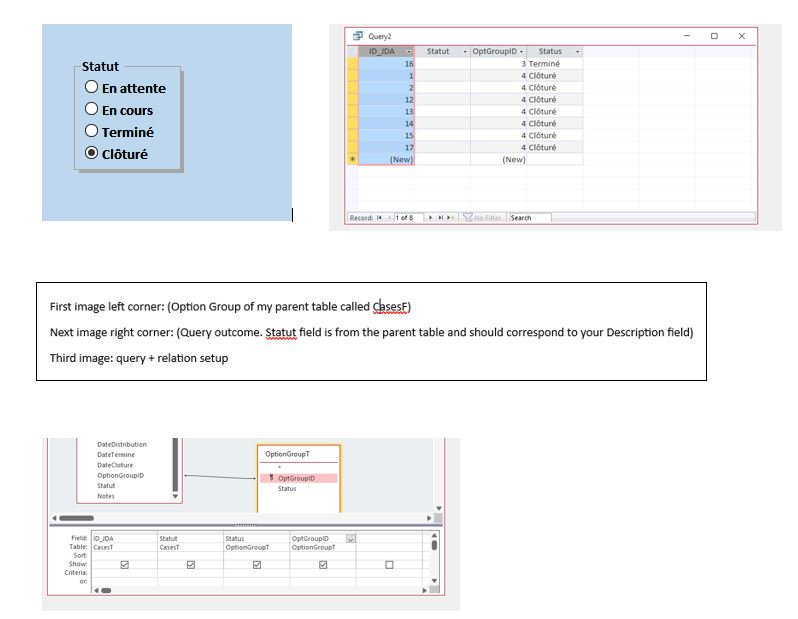
I have created a form with, among other things, an option group as shown in the expert access 4 tutorial. Everything works fine so far. By choosing a value on the form the inherent ID is added to right field in the table. Afterwards I have set up a query to generate specific date to create a report. Well nothing really complicated, but I cannot figure  how to show the text value instead of the ID Number? In a nutshell, if I chose in the option group for example "Green" , I expect also to see this text in the generated report instead of his bounded ID. What am I missing?

Thank you in advance for your suggestions
Kind regards
Roland  
Kevin Robertson  @Reply  
          
3 years ago
Add the field that contains your text value to the Query. Then add that field to the Report instead of the ID.
Kevin Robertson  @Reply  
          
3 years ago

Roland Richon OP  @Reply  
     
3 years ago

Roland Richon OP  @Reply  
     
3 years ago

Roland Richon OP  @Reply  
     
3 years ago
Sorry, for the two separate picture postings. I intended to attach them to my answer, but it seems that it didn't work out that way :)
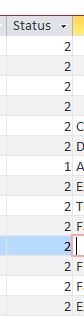
Well, as you see in the table it stores only the number value. The selected text in the option group for ex. "En cours" is not added to the table. So I don't know from where I could get the concerned text value to put it into the table in order to transfer it afterwards in my report.
Kevin Robertson  @Reply  
          
3 years ago
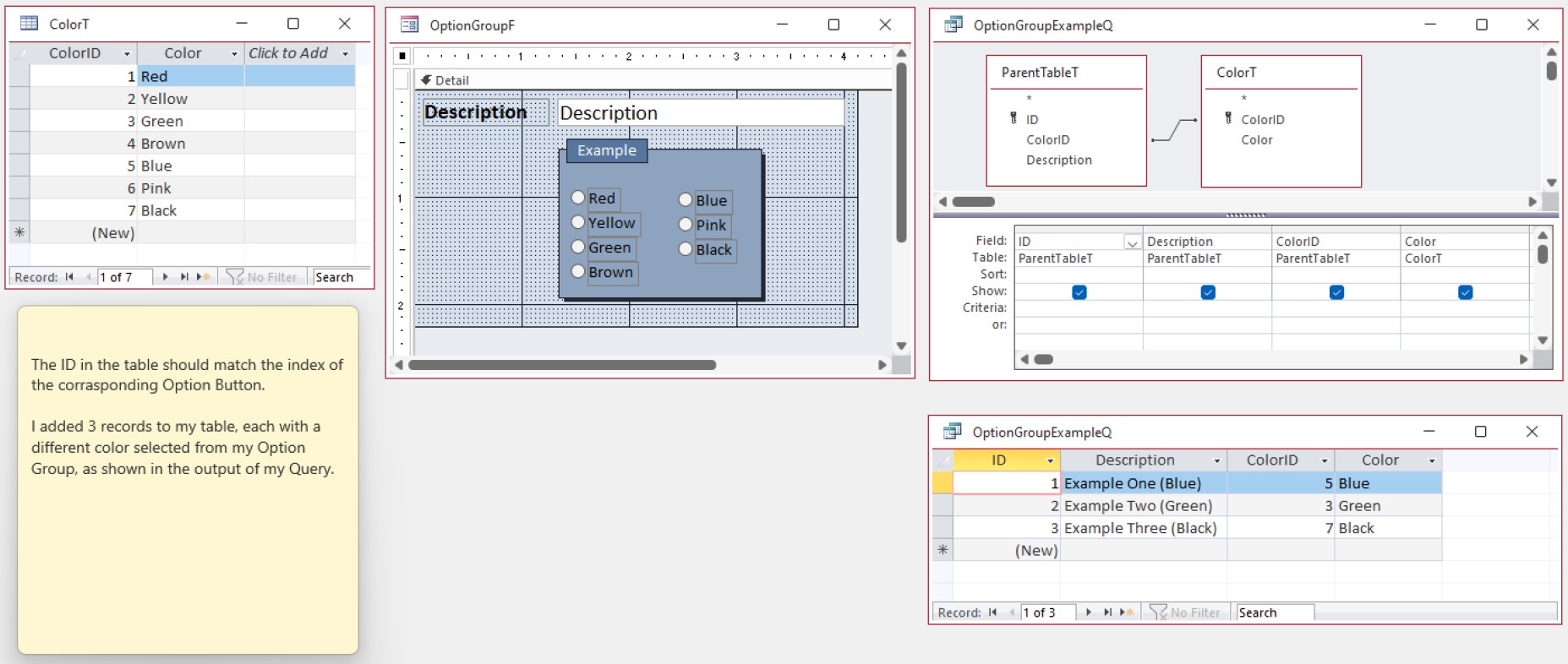
I would build a Table with the options and base the Option Group on that Table. Then it will be easy to add the field to your Query, then your Report.
Roland Richon OP  @Reply  
     
3 years ago
Ok, I will give it a try and I let you know. Thx so far
Roland Richon OP  @Reply  
     
3 years ago
Well I have created a separate table with the option group data in it as you have suggested. However, I had to resort to the lookup wizard in the table in order to see the text value from the option group (form) in the table (and report). Well that's all a bit weird, because along the courses it is often said to avoid using the lookup wizard. But I see no other way to get around this hitch at this time.
Kevin Robertson  @Reply  
          
3 years ago

Roland Richon OP  @Reply  
     
3 years ago
Hey Kevin, thank you for all this effort you applied. I will have a closer look to this and come back to you by tomorrow. Kind regards
Roland Richon OP  @Reply  
     
3 years ago
Good morning Kevin, I can follow your thoughts so far. But I am still missing one cue. The parent-table an the option group-table are both linked by the ID of the option group table. The parent table has the foreign key. But from where does the description field gets its data from?
Roland Richon OP  @Reply  
     
3 years ago

Roland Richon OP  @Reply  
     
3 years ago
Hello again, I was wondering in order to get the "statut" filed populated in the parenttable (with the chosen option group text), do I need add an IIF statement to the sql code in the query?
Kevin Robertson  @Reply  
          
3 years ago
All you need in the parent table is the OptionGroupID which is the value stored when you select an option from the Option Group on your form. The relationship between the two tables in your Query will get the text value you want (the Status column in your query).

Review this video: Relationships
Roland Richon OP  @Reply  
     
3 years ago
Ok thank you. I will need to look deeper in my setup. Because the status field is not updated in my case (as you can see above in my images). I keep you posted. Thx
Roland Richon OP  @Reply  
     
3 years ago
Puhh, finally it worked out. Things that happens when you try to run before you can walk ;) In fact, it was not that complicated but when one is not used to it, small tasks get fast complicated. I need to reconstruct your example in order to see how it works. Thanks a lot for your input. Kind regards

This thread is now CLOSED. If you wish to comment, start a NEW discussion in Access Forum.
 

Next Unseen

 
New Feature: Comment Live View


The following is a paid advertisement
Computer Learning Zone is not responsible for any content shown or offers made by these ads.
 

Learn
 
Access - index
Excel - index
Word - index
Windows - index
PowerPoint - index
Photoshop - index
Visual Basic - index
ASP - index
Seminars
More...
Customers
 
Login
My Account
My Courses
Lost Password
Memberships
Student Databases
Change Email
Info
 
Latest News
New Releases
User Forums
Topic Glossary
Tips & Tricks
Search The Site
Code Vault
Collapse Menus
Help
 
Customer Support
Web Site Tour
FAQs
TechHelp
Consulting Services
About
 
Background
Testimonials
Jobs
Affiliate Program
Richard Rost
Free Lessons
Mailing List
PCResale.NET
Order
 
Video Tutorials
Handbooks
Memberships
Learning Connection
Idiot's Guide to Excel
Volume Discounts
Payment Info
Shipping
Terms of Sale
Contact
 
Contact Info
Support Policy
Mailing Address
Phone Number
Fax Number
Course Survey
Email Richard
[email protected]
Blog RSS Feed    YouTube Channel

LinkedIn
Copyright 2026 by Computer Learning Zone, Amicron, and Richard Rost. All Rights Reserved. Current Time: 4/30/2026 10:28:39 AM. PLT: 0s