Free Lessons
Courses
Seminars
TechHelp
Fast Tips
Templates
Topic Index
Forum
ABCD
 
Home   Courses   TechHelp   Forums   Help   Contact   Merch   Join   Order   Logon  
 
Back to Access Forum    Comments List
Upload Images   @Reply   Bookmark    Link   Email   Next Unseen 
Visual Basic popup message
Chris Nichol 
     
3 years ago
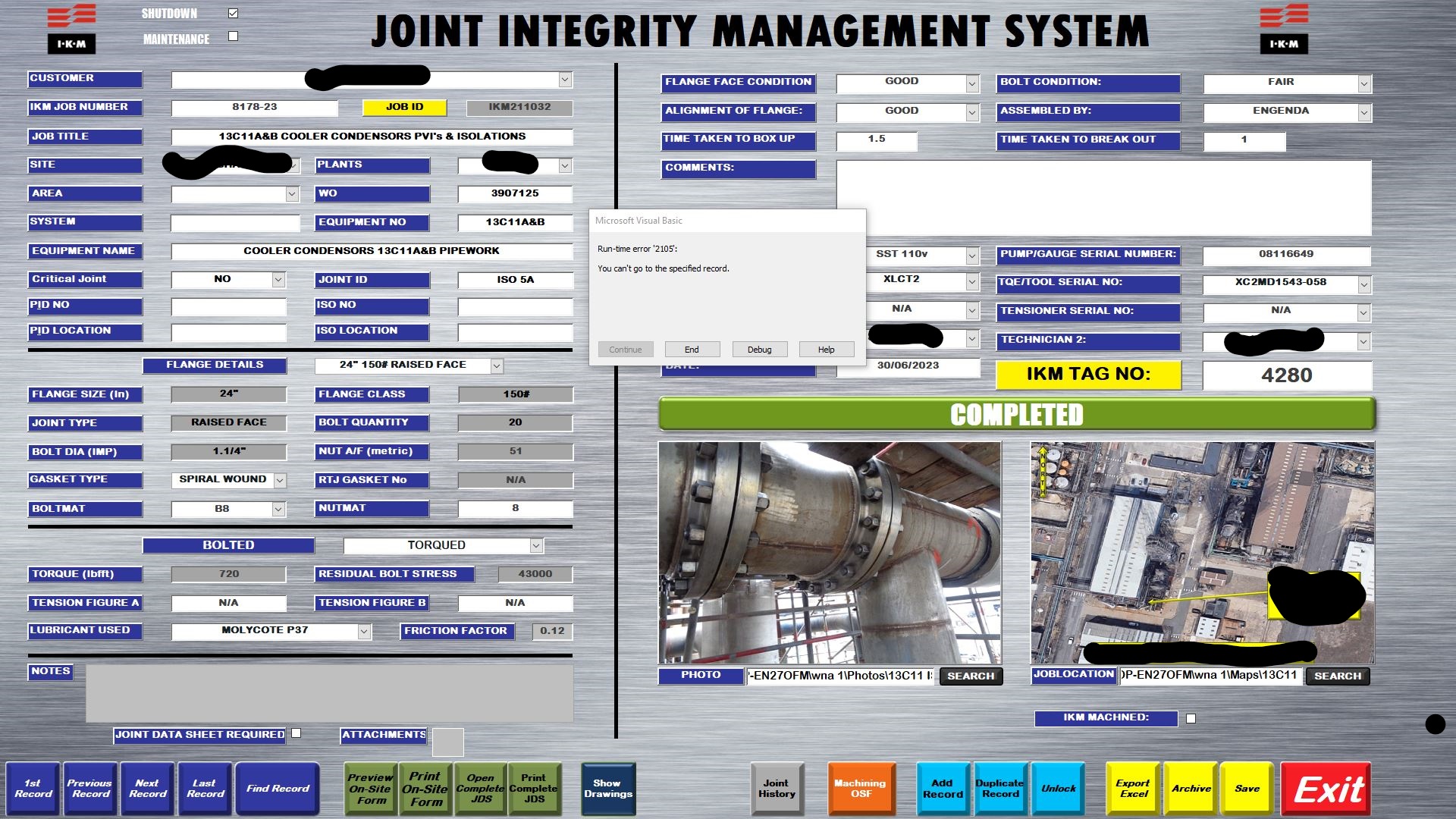
Hi, is it possible to turn off the Microsoft Visual Basic message that pops up? When I'm at the end of my records and press the next button I get a pop up message that says runtime error you can't go to specified record. It then gives you the option to debug it. BUT this is in my front end, I'm worried that someone will hit that button then get access to the VBA in the background and accidentally ruin things!

Many thanks in advance

Chris
Dan Jackson  @Reply  
            
3 years ago
Distribute ACCDE files. NOT ACCDB. They they cant access design or VBA!

You can also hide warning messages in the settings but recommend the above preferably
Kevin Robertson  @Reply  
          
3 years ago
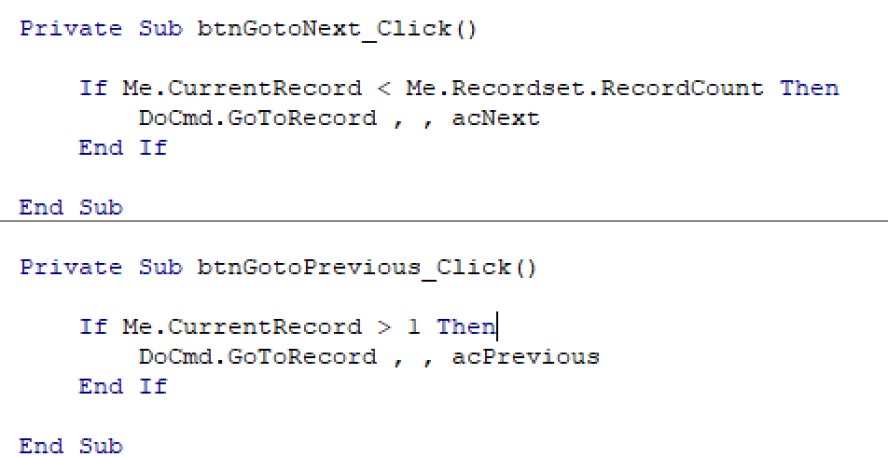
The screenshot below shows how I deal with this particular situation.
Kevin Robertson  @Reply  
          
3 years ago

Chris Nichol OP  @Reply  
     
3 years ago

Chris Nichol OP  @Reply  
     
3 years ago
Hi Kevin, that's great I'll give it a shot!
Chris Nichol OP  @Reply  
     
3 years ago
Hi Dan, sorry to be a pain I'm not the brightest when it comes to this stuff. How would i go about creating a ACCDE file is it just as simple as saving as the file?
Kevin Robertson  @Reply  
          
3 years ago
Did you watch the video Dan shared? Click on the link.
Dan Jackson  @Reply  
            
3 years ago
ACCDE :)
Dan Jackson  @Reply  
            
3 years ago
BTW, kudos on the design - that looks much better than anything I've made :P
Chris Nichol OP  @Reply  
     
3 years ago
Didn't realise that was link! haha. Oh thanks it's only taken me 3 years and about 300 Richard Rost videos to get this far haha.
Richard Rost  @Reply  
          
3 years ago
Kevin's method is best, however you can also use some quick and dirty error handling to have Access ignore errors like that. An On Error Resume Next works wonders, but use it sparingly. See Error Handling
Kevin Yip  @Reply  
     
3 years ago
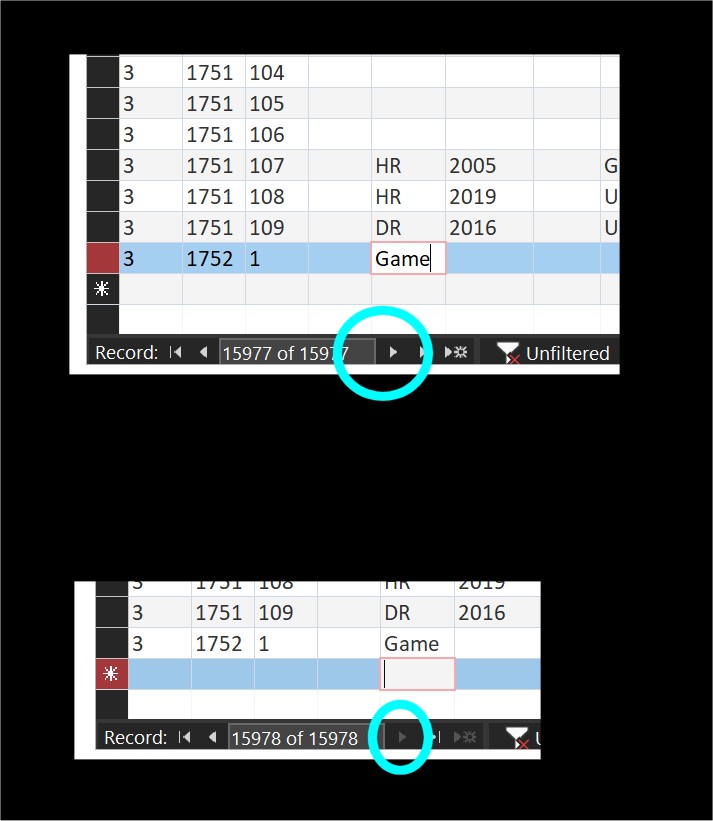
Hi Chris, consider greying out your button when there is no next record to go.  That's how the built-in buttons on Access forms do it (see pictures below).  If the user can't click the button, there won't be a run-time error to worry about.
Kevin Yip  @Reply  
     
3 years ago

Richard Rost  @Reply  
          
3 years ago
Excellent idea.
Kevin Robertson  @Reply  
          
3 years ago
I just implemented Kevin Yip's idea into my test database.
Here's the code I used:

Private Sub EnableDisableNavButtons()

    If Me.Recordset.RecordCount = 0 Then
        btnGotoNext.Enabled = False
        btnGotoPrevious.Enabled = False
    ElseIf Me.CurrentRecord = 1 Then
        btnGotoPrevious.Enabled = False
        btnGotoNext.Enabled = True
    ElseIf Me.CurrentRecord = Me.Recordset.RecordCount Or Me.NewRecord Then
        btnGotoNext.Enabled = False
        btnGotoPrevious.Enabled = True
    Else
        btnGotoNext.Enabled = True
        btnGotoPrevious.Enabled = True
    End If

End Sub


I called this sub in the On Current Event
Kevin Yip  @Reply  
     
3 years ago
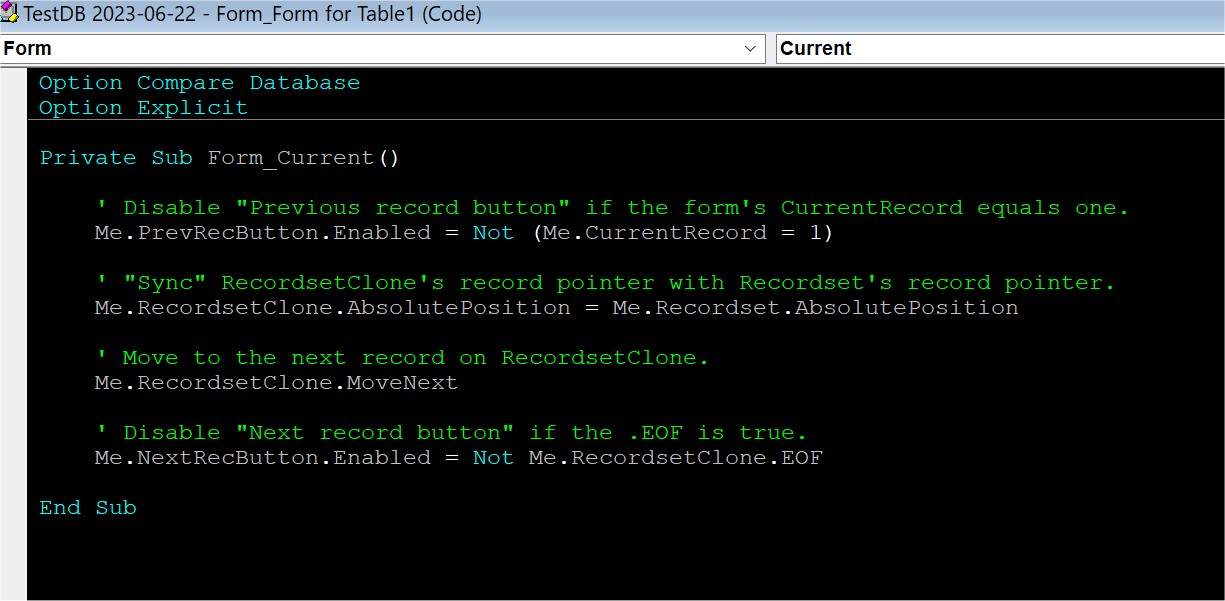
The record count can change due to filters, requeries, etc., and it doesn't get updated until you move to another record and trigger Current event again.  So if you want the effect to occur instantly, .RecordCount may not help.  I would use the .EOF property to check if the current record is the last record.  .EOF only becomes True if you run .MoveNext while on the last record.  And you can't use .MoveNext on the Form.Recordset object because that will affect the form itself.  So you need to use the Form.RecordsetClone property instead, and you need to "sync" its record pointer to Form.Recordset object's record pointer.  My sample code is pictured below.

Having done that, there are still caveats to deal with.  Even if the final record is reached, the next record is still available -- the *new* record, if the form allows record additions.  In that case, the "next record button" should still be enabled.  That's why the Access built-in button is not disabled even if you are at the last record in this case.  RecordCount and EOF properties will not help you in this case.  Maybe the AllowAdditions property can, but I haven't tested.

That's why I usually would just rely on the built-in record buttons instead, in order to save me potentially a lot of work.  P.S.  In my old job, I used mostly unbound forms, removing the prev/next buttons altogether.
Kevin Yip  @Reply  
     
3 years ago

Kevin Yip  @Reply  
     
3 years ago
Just a small point.  In my code above:

     Not (x = 1)

is not the same as:

     Not x = 1

Richard may want to make a video on how important parentheses are (may already have).

This thread is now CLOSED. If you wish to comment, start a NEW discussion in Access Forum.
 

Next Unseen

 
New Feature: Comment Live View


The following is a paid advertisement
Computer Learning Zone is not responsible for any content shown or offers made by these ads.
 

Learn
 
Access - index
Excel - index
Word - index
Windows - index
PowerPoint - index
Photoshop - index
Visual Basic - index
ASP - index
Seminars
More...
Customers
 
Login
My Account
My Courses
Lost Password
Memberships
Student Databases
Change Email
Info
 
Latest News
New Releases
User Forums
Topic Glossary
Tips & Tricks
Search The Site
Code Vault
Collapse Menus
Help
 
Customer Support
Web Site Tour
FAQs
TechHelp
Consulting Services
About
 
Background
Testimonials
Jobs
Affiliate Program
Richard Rost
Free Lessons
Mailing List
PCResale.NET
Order
 
Video Tutorials
Handbooks
Memberships
Learning Connection
Idiot's Guide to Excel
Volume Discounts
Payment Info
Shipping
Terms of Sale
Contact
 
Contact Info
Support Policy
Mailing Address
Phone Number
Fax Number
Course Survey
Email Richard
[email protected]
Blog RSS Feed    YouTube Channel

LinkedIn
Copyright 2026 by Computer Learning Zone, Amicron, and Richard Rost. All Rights Reserved. Current Time: 5/2/2026 10:07:21 AM. PLT: 0s