Free Lessons
Courses
Seminars
TechHelp
Fast Tips
Templates
Topic Index
Forum
ABCD
 
Home   Courses   TechHelp   Help   Contact   Merch   Join   Order   Logon   Forums   
 
Back to Limit Long Text    Comments List
Upload Images   @Reply   Bookmark    Link   Email   Next Unseen 
Long text on report
Simon Levesque 
     
3 years ago
I have a long text field for a record and everything works fine in the form when the user enters more than 255 characters. But when the report is generated, the field is only 255 characters long and I really need to show all the text, how can I do that?
Richard Rost  @Reply  
          
3 years ago
Did you make the control AND the section able to Can Grow?

Let's see some screen shots.
Simon Levesque OP  @Reply  
     
3 years ago
Yes it is an grow for both.
Simon Levesque OP  @Reply  
     
3 years ago
*Can grow. Working on screenshots, everything is in French so I need to change some stuff for the comprehension...
Richard Rost  @Reply  
          
3 years ago
The language doesn't matter. It could be in Klingon. I just want to see what's happening.
Kevin Yip  @Reply  
     
3 years ago
It may be due to the query.  If the query does any "processing" to the long text field, it will truncate it to 255 characters.  For instance, the two queries below will truncate the long text field:

     SELECT DISTINCT LongTextField FROM Table1

     SELECT LongTextField FROM Table1 UNION SELECT LongTextField FROM Table2

because the keywords DISTINCT and UNION do extra processing to the long text field.

The reason is that Access wants to prevent any slow down.  A long text field can store billions of bytes, and Access has to put a limit.

To prevent truncation, make sure no extra processing is done to long text fields.
Simon Levesque OP  @Reply  
     
3 years ago
I do have Select Distinct in my query, how would deal with it considering I have about 20 other fields that is in the Select part
Simon Levesque OP  @Reply  
     
3 years ago
Removing DISTINCT shows a lot of double records. Instead of a 3 pages report, its like 30 pages.
Richard Rost  @Reply  
          
3 years ago
Good catch, Kevin.

Simon, limit your records first with the DISTINCT keyword and then make a 2nd query to bring back in the long text fields after that point.

This has actually been on my list for a video for along time now. Someone asked me this a few months ago. I'll bump it up the list a bit.
Simon Levesque OP  @Reply  
     
3 years ago
Ok thanks guys, Im trying that
Kevin Yip  @Reply  
     
3 years ago
Using DISTINCT doesn't necessarily remove duplicates.  DISTINCT only removes duplicates where ALL corresponding fields have the same data in all the records across the board.  E.g.:

Field1   Field2   Field3
one      two      three

But in a normalized database, you shouldn't see this, ever.  This usually indicates something is wrong in the setup.

DISTINCT will not remove duplicates in cases like below:

Field1   Field2   Field3
one      two      three
one      three    four
one      four     five

You will still see duplicates of "one" in this case, because the records themselves are not duplicates of one another.
Simon Levesque OP  @Reply  
     
3 years ago
Can you suggest a video or other links to find what I can do to improve the databse and get rid of the duplicates. Thanks
Richard Rost  @Reply  
          
3 years ago
Start with Normalizing Data and if you want to get all the details, go to Access Relationship Seminar
Kevin Yip  @Reply  
     
3 years ago
Hi Simon, normalization means each piece of data should be stored in one place only, hence no duplicates.  I doubt you would type every long text in multiple places in your data entry, so I'm guessing you get those duplicates from queries.  But you have 30 pages of duplicates, 30 pages of data where every corresponding column has identical values in every record.  E.g.:

Field1   Field2   Field3
one      two      three
etc.

If the data look like the above, in a table or query, there is something wrong with the data.

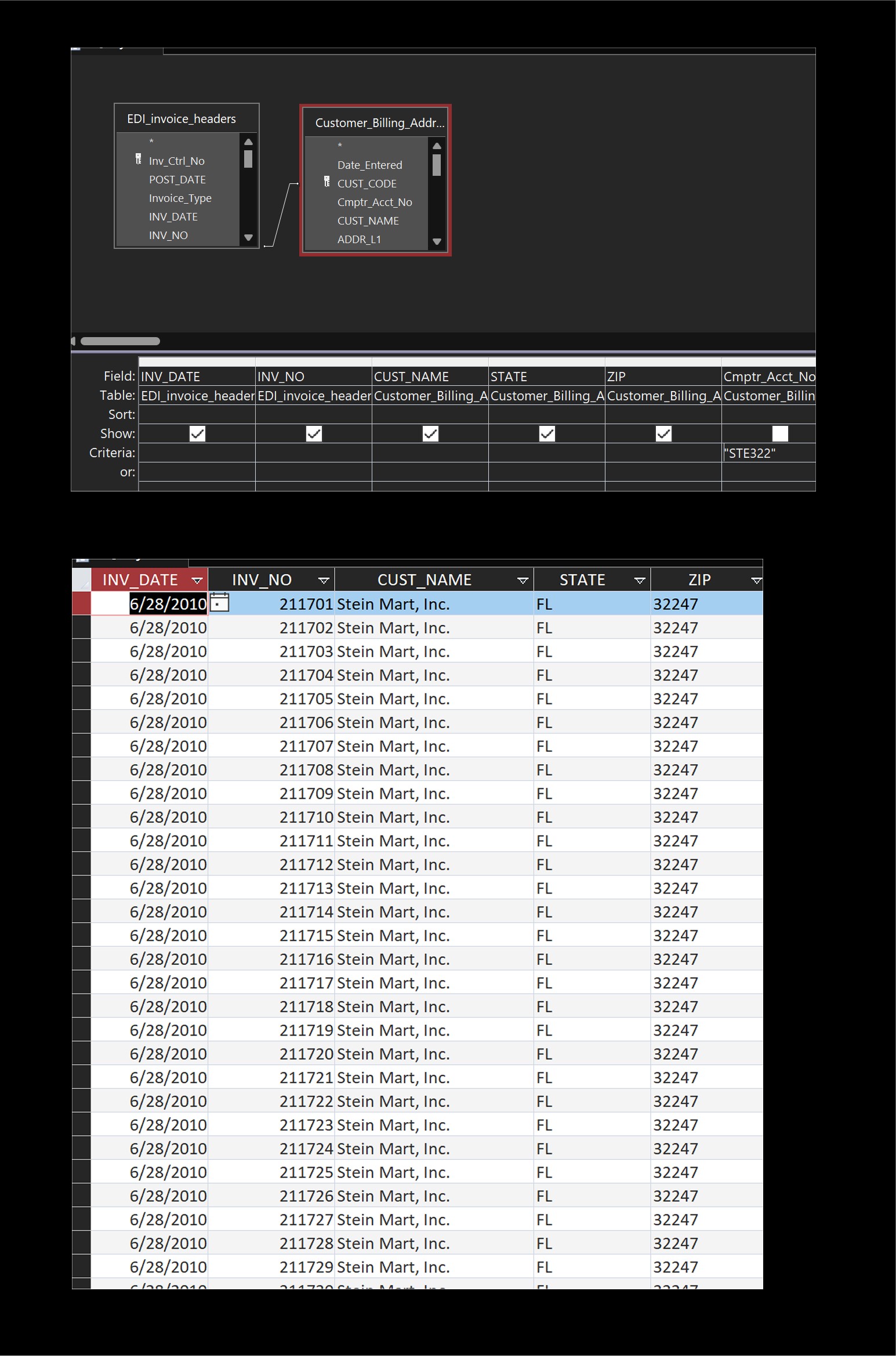
Duplicates that are "normal" would look like the picture below.  This query joins two normalized tables, and result shows some duplicated data.  But each record is *still unique* -- the invoice numbers and dates are different.  If SELECT DISTINCT were used here, it would not affect the result, and those duplicates would not be removed.   In this case the duplicates are "normal" -- that's because if you list all the invoices from the same customer, then naturally the addresses of those customers will be the same in all the records.
Kevin Yip  @Reply  
     
3 years ago

Richard Rost  @Reply  
          
3 years ago
If you can show us a sample of what your data looks like, and your resulting query, that would help.
Simon Levesque OP  @Reply  
     
3 years ago
Found the problem, I was storing a CustomerID and was using a query inside my report query to get the CustomerName instead of the autonumber(I did this originally because I had duplicates from my junction table...). I changed the controls on the report to use a Dlookup instead and everything works fine now, no duplicates and all the long text is there. Thank you all for your time

This thread is now CLOSED. If you wish to comment, start a NEW discussion in Limit Long Text.
 

Next Unseen


What's This?


The following is a paid advertisement
Computer Learning Zone is not responsible for any content shown or offers made by these ads.
 

Learn
 
Access - index
Excel - index
Word - index
Windows - index
PowerPoint - index
Photoshop - index
Visual Basic - index
ASP - index
Seminars
More...
Customers
 
Login
My Account
My Courses
Lost Password
Memberships
Student Databases
Change Email
Info
 
Latest News
New Releases
User Forums
Topic Glossary
Tips & Tricks
Search The Site
Code Vault
Collapse Menus
Help
 
Customer Support
Web Site Tour
FAQs
TechHelp
Consulting Services
About
 
Background
Testimonials
Jobs
Affiliate Program
Richard Rost
Free Lessons
Mailing List
PCResale.NET
Order
 
Video Tutorials
Handbooks
Memberships
Learning Connection
Idiot's Guide to Excel
Volume Discounts
Payment Info
Shipping
Terms of Sale
Contact
 
Contact Info
Support Policy
Mailing Address
Phone Number
Fax Number
Course Survey
Email Richard
[email protected]
Blog RSS Feed    YouTube Channel

LinkedIn
Copyright 2026 by Computer Learning Zone, Amicron, and Richard Rost. All Rights Reserved. Current Time: 9/6/2026 2:43:18 AM. PLT: 1s