Free Lessons
Courses
Seminars
TechHelp
Fast Tips
Templates
Topic Index
Forum
ABCD
 
Home   Courses   TechHelp   Forums   Help   Contact   Merch   Join   Order   Logon  
 
Back to Access Forum    Comments List
Upload Images   @Reply   Bookmark    Link   Email   Next Unseen 
Reference Field on Tab Control
Jerry Fowler 
       
3 years ago
Ok hopefully I can explain this.....

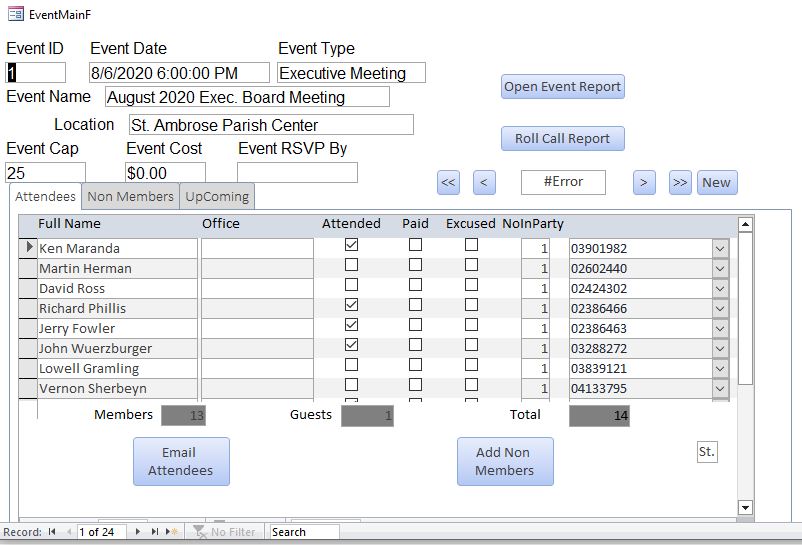
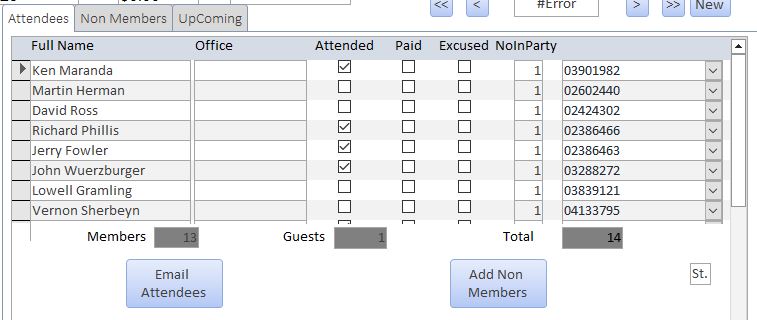
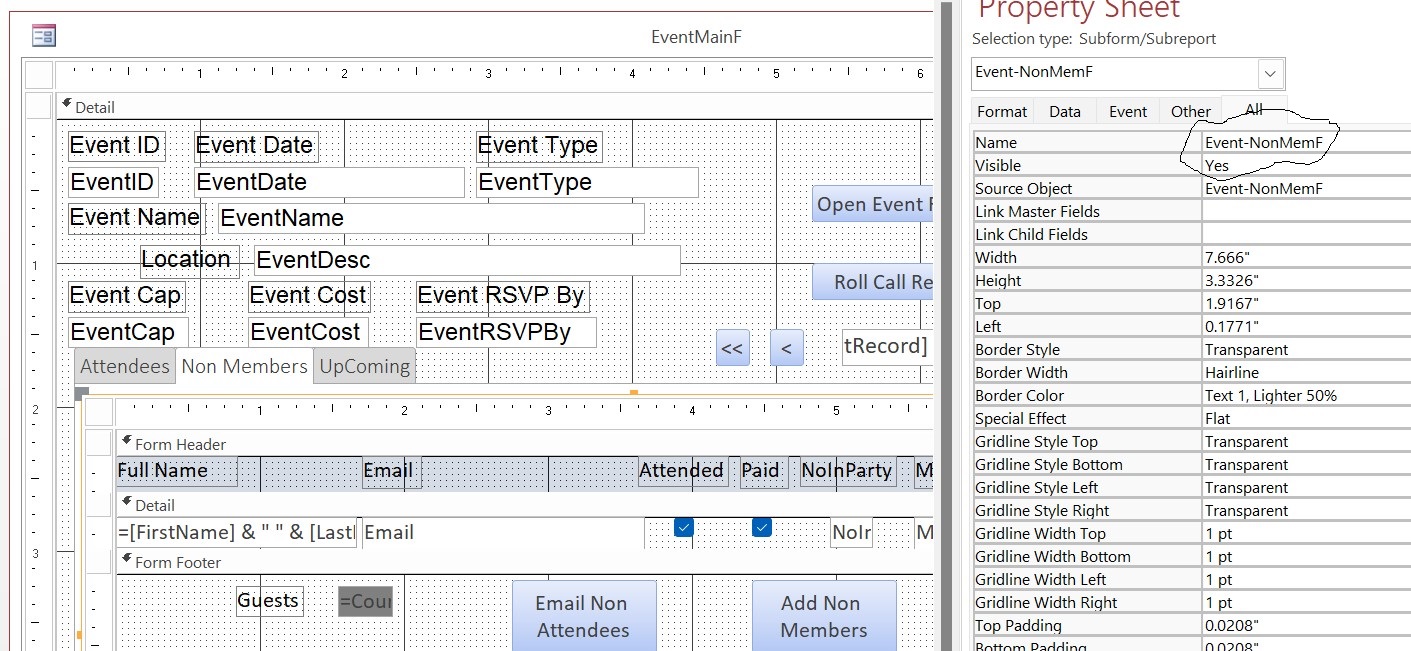
I have a form (EventMainF) that has a tab control with 3 tabs (Attendees, Non Members, and Upcoming.

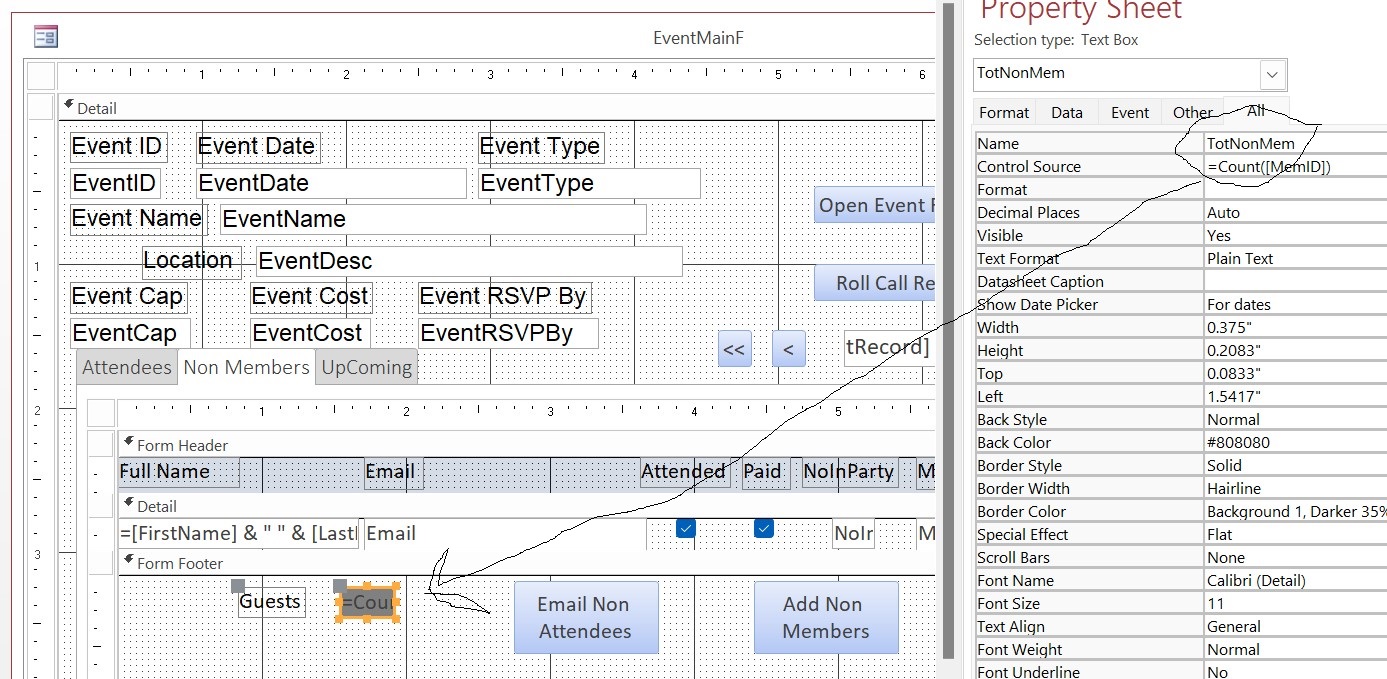
I have a field on the first tab called (TotGuest) I would like to reference a field on the 2nd tab called (TotNonMem) both have labels that say Guest. the subform that is on the 1st bad is called (Event-AttendeeF) and the subform on the 2nd tab s called (Event-NonMemF).

I have tried in the TotGuest field on the 1st tab;

=[TotNonMem]
=[Form]![Event-NonMemF]![TotNonMem]
=[Form]!Event-MainF]![Event-NonMemF]![Forms][TotNonMem]

and quite a few others. I'm not sure how to reference the field, using either the subform name or the tab control name, or a combination.

I am attaching screenshots
Jerry Fowler OP  @Reply  
       
3 years ago

Jerry Fowler OP  @Reply  
       
3 years ago

Jerry Fowler OP  @Reply  
       
3 years ago

Kevin Robertson  @Reply  
          
3 years ago
Refer to the control as you would a Subform.
You were almost correct with the third try listed above.

=[Forms]!Event-MainF]![Event-NonMemF].[Form]![TotNonMem]

Value From a Form
Value From Subform
Jerry Fowler OP  @Reply  
       
3 years ago
Makes Sense, Thanks.

So just refer to these as if they were a subform, and not as their tab control name.
Richard Rost  @Reply  
          
3 years ago
Indeed, the tab control isn't really a container in the sense that it doesn't hold the controls inside it like a subform would. It's more of a mechanism to manage the visibility of controls on your form. These controls are just placed on the form and the tab control helps to show or hide them as needed. And did I mention I really hate tab controls? :)
Jerry Fowler OP  @Reply  
       
3 years ago
Kevin, I gave it a try, did have to make one tiny change and add the [

=[Forms]![Event-MainF]![Event-NonMemF].[Form]![TotNonMem]

but I'm still getting a #Name? error the forms and field are spelt correctly
Jerry Fowler OP  @Reply  
       
3 years ago
Rick do they rank up there with split forms??? lol
Kevin Yip  @Reply  
     
3 years ago
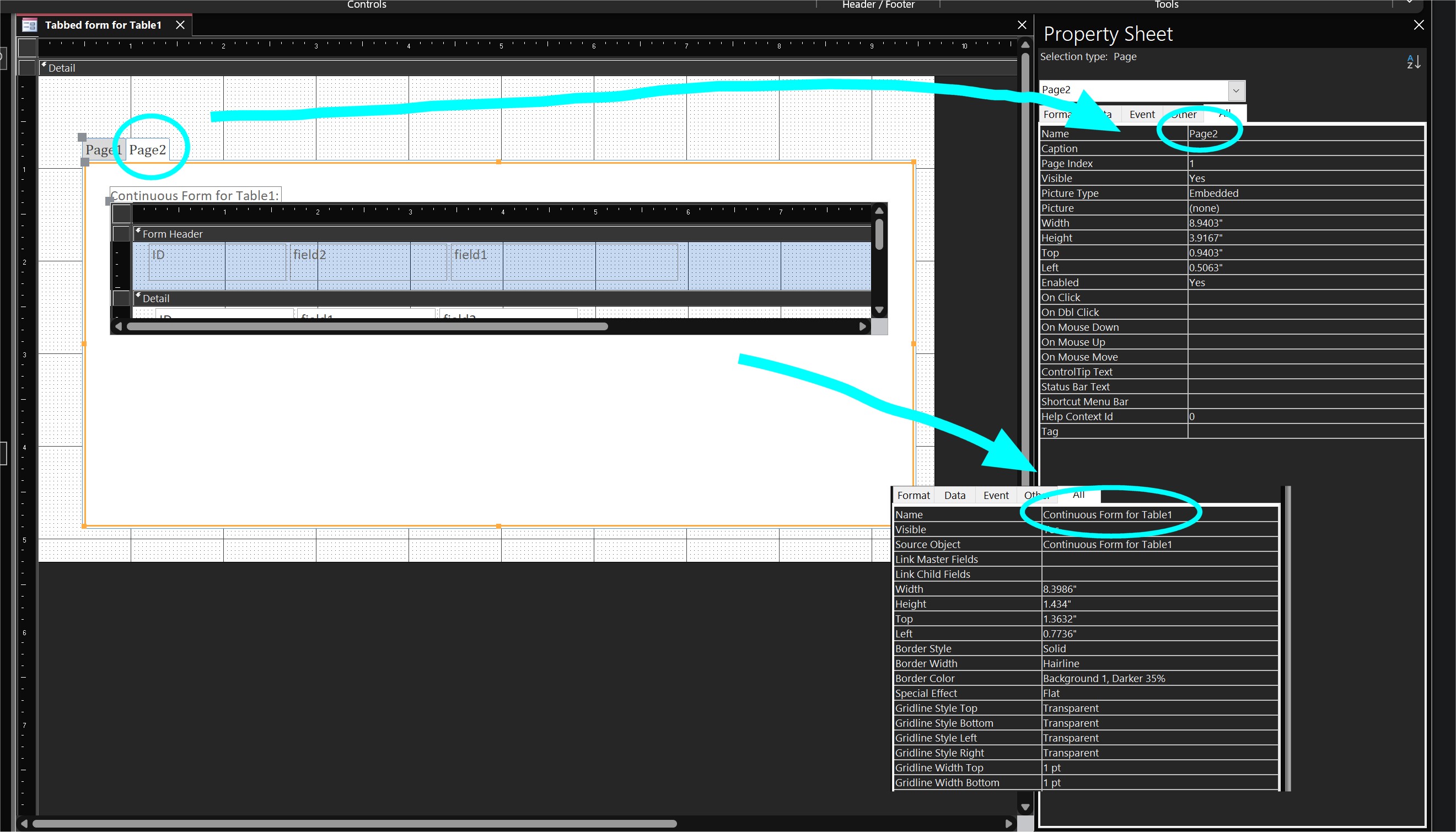
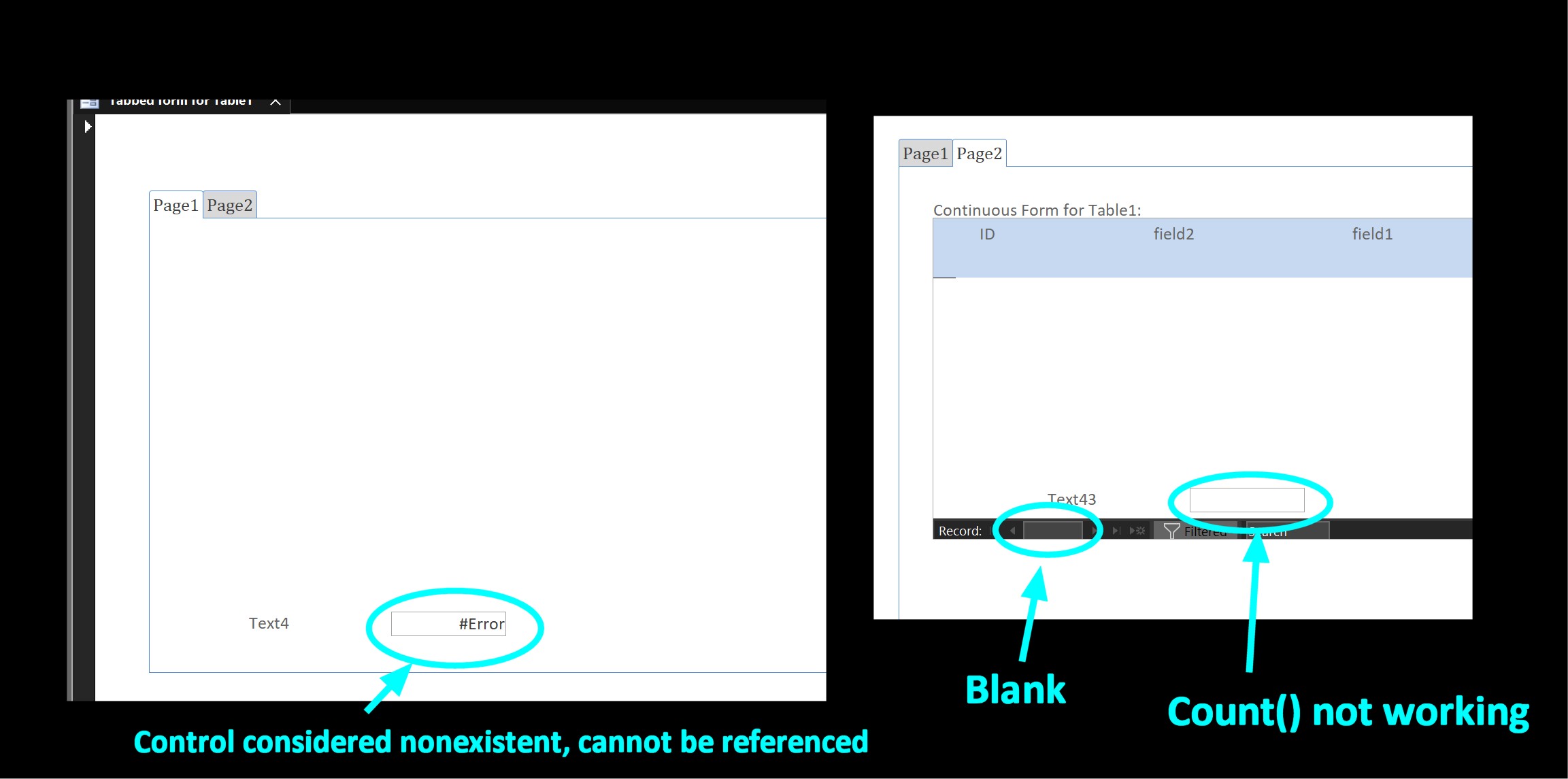
Hi Jerry, make sure you reference not the tab's name, but the actual subform control's name.  See picture below.  All the tabs have their own names, and that's one of the reasons Richard (and other users) dislike them.  It's a confusing system.  Tabs have names so you can set their focus.  But you should use the name of the subform control inside the tab in references.
Kevin Yip  @Reply  
     
3 years ago

Jerry Fowler OP  @Reply  
       
3 years ago
Here are screenshots of the form and the field. I can send anything you might require.
Jerry Fowler OP  @Reply  
       
3 years ago

Jerry Fowler OP  @Reply  
       
3 years ago

Jerry Fowler OP  @Reply  
       
3 years ago
This is my last form to use the Tab Controls, I have switched all my others over to using something like this

SubFormCTL.SourceObject = "MembershipF"

I'll get to this one eventually.  Sorry to be such a bother
Kevin Yip  @Reply  
     
3 years ago
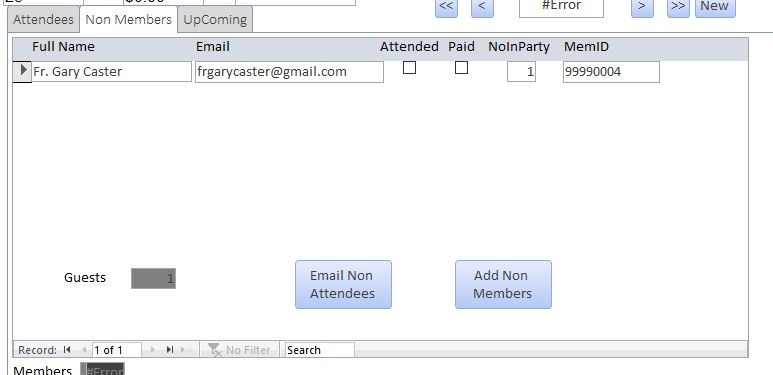
In your third screenshot, I see that the Non-Members form seems to have AllowAdditions set to false (it doesn't have a blank line to add a new record).  If that form has no record, it will be totally empty, and the record selector that normally shows "n of n" will be *blank* (see picture below).  In that case, the form will behave as if the whole form doesn't exist.  Anything you put in the footer will also be considered nonexistent.  That may be why you get an error when you try to reference that control elsewhere.  The Count() function will not give you zero, because it is not evaluated -- because the control itself is considered nonexistent.  This has to do with how forms work, and nothing to do with tab controls.  Please confirm if this is in fact what you are seeing.  Then we will think of a solution.
Kevin Yip  @Reply  
     
3 years ago

Jerry Fowler OP  @Reply  
       
3 years ago
Thanks ever so much for the effort I must have something else set wrong as I did change the for to allow Additions and even set the default value to Zero.  The counter is working on the Non Members tab. I'm going to break down and redo the form to use the SubFormCTL.SourceObject = like my other forms.  I see why Rick does not like to use them.  I won't take up any further time on this you can close it.
Jerry Fowler OP  @Reply  
       
3 years ago
OK, I don't know why I didn't do this in the first place.

=DCount("MemID","NonMemT","EventID =" & EventID

It's one of those "step back ask 5 people and then leave it for a day and come back to it" kind of things I guess.
Richard Rost  @Reply  
          
3 years ago
That's OK. That's what you're here for... to learn.

This thread is now CLOSED. If you wish to comment, start a NEW discussion in Access Forum.
 

Next Unseen

 
New Feature: Comment Live View


The following is a paid advertisement
Computer Learning Zone is not responsible for any content shown or offers made by these ads.
 

Learn
 
Access - index
Excel - index
Word - index
Windows - index
PowerPoint - index
Photoshop - index
Visual Basic - index
ASP - index
Seminars
More...
Customers
 
Login
My Account
My Courses
Lost Password
Memberships
Student Databases
Change Email
Info
 
Latest News
New Releases
User Forums
Topic Glossary
Tips & Tricks
Search The Site
Code Vault
Collapse Menus
Help
 
Customer Support
Web Site Tour
FAQs
TechHelp
Consulting Services
About
 
Background
Testimonials
Jobs
Affiliate Program
Richard Rost
Free Lessons
Mailing List
PCResale.NET
Order
 
Video Tutorials
Handbooks
Memberships
Learning Connection
Idiot's Guide to Excel
Volume Discounts
Payment Info
Shipping
Terms of Sale
Contact
 
Contact Info
Support Policy
Mailing Address
Phone Number
Fax Number
Course Survey
Email Richard
[email protected]
Blog RSS Feed    YouTube Channel

LinkedIn
Copyright 2026 by Computer Learning Zone, Amicron, and Richard Rost. All Rights Reserved. Current Time: 5/7/2026 5:19:11 AM. PLT: 1s