Free Lessons
Courses
Seminars
TechHelp
Fast Tips
Templates
Topic Index
Forum
ABCD
 
Home   Courses   TechHelp   Forums   Help   Contact   Merch   Join   Order   Logon  
 
Back to Access Forum    Comments List
Upload Images   @Reply   Bookmark    Link   Email   Next Unseen 
SQL Transactions Since Zero
Shia G. 
   
3 years ago
I'm currently working on a project involving a table that contains customer transactions. Each customer (CustID) has both credit and debit transactions. My goal is to formulate a query that retrieves all transactions since the last time each individual customer's total balance was more than zero (in Credit).

The reason for this query is that I'm preparing statements for customers, and I want to start these statements with the transactions from the last instance their account balance was at zero or higher.

I'm open to any suggestions or guidance you might have regarding how to achieve this. I'm comfortable with VBA coding as well, so if a solution involves coding, I'm ready to dive into that.

Thank you in advance for your assistance!
Shia G. OP  @Reply  
   
3 years ago
sorry forgot to mention that i am dealing with tens of thousands of transaction so the query should to be able to deal with large data
Kevin Yip  @Reply  
     
3 years ago
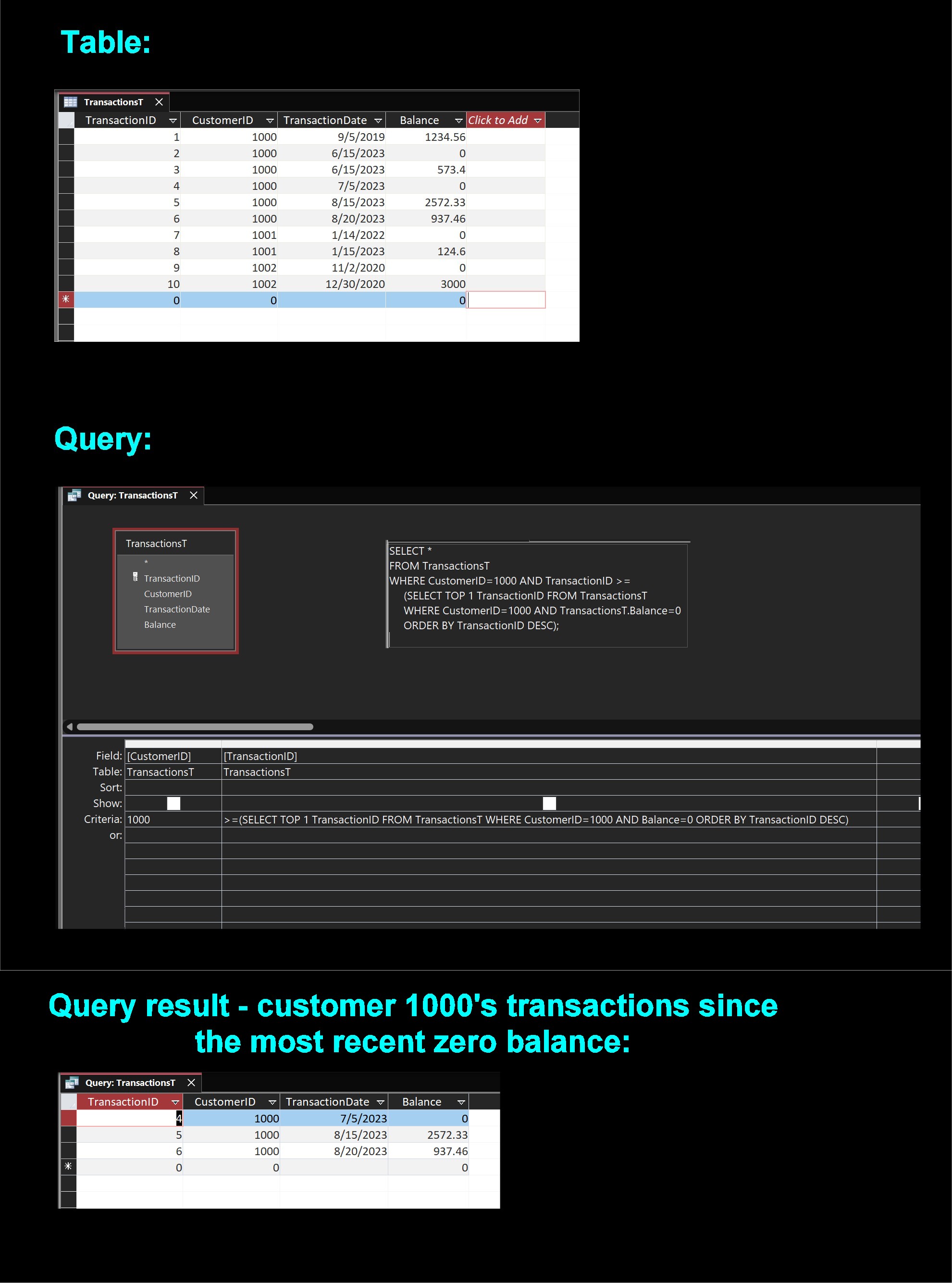
Suppose your transaction table looks like the one below, then the query for doing this is as shown below.  As far as I know this would be the simplest way, using only a single query with no VBA needed.

Each transaction should have its own unique transaction ID, because nothing else can uniquely identify a transaction -- not date, customer ID, or balance, because they are often not unique.  When a transaction is created, a new and unique transaction ID is made for it.  So the autonumber data type would be great for transaction ID.

The important thing is to find out which *most recent* transaction of a customer (say, customer ID 1000) has a balance of zero.  This can be done with this query:

     SELECT TOP 1 TransactionID FROM TransactionsT WHERE CustomerID=1000 AND Balance=0 ORDER BY TransactionID DESC;

The "DESC" at the end sorts everything descendingly, with the most recent transactions on top (because TransactionID has higher values for the more recent items).  The WHERE clause brings out only the records for customer 1000 that have a balance of zero.  So the topmost item (indicated by "TOP 1" at the start) is the most recent item with zero balance for this customer.

Then we create a "nested query", by putting the query above into another query.  The result is the second picture below.  If we know the TransactionID (let's call it A here) of most recent transaction for customer 1000 and balance zero, then can we find out all ensuing transactions with the query:

    SELECT * FROM TransactionsT WHERE TransactionID >= A

And this is why the resulting query is:

     SELECT * FROM TransactionsT WHERE TransactionID >= (SELECT TOP 1 TransactionID FROM TransactionsT WHERE CustomerID=1000 AND Balance=0 ORDER BY TransactionID DESC)
Kevin Yip  @Reply  
     
3 years ago

Shia G. OP  @Reply  
   
3 years ago
Thanks Kevin you're a real genius
I need 2 amendments to this code 1) Sometimes a user enters a transaction with an earlier date, so the TransactionID will be a new one, but the date an old one, 2) how can i change the query to deal with all CustID not only CustID 1000?

Kevin Yip  @Reply  
     
3 years ago
You're welcome.  If you use running balances in your table, then all records need to be entered in order.  If you enter an earlier transaction, it will affect all the running balances of the later transactions.  Bank statements, credit card bills, etc. all work the same way.  You can't enter something that occurred, say, 3 months ago without affecting all the data in the past 3 months.  The real-world application of a running balance seems to require things to be entered in the exact order they occurred.

To your second question, since the criteria for each customer are different, you'll need to run separate queries for individual customers.  In SQL Server, you can create a loop inside a query to process each customer.  But in Access, you need VBA to do such a thing: use a Recordset loop to access each customer in the customer table, and create a query like the above for each.
Shia G. OP  @Reply  
   
3 years ago
Thanks Kevin
Regarding running balances, no running balance is recorded upon the user's transaction submission. Instead, I've developed a query that calculates the running balance when generating the Report (Statement).

And regarding looping with recordset, I'm unsure how to do looping in VBA and subsequently presenting the results within a report. Are there any TechHelp available that offer guidance on utilizing a VBA loop to input data into a Report?
Kevin Yip  @Reply  
     
3 years ago
If balances have to be calculated every time, it could be time-consuming since you have tens of thousands of records as you said.  My suggestion is, again, put the balances directly in the table.  And for that to work, transactions have to be entered in order.  If you allow them to be entered out of order, you are essentially allowing the running balances to be changed, which never happens in real life.  E.g., on your bank statements, you can't add $300 to a transaction 2 years ago so that your balance today will be $300 more; that just can't happen.  If your database has similar real-life purposes, then you should put the balances in the table, enter records in order, and make the records unchangeable once they are entered.

This site should have all the necessary videos on Recordset and VBA.  I'll defer to the other experts on which videos to see (there may be a lot), since I'm not familiar with them.  P.S. Unlike the other moderators here, I'm not a student of this site (that's why I have no badges).  I'm an "outsider" whom Richard invited to join this forum.  That's why I only answer questions in the Access general forum sections instead of the course and seminar sections.

This thread is now CLOSED. If you wish to comment, start a NEW discussion in Access Forum.
 

Next Unseen

 
New Feature: Comment Live View


The following is a paid advertisement
Computer Learning Zone is not responsible for any content shown or offers made by these ads.
 

Learn
 
Access - index
Excel - index
Word - index
Windows - index
PowerPoint - index
Photoshop - index
Visual Basic - index
ASP - index
Seminars
More...
Customers
 
Login
My Account
My Courses
Lost Password
Memberships
Student Databases
Change Email
Info
 
Latest News
New Releases
User Forums
Topic Glossary
Tips & Tricks
Search The Site
Code Vault
Collapse Menus
Help
 
Customer Support
Web Site Tour
FAQs
TechHelp
Consulting Services
About
 
Background
Testimonials
Jobs
Affiliate Program
Richard Rost
Free Lessons
Mailing List
PCResale.NET
Order
 
Video Tutorials
Handbooks
Memberships
Learning Connection
Idiot's Guide to Excel
Volume Discounts
Payment Info
Shipping
Terms of Sale
Contact
 
Contact Info
Support Policy
Mailing Address
Phone Number
Fax Number
Course Survey
Email Richard
[email protected]
Blog RSS Feed    YouTube Channel

LinkedIn
Copyright 2026 by Computer Learning Zone, Amicron, and Richard Rost. All Rights Reserved. Current Time: 5/6/2026 6:52:11 AM. PLT: 0s