Free Lessons
Courses
Seminars
TechHelp
Fast Tips
Templates
Topic Index
Forum
ABCD
 
Home   Courses   TechHelp   Forums   Help   Contact   Merch   Join   Order   Logon  
 
Back to Access Forum    Comments List
Upload Images   @Reply   Bookmark    Link   Email   Next Unseen 
MisAligned Reports in PDF
Joseph Abrigo 
      
3 years ago
Why do the borders keep changing the alignment?

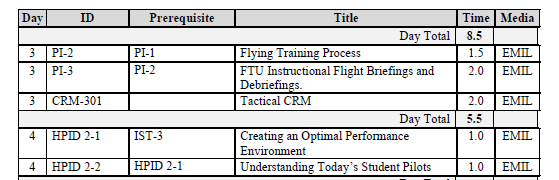
I have designed reports with borders around each data field so it looks like a table when it prints to PDF.  all the borders line up and print out correctly, but when i change to a different user on a different compute / monitor.  some of the borders aren't lined up when I print to PDF

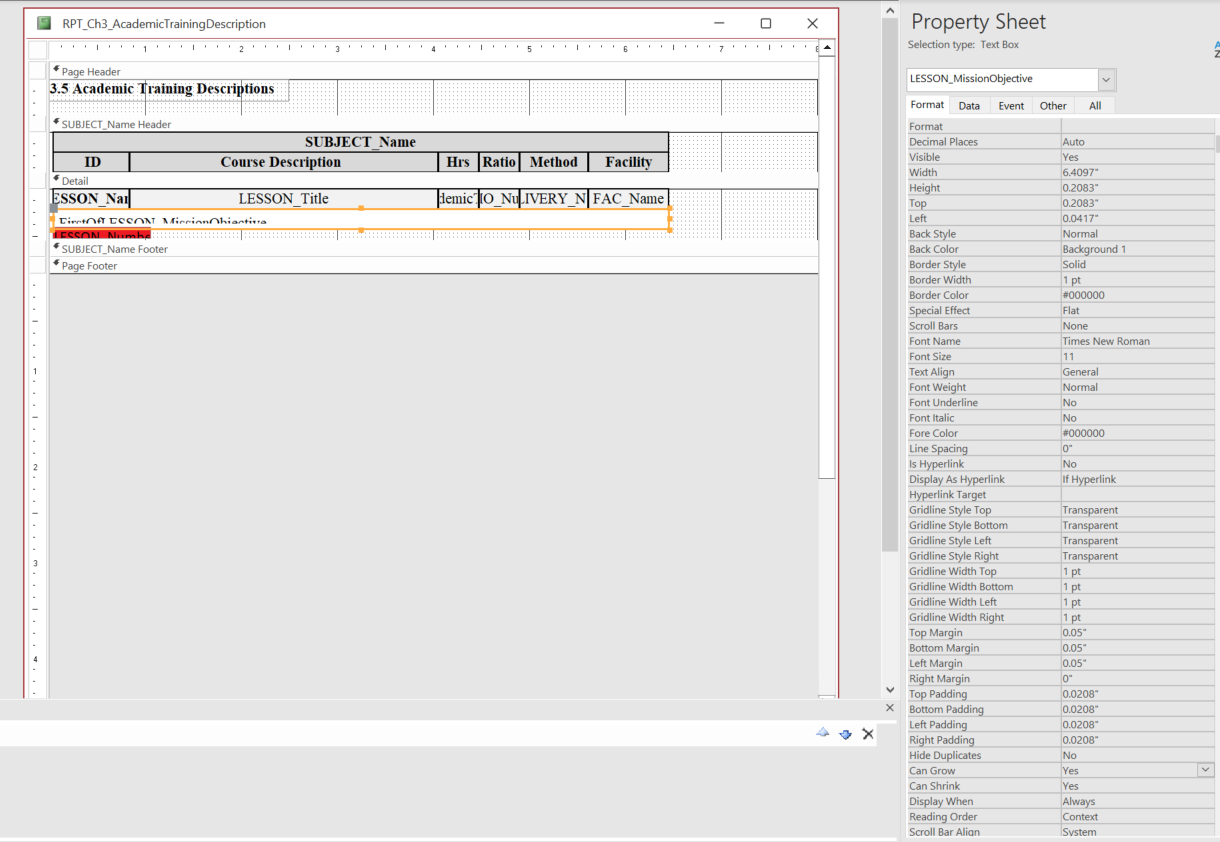
1. Grouped by Subject with a Header
2. Detail section:
   a.first line has 6 data fields that are Arranged(tabular), no control padding, Can    grow
   b. second line: one data field that is the entire width of the report, can grow.
Scott Axton  @Reply  
        
3 years ago
Unfortunately I think this is more of a Windows / Computer thing than an Access thing.

I had the same issue before even using Word or Excel.  Even if you cloned the computer you might have slight differences in user preferences and set up.  Printer drivers and monitor drivers can play a factor.

You might try printing to PDF then print out the PDF.  That should bypass the differences because you are printing an image not sending the data directly to the printer.
Joseph Abrigo OP  @Reply  
      
3 years ago

Joseph Abrigo OP  @Reply  
      
3 years ago
the right side goes out of alignment when I use another computer.  I have to adjust, resave and print.
Scott Axton  @Reply  
        
3 years ago
That appears to me to be a positioning and formatting issue.  Can you post a pic in design view please?
Scott Axton  @Reply  
        
3 years ago
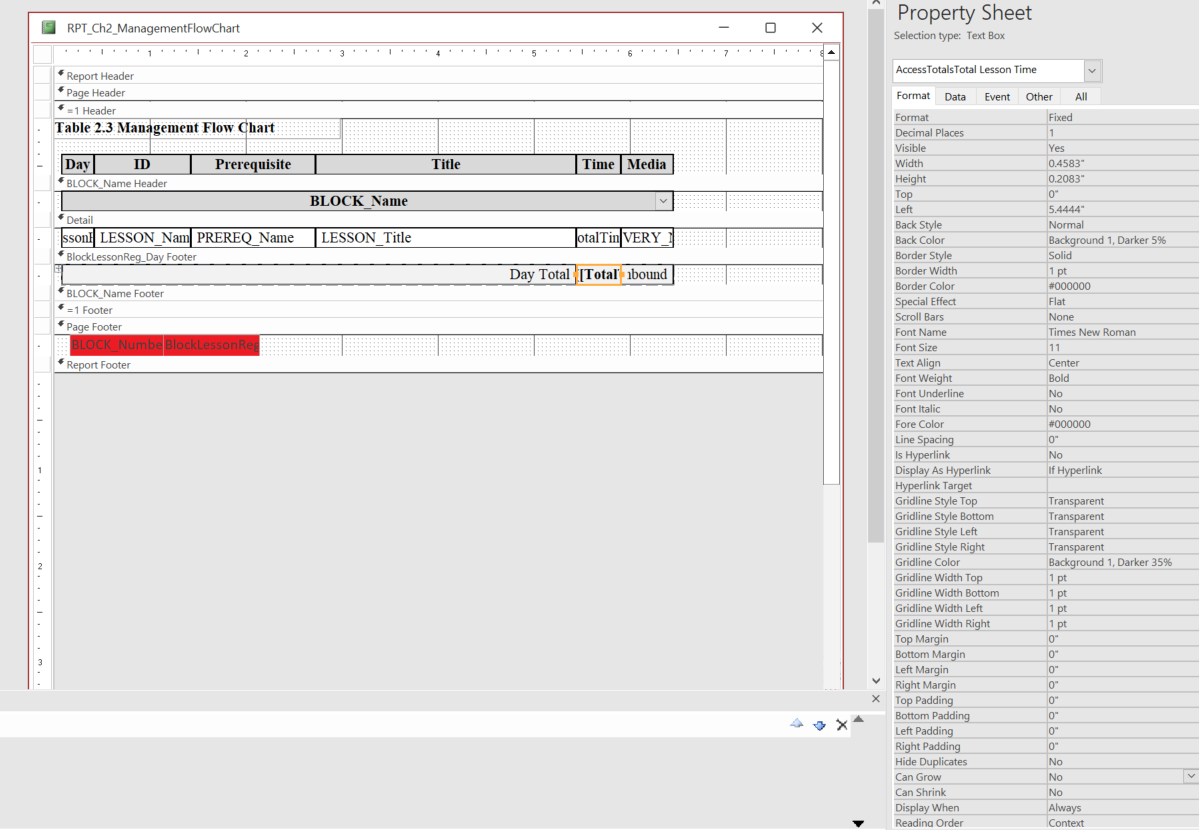
Note how the  Day Totals line has differing "weight"  of the box outline than the detail lines.  Try using the format painter to make sure they are formatted the same.

Just in case you aren't already - BACKUP  Work with a copy while you are trying different things.  It's easier to go back to a previous version than start over if something goes haywire.
Joseph Abrigo OP  @Reply  
      
3 years ago

Joseph Abrigo OP  @Reply  
      
3 years ago

Joseph Abrigo OP  @Reply  
      
3 years ago
The latest upload is the correct.  I have already corrected the alignment
Joseph Abrigo OP  @Reply  
      
3 years ago
When I go another computer, the alignment will be just a little off.
Joseph Abrigo OP  @Reply  
      
3 years ago

Joseph Abrigo OP  @Reply  
      
3 years ago
I just reopened the same file and it changed again.  very frustrating
Kevin Robertson  @Reply  
          
3 years ago
Does explicitly setting the widths of the Labels and Text Boxes in code when the Report opens help any?
Joseph Abrigo OP  @Reply  
      
3 years ago
it fixes it for a little bit, but then could change the next time I open the report
Joseph Abrigo OP  @Reply  
      
3 years ago
Kevin, what do you mean by Widths "in Code"?
Kevin Robertson  @Reply  
          
3 years ago
First you will need to get the width. You can use MsgBox for this.
I will use FirstName as an example.
MsgBox FirstName.Width

Make a note of these in Notepad. You will need them to set the values.
FirstName.Width = 3000
Joseph Abrigo OP  @Reply  
      
3 years ago
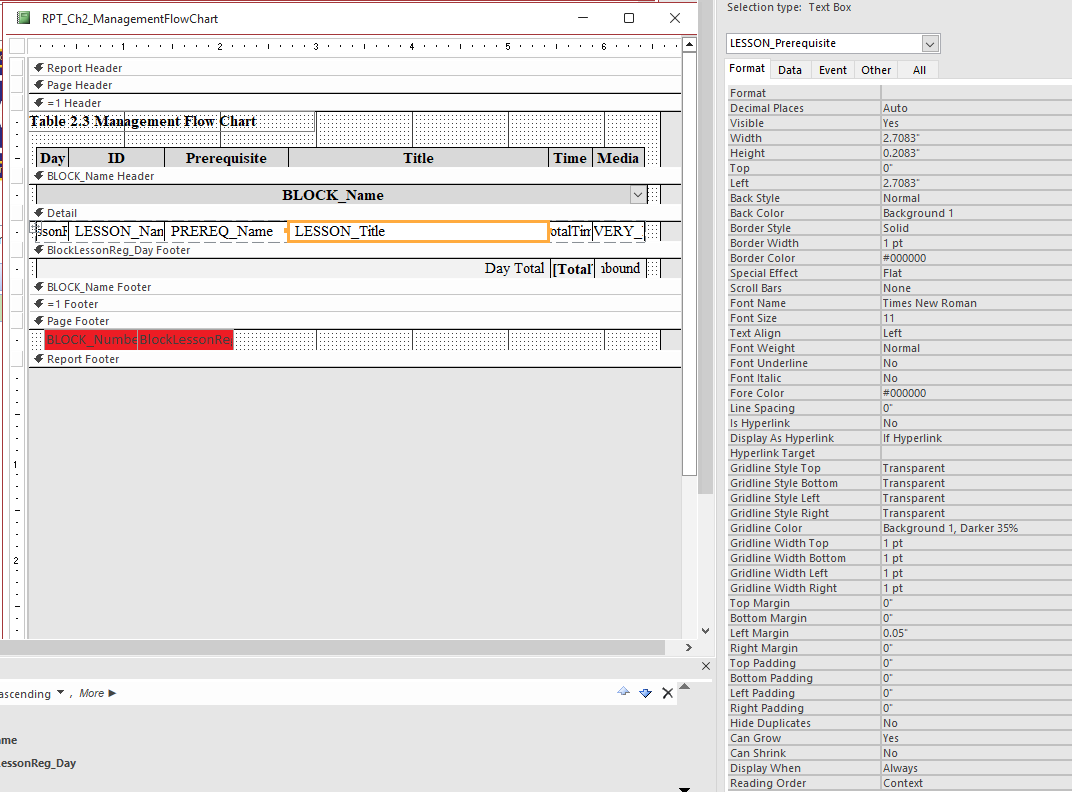
I got it to work using, VBA, OnLoad Block_Name.width = 9170.  When I print it by itself.
However, As a Sub-Report, the width does not stay.
this table is used as a Sub-Report of another Sub-Report.  

How do I keep the width when used as a sub-report
Joseph Abrigo OP  @Reply  
      
3 years ago
Kevin, Found the solution!!!!  Thank you for the lead.  would not have found it without it.
OnOpen Block_Name.width = 9170
it holds the size in the sub-report

This thread is now CLOSED. If you wish to comment, start a NEW discussion in Access Forum.
 

Next Unseen

 
New Feature: Comment Live View


The following is a paid advertisement
Computer Learning Zone is not responsible for any content shown or offers made by these ads.
 

Learn
 
Access - index
Excel - index
Word - index
Windows - index
PowerPoint - index
Photoshop - index
Visual Basic - index
ASP - index
Seminars
More...
Customers
 
Login
My Account
My Courses
Lost Password
Memberships
Student Databases
Change Email
Info
 
Latest News
New Releases
User Forums
Topic Glossary
Tips & Tricks
Search The Site
Code Vault
Collapse Menus
Help
 
Customer Support
Web Site Tour
FAQs
TechHelp
Consulting Services
About
 
Background
Testimonials
Jobs
Affiliate Program
Richard Rost
Free Lessons
Mailing List
PCResale.NET
Order
 
Video Tutorials
Handbooks
Memberships
Learning Connection
Idiot's Guide to Excel
Volume Discounts
Payment Info
Shipping
Terms of Sale
Contact
 
Contact Info
Support Policy
Mailing Address
Phone Number
Fax Number
Course Survey
Email Richard
[email protected]
Blog RSS Feed    YouTube Channel

LinkedIn
Copyright 2026 by Computer Learning Zone, Amicron, and Richard Rost. All Rights Reserved. Current Time: 5/6/2026 4:06:22 PM. PLT: 1s