Free Lessons
Courses
Seminars
TechHelp
Fast Tips
Templates
Topic Index
Forum
ABCD
 
Home   Courses   TechHelp   Forums   Help   Contact   Merch   Join   Order   Logon  
 
Back to Access Forum    Comments List
Upload Images   @Reply   Bookmark    Link   Email   Next Unseen 
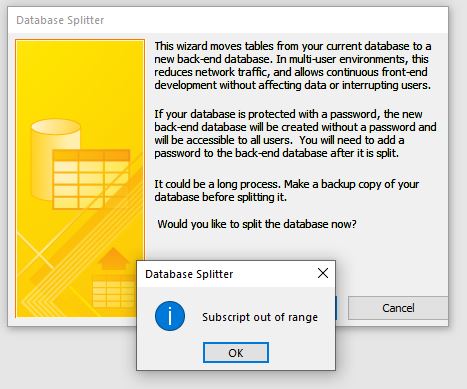
Subscript out of range
John Yeung 
     
3 years ago
when I split my database , it popped out " Subscript out of range "  . What does it mean ? How to fix it ?
John Yeung OP  @Reply  
     
3 years ago

Kevin Yip  @Reply  
     
3 years ago
This is likely due to the database splitter having problem processing one of the tables.  Check which tables were successfully split.  The splitter likely stopped at problematic the table, so one of the tables that weren't split is the culprit.  Try manually splitting those instead.  I always manually split tables and never use the splitter tool, which may have bugs.
John Yeung OP  @Reply  
     
3 years ago
thanks Kevin, would you talk a little bit more about how to manual split
thanks
Scott Axton  @Reply  
        
3 years ago
Watch this first:  Split Your Database

Actually not difficult at all.  Back up your current db.
Make two copies of it.  Name the first one "yourname"FE.accdb (FE = Front End)
Name the second one yournameBE.accdb (BE = Back End)
The name isn't important just so you know which is which.

Open the Back End copy and delete everything except the tables.  Save and Close it.
Open the Front End.  Delete all of the tables.
Now go to External Data --> New Data Source --> From Data Base -->  Access
In the dialog that comes up choose Link to the data source by creating linked table.
In the top line browse to the location of your BE copy.
In the next form that comes up select all of your tables and Click OK

John Yeung OP  @Reply  
     
3 years ago
thanks Scott, I did it
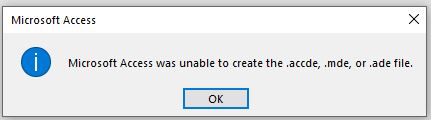
But the front end cannot be save as .accde  file
John Yeung OP  @Reply  
     
3 years ago

Richard Rost  @Reply  
          
3 years ago
You probably have a syntax error in your vba code. Debug compile.
John Yeung OP  @Reply  
     
3 years ago
Thanks Richard
It works
Richard Rost  @Reply  
          
3 years ago
Yeah, this comes up a lot. It's one of those error messages that could be a little clearer. They could easily add "try compiling your VBA" to that error message, but it's one of those things that unless you've experienced it, you don't know to look for it. Next time you get an error message, Google the exact text. In this particular case, you would have found my compile video; I just checked, and it's the number one video for that search.

And if you do search for an error message and my video doesn't show up, then let me know and I'll make one. LOL, that's my goal... To be the number one video for anything Access related.
John Yeung OP  @Reply  
     
3 years ago
with the help of your videos and your team and chatGPT
I solve 90% of my questions

This thread is now CLOSED. If you wish to comment, start a NEW discussion in Access Forum.
 

Next Unseen

 
New Feature: Comment Live View


The following is a paid advertisement
Computer Learning Zone is not responsible for any content shown or offers made by these ads.
 

Learn
 
Access - index
Excel - index
Word - index
Windows - index
PowerPoint - index
Photoshop - index
Visual Basic - index
ASP - index
Seminars
More...
Customers
 
Login
My Account
My Courses
Lost Password
Memberships
Student Databases
Change Email
Info
 
Latest News
New Releases
User Forums
Topic Glossary
Tips & Tricks
Search The Site
Code Vault
Collapse Menus
Help
 
Customer Support
Web Site Tour
FAQs
TechHelp
Consulting Services
About
 
Background
Testimonials
Jobs
Affiliate Program
Richard Rost
Free Lessons
Mailing List
PCResale.NET
Order
 
Video Tutorials
Handbooks
Memberships
Learning Connection
Idiot's Guide to Excel
Volume Discounts
Payment Info
Shipping
Terms of Sale
Contact
 
Contact Info
Support Policy
Mailing Address
Phone Number
Fax Number
Course Survey
Email Richard
[email protected]
Blog RSS Feed    YouTube Channel

LinkedIn
Copyright 2026 by Computer Learning Zone, Amicron, and Richard Rost. All Rights Reserved. Current Time: 5/15/2026 4:17:06 AM. PLT: 0s