Free Lessons
Courses
Seminars
TechHelp
Fast Tips
Templates
Topic Index
Forum
ABCD
 
Home   Courses   TechHelp   Forums   Help   Contact   Merch   Join   Order   Logon  
 
Back to Access Project Management    Comments List
Upload Images   @Reply   Bookmark    Link   Email   Next Unseen 
V 2.0
Caleb Hansen 
        
3 years ago
Richard-

How are we looking on version 2.0? Is it popular enough? If so, I've got a lot of ideas. I'm trying to build it out myself but I am slow and this is a big project for even you. So far I've only been able to adapt it to my own database and add a combo box to change the timeframe from days to weeks or months. I have a lot more that I want to do with it though.
Richard Rost  @Reply  
          
3 years ago
It's on the list, but it's not extremely high up. However, it's definitely on there. I've got some things I want to add to it as well. Keep checking back, though. When I'm ready to start working on it again, I will put out a poll and send out an email to everyone who purchased Version 1 to see what features you'd like me to add. Based on that feedback, I'll make a roadmap for what I'm going to put in Version 2. Keep bugging me every month or two if you don't see any action on this, because it is something that I do want to build eventually.
Caleb Hansen OP  @Reply  
        
3 years ago

Caleb Hansen OP  @Reply  
        
3 years ago

Caleb Hansen OP  @Reply  
        
3 years ago
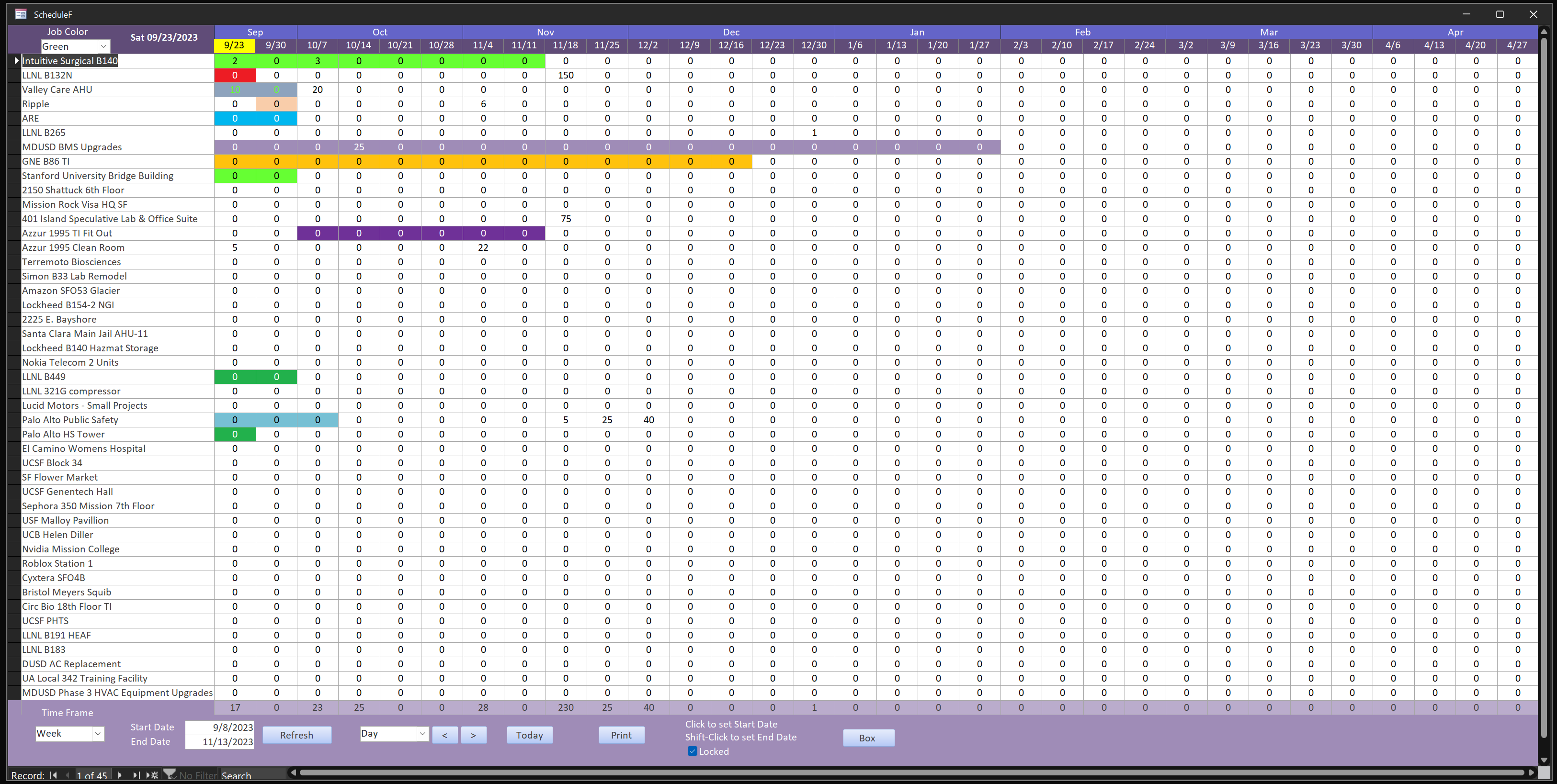
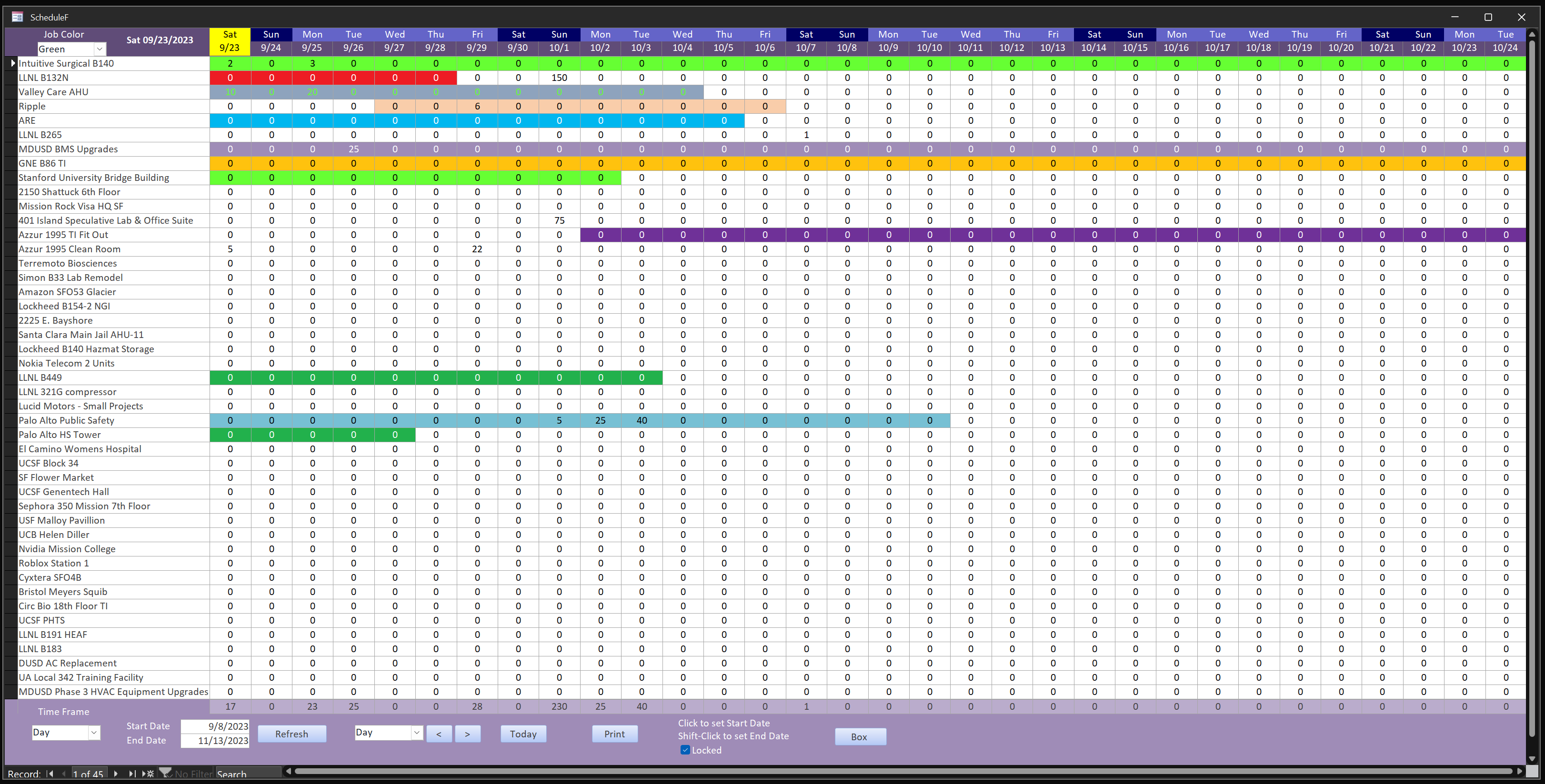
I know it hasn't been a month yet, but I lack the virtue of patience. I've been working on figuring out how to do formatconditions with VBA instead of the native tool and it just took way too long to load whenever I changed the dates. Perhaps you'll have something that is a lot snappier. I went back to the native formatconditions tool and it's a lot better. I set up a temporary date table and set the "D" boxes control source to those dates. I then put all of the D boxes in an unlinked subform located in the same spot and was able to reference the D box dates from the parent form to set the format conditions. This way I could change the timeframe from days to weeks or months and the chart would change accordingly. I also added 12 more colors to the list. For my purposes I added a number to each box that represents the hours of labor for that timeframe and then it totals at the bottom. This will help us figure out when we might be in trouble trying to man our jobs. My next adventure will be to create an individual job schedule based on task codes I already have set up. Then, the hours for all tasks in a given day will also total at the bottom. That total will become the hour total in the box for the overall Jobs schedule. Here are some snapshots:
Richard Rost  @Reply  
          
3 years ago
Nice work.

This thread is now CLOSED. If you wish to comment, start a NEW discussion in Access Project Management.
 

Next Unseen

 
New Feature: Comment Live View


The following is a paid advertisement
Computer Learning Zone is not responsible for any content shown or offers made by these ads.
 

Learn
 
Access - index
Excel - index
Word - index
Windows - index
PowerPoint - index
Photoshop - index
Visual Basic - index
ASP - index
Seminars
More...
Customers
 
Login
My Account
My Courses
Lost Password
Memberships
Student Databases
Change Email
Info
 
Latest News
New Releases
User Forums
Topic Glossary
Tips & Tricks
Search The Site
Code Vault
Collapse Menus
Help
 
Customer Support
Web Site Tour
FAQs
TechHelp
Consulting Services
About
 
Background
Testimonials
Jobs
Affiliate Program
Richard Rost
Free Lessons
Mailing List
PCResale.NET
Order
 
Video Tutorials
Handbooks
Memberships
Learning Connection
Idiot's Guide to Excel
Volume Discounts
Payment Info
Shipping
Terms of Sale
Contact
 
Contact Info
Support Policy
Mailing Address
Phone Number
Fax Number
Course Survey
Email Richard
[email protected]
Blog RSS Feed    YouTube Channel

LinkedIn
Copyright 2026 by Computer Learning Zone, Amicron, and Richard Rost. All Rights Reserved. Current Time: 4/30/2026 10:04:11 AM. PLT: 0s