Free Lessons
Courses
Seminars
TechHelp
Fast Tips
Templates
Topic Index
Forum
ABCD
 
Home   Courses   TechHelp   Forums   Help   Contact   Merch   Join   Order   Logon  
 
Back to Access Forum    Comments List
Upload Images   @Reply   Bookmark    Link   Email   Next Unseen 
Normalizing My DB
Sami Shamma 
             
3 years ago
Hi Richard
I have my DB working ok, I am bothered by the fact that on part of it is not normalized. The DB grow from an old Excell based system. I think this will make a great Teck Help video.
It is a Religious department at the state prisons. it tracks what inmates attend what religious services and holiday programs.

The system has three main tables:
1) Inmate static Information (AlphaT): Name, number, religion, housing etc.
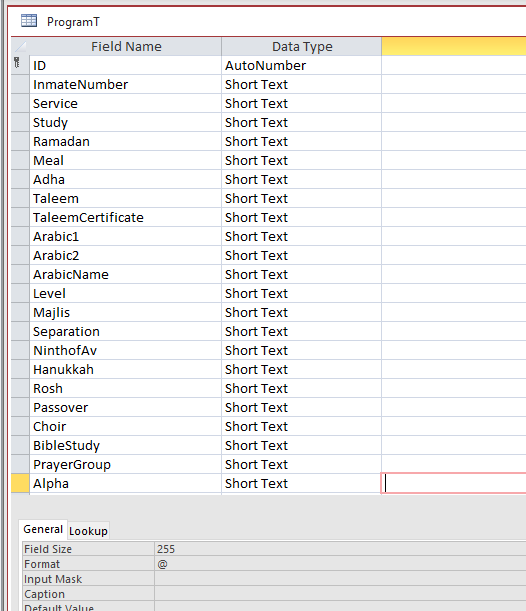
2) Inmate programs (programT), What inmate attend what program. This is the table that need normalization.
3) Offered Program tables (ServiceT), What program runs on which day at wat location for which group of inmates etc.

The Inmate program Table (ProgramT) Has Auto-number key, Inmate number foreign key to (AlphaT), then a long list of programs the inmates can sign up for (54 Fields).
I would like to normalize this table by removing all the programs from this table into a Detail table that has the Inmate as a foreign Key. I can do that easily. my problem is how to have my forms maintain the current look and feel.

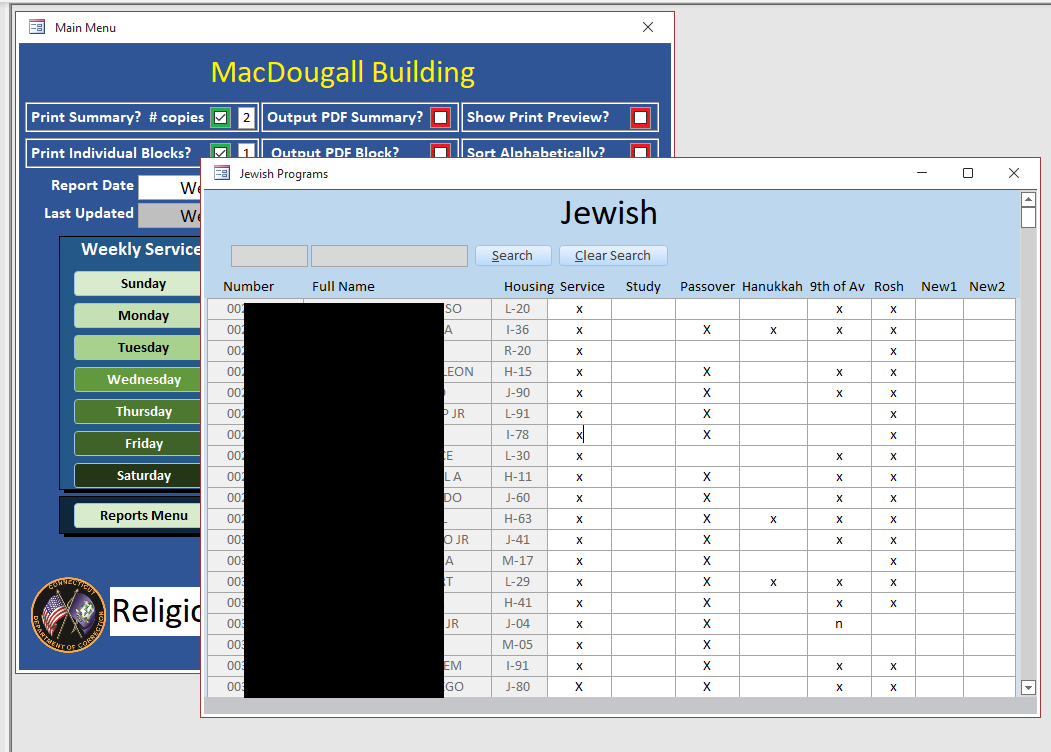
I am happy with the look and feel of the system (thanks to your videos and training courses) I would like to maintain a look close to it. I will be posting screen shots.
Sami Shamma OP  @Reply  
             
3 years ago

Sami Shamma OP  @Reply  
             
3 years ago

Sami Shamma OP  @Reply  
             
3 years ago
I will be replacing all the "x" fields with Boolean Fields during the rewrite.
The main Question is:
how can I produce Forms that has the column headings from my new detail table?

Many thanks
John Davy  @Reply  
         
3 years ago
Hi, I suggest that you normalize the tables exactly the way you want. You will likely need to make queries that include the new table with proper links and include all the fields that you need in the reports. Then use the query for the report making the necessary changes for some fields. You can do it!
John

John Davy  @Reply  
         
3 years ago
Hi Sami
If Inmates attend more than 1 program and a program may have many inmates then you really need a many to many relationship. That is : Table for Inmate information, Table for Program information and a table that holds a link to the Inmate table and a link to the Program Table. Richard has a good video on Many to Many and how to create them If you need help let me know.
John
Sami Shamma OP  @Reply  
             
3 years ago
I have now normalized my DB.
I am struggling to get Form functionality that I want (see Screenshot above).

I can perhaps solve this problem if I can use a "Recordset" as the "Record Source" of a form. is that doable?
Can't use a Query as it is too complicated to be editable.

Thanks
Kevin Yip  @Reply  
     
3 years ago
Hi Sami, for your form to look the way shown in your picture, you may use a crosstab query.

A crosstab query will convert a "flat table" like this:

ID     Field1     Field2
1      A          1A
1      B          1B
1      C          1C
1      D          1D
2      A          2A
2      B          2B
2      C          2C
2      D          2D
3      A          3A
3      B          3B
3      C          3C
3      D          3D

to this:

ID     A     B     C     D
1      1A    1B    1C    1D
2      2A    2B    2C    2D
3      3A    3B    3C    3D

But the caveat is that data won't be updateable.

To make them updateable, you need more complicated VBA.

Find out if it is important to your users for your form to look that way.
Sami Shamma OP  @Reply  
             
3 years ago
Hi Kevin
Thank you for your suggestion. I think it will help if I give you more information on the workflow and the file design.
I normalized my Tables from my original post, there are now the following entities:

1)AlphaT that contains the inmate basic static information, Name, Number, location, Religion etc.

2)CompendiumT containing what programs we offer, it has:
  a.CompendiumID
  b.ReligionID --- Catholic, Jewish, etc.
  c.CompendiumName --- Mass, Passover, AshWednesday etc.
  d.AdditionalData --- Y/N if this requires additions info i.e. Meal Type for Passover or Ramadan

3)ProgramT contains what an inmate is signed for:
  a.ProgramID
  b.InmateNumber
  c.CompendiumID
  d.Participate --- Y/N
  e.Notes --- only visible if AdditionalData is True.

We send out invitations to inmates of a religion to participate. We get back signup sheets from them.

Now I need the ability to update my tables with straight forward Form that has a searchable list of the inmates of that religion (see screenshot above) where I key the inmate number and then mark the Program for that event as True.

Many of my fellow chaplains are near computer illiterate, some still type Word documents with a return after every line ☹, so the Form has to be simple to use.

I have not yet raped my mind on how to design such a Form with the new Table structure.
Sami Shamma OP  @Reply  
             
3 years ago
PS. &#9785 was supposed to be a sad face.
Kevin Yip  @Reply  
     
3 years ago
A simple and straightforward form would be one that shows ONE inmate at at time and all his or her info.  Let your user select an inmate from a combo box, then show the info for that person only.  In your picture, you try to show all the inmates and all the info, and that would actually be less user-friendly, in my opinion.  All the info all at once would be distracting and overwhelming.  A simpler form as I described above would be a lot less troublesome to design as well.

The grid-like form appearance in your picture seems to be inspired by Excel.  Access is not Excel; designing a form or a report in Access is quite different from designing a worksheet in Excel.
Sami Shamma OP  @Reply  
             
3 years ago
Hi Kiven

You are helping me see beyond my blinders. I cannot use combo box to select inmates as I have over 1500 in one prison. and even if I filter by Religion, I still have over 600 of one denomination. However, I can use a searchable form similar to my picture with only inmate info, then when the user clicks on a record, a child subform opens with available programs for that religion and the user can check the desired program.

The only question is: how to deal with the fact the ProgramT contains only records for already signed up programs. I think I have to do that with a record set that loops through all the Compendium record for that religion and populate the subform. on exit from the subform, I loop through the record set again and write to programT the Checked program.

Sorry for rambling, What do you think?

Many thanks.

Kevin Yip  @Reply  
     
3 years ago
There is a way to have your combo box show only the entries that contain the text you are typing, as you are typing it -- i.e. filter as you type.  This site may already have a video on a similar topic: search as you type.  You may be able to adapt from it.

To your other question ("ProgramT containing only existing sign-ups..."), you are thinking in terms of Excel again.  Access is not Excel, where you can enter data on any blank cells.  In Access, data have to be entered as *records*.  If your table is missing records, you need to find ways to enter them.  This is another reason your Excel-inspired form layout won't work, because a crosstab layout like that can't be used to enter records.
Sami Shamma OP  @Reply  
             
3 years ago
Good morning, Kevin.
You are absolutely correct. It was yesterday that I finally shed my Excel influence on this DB and designed my table is classical Header/Detail one-to-many fashion. So, if an inmate is signed up for a program he will have a record in the detail table, otherwise he does not. SQL will do the rest.

Thank you for not giving up on me.

I will post my new Forms once I am done with designing them.

Many Thanks

This thread is now CLOSED. If you wish to comment, start a NEW discussion in Access Forum.
 

Next Unseen

 
New Feature: Comment Live View


The following is a paid advertisement
Computer Learning Zone is not responsible for any content shown or offers made by these ads.
 

Learn
 
Access - index
Excel - index
Word - index
Windows - index
PowerPoint - index
Photoshop - index
Visual Basic - index
ASP - index
Seminars
More...
Customers
 
Login
My Account
My Courses
Lost Password
Memberships
Student Databases
Change Email
Info
 
Latest News
New Releases
User Forums
Topic Glossary
Tips & Tricks
Search The Site
Code Vault
Collapse Menus
Help
 
Customer Support
Web Site Tour
FAQs
TechHelp
Consulting Services
About
 
Background
Testimonials
Jobs
Affiliate Program
Richard Rost
Free Lessons
Mailing List
PCResale.NET
Order
 
Video Tutorials
Handbooks
Memberships
Learning Connection
Idiot's Guide to Excel
Volume Discounts
Payment Info
Shipping
Terms of Sale
Contact
 
Contact Info
Support Policy
Mailing Address
Phone Number
Fax Number
Course Survey
Email Richard
[email protected]
Blog RSS Feed    YouTube Channel

LinkedIn
Copyright 2026 by Computer Learning Zone, Amicron, and Richard Rost. All Rights Reserved. Current Time: 4/30/2026 7:07:15 AM. PLT: 0s