Free Lessons
Courses
Seminars
TechHelp
Fast Tips
Templates
Topic Index
Forum
ABCD
 
Home   Courses   TechHelp   Help   Contact   Merch   Join   Order   Logon   Forums   
 
Back to Access Forum    Comments List
Upload Images   @Reply   Bookmark    Link   Email   Next Unseen 
Deleting
Tammie Barr 
    
3 years ago
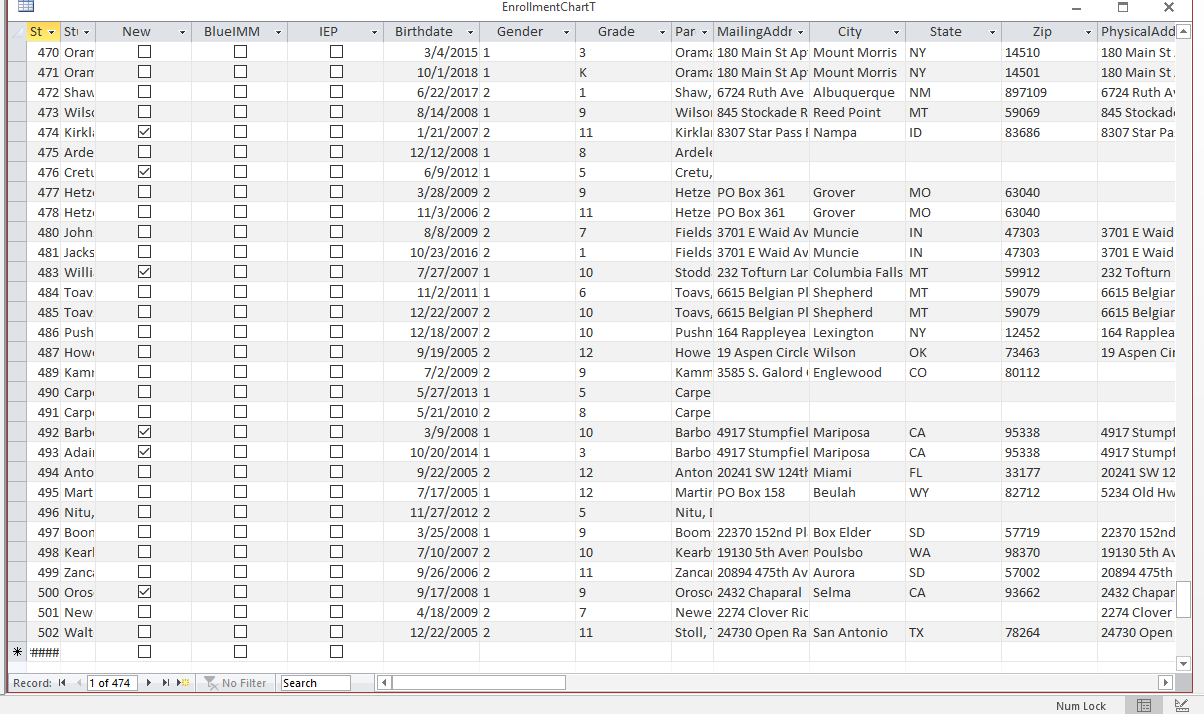
The main table (EnrollmentChart) is added to daily. We got to file number 502, but everything added in the last few days, doesn't stay. I have no idea why it would disappear. I type in the information confirm that is is saved. Go to other records, them come back to the one I just entered it shows. Then I close the program and reopen it and the information for that student is gone. The same thing is happening to the class chart. Please help, looking for any ideas on why this is happening. The database is split.
Gregory Clancey  @Reply  
    
3 years ago
There's a bit of mystery there for sure. Perhaps you should confirm that the Form is opening with the table to which you'd committed the data. Sometimes renaming a table can have unintended consequences..
John Davy  @Reply  
         
3 years ago
It may be an indexing issue. How are the records sorted?  John
Tammie Barr OP  @Reply  
    
3 years ago
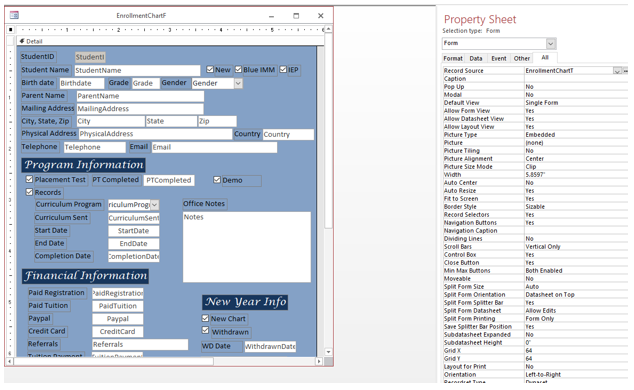
The EnrollmentChartF is attached to the EnrollmentChartT. The entire system is built off of this table. The EnrollmentChartT is indexed by the studentId only. We have 474 records according to the record count some were deleted because they never actually enrolled so we get rid of the record so that number is probably correct. The office staff enters new students daily, on this EnrollmentChartF, once complete the rest of the staff can then search for students and we track our communication with each student on a different form. Only a few Office staff members have the ability to edit the information on the EnrollmentChartF. I built this system last year. The form names and tables have not been changed. I tried to stick with the rules Mr. Ross uses in his videos. Maybe I need more boxes to be indexed but I'm not sure. We are using Access 2016 version. Please help, I really need to figure out why new clients info is not saving. I really do appreciate any idea you may have to remedy this issue. Thank you!
Tammie Barr OP  @Reply  
    
3 years ago

Tammie Barr OP  @Reply  
    
3 years ago

Tammie Barr OP  @Reply  
    
3 years ago

Tammie Barr OP  @Reply  
    
3 years ago
I made the student name field and parent name field smaller to protect our families.
Kevin Yip  @Reply  
      
3 years ago
Open the table and the form side by side.  Make changes to the form.  Go to the table and refresh it (press F5), and see if the same changes are made.  If not, make changes directly on the table.  Refresh the form and see if the same changes are present there.  Any number of things could be the culprit at this early stage of diagnosing the problem.
Kevin Yip  @Reply  
      
3 years ago
If your table uses an autonumber field, see what the next number is.  You said you had entered several records already, so the autonumber must have incremented several times.  If it hasn't incremented at all, then the table has never been written into all this time, and you need to find out where exactly the form saved its data.

This thread is now CLOSED. If you wish to comment, start a NEW discussion in Access Forum.
 

Next Unseen


What's This?


The following is a paid advertisement
Computer Learning Zone is not responsible for any content shown or offers made by these ads.
 

Learn
 
Access - index
Excel - index
Word - index
Windows - index
PowerPoint - index
Photoshop - index
Visual Basic - index
ASP - index
Seminars
More...
Customers
 
Login
My Account
My Courses
Lost Password
Memberships
Student Databases
Change Email
Info
 
Latest News
New Releases
User Forums
Topic Glossary
Tips & Tricks
Search The Site
Code Vault
Collapse Menus
Help
 
Customer Support
Web Site Tour
FAQs
TechHelp
Consulting Services
About
 
Background
Testimonials
Jobs
Affiliate Program
Richard Rost
Free Lessons
Mailing List
PCResale.NET
Order
 
Video Tutorials
Handbooks
Memberships
Learning Connection
Idiot's Guide to Excel
Volume Discounts
Payment Info
Shipping
Terms of Sale
Contact
 
Contact Info
Support Policy
Mailing Address
Phone Number
Fax Number
Course Survey
Email Richard
[email protected]
Blog RSS Feed    YouTube Channel

LinkedIn
Copyright 2026 by Computer Learning Zone, Amicron, and Richard Rost. All Rights Reserved. Current Time: 9/5/2026 2:45:12 PM. PLT: 1s