Free Lessons
Courses
Seminars
TechHelp
Fast Tips
Templates
Topic Index
Forum
ABCD
 
Home   Courses   TechHelp   Forums   Help   Contact   Merch   Join   Order   Logon  
 
Back to Column Colors    Comments List
Upload Images   @Reply   Bookmark    Link   Email   Next Unseen 
Column Colors
Mario Jaile 
    
3 years ago
Query column colors do not transfer to combo box
I have a combo box based on a query named 'PriceListQuery' , I made some of the columns in this query different colors.

When I choose to make a list box or combo box with this query, the column colors do not transfer.
Scott Axton  @Reply  
        
3 years ago
That is correct.  You can't do that.  
Even though you are using a query as the row source for a combo box it doesn't have the ability to do the colors like you are describing.

I see you have Developer 16 so you may be able to format the colors in the list box.  BUT they will not follow along with a query.  
Mario Jaile OP  @Reply  
    
3 years ago
I saw the column colors video by Richard and in his illustration he says "List Box or Combo Box", unless I misunderstood.
Scott Axton  @Reply  
        
3 years ago
Mario either you didn't hear correctly of you misunderstood.  

I just went back and re-watched the Lesson 3 video and at ~1:00 or so into the video Richard says, " Can you format a Listbox... and the answer is no.  But I will show you how to use a Continuous Subform look like a list box and you can apply conditional formatting to it..."

The techniques demonstrated ONLY apply to a Continuous Form made to look like a list box.  This technique will not work for a Combo Box.  Richard doesn't even mention a Combo in the video.

Sorry but, as of today, Microsoft has not added in the capability to color or bold or change fonts in conventional Combo Boxes or the List Box controls.  That's just a limitation of Access.
Kevin Yip  @Reply  
     
3 years ago
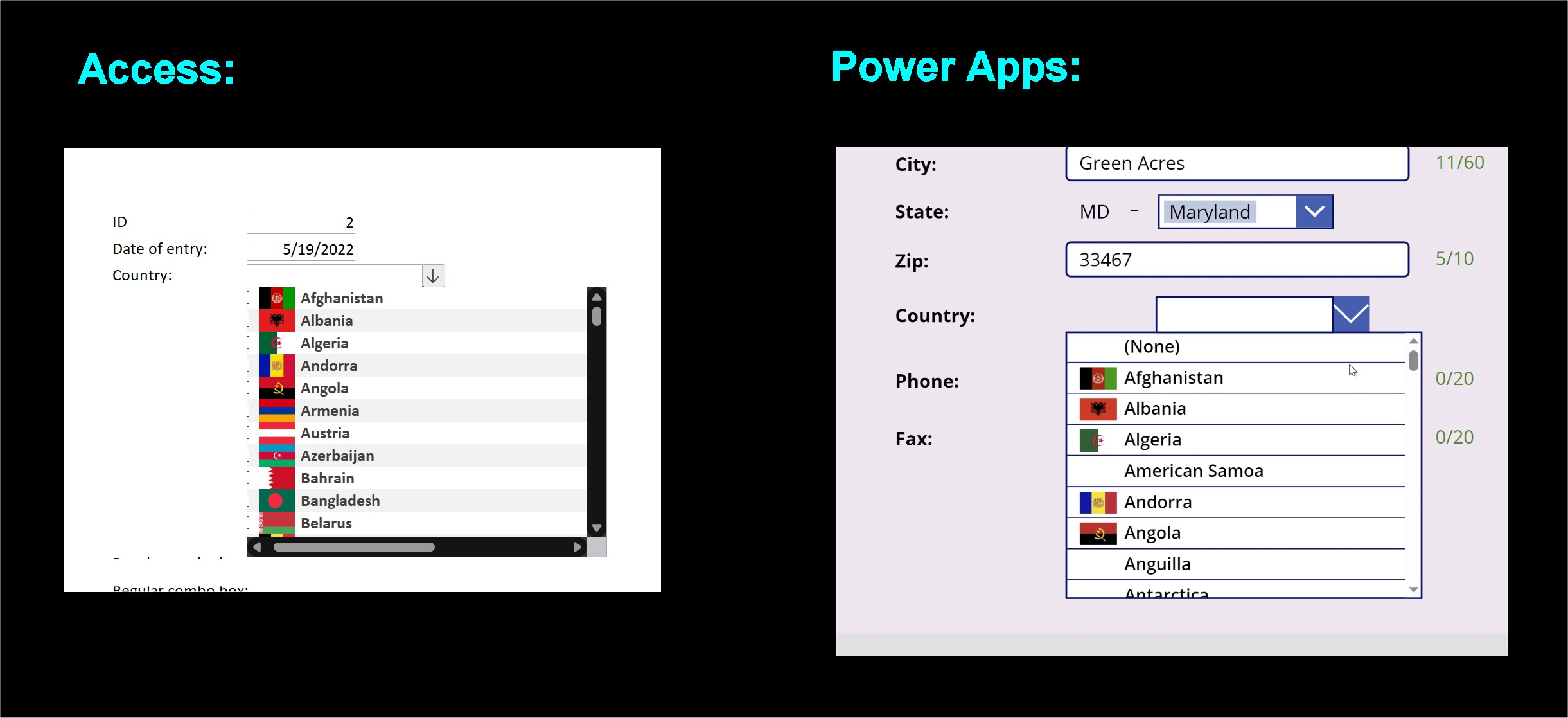
Basically, to create combo boxes with better formatting, you need to make fake combo boxes.  This is true in other programming environments as well.  I recently trialed Power Apps and it also requires fakery to create combo boxes with advanced formatting such as pictures (see pictures below).  Richard's recent videos on custom MsgBox also illustrates this fact: you often have to fake it to make it.  That's because no programming environment can do everything, and they always have some primitive features that clever developers have to work around.
Kevin Yip  @Reply  
     
3 years ago

Mario Jaile OP  @Reply  
    
3 years ago

Mario Jaile OP  @Reply  
    
3 years ago
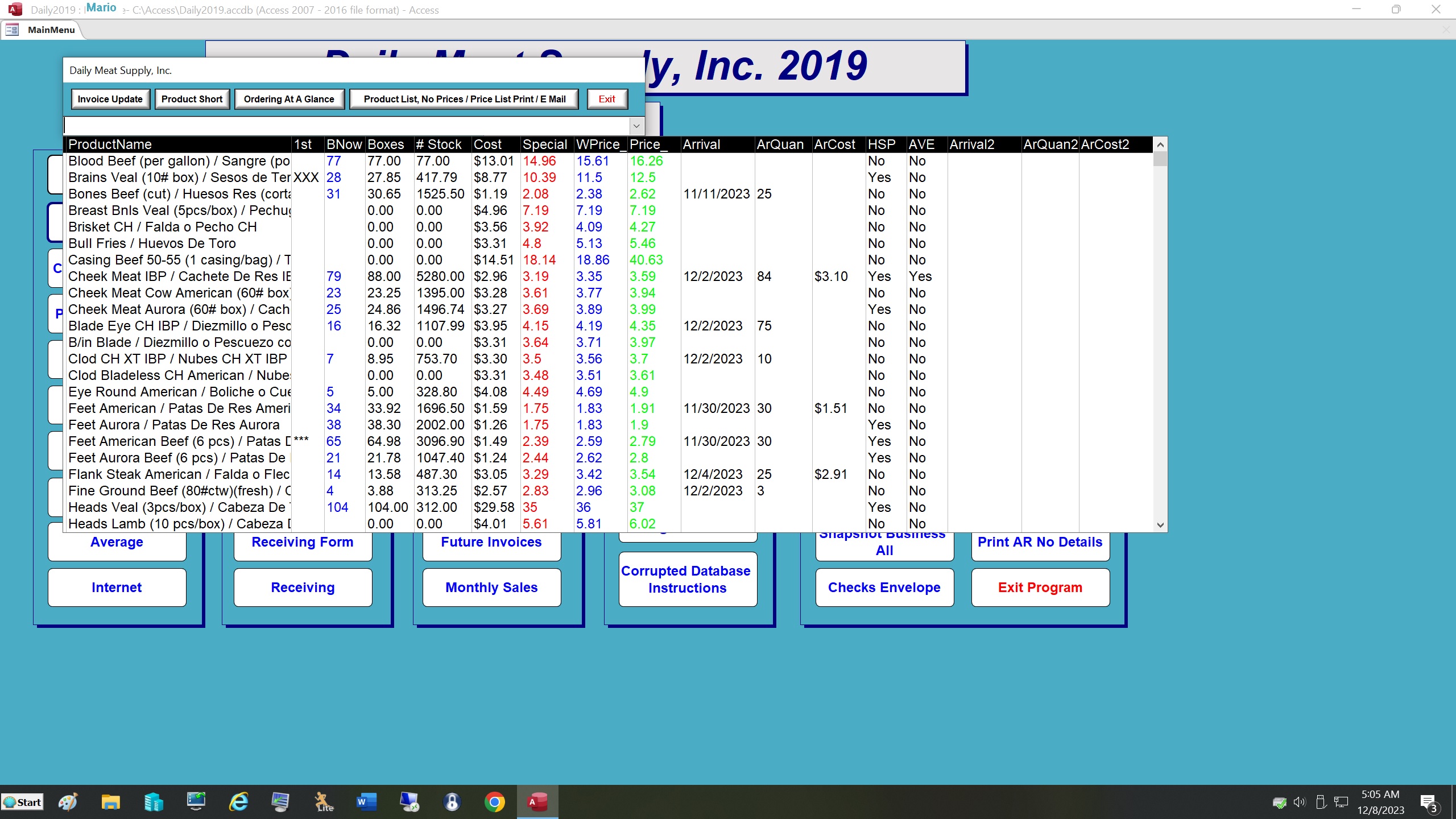
Thank you. I followed Richard's "Column Colors" video and added this to the control source property: =[PriceListQuery]![PrdtID]
(Price List query is the source and PrdtID is the primary key. Please see attachment
Mario Jaile OP  @Reply  
    
3 years ago
Is there a way I can put a $ sign in these columns: "Special", "WPrice_" and "Price_" ?
Thanks.
Richard Rost  @Reply  
          
2 years ago
Yes, you can set up custom column headers. I've got a video on this coming out.

This thread is now CLOSED. If you wish to comment, start a NEW discussion in Column Colors.
 

Next Unseen

 
New Feature: Comment Live View


The following is a paid advertisement
Computer Learning Zone is not responsible for any content shown or offers made by these ads.
 

Learn
 
Access - index
Excel - index
Word - index
Windows - index
PowerPoint - index
Photoshop - index
Visual Basic - index
ASP - index
Seminars
More...
Customers
 
Login
My Account
My Courses
Lost Password
Memberships
Student Databases
Change Email
Info
 
Latest News
New Releases
User Forums
Topic Glossary
Tips & Tricks
Search The Site
Code Vault
Collapse Menus
Help
 
Customer Support
Web Site Tour
FAQs
TechHelp
Consulting Services
About
 
Background
Testimonials
Jobs
Affiliate Program
Richard Rost
Free Lessons
Mailing List
PCResale.NET
Order
 
Video Tutorials
Handbooks
Memberships
Learning Connection
Idiot's Guide to Excel
Volume Discounts
Payment Info
Shipping
Terms of Sale
Contact
 
Contact Info
Support Policy
Mailing Address
Phone Number
Fax Number
Course Survey
Email Richard
[email protected]
Blog RSS Feed    YouTube Channel

LinkedIn
Copyright 2026 by Computer Learning Zone, Amicron, and Richard Rost. All Rights Reserved. Current Time: 4/30/2026 8:52:12 AM. PLT: 0s