Free Lessons
Courses
Seminars
TechHelp
Fast Tips
Templates
Topic Index
Forum
ABCD
 
Home   Courses   TechHelp   Forums   Help   Contact   Merch   Join   Order   Logon  
 
Back to Access Forum    Comments List
Upload Images   @Reply   Bookmark    Link   Email   Next Unseen 
Table limit for Queries
David Cummins 
      
3 years ago
Is there a limit of how many tables can be used to create a query? I have made a few queries using 3 tables but when I add a 4th table, the query does not work properly.
Sami Shamma  @Reply  
             
3 years ago
The limit is quite big. 4 is not a large number of tables.  The problem is elsewhere. send a screen shout of the Query design.
Alex Hedley  @Reply  
            
3 years ago
Alex Hedley  @Reply  
            
3 years ago
> the query does not work properly.

What doesn't work?
David Cummins OP  @Reply  
      
3 years ago

David Cummins OP  @Reply  
      
3 years ago
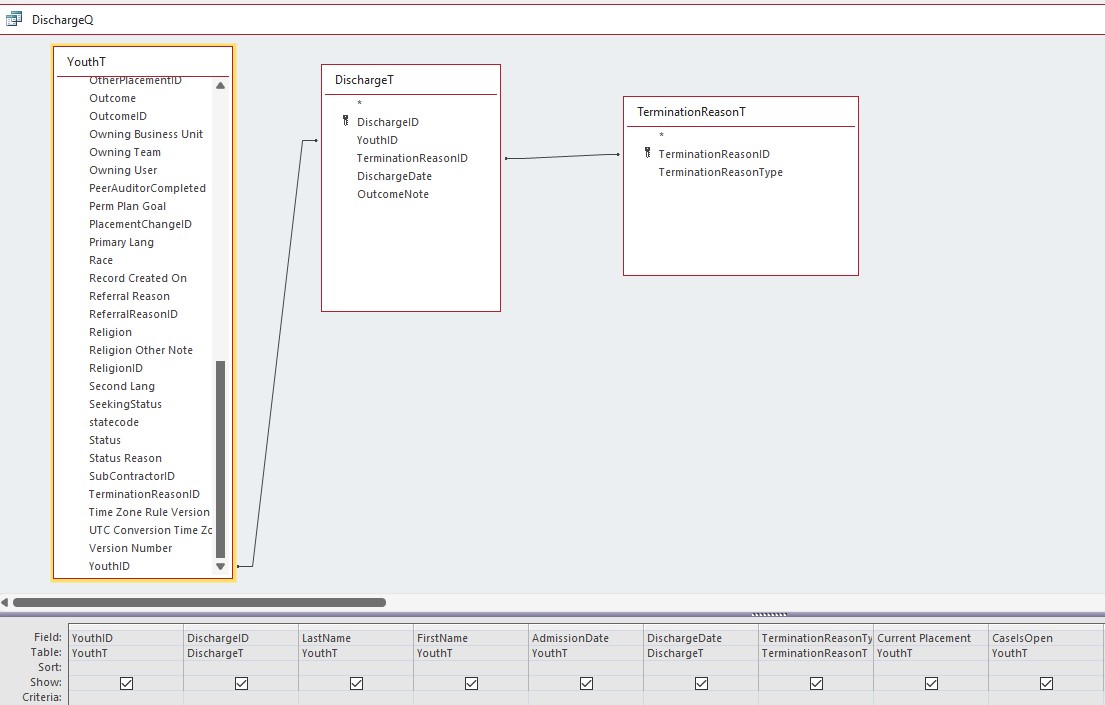
When I run this, I get 42 records which is correct.
David Cummins OP  @Reply  
      
3 years ago

David Cummins OP  @Reply  
      
3 years ago
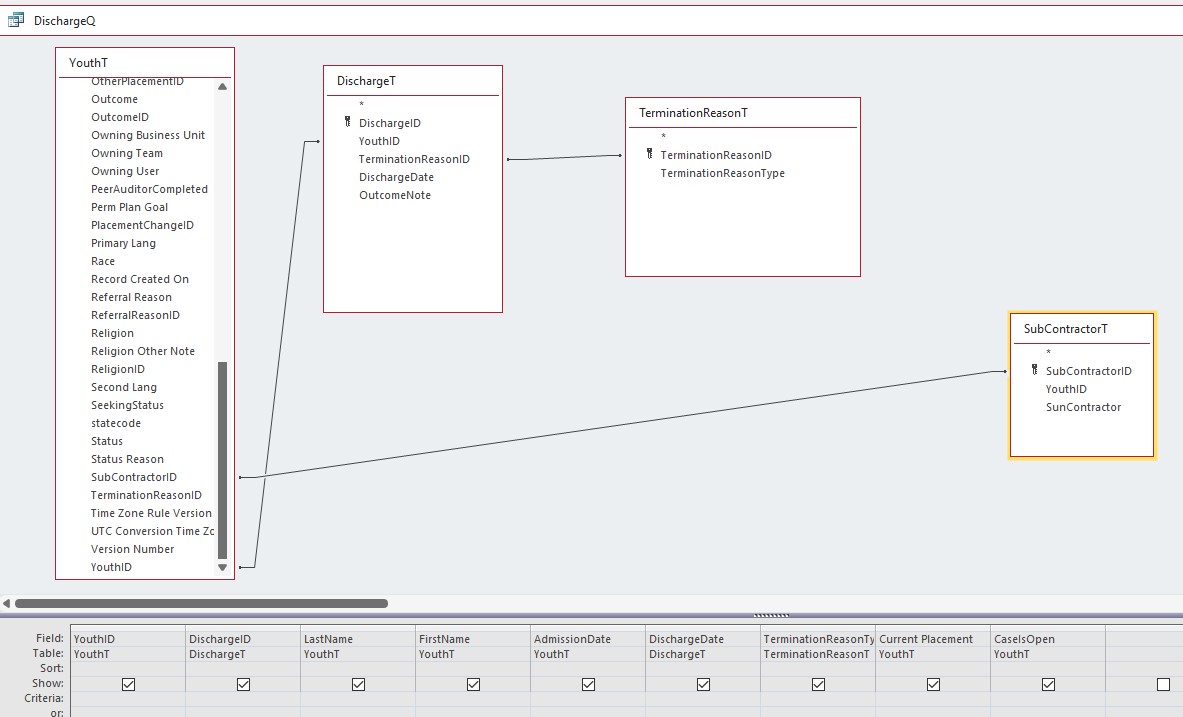
When I run this, it cancels all the records and renders only 1 record. If I related the Youth ID in the YouthT to the Youth ID in the Subcontactor T, I get zero records.

I will resolve this by consolidating the Subcontactor T into the Youth T. I will probably have to consolidate other tables too. I think I have too many tables for Dataverse to properly connect to the Access front end.
Sami Shamma  @Reply  
             
3 years ago
your Database is all over the place.

for example: TerminationReasonID is stored in YouthT and in DischargeT. That does not make sense.
YouthID is stored in SubContactorT. Why does that table hold anything more than the SubContactor (I assume name) misspelled SunContractor.

You did not select ant fields from SubContractorT

My strong recommendation is to get the relationship seminar and start there

https://599cd.com/1955
Alex Hedley  @Reply  
            
3 years ago
Check the JOIN TYPE
David Cummins OP  @Reply  
      
3 years ago
Sami, I have to create multiple queries based on different instances for Youth clients. Are you recommending that I don't have multiple foreign ID's in my tables?
Kevin Yip  @Reply  
     
3 years ago
If you have 43 rows without SubcontractorT, but only 1 row after joining with SubcontractorT, that means SubcontractorT and YouthT only share ONE common value of SubcontractorID.  For instance, if SubcontractorT contains 1, 2, 3, and 4 for SubcontractorID, and YouthT contains 4, 5, 6, and 7 for SubcontractorID, then yes, only one record will show up, because only "4" is shared by both tables.  When you inner-join two tables, only the records where join fields are equal in both tables will appear.  That is why there is an equal sign in specifying the inner join:

   INNER JOIN ON (Table1.field1 = Table2.field2)
Kevin Yip  @Reply  
     
3 years ago
When you get zero record in a join, that means the two sides doesn't have any matching value in the join field.
Sami Shamma  @Reply  
             
3 years ago
David
That is NOT what I am saying.
In classical DB design, a Foreign key in table1 will link to a PrimaryKey in tableA.  
you can have Foreignkey1, Foreignkey2, Foreignkey3 in table1 linking to the primary kyes in TableA, TableB, tableC.

I just do not understand your table design

By the way, what is the primary key of YouthT?

David Cummins OP  @Reply  
      
3 years ago
Sami, I think I understand. I was thinking about creating a junction T to create a many to many relationship. I since realized I don't need that anymore. I need to clean up some of the tables and delete extraneous FK's.

The PK for YouthT is YouthID.

The screen shot of the YouthT looks busy because it is a linked Dataverse table. The other tables are still offline but will be exported and linked to Dataverse when I finish the DB.  Working in Dataverese adds more complexity and is challenging for me.
Sami Shamma  @Reply  
             
3 years ago
Good luck my friend.

This thread is now CLOSED. If you wish to comment, start a NEW discussion in Access Forum.
 

Next Unseen

 
New Feature: Comment Live View


The following is a paid advertisement
Computer Learning Zone is not responsible for any content shown or offers made by these ads.
 

Learn
 
Access - index
Excel - index
Word - index
Windows - index
PowerPoint - index
Photoshop - index
Visual Basic - index
ASP - index
Seminars
More...
Customers
 
Login
My Account
My Courses
Lost Password
Memberships
Student Databases
Change Email
Info
 
Latest News
New Releases
User Forums
Topic Glossary
Tips & Tricks
Search The Site
Code Vault
Collapse Menus
Help
 
Customer Support
Web Site Tour
FAQs
TechHelp
Consulting Services
About
 
Background
Testimonials
Jobs
Affiliate Program
Richard Rost
Free Lessons
Mailing List
PCResale.NET
Order
 
Video Tutorials
Handbooks
Memberships
Learning Connection
Idiot's Guide to Excel
Volume Discounts
Payment Info
Shipping
Terms of Sale
Contact
 
Contact Info
Support Policy
Mailing Address
Phone Number
Fax Number
Course Survey
Email Richard
[email protected]
Blog RSS Feed    YouTube Channel

LinkedIn
Copyright 2026 by Computer Learning Zone, Amicron, and Richard Rost. All Rights Reserved. Current Time: 4/30/2026 3:22:21 AM. PLT: 0s