Free Lessons
Courses
Seminars
TechHelp
Fast Tips
Templates
Topic Index
Forum
ABCD
 
Home   Courses   TechHelp   Forums   Help   Contact   Merch   Join   Order   Logon  
 
Back to Access Forum    Comments List
Upload Images   @Reply   Bookmark    Link   Email   Next Unseen 
Formula to transfer data
Stephen Meiring 
   
3 years ago
Hello,

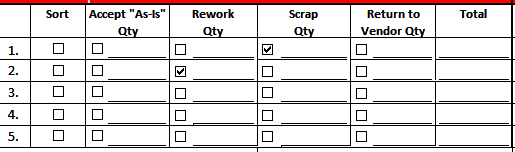
I have a database where an operator inputs information on our nonconforming parts. Information is transferred to a printable form within Access. Everything is transferring exactly how I want it. I am not sure how to write a formula for the following:

I have 5 discrepancy types and discrepancy quantities.

How would I write the formula to show the qty in the correct area of the printable form.

If I have 3 pcs of scrap for discrepancy 1
and 9 pcs of rework for the 2nd discrepancy.

I will attach screen shots of the Input form and Printable form.
Stephen Meiring OP  @Reply  
   
3 years ago

Stephen Meiring OP  @Reply  
   
3 years ago

Stephen Meiring OP  @Reply  
   
3 years ago
The names for the qty fields are Discrepancy Qty and Discrepancy 2 Qty.
Kevin Yip  @Reply  
     
3 years ago
I'll refer to your "printable form" as a "report" below, for clarity's sake.

As it stands now, you need to put a textbox in every row and column on the report, and use an IIf() function in every box to check if data should be put in row 1 column 1, r1 c2, r1 c3, ... r2 c1, r2 c3... etc.  Your report is a 6x6 grid, so you need 36 textboxes (and checkboxes) with an IIf() in the control source of every one of them.  So it's not very efficient.  And that is because your table doesn't seem to be "normalized."

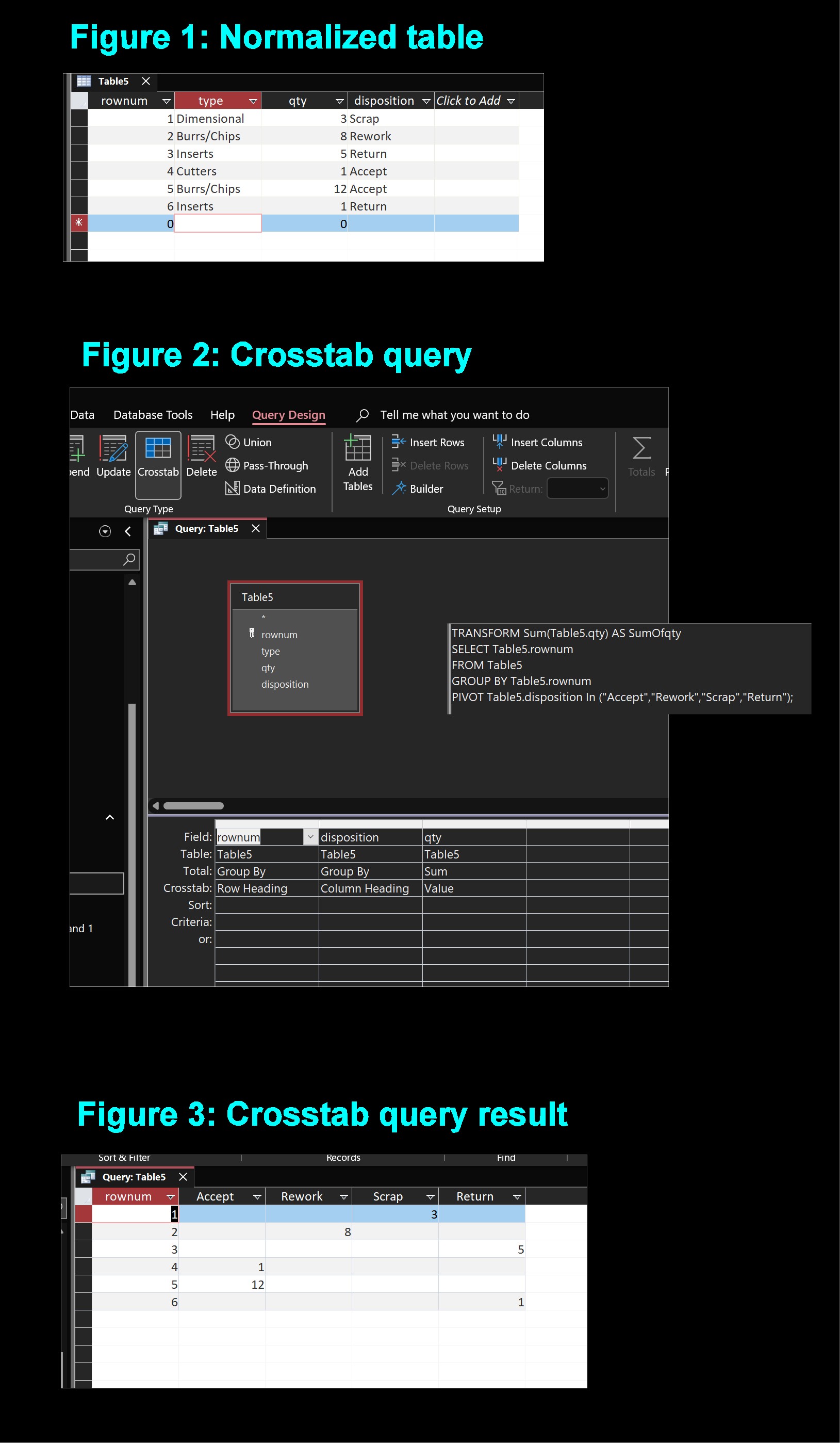
Instead of putting like items in separate columns (like your Discrepancy Qty 1 and 2), normalization recommends that you put them in the same column but different rows.  Figure 1 below shows what your table would look like, if normalized.

With a crosstab query (similar to pivot table in Excel) as shown in Figure 2, you can transform your normalized table into a different row-column arrangement.  The crosstab query produces a result as shown in Figure 3.

Note that Figure 3 has the exact same layout you need for your report -- the 3 units of scrap qty is in row 1 column 4, the same place you need it on the report.  You just need to have your report print each row accordingly, and all the data will fall into the right columns.  This will save you a lot of work in setting up the report.  And that's all because the table is set up correctly.

This site has courses on normalization and crosstab query, which are pretty big and important topics in database.
Kevin Yip  @Reply  
     
3 years ago

Stephen Meiring OP  @Reply  
   
3 years ago
Hello Kevin,

I'm just now getting back to work after an illness. Thank you for your response. I was afraid you were going to say that. I already anticipated that was the route I was going to have to take. I will work on this over the next couple of weeks and will let you know if I run into any issues.

Have a Merry Christmas and a Happy New Year!

Stephen

This thread is now CLOSED. If you wish to comment, start a NEW discussion in Access Forum.
 

Next Unseen

 
New Feature: Comment Live View


The following is a paid advertisement
Computer Learning Zone is not responsible for any content shown or offers made by these ads.
 

Learn
 
Access - index
Excel - index
Word - index
Windows - index
PowerPoint - index
Photoshop - index
Visual Basic - index
ASP - index
Seminars
More...
Customers
 
Login
My Account
My Courses
Lost Password
Memberships
Student Databases
Change Email
Info
 
Latest News
New Releases
User Forums
Topic Glossary
Tips & Tricks
Search The Site
Code Vault
Collapse Menus
Help
 
Customer Support
Web Site Tour
FAQs
TechHelp
Consulting Services
About
 
Background
Testimonials
Jobs
Affiliate Program
Richard Rost
Free Lessons
Mailing List
PCResale.NET
Order
 
Video Tutorials
Handbooks
Memberships
Learning Connection
Idiot's Guide to Excel
Volume Discounts
Payment Info
Shipping
Terms of Sale
Contact
 
Contact Info
Support Policy
Mailing Address
Phone Number
Fax Number
Course Survey
Email Richard
[email protected]
Blog RSS Feed    YouTube Channel

LinkedIn
Copyright 2026 by Computer Learning Zone, Amicron, and Richard Rost. All Rights Reserved. Current Time: 6/17/2026 10:39:52 AM. PLT: 0s