Free Lessons
Courses
Seminars
TechHelp
Fast Tips
Templates
Topic Index
Forum
ABCD
 
Home   Courses   TechHelp   Forums   Help   Contact   Merch   Join   Order   Logon  
 
Back to Access Forum    Comments List
Upload Images   @Reply   Bookmark    Link   Email   Next Unseen 
Calculate Totals in a listbox
Bruno Segers 
    
2 years ago
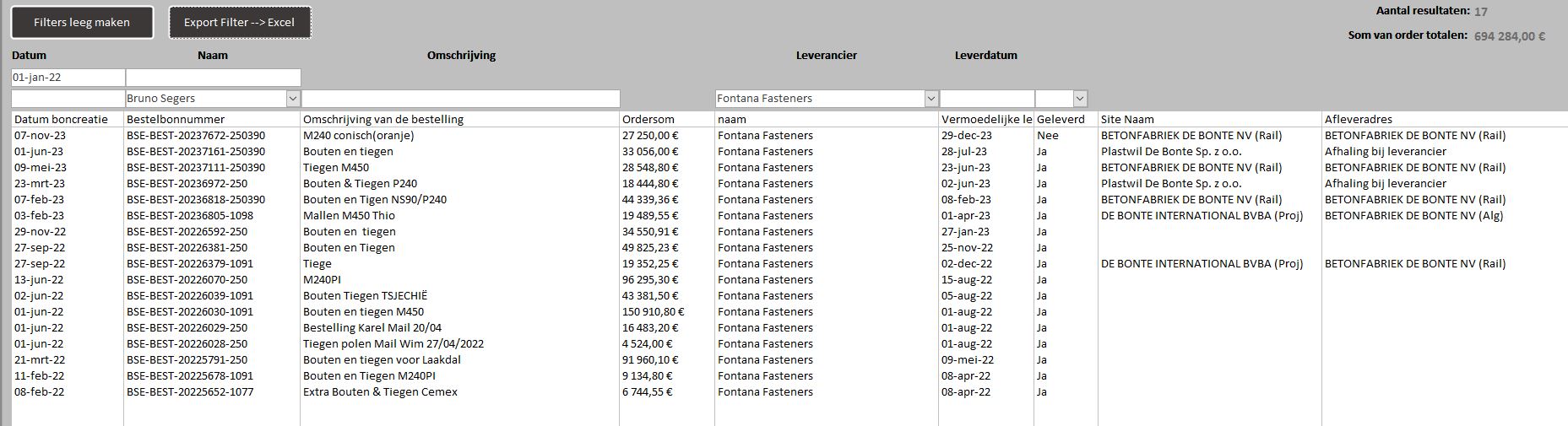
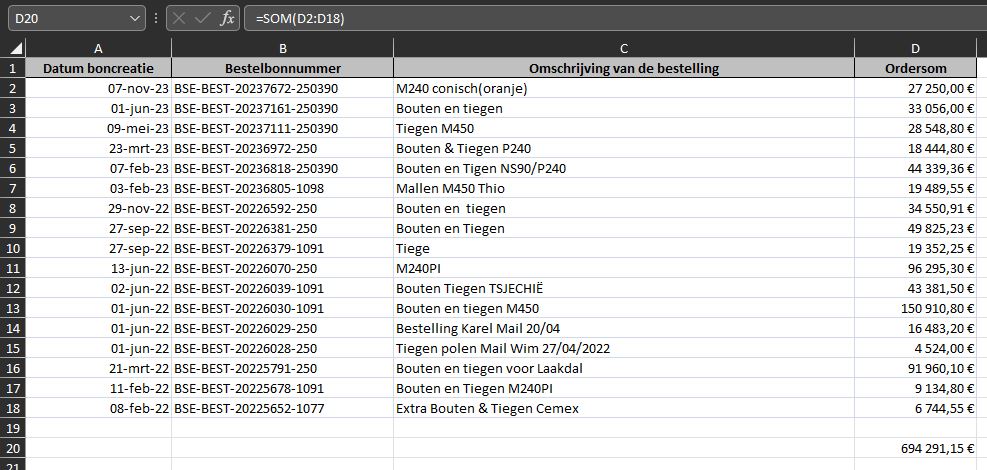
I have a listbox with all my orders from all my suppliers where I can always filter according to my wishes. Column 4 is the order total. In my form I created 2 fields to see the following: number of lines in the listbox and what the full order totals are. now when I export this listbox to Excel I notice that there is a difference in this Globel total. Is there anyone who notices what's wrong in my VBA code?

DetailsPrivate Sub TotalSelectedOrders()
    Dim SumSelectedOrders As Double
    Dim i As Long
    
    For i = 0 To SearchboxDBOrders.ListCount - 1
  
    SumSelectedOrders = SumSelectedOrders +
    Val(SearchboxDBOrders.Column(4, i))
  
    Next i
    TxtTotalSelectedOrders.Value = SumSelectedOrders
End Sub

Kevin Robertson  @Reply  
          
2 years ago
What is the value you are expecting compared to the value you are actually getting?
Are additional values being exported to excel? Are there missing values?
Could be a rounding issue.

I built a form to test your code and I got the correct total.
Bruno Segers OP  @Reply  
    
2 years ago
Hi Kevin,
The differences increase as the list get longer.
The export list is identical to the list box list in Access
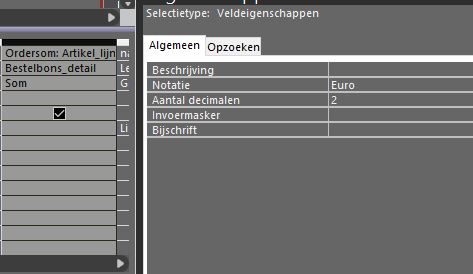
I also defined the roundings in the Qwery to "2" after the comma
I added some screenshots to this answer.
Bruno Segers OP  @Reply  
    
2 years ago

Bruno Segers OP  @Reply  
    
2 years ago

Bruno Segers OP  @Reply  
    
2 years ago

Kevin Robertson  @Reply  
          
2 years ago
It may be the Column Heads causing the problem.
Try changing the Lower Bound value to 1 instead of 0.

For i = 1 To SearchboxDBOrders.ListCount - 1
Bruno Segers OP  @Reply  
    
2 years ago
I tried but has no effect.
But I have started to think about your remarks about roundings after the decimal point.
I noticed that my result always ends at ###, 00 while I did expect a number after the decimal point.
I discussed this with ChatGTP and it asked me to change the code as below:

Dim SumSelectedOrders As Currency ' Use Currency for precision with decimals
       SumSelectedOrders = 0

Dim i As Long

For i = 0 To SearchboxDBOrders.ListCount - 1
    SumSelectedOrders = SumSelectedOrders + CCur(SearchboxDBOrders.Column(4, i)) ' Custom column index as needed
Next i

TxtTotalSelectedOrders.Value = SumSelectedOrders

But then Access informed me that the types are mismatch.
I also try to look for solutions, but I can't figure it out yet.
Kevin Yip  @Reply  
     
2 years ago
Hi Bruno, in your original code, the Val() function does not recognize commas "," as part of a number.  Val() only looks at the numeric portion at the start of the entry, and ignores anything after the comma.  Therefore, all the decimals in your numbers are ignored, and that is why you get an incorrect total.

If the text does not begin with a number, such as "EUR 100", Val() will simply ignore everything and return zero.  Due to all these caveats, Val() is not really the function to do conversions in many cases.  (I use it mainly for sorting alphanumeric data, actually.)

CCur() also doesn't work because it requires a number (or string) that looks exactly like a literal number.  And yours don't, because they have spaces.  For instance, CCur("27 250") won't work, but CCur("27250") will.

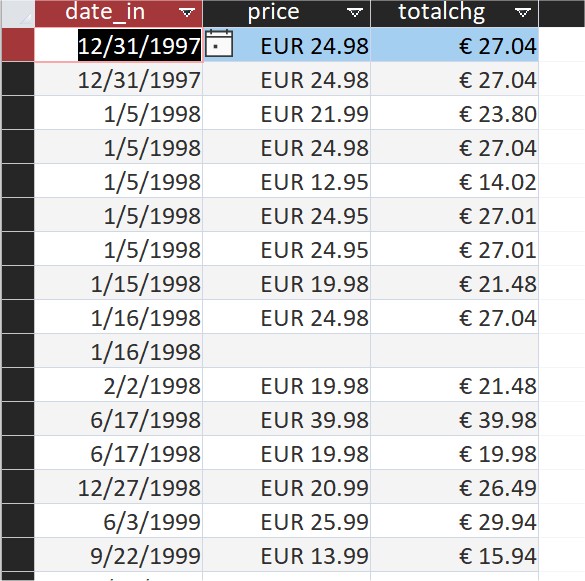
I would suggest you use a subform instead of a listbox.  A subform can require a field to be numeric, thus assuring of the correct math being used for the total.  A listbox, however, contains only text.  A subform also lets you format a numeric field to whatever appearance you like (see picture below).
Kevin Yip  @Reply  
     
2 years ago

This thread is now CLOSED. If you wish to comment, start a NEW discussion in Access Forum.
 

Next Unseen

 
New Feature: Comment Live View


The following is a paid advertisement
Computer Learning Zone is not responsible for any content shown or offers made by these ads.
 

Learn
 
Access - index
Excel - index
Word - index
Windows - index
PowerPoint - index
Photoshop - index
Visual Basic - index
ASP - index
Seminars
More...
Customers
 
Login
My Account
My Courses
Lost Password
Memberships
Student Databases
Change Email
Info
 
Latest News
New Releases
User Forums
Topic Glossary
Tips & Tricks
Search The Site
Code Vault
Collapse Menus
Help
 
Customer Support
Web Site Tour
FAQs
TechHelp
Consulting Services
About
 
Background
Testimonials
Jobs
Affiliate Program
Richard Rost
Free Lessons
Mailing List
PCResale.NET
Order
 
Video Tutorials
Handbooks
Memberships
Learning Connection
Idiot's Guide to Excel
Volume Discounts
Payment Info
Shipping
Terms of Sale
Contact
 
Contact Info
Support Policy
Mailing Address
Phone Number
Fax Number
Course Survey
Email Richard
[email protected]
Blog RSS Feed    YouTube Channel

LinkedIn
Copyright 2026 by Computer Learning Zone, Amicron, and Richard Rost. All Rights Reserved. Current Time: 5/6/2026 1:20:23 PM. PLT: 1s