Free Lessons
Courses
Seminars
TechHelp
Fast Tips
Templates
Topic Index
Forum
ABCD
 
Home   Courses   TechHelp   Forums   Help   Contact   Merch   Join   Order   Logon  
 
Back to Access Forum    Comments List
Upload Images   @Reply   Bookmark    Link   Email   Next Unseen 
SQL or VBA for M to M Form
David Cummins 
      
2 years ago
I have tried a few times to use a junction table to create a Many to Many relationships. I understand the logic of M to M but I get lost on the form side because I am unable to create a form that feeds the junction table relating to the other two tables. I found a workaround by using a sub form to display the data I need. I deleted the junction table that is now extraneous to my app.  

For future reference, how do I relate the junction tables with a form to the other two tables? Do I need SQL or VBA to do so? Or should I just stick to sub forms and Many to One?
Adam Schwanz  @Reply  
           
2 years ago
Many to Many isn't a programming (SQL or VBA) thing, its a database thing, a database relationship. The way you're doing it now does not allow a Many to Many relationship. If you end up actually needing a many to many, you would need to set it up correctly.

I think you might still be confused about what that is, did you watch Many-to-Many? Mainly the extended cut which shows examples of working with forms and a many to many relationship. That explains it far better than I could help.
John Davy  @Reply  
         
2 years ago
Hi David,
Don't give up on Many to Many. Once you do one or two, you will see how easy it is. I have some materials that I will share with you. send me an email and I will forward some info to you. [email protected]
John
Kevin Yip  @Reply  
     
2 years ago
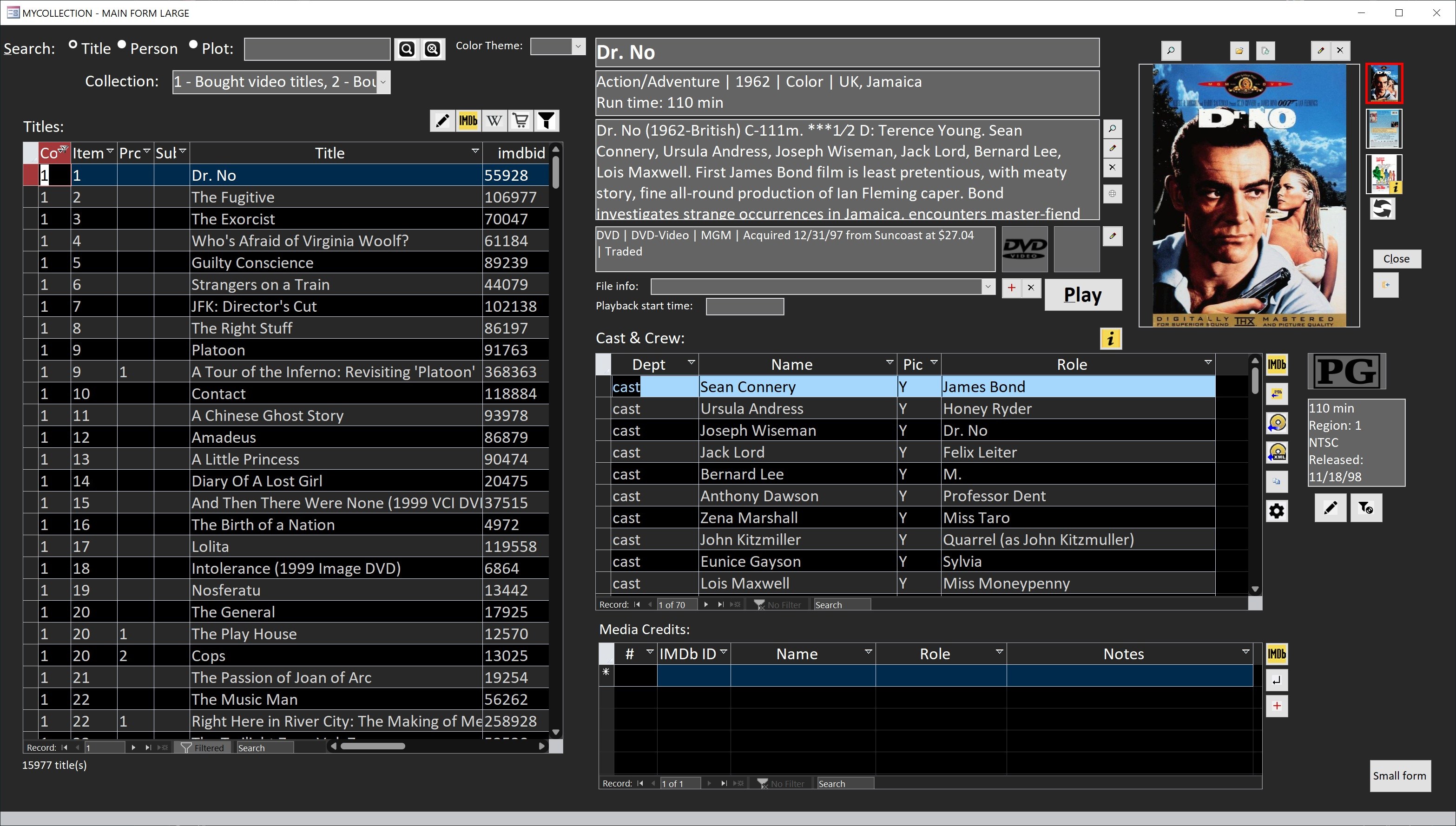
As Adam said, relationships are more about table design, not form design.  A junction table is basically any table that has two or more foreign primary IDs.  If a movie database has a "cast and crew" table with actors IDs and the movie IDs of the movies those actors appear in, then that is a junction table right there.  But the actual form may look like the picture below, where the presence of a junction table is not obvious -- because all data are mixed together and presented in a useful way to the user.  A form is just a user interface, and it displays data in whatever manner most useful to the user.
Kevin Yip  @Reply  
     
2 years ago

David Cummins OP  @Reply  
      
2 years ago
Thanks for the info, gentleman. I was able to create a M to M relationship and working form in a test environment, but it didn't translate in my working app. In any case, I think I am overthinking my designs. It turns out that I have two applications that I thought I needed a M to M solution. Turns out that a M to 1 worked instead. I've read on few blogs that M-M is rarely used and now I am beginning to understand why.
Kevin Yip  @Reply  
     
2 years ago
Many-to-many relationships are actually more common than strictly one-to-many relationships, in which an entity has no parents and only descendants.  Not many things in our lives are "progenitors" of everything.  All living things on Earth are descendants of a single organism, and all lifeforms are based on carbon, oxygen, and hydrogen atoms, just to cite two rare one-to-many examples.  In our lives, most things are many-to-many: a customer can order many items, while one item can be bought by many customers; an actor stars in multiple movies, and a movie has multiple actors, and so forth.
Richard Rost  @Reply  
          
2 years ago
It is possible that life originated in multiple locations on Earth around the same time. The conditions that brought about the "first organism" could have spawned many such organisms in various locations. Just sayin' LOL

This thread is now CLOSED. If you wish to comment, start a NEW discussion in Access Forum.
 

Next Unseen

 
New Feature: Comment Live View


The following is a paid advertisement
Computer Learning Zone is not responsible for any content shown or offers made by these ads.
 

Learn
 
Access - index
Excel - index
Word - index
Windows - index
PowerPoint - index
Photoshop - index
Visual Basic - index
ASP - index
Seminars
More...
Customers
 
Login
My Account
My Courses
Lost Password
Memberships
Student Databases
Change Email
Info
 
Latest News
New Releases
User Forums
Topic Glossary
Tips & Tricks
Search The Site
Code Vault
Collapse Menus
Help
 
Customer Support
Web Site Tour
FAQs
TechHelp
Consulting Services
About
 
Background
Testimonials
Jobs
Affiliate Program
Richard Rost
Free Lessons
Mailing List
PCResale.NET
Order
 
Video Tutorials
Handbooks
Memberships
Learning Connection
Idiot's Guide to Excel
Volume Discounts
Payment Info
Shipping
Terms of Sale
Contact
 
Contact Info
Support Policy
Mailing Address
Phone Number
Fax Number
Course Survey
Email Richard
[email protected]
Blog RSS Feed    YouTube Channel

LinkedIn
Copyright 2026 by Computer Learning Zone, Amicron, and Richard Rost. All Rights Reserved. Current Time: 4/30/2026 7:08:53 AM. PLT: 1s