Free Lessons
Courses
Seminars
TechHelp
Fast Tips
Templates
Topic Index
Forum
ABCD
 
Home   Courses   TechHelp   Help   Contact   Merch   Join   Order   Logon   Forums   
 
Back to Access Forum    Comments List
Upload Images   @Reply   Bookmark    Link   Email   Next Unseen 
Form with Details and Sum
David Cooke 
     
2 years ago
Good Morning,
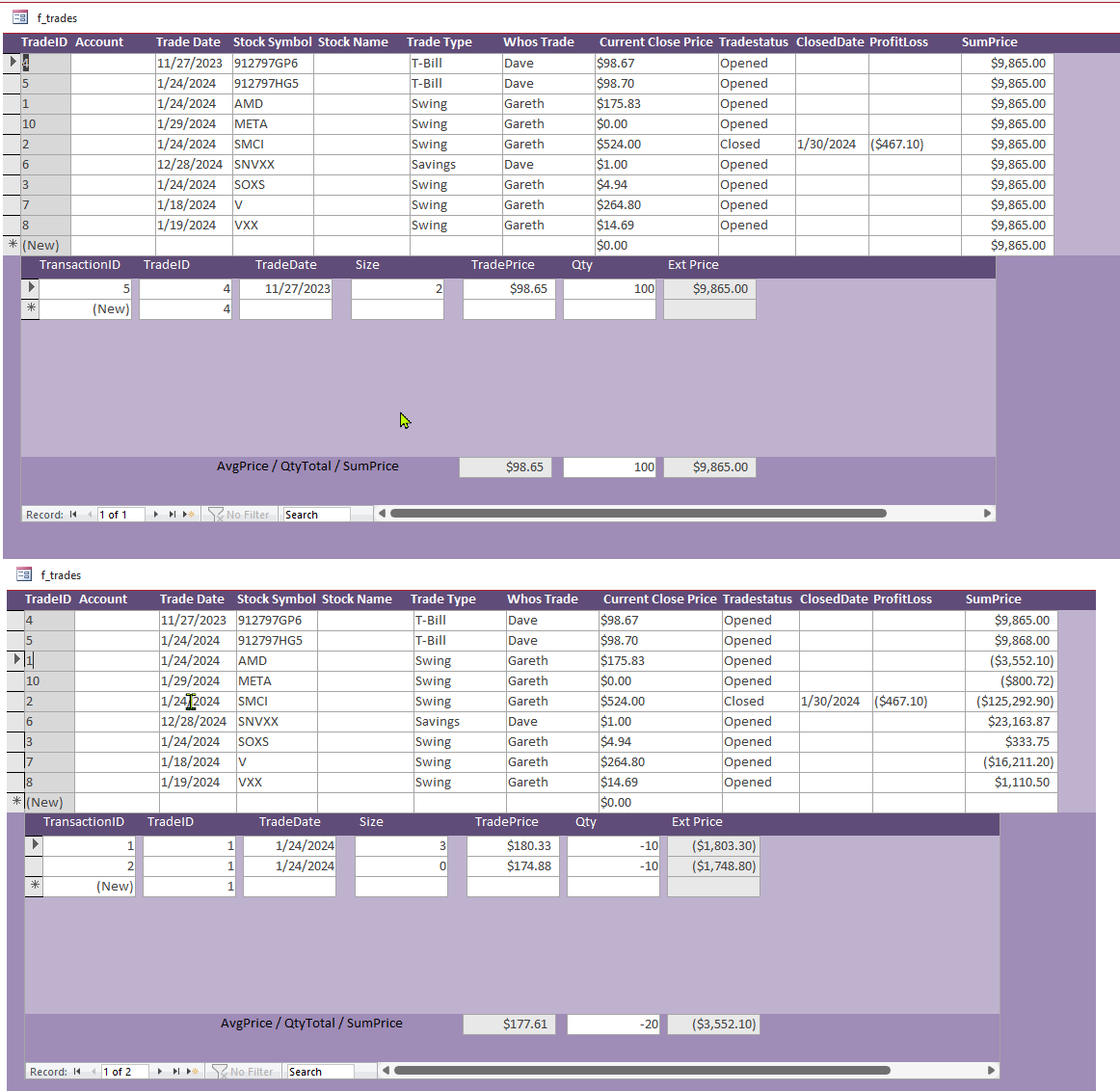
I've created a form with stock trades and a subform with the transaction details.  In the Parent form I can take the SUM from the Subform but the SUM in the parent form doesn't update until I click on the record.  Is there a way to get the correct sum when opening or updating the subform?  Will upload screen shot.

Thank you
David Cooke OP  @Reply  
     
2 years ago

Sami Shamma  @Reply  
             
2 years ago
In the "Form" On Current property, insert this VBA code:

Me.Refresh
David Cooke OP  @Reply  
     
2 years ago
Hi Sami,
On Current for the form me.refresh updates all values with the same when clicking on the record.  With out me.refresh if I select the record the SUM value updates to the proper value.  I'm looking for the values to be correct when I open the form verses clicking each record.  I think I may have to try a do this in a query with SQL.  Not sure the syntax yet.

Thank you for your input!
Sami Shamma  @Reply  
             
2 years ago
then I did not understand what you did. Can you highlight on the image which is the Sum field and what is the record source for that field.
Sami Shamma  @Reply  
             
2 years ago
We will help you with the syntax once we are clear on what you are attempting to do.
Juan C Rivera  @Reply  
            
2 years ago
How about the event on change?  add the me. refresh ???

V/r
Juan
David Cooke OP  @Reply  
     
2 years ago
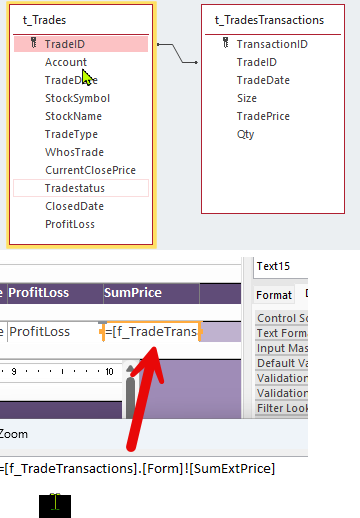
I have two tables: Trades I'm in (t_Trades) and the transaction the matches the trades (t_TradesTransactions).  From the transactions matched to the TradeID I want to get the SUM of QTY, Sum of the TradePrice and the Avg of TradePrice.  This I can do in a query and the results in to the subform.  The subform is based on Query:

SELECT t_TradesTransactions.*, [TradePrice]*[Qty] AS ExtPrice
FROM t_TradesTransactions;

The I'm trying to use the parent form to get the data from the subform:
=[f_TradeTransactions].[Form]![SumExtPrice]

Thanks
David Cooke OP  @Reply  
     
2 years ago

Sami Shamma  @Reply  
             
2 years ago
To reference a filed on the sub form the syntax is explained in this video:Bang! v Dot.
Sami Shamma  @Reply  
             
2 years ago
The syntax is:
Forms!MainF!SubF.Form!FieldName
Kevin Yip  @Reply  
     
2 years ago
Hi David, to show the subform's total on the main form, you need to first put the subtotal on the subform.  Create a textbox on the subform's footer with the properties:

Name: SumExtPrice
Control source:  =Sum([ExtPrice])
Visible: No (if you prefer it to be invisible)

This field has to be put on the footer, because an aggregate function like Sum() only works in footers.

Then, on the main form, create a textbox anywhere with the control source below (which you already did):

    =[f_TradeTransactions].[Form]![SumExtPrice]

And voila, the main form now shows the subform's total.  It will always show whatever that is shown in the subform's subtotal, i.e. it always refreshes itself.
David Cooke OP  @Reply  
     
2 years ago
Hi Kevin,  Yes I can get the Sum to the parent form but when it shows 7 records the SUM field defaults to the first record for all 7 records until I click on each record.  I was hoping to have the correct value in all 7 records when I open the form/sub form.   See the first screen shot in the thread.  The first view is when I opened it then the second is when I went through each record.

Hi Sami,  When I change what you suggested from =[f_TradeTransactions].[Form]![SumExtPrice] ( I get a valid value) to =Forms![f_TradeTransactions].[Form]![SumExtPrice] I get #name.

Thank you all!

Dave
Sami Shamma  @Reply  
             
2 years ago
You need the main form name and the sub form name in the expression.
Forms.[mainform]![subform].form!field
David Cooke OP  @Reply  
     
2 years ago
Seems easier to have two queries one for the parent and subform.  I don't even need to  have sums in the subform.  I needed to see my QTY/AVG/SUM plus see what my transactions were.  Next is to get near live time stock quotes.  :)

Thanks all for your inputs.

This thread is now CLOSED. If you wish to comment, start a NEW discussion in Access Forum.
 

Next Unseen


What's This?


The following is a paid advertisement
Computer Learning Zone is not responsible for any content shown or offers made by these ads.
 

Learn
 
Access - index
Excel - index
Word - index
Windows - index
PowerPoint - index
Photoshop - index
Visual Basic - index
ASP - index
Seminars
More...
Customers
 
Login
My Account
My Courses
Lost Password
Memberships
Student Databases
Change Email
Info
 
Latest News
New Releases
User Forums
Topic Glossary
Tips & Tricks
Search The Site
Code Vault
Collapse Menus
Help
 
Customer Support
Web Site Tour
FAQs
TechHelp
Consulting Services
About
 
Background
Testimonials
Jobs
Affiliate Program
Richard Rost
Free Lessons
Mailing List
PCResale.NET
Order
 
Video Tutorials
Handbooks
Memberships
Learning Connection
Idiot's Guide to Excel
Volume Discounts
Payment Info
Shipping
Terms of Sale
Contact
 
Contact Info
Support Policy
Mailing Address
Phone Number
Fax Number
Course Survey
Email Richard
[email protected]
Blog RSS Feed    YouTube Channel

LinkedIn
Copyright 2026 by Computer Learning Zone, Amicron, and Richard Rost. All Rights Reserved. Current Time: 9/6/2026 5:12:58 AM. PLT: 0s