Free Lessons
Courses
Seminars
TechHelp
Fast Tips
Templates
Topic Index
Forum
ABCD
 
Home   Courses   TechHelp   Forums   Help   Contact   Merch   Join   Order   Logon  
 
Back to Asset Management Lessons    Comments List
Upload Images   @Reply   Bookmark    Link   Email   Next Unseen 
Bulk Asset Addition
Michael Olsen 
      
2 years ago
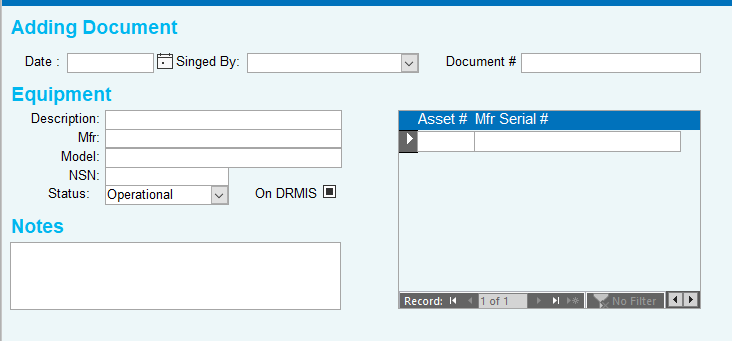
I will often receive shipments of 10 or more identical items that need to be tracked by their serial numbers. How can I create a form where I can enter the "common data" and then add the various serial numbers in a continuous subform?

For instance, I recently received a shipment of 30 new processors from a vendor. They are all the same, except for the Manufacturer's Serial Number (Mfr. SN). How can I enter them without having to repeatedly typing or selecting the Vendor_ID, Description, and so on?

Currently, my form generates one record with the common data and a blank Mfr. SN. Then, there are a series of records that only contain Mfr. SN.
Michael Olsen OP  @Reply  
      
2 years ago

Adam Schwanz  @Reply  
           
2 years ago
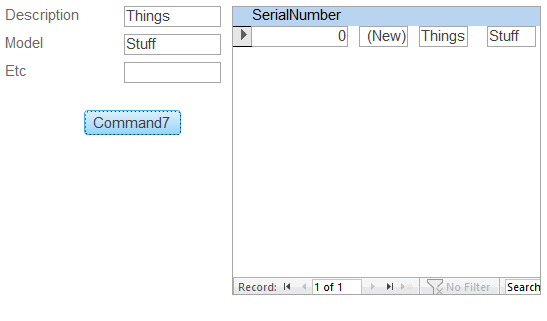
You could make a form that you fill out with unbound fields, then set the default values of the fields in your subform to those fields
Adam Schwanz  @Reply  
           
2 years ago

Adam Schwanz  @Reply  
           
2 years ago
Something like this, put in what you want for all of them on the left, the button is just a requery on the subform so it gets the updated default values, and you're good to go on spam entering serial numbers, all the extra fields on the subform can be visible:false
Richard Rost  @Reply  
          
2 years ago
Adam's method is one way that you could do it, but I would do it a different way. I would have one table that stores the product description, model, and other relevant information, and then have a second related table that solely stores the serial number and other details about each specific unit, such as the purchase date. I would definitely go with the two-table solution. Michael, you have it perfectly right there in your mock-up. Just set up two tables with a relationship between them. Maybe have the product ID in the unit table as a foreign key. It's just like customers and contacts.
Juan C Rivera  @Reply  
            
2 years ago
copy last record
Here is an oldie but goodie.   copy record fields with DLOOKUP.  I use this method plenty.
Michael Olsen OP  @Reply  
      
2 years ago
WOW!  Thanks for all the great info everyone.

Adam's sounds plausible for my needs, but perhaps a bit 'clunky' for production.  That said, it is a great place to start from, and I already have a couple of ideas for a smoother production run.  

I tried Richard's idea, but ran into several unexpected tech issues.  Still working on it, as I can see that being the best choice long term.  

Juan your recommendation will for now be a godsend for my data entry clerks.  It is not what I am seeking for a final result, but it is many times more efficient than what we have, and more intuitive that Adam's initial suggestion.

In the end, I can see where I might use a 'hybrid' of all three.  Thanks again for a great job of pointing the way and educating at the same time.  Y'all are <B>AWSOME</B> !
Richard Rost  @Reply  
          
2 years ago
I've got this on my list for a TechHelp video. Between your question and a couple others, I received a few different inquiries about this in the last couple of weeks. Promise. I'm going out of town until Tuesday, so I might not get a chance to record it until next week. But if you're not in a hurry, just sit back, hang tight, and I'll show you my thoughts on it when I get a chance to put this together.
Michael Olsen OP  @Reply  
      
2 years ago
Richard,

You and your 'crew' are fantastic.  It genuinely feels like I am dealing with friends.  Thank you all most deeply.

As for making a TechHelp video -- WOW!  That is way more than I could have ever thought to ask for.  With what your team has already provided, I have a ton of detailed notes that I will be working through this weekend.  I expect that I will be spending most of next week implementing and testing them to get what I want.  So, please take your time with the video.  I have no doubt it will be a great one and extremely helpful once done.

Again, THANK YOU EVERYONE!
Richard Rost  @Reply  
          
2 years ago
I sat down today and tried to come up with an easy way to do this in a TechHelp video, but I don't think there's an easy or quick solution that I could do without a ton of background and other stuff. I'm afraid it's just too complicated for a TechHelp video right now. However, I do cover this topic extensively in Access Developer 27 and in the Barcode Seminar. At this point it kind of falls under the category of "not reinventing the wheel."
Michael Olsen OP  @Reply  
      
2 years ago
No sweat Richard.  I appreciate your pointing me to two other resources.  Besides, everyone has given a ton of great help already.  For now I have implemented a 'kludge' based on Adams suggestion.  It was fast and relatively simple to implement.  My inventory techs are grateful for the improvement.  We all agree it is not quite what we want for production, but it is a good starting point/prototype.  

I'm out of town for two weeks - Professional Conferences.  So I will have plenty of down time to open paper notebook and work out a few details.  Yes I still use paper and pencil to map out my ideas and foresee issues.  Just something about 'unplugging' that seems to help my thinking and creativity.  It drives many of the young techs I work with crazy, but since I'm the boss, they just keep reminding me that it is the 21st century, and I remind them I like my "crash proof word processor".  LOL
Richard Rost  @Reply  
          
2 years ago
Nothing wrong with a good old notepad. I used to prototype stuff on graph paper until a few years ago. :)

This thread is now CLOSED. If you wish to comment, start a NEW discussion in Asset Management Lessons.
 

Next Unseen

 
New Feature: Comment Live View


The following is a paid advertisement
Computer Learning Zone is not responsible for any content shown or offers made by these ads.
 

Learn
 
Access - index
Excel - index
Word - index
Windows - index
PowerPoint - index
Photoshop - index
Visual Basic - index
ASP - index
Seminars
More...
Customers
 
Login
My Account
My Courses
Lost Password
Memberships
Student Databases
Change Email
Info
 
Latest News
New Releases
User Forums
Topic Glossary
Tips & Tricks
Search The Site
Code Vault
Collapse Menus
Help
 
Customer Support
Web Site Tour
FAQs
TechHelp
Consulting Services
About
 
Background
Testimonials
Jobs
Affiliate Program
Richard Rost
Free Lessons
Mailing List
PCResale.NET
Order
 
Video Tutorials
Handbooks
Memberships
Learning Connection
Idiot's Guide to Excel
Volume Discounts
Payment Info
Shipping
Terms of Sale
Contact
 
Contact Info
Support Policy
Mailing Address
Phone Number
Fax Number
Course Survey
Email Richard
[email protected]
Blog RSS Feed    YouTube Channel

LinkedIn
Copyright 2026 by Computer Learning Zone, Amicron, and Richard Rost. All Rights Reserved. Current Time: 6/16/2026 11:20:10 AM. PLT: 0s