Free Lessons
Courses
Seminars
TechHelp
Fast Tips
Templates
Topic Index
Forum
ABCD
 
Home   Courses   TechHelp   Forums   Help   Contact   Merch   Join   Order   Logon  
 
Back to Access Forum    Comments List
Upload Images   @Reply   Bookmark    Link   Email   Next Unseen 
Slow Qry w SQL Expr backend
Susan De Cicco 
     
2 years ago
I am migrating to SQL server w/ a MS Access front end. As step 1, I'm using SQL Express locally. All tables are linked, and things work but they are slowwwww in some cases.
For example, a  query that has both a join and a Where clause that depends on a calculated field, takes several seconds to run. Here is an test query that selects Employees and the GroupIDs they are in.
The function TestSpeed() simply returns the EmployeeID + 1.

<CODE>SELECT tblEmployee.EmployeeID, tblEmployee.EmployeeName, tblLink_EmployeeGroup.GroupID
FROM tblEmployee INNER JOIN tblLink_EmployeeGroup ON tblEmployee.EmployeeID = tblLink_EmployeeGroup.EmployeeID
WHERE (((testspeed([tblEmployee.EmployeeID]))>34));</CODE>

I have fewer than 50 records in both tables. If I remove the Where clause, it's fast. If I remove the join to the Link table, it's fast. With both, it takes about 4 seconds. It did not have this problem with Access as a backend. TIA for any suggestions.
Kevin Yip  @Reply  
     
2 years ago
Is your SQL Server installed on an online host like Winhost?  Internet connection speed is nowhere close to local speed, and that usually explains the slowdown.  Try running other queries to see if the same slowdown occurs.
Susan De Cicco OP  @Reply  
     
2 years ago
No, I am running SQL Express on the same machine that the Access front end is on (my laptop - no internet involved). I have not yet made an account at WinHost. Sorry if I wasn't clear.
Kevin Yip  @Reply  
     
2 years ago
Try running other queries to see if the same slowdown occurs.  Also, is your laptop powerful enough?  That is usually not the machine of choice to run SQL Server.  I hope you are just running a test system.  You need a powerful machine to use it for real.  An online host like Winhost uses top-of-the-line server machines.
Susan De Cicco OP  @Reply  
     
2 years ago
I should add that the query in my original post is the simplest thing I could think of that illustrates the problem. The "real" queries in the database are more complex. ALL of the queries in my database that meet the following conditions are slow:
1. involve a join
2. have a Where clause that checks the result of a function
3. that function takes another field in the query as an input parameter

The example query is super simple and takes about 4 seconds. Many of my "real" queries call functions that have DLookups and whatnot in them, and have much more complex joins with multiple tables ...and these can take up to 30 seconds or longer. And this is on a local setup, so it can only be worse over the internet.
Susan De Cicco OP  @Reply  
     
2 years ago
Yes, this is only a test. My laptop is reasonably powerful, though I suppose that can't be ruled out as the problem. It's just that the difference between queries that meet the 3 criteria I listed vs. those that don't is SO marked, that it seems like something else is at work here.

Thanks Kevin for repsonding!
Kevin Yip  @Reply  
     
2 years ago
If the laptop is not where you will end up using (as recommended not to), there is no point testing this any further on a laptop.  You need to do testing (any testing) on a system that is comparable to what you will use for real.  Laptops are not comparable to desktops because they are generally less powerful than desktops.
Richard Rost  @Reply  
           
2 years ago
Well, I agree with Kevin that the final machine that you end up setting up as your server should be powerful enough to run SQL Server. If you're just doing some simple testing on a laptop, you shouldn't have many problems. I've done this myself many times. I used to have SQL Server Express set up on an old laptop, and I would use it for the prototype systems, and then eventually move over the database to a real server. This was most common when I used to work for other people because I obviously didn't have their server with me when I was developing. But as far as what's causing the slowdown, it could be any number of things. This is one of those things where without actually seeing what you've got going on there, it's very difficult to troubleshoot.
Kevin Yip  @Reply  
     
2 years ago
Hi Richard, you use your laptop as a support tool for your clients, not as a candidate for a final production server, one that will likely need to be running 24/7/365 for possibly mission-critical tasks.  I don't see how you could do testing for such an environment without using a machine that actual suits the environment.  You can test with a laptop now, but all the issues you face now may not be even applicable to the actual production environment.  You fix issue A, B, and C on a laptop, but you will likely face issue D, E, and F in the actual environment.  And all your time spent on the laptop will be wasted.
Richard Rost  @Reply  
           
2 years ago
You may have a different set of issues, yes, but it's not time "wasted." It's developing the database, making sure everything works, making sure the fields and the SQL and all that are good. But of course, sure, when you finally migrate to the FINAL server who knows what kinds of issues might arise? It's still better to prepare as much as you can on your Dev server (even if it's an old laptop) than to not prepare at all. I've spent MANY weekends in the server closets at my clients' firms. LOL
Kevin Yip  @Reply  
     
2 years ago
How you design a database is often dictated by what system performance you are dealing with.  A database running on a local machine, a local network, online host, fast server, slow server, etc., all affect how the database ends up being designed.  A query may take 10 seconds to run on a slow machine and has to be rewritten, but it may take only split second to run on a faster machine so it does NOT need to be rewritten.  You would NOT know that if you did your testing on a slow laptop.

Like all server products, SQL Server is meant to be run on machines that are as fast as they can be, because their server roles demand such power.  That is quite the difference at the opposite end, as client products are often designed with slower, outdated devices in mind to ensure max compatibility for most users.  Many tools still support Windows 7, for instance.

You could help a user save time instead of wasting it on issues that have long been settled: you install SQL Server on server-class machines that it is meant to be installed on, not laptops.

Matt Hall  @Reply  
          
2 years ago
Susan, assuming the laptop is a windows machine, if you open Task Manager and watch the performance tab when you are running the queries in question, you should be able to see if you are running out of ram or CPU capacity.  This may help rule out or confirm the hardware as the culprit.
Susan De Cicco OP  @Reply  
     
2 years ago
I checked the task mananger  - CPU remains between 0 and 5%, and hard faults/sec is 1 or 0. (thanks for the suggestion Matt).

I've been doing additoinal testing - the following function takes 4 second longer to run if the DLookUP function is there vs. if it's commented out. I've read that domain functions are notoriously slow. Are they THIS slow though? Again, this doesn't happen with an MS access backend.

Function testIt()
Debug.Print "Start = " & Now()
Dim rs As ADODB.Recordset: Set rs = New ADODB.Recordset
Dim sql As String, s As String
sql = "select * from tblProject"
rs.Open sql, CurrentProject.Connection, 3, 3
rs.MoveFirst

While Not rs.EOF
s = DLookup("Status", "tblEmployee", "EmployeeID = 3")
Debug.Print "ID is = " & rs("projectID") & " " & s
rs.MoveNext
Wend
rs.Close
Set rs = Nothing
Debug.Print "end  = " & Now()
End Function

Here is the output (with and without the DlookUp line commented out:
Start = 4/6/2024 10:57:56 AM
ID is = 21 active
ID is = 23 active
ID is = 27 active
ID is = 31 active
ID is = 36 active
end  = 4/6/2024 10:58:00 AM

Start = 4/6/2024 10:58:22 AM
ID is = 21
ID is = 23
ID is = 27
ID is = 31
ID is = 36
end  = 4/6/2024 10:58:22 AM

Kevin Yip  @Reply  
     
2 years ago
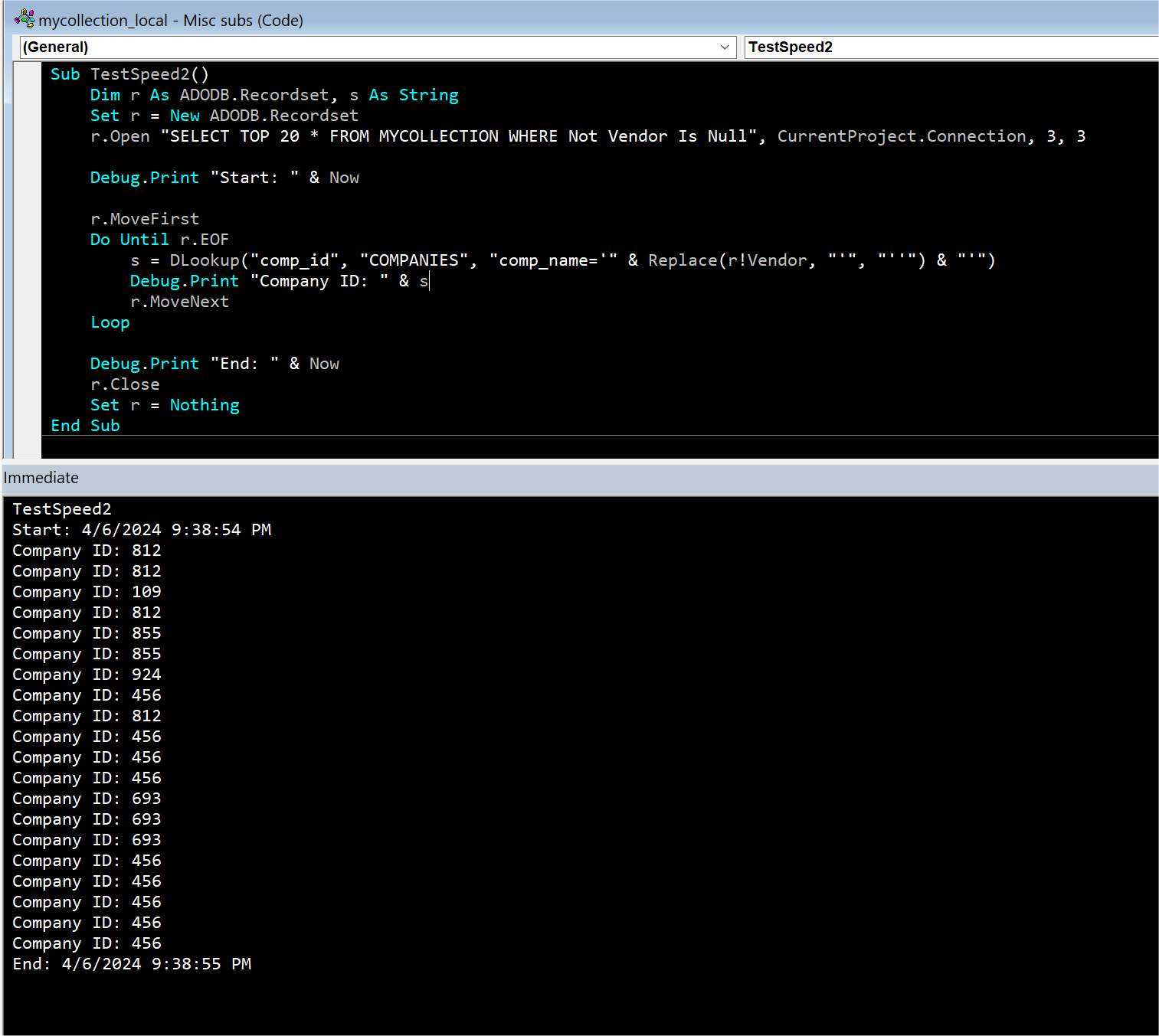
Hi Susan, you ran DLookup only 5 times on a table with only 50 records and it took 4 seconds.  I did a test by running DLookup 20 times on a table with 1000 records, with a recordset that opened a table with 16k records, and it took only 1 second (see picture below).  This is what I meant by your system performance being a major decisive factor on how you end up designing the database.  Even if you had the best Access skills in the world, you would still be completely in the dark if you didn't have the right system at your disposal.  A good developer is supposed to know what PC specifications are needed for any particular task or situation.
Kevin Yip  @Reply  
     
2 years ago

Kevin Yip  @Reply  
     
2 years ago
If my math is correct, my PC is at least 16 times faster than yours based on the above results of both our tests.  My PC has a 5-year-old CPU -- Intel Core i5-9600K 6-Core 3.70GHz.  You can bet a proper server is much faster still.
Kevin Yip  @Reply  
     
2 years ago
The CPU utilization percentage you see at the Task Manager only measures how "busy" a CPU is, not how fast.  A fast and busy CPU still performs faster than a slow and idle one.  CPU speed mainly depends on clock speed (GHz) and the number of cores it has.
Susan De Cicco OP  @Reply  
     
2 years ago
I think I may have more than one issue going here. Further testing has lead me to think Cursor location is part of the issue. I wrote my own DLookup function (below).
If I use 'gConn' instead of the currentproject.connection, this runs very fast.  If I use CurrentProject.connection, it's the usual 4 seconds-ish. Therefore, at least some of the problem is independent of hardware.

Function DLookUpX2() As String
Call SetGConn

Dim rs2 As ADODB.Recordset: Set rs2 = New ADODB.Recordset
Dim sql As String, s As String
sql = "select status from tblEmployee where EmployeeID = 3"

rs2.Open sql, gConn, 1, 3
'rs2.Open sql, CurrentProject.Connection, 1, 3

rs2.MoveFirst
While Not rs2.EOF

s = CStr(rs2(0))
rs2.MoveNext
Wend
DLookUpX2 = s

rs2.Close
Set rs2 = Nothing
Debug.Print s

End Function

Public Function SetGConn() As Boolean
Set gConn = CurrentProject.Connection
gConn.CursorLocation = adUseClient
End Function

This suggestion found here:https://microsoft.public.vb.general.discussion.narkive.com/T7z3r42X/why-going-through-an-ado-recordset-in-sql-server-is-slower-than-in-access

The other issue (almost certainly related) is slowdowns seem to occur when more than one recordset is open at a time. This other thread suggests it may be necessary to open two connections. I will go down that rabbit hole next, but it's (even) more out of my comfort zone. 'https://stackoverflow.com/questions/51595424/why-is-opening-a-second-ado-client-side-recordset-so-terribly-slow
Kevin Yip  @Reply  
     
2 years ago
Tell us your actual system specs you have right now: CPU speed, clock rate, core numbers, etc.  That is really the crux of the matter here.  Even if you don't run into system problems now, you eventually will, if your system is as woefully underpowered as our test results seem to indicate.
Susan De Cicco OP  @Reply  
     
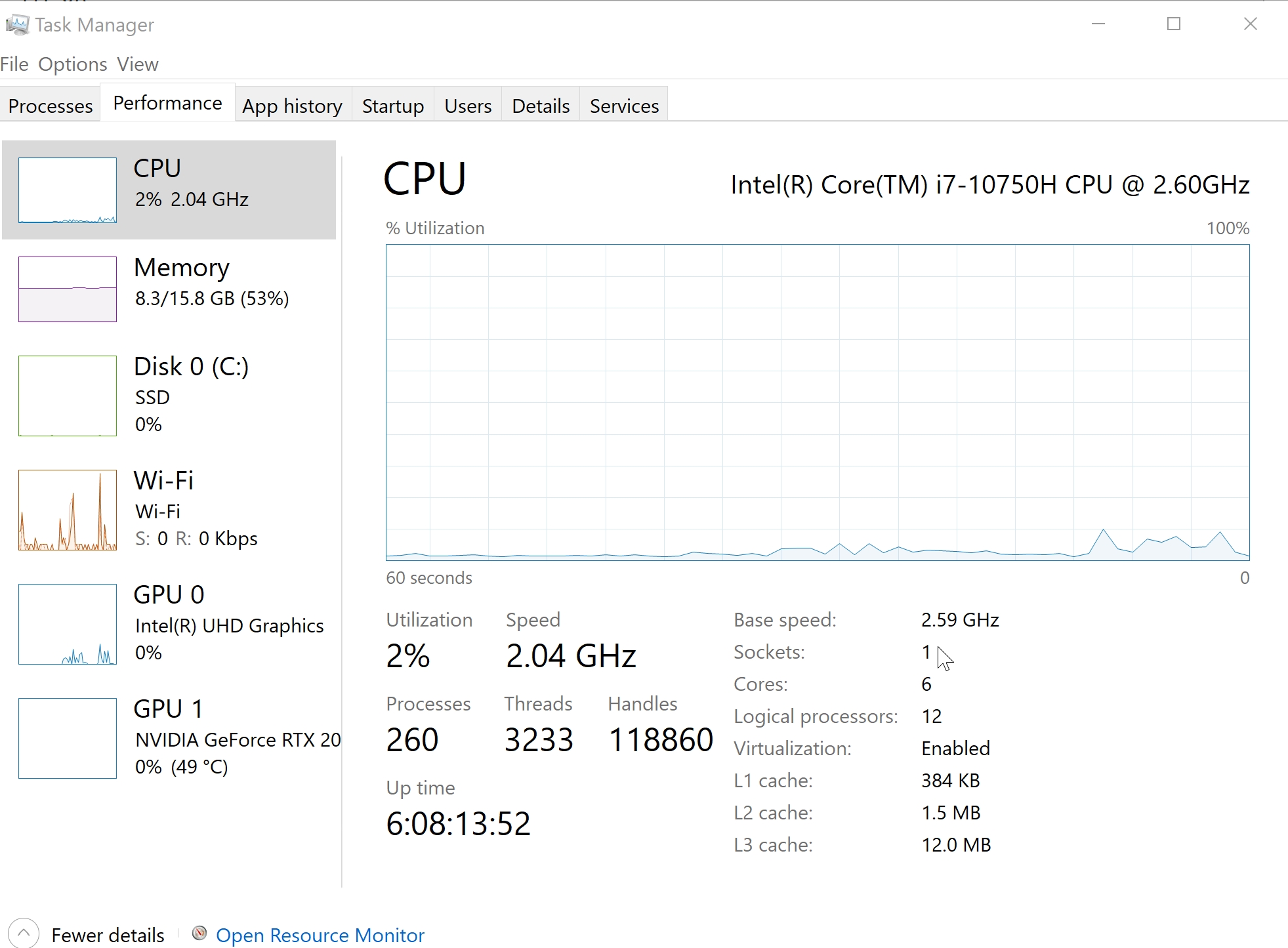
2 years ago

Kevin Yip  @Reply  
     
2 years ago
I did another test using ADO, using the same code you did originally, and it also took 1 second to complete (picture below).  Again, my table sizes and loop count all far exceeded yours.

Your CPU is about 20% slower than mine according to online benchmarks.  You may Google "i5-9600k vs i7-10750h" to browse the results.  But note that benchmarks aren't real-life usages.  Many other factors may be at play.  For instance, the elephant in the room: SQL Server.  Was it installed properly on your laptop?  My tests above were done with SQL Server installed on the same PC as Access, just like yours.
Kevin Yip  @Reply  
     
2 years ago

Susan De Cicco OP  @Reply  
     
2 years ago
I am running SQL Express on the same machine, not SQL Server. Whether it's installed "correctly", I don't know.
Kevin Yip  @Reply  
     
2 years ago
Well, you have to know, and so does whoever ends up managing this.  If you use Winhost (which I recommend), you let Winhost run the server for you, which will save you some headache.  But you still have to do many of the configurations yourself.  

"SQL Server Express" is a free version of SQL Server, and it differs mainly in the database size allowed, which is 10GB.
Susan De Cicco OP  @Reply  
     
2 years ago
Yes, I realize that SQL express is a free version of SQL Server, but as such, it is not exactly the same. And you can never be 100% sure where the differences lie. I also realize that a local environment is different than having the backend hosted somewhere else. I was hoping to be able to do my development locally without needing to connect to WinHost until I was ready to test that portion of things. Yes, of course there can be interactions, but first things first, e.g. Do my SQL statements work? Are my data types compatible? That sort of thing.
My main goal in making this post is to see if anyone saw my code and was like "Oh, yes, clearly you are missing X paramemter that is needed when using SQL server as a backend".  
I do plan to get an WinHost account, so we'll see if the problem disappears when everything is moved there. Thank you for your time troubleshooting.
Kevin Yip  @Reply  
     
2 years ago
You may do a test entirely on SQL Server by running a stored procedure.  It runs entirely on SQL Server, without involving Access.  This is one way to make sure SQL Server itself is in tip-top shape.  The picture below is a stored procedure written in T-SQL, the coding language of SQL Server, that does the same test we did earlier: looping 20 times and doing a table lookup each time.  As the picture shows, the test took about 200 milliseconds.  You laptop should yield a similar result.  But again, other things may affect performance.  Performance is not just about CPU.  Every system components, from hard drives to memory, contribute to it.  If you use an online server like Winhost, your Internet speed also affects performance.
Kevin Yip  @Reply  
     
2 years ago

This thread is now CLOSED. If you wish to comment, start a NEW discussion in Access Forum.
 

Next Unseen

 
New Feature: Comment Live View


The following is a paid advertisement
Computer Learning Zone is not responsible for any content shown or offers made by these ads.
 

Learn
 
Access - index
Excel - index
Word - index
Windows - index
PowerPoint - index
Photoshop - index
Visual Basic - index
ASP - index
Seminars
More...
Customers
 
Login
My Account
My Courses
Lost Password
Memberships
Student Databases
Change Email
Info
 
Latest News
New Releases
User Forums
Topic Glossary
Tips & Tricks
Search The Site
Code Vault
Collapse Menus
Help
 
Customer Support
Web Site Tour
FAQs
TechHelp
Consulting Services
About
 
Background
Testimonials
Jobs
Affiliate Program
Richard Rost
Free Lessons
Mailing List
PCResale.NET
Order
 
Video Tutorials
Handbooks
Memberships
Learning Connection
Idiot's Guide to Excel
Volume Discounts
Payment Info
Shipping
Terms of Sale
Contact
 
Contact Info
Support Policy
Mailing Address
Phone Number
Fax Number
Course Survey
Email Richard
[email protected]
Blog RSS Feed    YouTube Channel

LinkedIn
Copyright 2026 by Computer Learning Zone, Amicron, and Richard Rost. All Rights Reserved. Current Time: 4/30/2026 3:25:31 PM. PLT: 1s