Free Lessons
Courses
Seminars
TechHelp
Fast Tips
Templates
Topic Index
Forum
ABCD
 
Home   Courses   TechHelp   Forums   Help   Contact   Merch   Join   Order   Logon  
 
Back to Access Forum    Comments List
Upload Images   @Reply   Bookmark    Link   Email   Next Unseen 
Developer Ideas
Sami Shamma 
             
2 years ago
Hi Richard.
I, like many businesses such as doctors, lawyers, government agencies, use scanned or generated PDFs. These PDFs need to be connected to the appropriate records in the Access DB.

Possible lessons could include:
1) How to link PDF files to records.
2) How to batch scan documents and split them into individual PDFs, then assign them to records.
3) Naming conventions to automate linking between files and records.
4) Read information inside a PDF file to determine which record it belongs to and assign it accordingly.
5 etc.

I have a real scenario I am happy to share with you.
Alex Hedley  @Reply  
           
2 years ago
Sami Shamma OP  @Reply  
             
2 years ago
Hi Alex

I have not watched that seminar yet. I will do so soon. The bulk of what I am thinking of is how to manipulate the Data in the pdf file from VBA to capture user information to be used to link to a record as well as how to come up with the optimum solution to handle bulk scanning of documents.
Richard Rost  @Reply  
          
2 years ago
A lot of this I also covered in ABCD Core Part 5. In fact, one of the things I had planned to make the ABCD do well with is storing documents related to customers. This is important for any medical office, law firm, etc., where they have to keep lots of documents for their customers. As far as manipulating PDFs directly from VBA, that's kind of tough. Access and VBA by themselves don't really have the tools necessary to manipulate PDF files, but there are third-party utilities you can get and you can control them from VBA. I was playing with some of them the other day; you could do things like split files apart and such. One thing I was thinking of building was the ability to add files en masse to a database by simply copying them to a specific folder, then click a button in the database, and it just pulls all the files in that folder in and then attaches them to whatever record you pick. If someone she could do. And as far as reading in a PDF file, that might be possible by using Word as an intermediate ' open up Word, pull in the PDF file, save it as text, and then pull that into Access. That might make an interesting video as well.
Alex Hedley  @Reply  
           
2 years ago
More ABCD next?
Richard Rost  @Reply  
          
2 years ago
It's on the list.
Kevin Yip  @Reply  
     
2 years ago
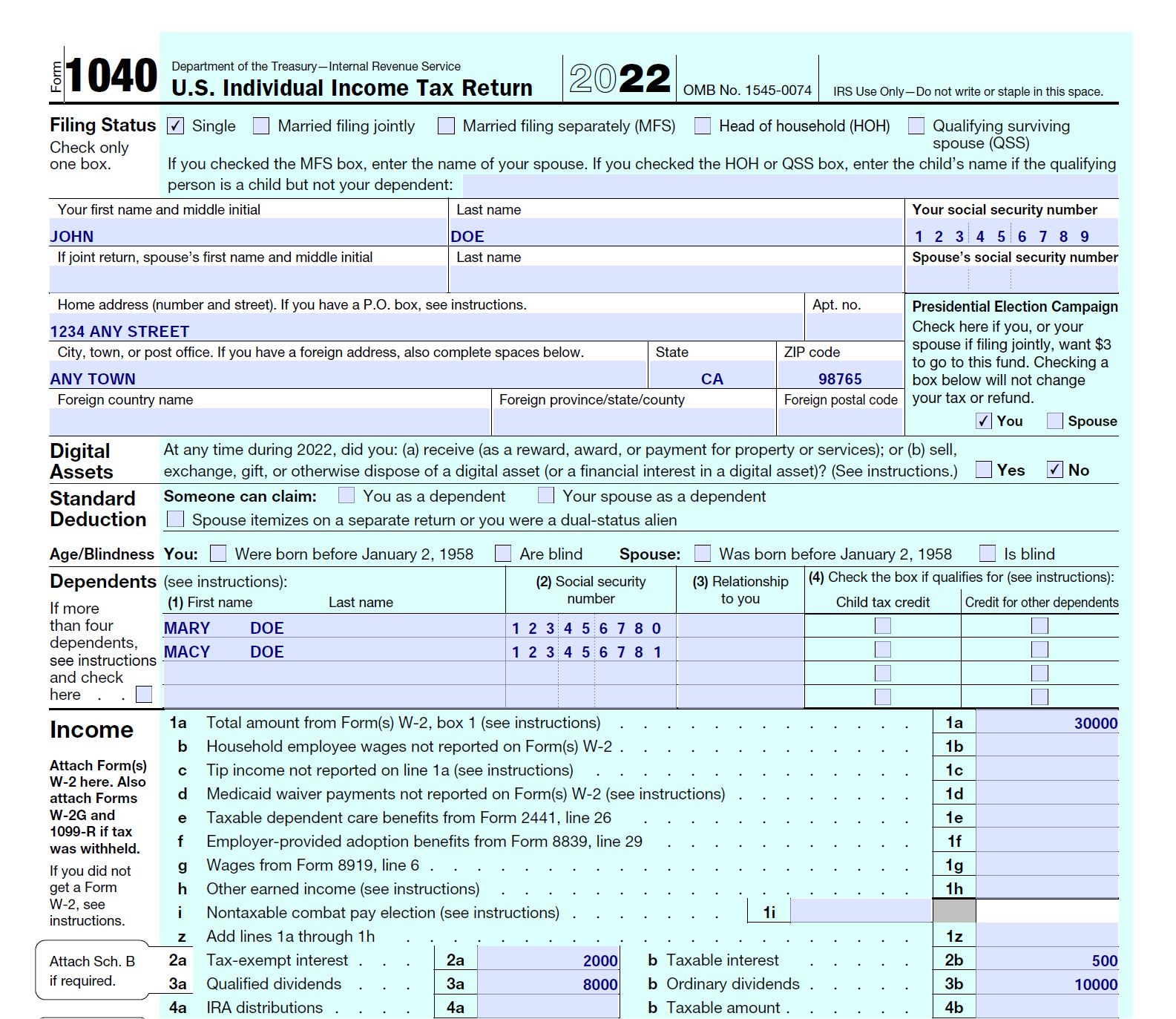
As Richard says, using PDFs as an input source is tough.  Not only would you need good text recognition (OCR, which is often not 100% correct), but you would also need to extract the right text and put it in the right field.  On forms that have complex layouts (which most forms do; see picture below), this would be so difficult (if not impossible) that you might actually save time by typing the data manually into Access.  PDFs are great as output, not input.  You need to work with a data format that is more programmer-friendly.  Ask the people who give you the PDFs if they can give you the data in csv, txt, xlsx, etc., any format but PDF.


Kevin Yip  @Reply  
     
2 years ago

Kevin Yip  @Reply  
     
2 years ago
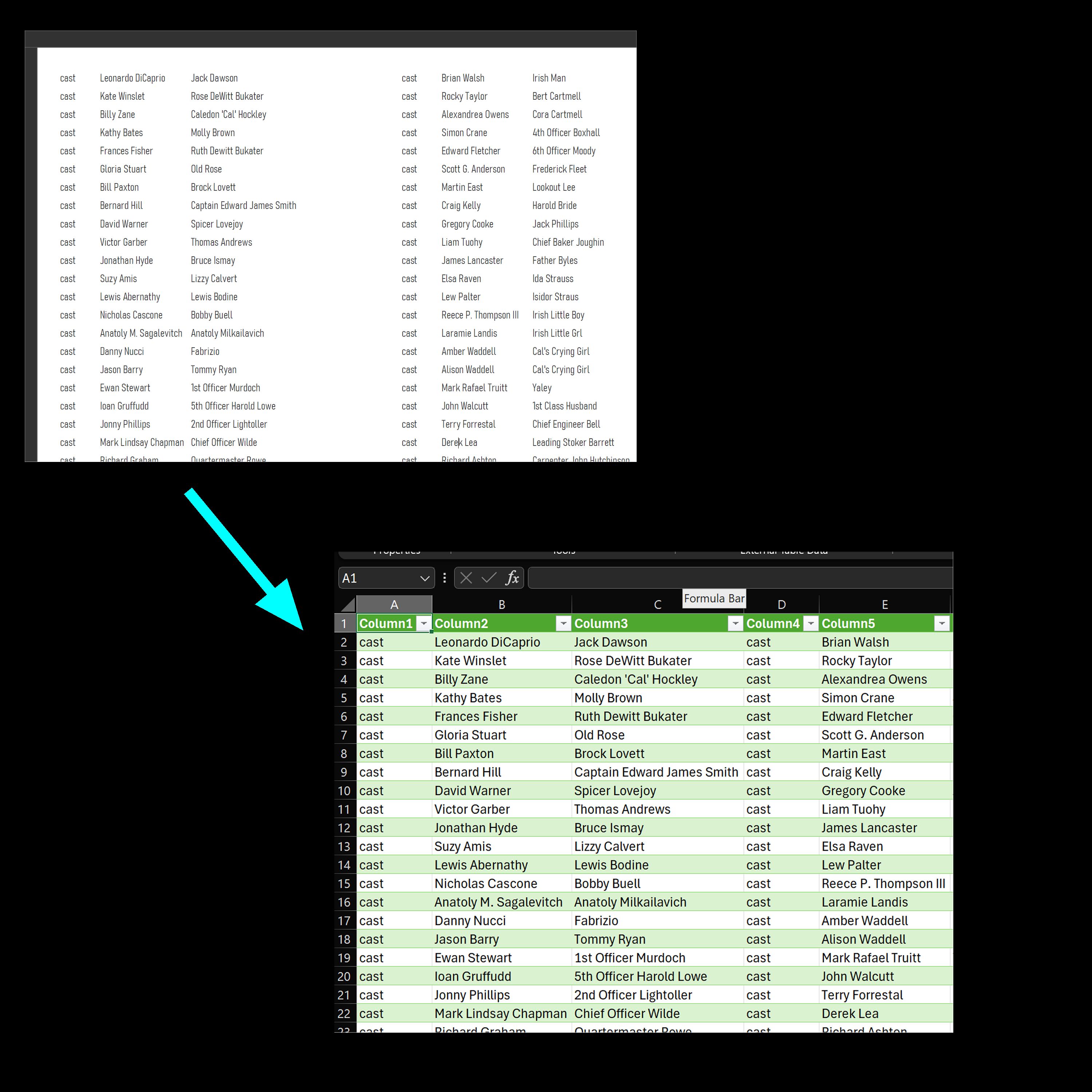
The only kind of PDF that is "friendly" for importing is one that is in a table format, or a format that looks like a table.  In that case, Excel can import it with ease (go to Data -> Get Data -> From File -> From PDF) and put all the text in almost exactly the same table format.  See picture below.  A scanned PDF needs to be fully OCR'ed for this to work.
Kevin Yip  @Reply  
     
2 years ago

Sami Shamma OP  @Reply  
             
2 years ago
Hi Richard
I am re-watching developer 39. I think this is a nice idea for a tech help series rather than developer lessons. If you do documents index 2.0 incorporating open AI.
Donald Lader  @Reply  
      
2 years ago
I always work with government forms, so PDFs are a fact of life. I am looking at a program called bulkpdf (bulkpdf.de), which claims it can fill PDFs from Access data (and others). If it works, although it is third-party, it may be the answer to an age-old problem. I also vote for more with ABCD and the need for document control.
Kevin Yip  @Reply  
     
2 years ago
I believe Richard has already done a video on filling in PDF forms with Access.  The topic of this thread is actually reading info from a PDF and assigning it correctly to Access table fields, which is a much tougher challenge.
Sami Shamma OP  @Reply  
             
2 years ago
Yes Kevin.
As I said PDF is omnipresent in governmental agencies. Having the ability to read something as simple as an ID or a code that can then be used for:
1) naming the file
2) assigning the file to a Record
3) split the pdf to individual documents

Will be a life saver.
Richard Rost  @Reply  
          
2 years ago
I would handle it the same way I'd handle parsing data from a webpage. Open the PDF. Switch to it. Copy the data from it. Paste it into a field in an Access form. Parse away. I do something like this with my Account Balances Template where I read balances off of bank websites.

Oh wait... I haven't published that update yet... but it's coming. :)

This thread is now CLOSED. If you wish to comment, start a NEW discussion in Access Forum.
 

Next Unseen

 
New Feature: Comment Live View


The following is a paid advertisement
Computer Learning Zone is not responsible for any content shown or offers made by these ads.
 

Learn
 
Access - index
Excel - index
Word - index
Windows - index
PowerPoint - index
Photoshop - index
Visual Basic - index
ASP - index
Seminars
More...
Customers
 
Login
My Account
My Courses
Lost Password
Memberships
Student Databases
Change Email
Info
 
Latest News
New Releases
User Forums
Topic Glossary
Tips & Tricks
Search The Site
Code Vault
Collapse Menus
Help
 
Customer Support
Web Site Tour
FAQs
TechHelp
Consulting Services
About
 
Background
Testimonials
Jobs
Affiliate Program
Richard Rost
Free Lessons
Mailing List
PCResale.NET
Order
 
Video Tutorials
Handbooks
Memberships
Learning Connection
Idiot's Guide to Excel
Volume Discounts
Payment Info
Shipping
Terms of Sale
Contact
 
Contact Info
Support Policy
Mailing Address
Phone Number
Fax Number
Course Survey
Email Richard
[email protected]
Blog RSS Feed    YouTube Channel

LinkedIn
Copyright 2026 by Computer Learning Zone, Amicron, and Richard Rost. All Rights Reserved. Current Time: 6/16/2026 6:41:01 PM. PLT: 0s