Free Lessons
Courses
Seminars
TechHelp
Fast Tips
Templates
Topic Index
Forum
ABCD
 
Home   Courses   TechHelp   Forums   Help   Contact   Merch   Join   Order   Logon  
 
Back to Access Forum    Comments List
Upload Images   @Reply   Bookmark    Link   Email   Next Unseen 
cant email ACCDE file
Eileen Blake 
    
2 years ago
I have completed a conversion of an Access db to have the backend on SharePoint.  I now need to find a way to send the ACCDE front end file to my users.  I was hoping to send it by email as they all are remote users.  I have put the ACCDE file in a zip folder buy my outlook gives me a message that it is too big to send.  The ACCDE file zipped is 40586KB.  Is there any other way to send the ACCDE file by email?  Does this file size seem large?

Adam Schwanz  @Reply  
           
2 years ago
Your file size is massive for just a front end, so something isn't right. Does it still have the backend tables attached locally to it? Or do you have a lot of images or documents or something stored inside the database instead of a folder?
John Campbell  @Reply  
     
2 years ago
Just use DropBox to send the file.
Kevin Yip  @Reply  
     
2 years ago
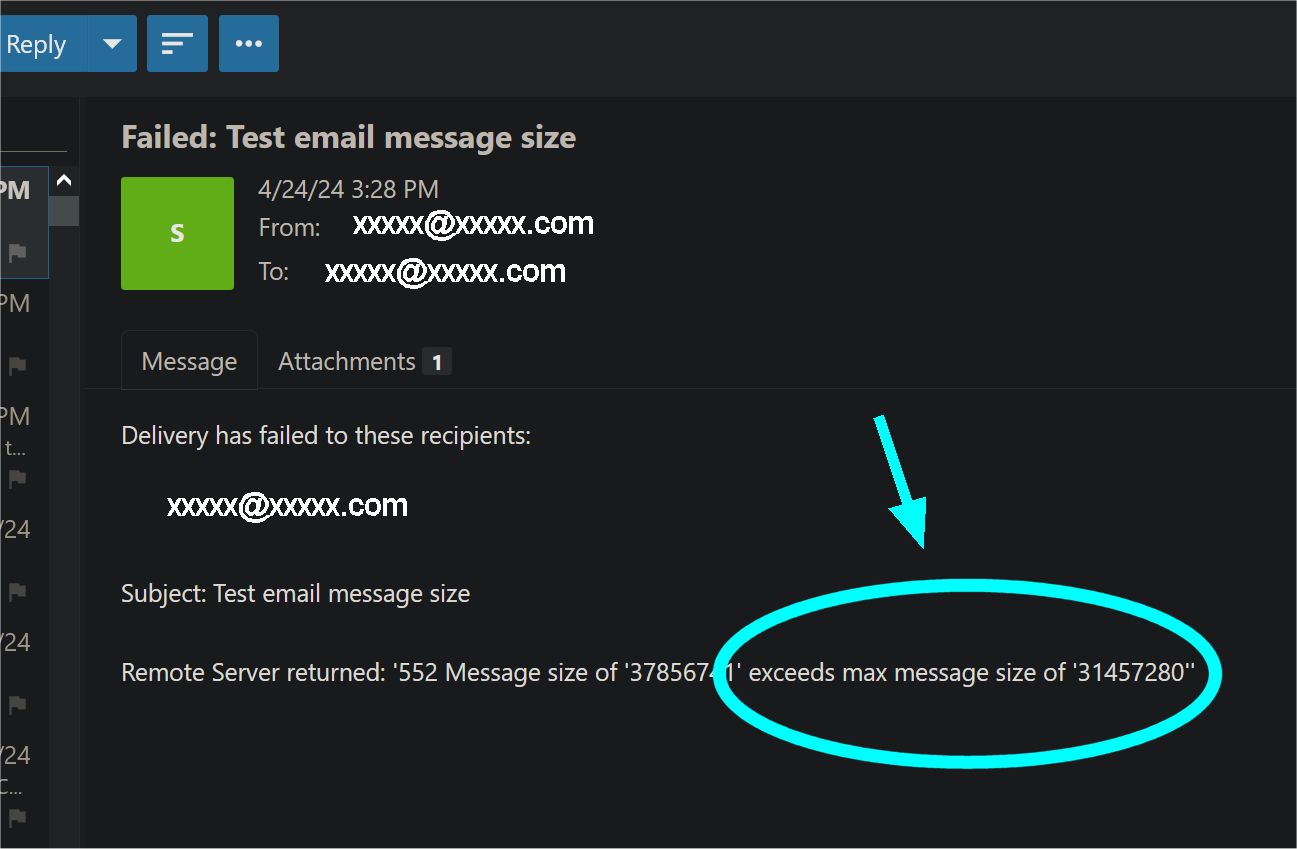
All email services put a limit on the attachment size of each email you send.  If your sender's email address ends with Yahoo dot com or Gmail dot com, then the total size of all your attachments in a single outgoing email can only be up to 25 megabytes, because that is the limit imposed by Yahoo and Gmail.  If you use Winhost to send mail (like I do), you are limited to 30 MB of total attachment size per email.  Different email services impose different limits, some as low as 10MB, but most are 20-30MB.  If you exceed the limit, you may get a return email notice telling you what the limit is (see picture below).

Sending big files over the Internet is a bane for every Internet users.  You have to find another way to send the file that doesn't impose a size limit, such as a cloud storage service as John suggested above; but then you have to watch for the storage size limit of that service.  Or you find a way to reduce the attachment size per email.  A last resort is "splitting" a big file into multiple smaller parts with a third-party utility (WinZip can do that).
Kevin Yip  @Reply  
     
2 years ago

Eileen Blake OP  @Reply  
    
2 years ago
Thanks for the info.
Adam... Yes, this file is bigger than I expected.  The front end has the links to the SharePoint tables that store all of the data, including attached files.  Is there something I should be looking for in the front end vba, forms, tables or queries that would lead the file to be this big.  I took this project over from another developer and there may be some code I haven't had a chance to review yet.
Adam Schwanz  @Reply  
           
2 years ago
The amount of code is going to be negligible for the size. The most likely culprits would be that the tables aren't linked and they have hundreds of thousands of records (if they're linked it's not causing this) or that you have some images or documents stored inside the database, perhaps in a report? (at that size we're probably talking multiple). You could also try to compact and repair the database and see if it helps the size.Compact & Repair

I've seen a few databases in your size range as the accdb file, most of them had images stored inside the database, but as a compressed file it shouldn't be that large, what is the actual size of the file when it's not zipped?
Eileen Blake OP  @Reply  
    
2 years ago
The file when not zipped is 474180 KB.  Its really odd.  The have a logo on my entry form, but other than that there are no images on forms.  I did do a compact and repair before zipping too.  I have a profile image on a form, but it is stored in the table as an attachment type.  All tables are linked from SharePoint.
Adam Schwanz  @Reply  
           
2 years ago
Try looking in your reports, see if any of them are like an embedded word document or something.
Eileen Blake OP  @Reply  
    
2 years ago
Reports have no embedded word documents.  All reports are forms that export to excel or pdf on a button event.
Kevin Yip  @Reply  
     
2 years ago
Create a new database .accdb file, import each object one by one to the new file, and note the file size change every time.  When the file size jumps up, you have the culprit.
Richard Rost  @Reply  
           
2 years ago
Richard Rost  @Reply  
           
2 years ago
Like Kevin said, you can create a new database, copy each item over to it, do a compact and repair, and see what the large objects are. I also have a template that does this too. And yes that is absolutely massive for just a front end. Object Size Analyzer
Eileen Blake OP  @Reply  
    
2 years ago
I took the suggested steps, created a new database and copied all of my objects to it.  At that point, the database size was 7076 KB.  Then I added the linked SharePoint tables and the database became 44416 KB.  Did a compact and repair, size went down to 20500 KB.  Safe to say, it is the linked SharePoint tables that are causing the file size to increase.  At this point, I am resigned to dealing with the large file size and finding a way to share it.
Thank you all for the troubleshooting help.
Richard Rost  @Reply  
           
2 years ago
Yeah, that's crazy. I've never seen that before unless you've got data still being stored locally. I asked ChatGPT about your problem...

Linking tables from SharePoint in Microsoft Access does not typically result in a significant increase in the size of the database file itself. When you link to SharePoint lists, Access stores only the definitions of the linked lists, not the actual data contained within them. This means that while the linked tables appear within your Access database, the data remains stored on SharePoint, and Access interacts with it remotely.

However, there can be some increase in file size due to the metadata and connection information that Access needs to maintain for these links. This includes information on list structure, fields, and the necessary details to manage the connection and synchronization with SharePoint. But, this increase should not be as dramatic as what your client described.

In the case described in your client's email, the initial increase in database size upon adding linked SharePoint tables might be due to temporary objects or additional metadata that Access needed to set up initially. The reduction in size following the compact and repair operation suggests that there were temporary or redundant objects that were cleaned up.

It's possible that other factors might be contributing to the observed file size changes, such as local caching of some data or the presence of additional objects not directly related to the linked tables. I recommend reviewing what else might have been modified or added during the process and ensure that the compact and repair operation is performed regularly to manage bloat from temporary objects.
Richard Rost  @Reply  
           
2 years ago
Another reason I prefer SQL Server over Sharepoint. :)
Kevin Yip  @Reply  
     
2 years ago
See if you imported the table instead of linking it.  Importing means physically copying all the data to Access, which of course will increase the database size.  Linking means only linking the tables.  A linked table should have a little arrow in its icon on the navigation pane, whereas an imported table doesn't.

This thread is now CLOSED. If you wish to comment, start a NEW discussion in Access Forum.
 

Next Unseen

 
New Feature: Comment Live View


The following is a paid advertisement
Computer Learning Zone is not responsible for any content shown or offers made by these ads.
 

Learn
 
Access - index
Excel - index
Word - index
Windows - index
PowerPoint - index
Photoshop - index
Visual Basic - index
ASP - index
Seminars
More...
Customers
 
Login
My Account
My Courses
Lost Password
Memberships
Student Databases
Change Email
Info
 
Latest News
New Releases
User Forums
Topic Glossary
Tips & Tricks
Search The Site
Code Vault
Collapse Menus
Help
 
Customer Support
Web Site Tour
FAQs
TechHelp
Consulting Services
About
 
Background
Testimonials
Jobs
Affiliate Program
Richard Rost
Free Lessons
Mailing List
PCResale.NET
Order
 
Video Tutorials
Handbooks
Memberships
Learning Connection
Idiot's Guide to Excel
Volume Discounts
Payment Info
Shipping
Terms of Sale
Contact
 
Contact Info
Support Policy
Mailing Address
Phone Number
Fax Number
Course Survey
Email Richard
[email protected]
Blog RSS Feed    YouTube Channel

LinkedIn
Copyright 2026 by Computer Learning Zone, Amicron, and Richard Rost. All Rights Reserved. Current Time: 6/16/2026 7:02:04 PM. PLT: 0s