Free Lessons
Courses
Seminars
TechHelp
Fast Tips
Templates
Topic Index
Forum
ABCD
 
Home   Courses   TechHelp   Help   Contact   Merch   Join   Order   Logon   Forums   
 
Back to Access Forum    Comments List
Upload Images   @Reply   Bookmark    Link   Email   Next Unseen 
Whats happening to my query
Michelle Seidelin 
    
2 years ago
Hello everyone, I am trying to make a query to show date, time into separate fields, then I am also wanting to display call signs for some reason when you try to enter a date in the query. It is not letting you it beeps or upload photos as soon as possible
Michelle Seidelin OP  @Reply  
    
2 years ago

Adam Schwanz  @Reply  
           
2 years ago
I don't follow. What you mean when you enter a date in the query? Do you mean you are trying to do data entry on it?
More than likely, it's either because you're entering the date in as a non-date format, or if you used DateValue() then it's calculated and you cant type in it.
David Burns  @Reply  
    
2 years ago
Are you trying to edit/add the date in the query? Wouldn't the query pull the date from somewhere?
Sami Shamma  @Reply  
             
2 years ago
What field are you trying to enter data on?
The query seems to be editable from the picture that you've shown. However, you cannot enter data on a calculated or manipulated field.
Michelle Seidelin OP  @Reply  
    
2 years ago
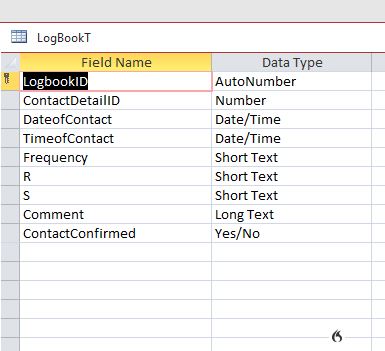
The query is getting the information from our table called ContactdetailsTFor the name of the person and getting the date and start time from a table called logBookT For some reason it will go so far. Then will not let me enter details in certain fields. If I put garbage in, it lets me go on for a while then this happens again
Michelle Seidelin OP  @Reply  
    
2 years ago
Then in time to time. It works then it will not lGives the table. The auto number just comes up was zero. I will update photos next time this happens
Sami Shamma  @Reply  
             
2 years ago
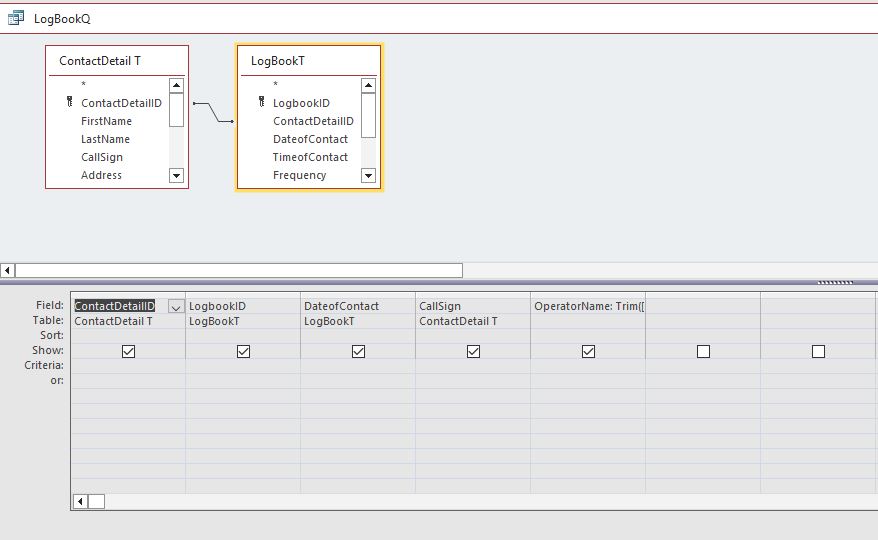
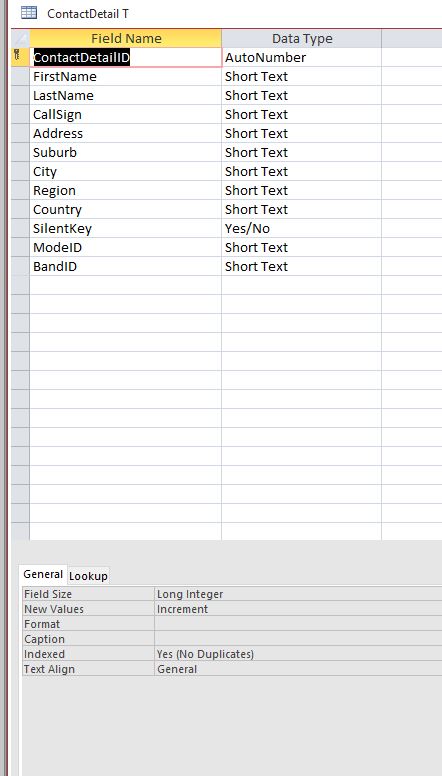
you need to share more information. send Images of the tables, and query in design layout.
Michelle Seidelin OP  @Reply  
    
2 years ago
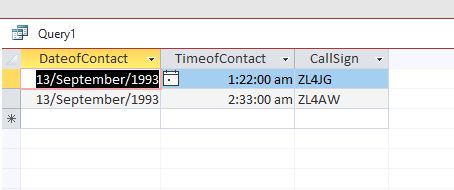
I have discovered that working until you put the date field in then it just won't let you enter the date as shown in the picture attached I have also discovered after joining to fields first name and last name. It shows up the way it should. But as you will see even with the field for date, it won't let you put the date in also you can enter quite a few different people here and it transfers it to the contact detail table but when you go back into the query. There's only two entries there again, but they are in the contact table. I'm a bit puzzled
Michelle Seidelin OP  @Reply  
    
2 years ago
Until you put the date field and you are able to put anything in the other fields. But as soon as the date field goes in. It will not let you put anything in any of the fields as mentioned when you run the query after saving it. It still doesn't show all the entries you have done like it does on the video but it does put the information into the contact details form
Michelle Seidelin OP  @Reply  
    
2 years ago
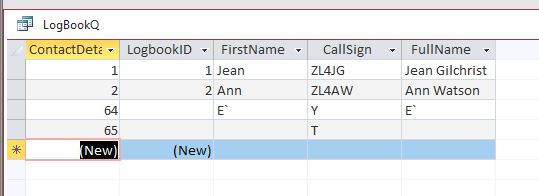
I have discovered another thing when you put an entry into the table called call log. It is not assigning a number to the call log any suggestions. I have to agree that I am going from call log as my main table and getting the extras from contact detail table and I have put them in individually not using the star
Michelle Seidelin OP  @Reply  
    
2 years ago

Michelle Seidelin OP  @Reply  
    
2 years ago

David Burns  @Reply  
    
2 years ago
Michelle, you've provided lots of bits of information that are difficult to put together... for me anyway. Perhaps take a step back and outline the tables and what you want your query to do?
Adam Schwanz  @Reply  
           
2 years ago
I'm even more confused now then I was originally. Are these 2 unrelated questions?

In the original question about the date, is that a date/time field? If so, are you using format to make it appear that way? If so, you probably can't type in the date like that, if you typed 1-1-24 though it should go in and then format to appear how you have it.
Michelle Seidelin OP  @Reply  
    
2 years ago
Hello everyone, here is what I am trying to do run a query to join the following two tables. The table called contactdetailsAs the table which will how old those sort of details the table which is called callbook As a table which holds all the contacts the contacts are when I make a contact with another amateur radio station somewhere in the world I could rated at queried to feed those two tables together as soon as I got the table going and added the fields called dateofContact And ContactDetail. It recognised the foreign key but as soon as I put in the field called Date of contact without spaces at just refuse to let me enter anything. I am running from New Zealand so the date format is day month year. All I get when tying to type on a date or time into separate fields as a beep from my computer it is saving the information I enter into the query for name but as soon as a query is reopened. It is gone from the query, but does say that in the table. I hope that helps
Michelle Seidelin OP  @Reply  
    
2 years ago

Michelle Seidelin OP  @Reply  
    
2 years ago

Michelle Seidelin OP  @Reply  
    
2 years ago
Here is a photo of the query annual notice. It is not assigning a number to the log book. When you enter something with it allows you to
Paul Kiener  @Reply  
      
2 years ago
Michelle,  I would suggest that you combine your two tables into one large table.  I'm not sure why you want to have two separate tables in this situation.  However, if you still want to have two tables, the related field between the two tables should be "LogbookID" instead of "ContactDetailID".  LogBookT should be the parent table, and ContactDetailT is the child table.
As for the date, I would follow on the earlier suggestion to double-check your format for this field.
Hope this helps.
Richard Rost  @Reply  
          
2 years ago
Yeah, whenever I see two (New)s in a query, that's never a good sign.

This thread is now CLOSED. If you wish to comment, start a NEW discussion in Access Forum.
 

Next Unseen


What's This?


The following is a paid advertisement
Computer Learning Zone is not responsible for any content shown or offers made by these ads.
 

Learn
 
Access - index
Excel - index
Word - index
Windows - index
PowerPoint - index
Photoshop - index
Visual Basic - index
ASP - index
Seminars
More...
Customers
 
Login
My Account
My Courses
Lost Password
Memberships
Student Databases
Change Email
Info
 
Latest News
New Releases
User Forums
Topic Glossary
Tips & Tricks
Search The Site
Code Vault
Collapse Menus
Help
 
Customer Support
Web Site Tour
FAQs
TechHelp
Consulting Services
About
 
Background
Testimonials
Jobs
Affiliate Program
Richard Rost
Free Lessons
Mailing List
PCResale.NET
Order
 
Video Tutorials
Handbooks
Memberships
Learning Connection
Idiot's Guide to Excel
Volume Discounts
Payment Info
Shipping
Terms of Sale
Contact
 
Contact Info
Support Policy
Mailing Address
Phone Number
Fax Number
Course Survey
Email Richard
[email protected]
Blog RSS Feed    YouTube Channel

LinkedIn
Copyright 2026 by Computer Learning Zone, Amicron, and Richard Rost. All Rights Reserved. Current Time: 9/5/2026 5:25:07 PM. PLT: 0s