Free Lessons
Courses
Seminars
TechHelp
Fast Tips
Templates
Topic Index
Forum
ABCD
 
Home   Courses   TechHelp   Forums   Help   Contact   Merch   Join   Order   Logon  
 
Back to Access Forum    Comments List
Upload Images   @Reply   Bookmark    Link   Email   Next Unseen 
Copy Table records
Ludwig Willems 
      
2 years ago
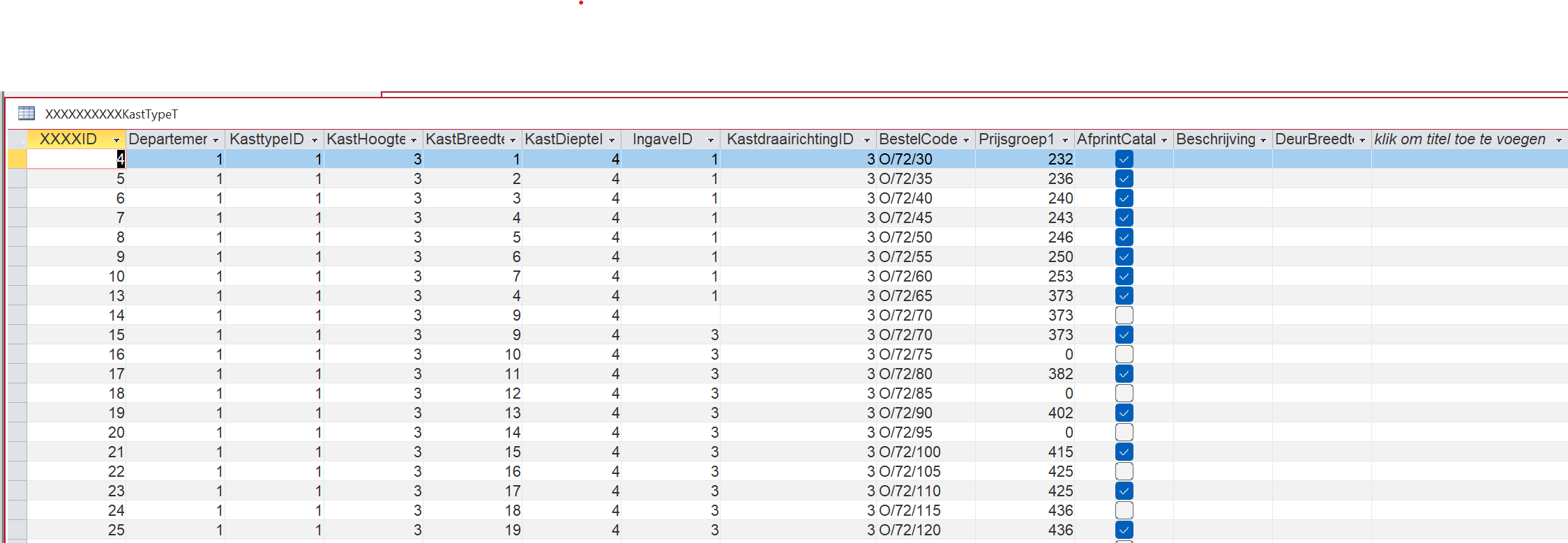
hello, I would like to copy records from a table. I would like to save this in a new temporary table, then I can adjust it and place it back under the last record. That works, but as you can see in the attachment, the foreing key only copies numbers from the combo box relationship and the fields that are filled in without a combo box will copy their value. Is there a possibility to copy the value of the combox numbers as value text. Seems like a stupid question to me because I've been working on it a lot and haven't found a solution. But you never agree here with those gurus. :)
Ludwig Willems OP  @Reply  
      
2 years ago

Juan C Rivera  @Reply  
            
2 years ago
you need to look at ComboBox.Column property (Access).  Combo.name.column(0), will return the ID number.  Combo.name.column(1) may return what you are looking to get.  not always is this correct but play with the column property to see what you get.  Hope this point you in the right direction.
Now if all you want is a number as a string look up the CStr Function.  "CStr( expression )"
Richard Rost  @Reply  
          
2 years ago
You're copying the values in those fields, which are IDs. If you want to SEE the text in the combo box, just link this to the supporting table in a query and look at that.
Ludwig Willems OP  @Reply  
      
2 years ago
Richard, do you have an example of that somewhere :)
Richard Rost  @Reply  
          
2 years ago
That's just a basic Relationships concept. Make a query. Join CustomerT and OrderT on CustomerID. Now you can display any of the CustomerT fields like FirstName, etc. I cover this in a LOT of videos, but perhaps this would be a good topic for a standalone video.
Ludwig Willems OP  @Reply  
      
2 years ago
a super iD, the problem I encounter is when there are foreingkeys, different tables. My intention would be that the data from 3 tables that have been poured into 1 form with a subform to enter the data, copy this existing to a temporary table if necessary, adjust certain data and then paste it under the last record for those 3 tables at the bottom . I am faced with large blocks of data that are almost the same and that need to be adjusted on a few items. It would save me a lot of time instead of having to enter those blocks completely again each time with a few adjustments.
Richard Rost  @Reply  
          
2 years ago
Without seeing more (a lot more) I really can't visualize it to direct you on the best way to handle it.
Ludwig Willems OP  @Reply  
      
2 years ago
Well, I started by entering it all separately, a lot of work, but once it's in there we can do magic with it.

This thread is now CLOSED. If you wish to comment, start a NEW discussion in Access Forum.
 

Next Unseen

 
New Feature: Comment Live View


The following is a paid advertisement
Computer Learning Zone is not responsible for any content shown or offers made by these ads.
 

Learn
 
Access - index
Excel - index
Word - index
Windows - index
PowerPoint - index
Photoshop - index
Visual Basic - index
ASP - index
Seminars
More...
Customers
 
Login
My Account
My Courses
Lost Password
Memberships
Student Databases
Change Email
Info
 
Latest News
New Releases
User Forums
Topic Glossary
Tips & Tricks
Search The Site
Code Vault
Collapse Menus
Help
 
Customer Support
Web Site Tour
FAQs
TechHelp
Consulting Services
About
 
Background
Testimonials
Jobs
Affiliate Program
Richard Rost
Free Lessons
Mailing List
PCResale.NET
Order
 
Video Tutorials
Handbooks
Memberships
Learning Connection
Idiot's Guide to Excel
Volume Discounts
Payment Info
Shipping
Terms of Sale
Contact
 
Contact Info
Support Policy
Mailing Address
Phone Number
Fax Number
Course Survey
Email Richard
[email protected]
Blog RSS Feed    YouTube Channel

LinkedIn
Copyright 2026 by Computer Learning Zone, Amicron, and Richard Rost. All Rights Reserved. Current Time: 5/6/2026 7:57:37 AM. PLT: 0s