Free Lessons
Courses
Seminars
TechHelp
Fast Tips
Templates
Topic Index
Forum
ABCD
 
Home   Courses   TechHelp   Forums   Help   Contact   Merch   Join   Order   Logon  
 
Back to Access Forum    Comments List
Upload Images   @Reply   Bookmark    Link   Email   Next Unseen 
Record navigation very slow
Jose Melean 
    
2 years ago
Hi every one,
Got a question about how Access forms deal with their recordsets.
Once a form loads its respective recordset, does it keep the data in the local memory?
My question is because after moving the BE to sql server, navigating from one record to another takes a while. I would say 15 ' 25 seconds to go to the next/previous record.
It might sound like not much time, but just going though a few records it could take minutes.
Even with a handful of records, the behavior continues.
Any thoughts / ideas of how solve the issue will be greatly appreciated.
Regards.
Kevin Yip  @Reply  
     
2 years ago
Is your SQL Server BE located on the internet or locally?  If it's the former, check your Internet speed.  Access does cache data during record navigation, but it won't help much if the underlying data transfer speed is slow.
Richard Rost  @Reply  
          
2 years ago
I've got about 30,000 records in my CustomerT and that's stored on the SQL Server on my website. I have a local Access form connected to it just thru a simple linked table and I can scroll thru records with navigation buttons just fine... Almost as fast as local tables. So I agree with Kevin. Check your connection.
Jose Melean OP  @Reply  
    
2 years ago
Thanks for the reply Kevin and Richard.
Yes the BE is in the internet (Winhost)
I'll check the connection speed, however the connection is very fast for anything else we do, from downloading movies to uploading larges files to Sharepoint.
If the connection speed is definitely the issue, I should try another technique like a temp table that works as cache or something like that.
Thanks!
Kevin Yip  @Reply  
     
2 years ago
Even "fast" Internet speed is nowhere nearly as fast as local hard drive speed.  An SSD hard drive can transfer at about 400 megabytes/sec, which is over tenfold the Internet speed most people have (about 50 - 300 megaBITS per sec).  You really have to design your forms, reports, etc. to minimize and optimize data retrievals as much as possible.  And that's another issue to look into: are your forms designed specifically for this scenario?
Jose Melean OP  @Reply  
    
2 years ago
That's something I will look into.
Right now there's a VBA script which runs when the forms loads and makes a query for only the records needed and makes it the form's recordset.
...and basically because of how we're pulling the records from the BE it came up the question about if forms loads the recordset and keeps in memory.
Then when form loads, it takes what it takes to run the query and load the recordset.
But in some instances a form can only loads only 3 records, still moving from one to another takes some seconds.
Since most of the time, the records are for read only, I'm thinking of using passthrough query for the form recordset and if a user needs to edit it, then use VBA to change the recordset to regular one (if that is how they are called.)
Kevin Yip  @Reply  
     
2 years ago
To improve speed, all the querying should ideally be run on the server side.  If you compose queries with VBA like you said, that is being done on the client (Access) side, same as making queries from the Access query designer.  Anything done on the Access side is the opposite of doing it on the server side, and that is not conducive to improving performance.  Regarding pass-through queries, that is a way for Access to "send" a query to SQL Server, which is still technically doing it on the Access side.  To do it *completely* on the server side, you need to make the queries directly on SQL Server (see picture below).  They are called "views" or "stored procedures."
Kevin Yip  @Reply  
     
2 years ago

Kevin Yip  @Reply  
     
2 years ago
Then you link these views or stored procedures in Access the same way you link tables from SQL Server.  That way, Access doesn't have to process a thing.  It just needs to open the linked data.

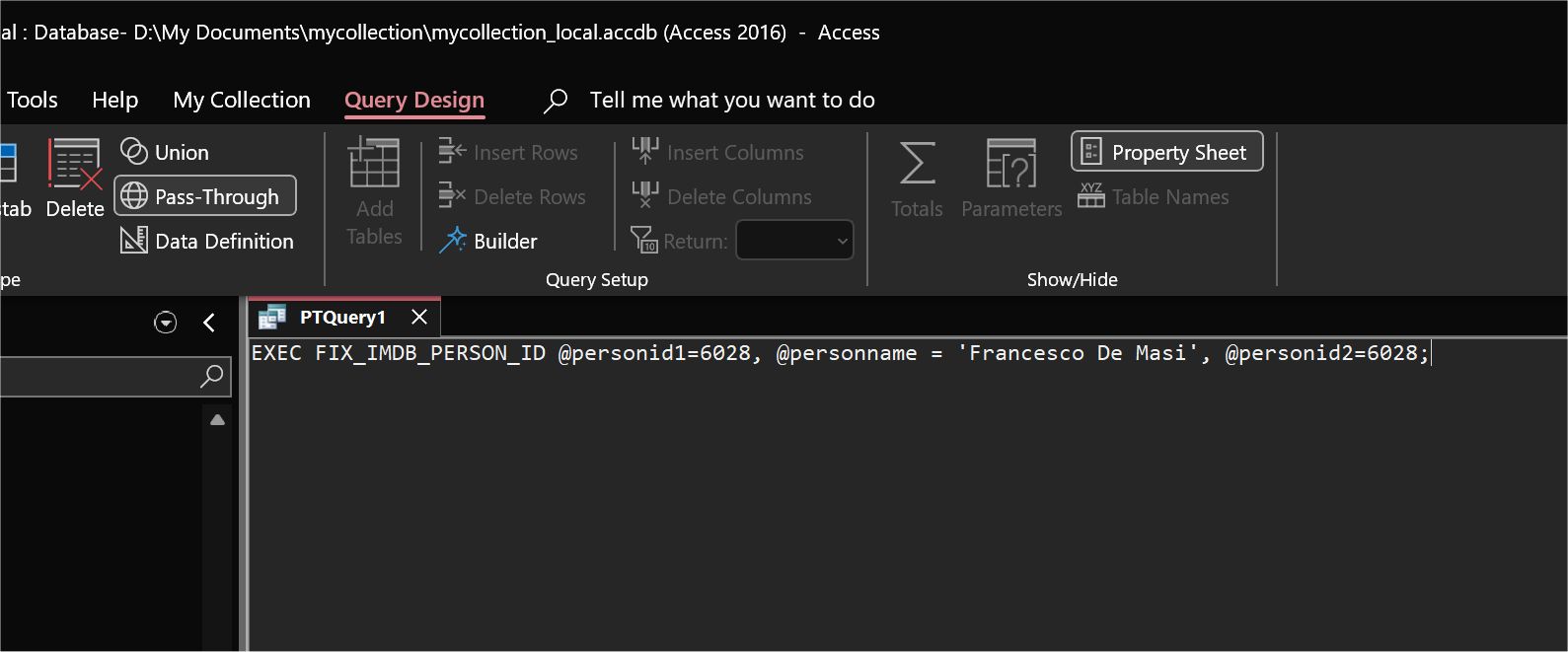
If you need "dynamic" queries with different criteria, parameters, etc., you can create views/stored procs in SQL Server that accept parameters.  In Access, run a passthrough query that simply sends the name of the view/store proc and the parameters (see picture below).  The purpose is to have Access from do as little processing as possible, and having SQL Server do the most processing.
Kevin Yip  @Reply  
     
2 years ago

Jose Melean OP  @Reply  
    
2 years ago
Thanks a lot Kevin

This thread is now CLOSED. If you wish to comment, start a NEW discussion in Access Forum.
 

Next Unseen

 
New Feature: Comment Live View


The following is a paid advertisement
Computer Learning Zone is not responsible for any content shown or offers made by these ads.
 

Learn
 
Access - index
Excel - index
Word - index
Windows - index
PowerPoint - index
Photoshop - index
Visual Basic - index
ASP - index
Seminars
More...
Customers
 
Login
My Account
My Courses
Lost Password
Memberships
Student Databases
Change Email
Info
 
Latest News
New Releases
User Forums
Topic Glossary
Tips & Tricks
Search The Site
Code Vault
Collapse Menus
Help
 
Customer Support
Web Site Tour
FAQs
TechHelp
Consulting Services
About
 
Background
Testimonials
Jobs
Affiliate Program
Richard Rost
Free Lessons
Mailing List
PCResale.NET
Order
 
Video Tutorials
Handbooks
Memberships
Learning Connection
Idiot's Guide to Excel
Volume Discounts
Payment Info
Shipping
Terms of Sale
Contact
 
Contact Info
Support Policy
Mailing Address
Phone Number
Fax Number
Course Survey
Email Richard
[email protected]
Blog RSS Feed    YouTube Channel

LinkedIn
Copyright 2026 by Computer Learning Zone, Amicron, and Richard Rost. All Rights Reserved. Current Time: 5/2/2026 8:29:51 AM. PLT: 1s