Free Lessons
Courses
Seminars
TechHelp
Fast Tips
Templates
Topic Index
Forum
ABCD
 
Home   Courses   Templates   Seminars   TechHelp   Forums   Help   Contact   Join   Order   Logon  
 
Home > TechHelp > Directory > Access > ByRef Argument Type Mismatch < Abort Loop | Sex & Gender >
Back to ByRef Argument Type Mismatch    Comments List
Upload Images   @Reply   Bookmark    Link   Email   Next Unseen 
Time machine
Thomas Gonder 
      
18 months ago
I could have used this video three years ago.
Please go back and post it, Trekkie ;)
The number of compile errors in called procedures I've fought...
But how odd you can't pass a string variant into a string typed variable, how hard would it have been to test and convert within the VBA compiler? Is there a variable type that can't be represented as a string? Doh.
Kevin Yip  @Reply  
     
18 months ago
That is because a variant variable can be null, but a string variable cannot.  They are not really compatible data types, hence the "argument type mismatch" error.

The following code will run with no errors:

    Dim v As Variant
    v = "string"
    v = 1
    v = Null
    v = #6/28/2024#
    v = Null
    v = "string again"

This is why it's a variant -- its data type can vary.

But the code below will error on the third line, because a string variable can't be null:

    Dim s As String
    s = "string"
    s = Null
    s = "string"

Nor any typed variable -- integer, boolean, date, etc.
Thomas Gonder OP  @Reply  
      
18 months ago
Okay, don't we have Nulls all the time in data fields that are typed as strings in a table? So, why make VBA different?
Kevin Yip  @Reply  
     
18 months ago
Data types in tables aren't exactly the same thing as data types in VBA.  You can enter nulls in a textbox because the underlying table allows nulls to be entered in that field, with the field's "Required" property set to No.  If "Required" is Yes, and if you enter a blank in a textbox, a zero-length string will be entered into the table instead, not null.  Tables have this flexibility, because that's part of a database's function.  But VBA, like other programming languages, deals with variables, not tables, and has to be strict with data types.
Thomas Gonder OP  @Reply  
      
18 months ago
I've worked in other databases that have a language more tightly coupled to the way the database works. Yes, I know that VBA is used for other MS and Office applications. The fact that MS decided to allow a variant type of variable shows that one really doesn't have to be that strict with typing (as other languages or implementations have shown). Some languages that compile down to assembly code worked around this limitation some thirty years ago (I don't know how as they did it after I worked in O/S assembly, but still). As I said, a little more design work with VBA could (or can) eliminate these compile and runtime problems.
Kevin Yip  @Reply  
     
18 months ago
It's not really a problem if it functions per its design.  A variant is simply not compatible with a string.  In the example in Richard's video, it just *happens* that a variant has a string value.  That doesn't mean it should be compatible to an actual string variable, because a variant variable could very well be any other types of value.
Thomas Gonder OP  @Reply  
      
18 months ago
Then how do we explain this strange way that incompatible variables work?
?"2024" = Year(now)
True
?vartype(Year(now))
2
Kevin Yip  @Reply  
     
18 months ago
Regarding "2024" = 2024 returning true, it has more to do with how VBA handles comparisons.  Here is Microsoft's documentation of it:

     https://learn.microsoft.com/en-us/office/vba/language/reference/user-interface-help/comparison-operators

which says:

     "When either expression is not a variant, if one expression is a numeric data type and the other is a Variant that is, or can be, a number, then perform a numeric comparison."

For instance, the code below:

    Dim s As String, i As Integer
    s = "2024"
    i = 2024
    Debug.Print s = i

will return True, because s and i are both not variant, and s can be numeric.

But the code below:

    Dim v1 As Variant, v2 As Variant
    v1 = "2024"
    v2 = 2024
    Debug.Print v1 = v2

will return False instead.  As the Microsoft doc above says, if *both* variables are variant, the variable with string value is greater than the one with the numeric value, even if they appear equal.  In fact, any string value in v1 would be "greater" than any integer value in v2 (e.g. "0" > 2024).

Some of these "rules" may be a little arcane, but that's what the Microsoft doc says.  And "Option Compare Database/Binary/Text" adds even more rules to how values are compared.
Kevin Yip  @Reply  
     
18 months ago
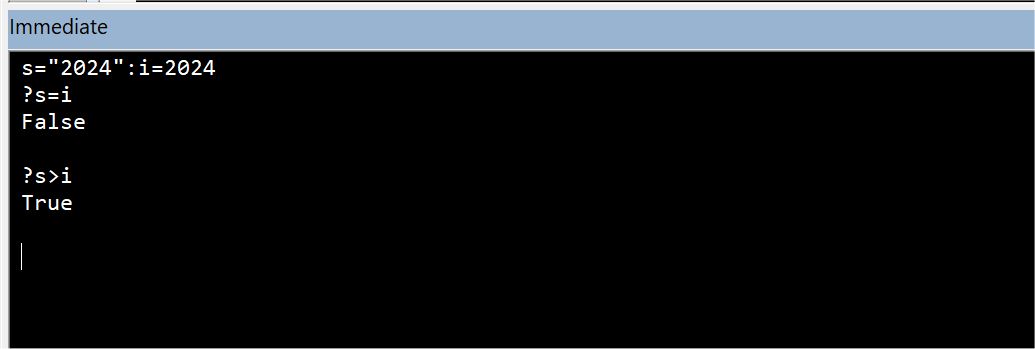
In the immediate window, the use of Dim is not allowed, so all variables are variant.  And when one variant variable is "2024" and the other 2024, they are not equal, just as the Microsoft doc says.  See picture below.
Kevin Yip  @Reply  
     
18 months ago

Thomas Gonder OP  @Reply  
      
17 months ago
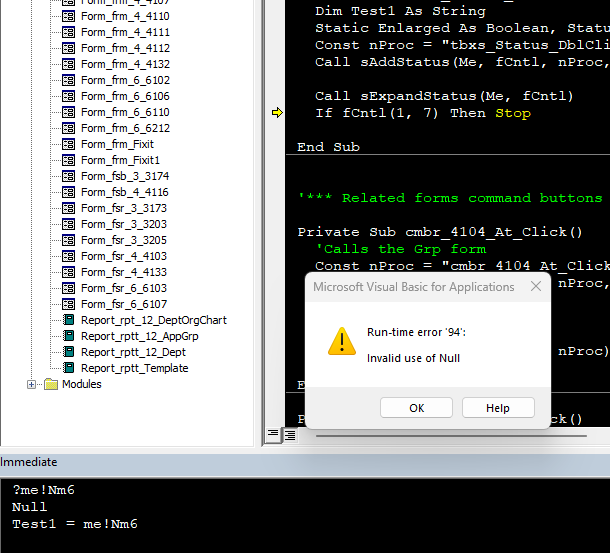
Hi Kevin Y. The point was that VBA CAN compare dislike variables. You did a more thorough job explaining it. Back to the original point, why can't a variable string be Null? it was an ARBITRARY decision that conflicts with how Access tables work.

How many hundreds or thousands of times have you had to deal with something as silly as this? (image below)
Thomas Gonder OP  @Reply  
      
17 months ago

Kevin Yip  @Reply  
     
17 months ago
That's just the way VBA is designed: none of the typed variables (string, integer, boolean, etc.) can be null.  If you need a null to be stored in a variable, you need to declare it as a totally different data type, like variant.  Many other programming languages are designed that way.  But some do allow nullable variables.  I believe C# lets you declare a typed variable that can also be nullable (i.e. an integer variable that can be either an integer or null).
Thomas Gonder OP  @Reply  
      
17 months ago
I can "design" a bicycle to be low to the ground like a child's tricycle. That doesn't mean it will be very functional.

Don't get me wrong, I like many of the features in VBA and the editor, especially when compared to the BASIC I used twenty years before MS started on VBA. However, I would have expected better. Especially in the thirty years they've had to fix some of the oddities (bad design?). Or why would there be so much excitement around Twin Basic?

What other variable types, beside variant can have a Null? Since "real programmers" don't use variants (I don't say that, but many of my professors did), what does that say?
Thomas Gonder OP  @Reply  
      
17 months ago

Richard Rost  @Reply  
          
17 months ago
I am a real programmer and I use variants ergo your professors are invalid. Lol.

This thread is now CLOSED. If you wish to comment, start a NEW discussion in ByRef Argument Type Mismatch.
 

Next Unseen


The following is a paid advertisement
Computer Learning Zone is not responsible for any content shown or offers made by these ads.
 

Learn
 
Access - index
Excel - index
Word - index
Windows - index
PowerPoint - index
Photoshop - index
Visual Basic - index
ASP - index
Seminars
More...
Customers
 
Login
My Account
My Courses
Lost Password
Memberships
Student Databases
Change Email
Info
 
Latest News
New Releases
User Forums
Topic Glossary
Tips & Tricks
Search The Site
Code Vault
Collapse Menus
Help
 
Customer Support
Web Site Tour
FAQs
TechHelp
Consulting Services
About
 
Background
Testimonials
Jobs
Affiliate Program
Richard Rost
Free Lessons
Mailing List
PCResale.NET
Order
 
Video Tutorials
Handbooks
Memberships
Learning Connection
Idiot's Guide to Excel
Volume Discounts
Payment Info
Shipping
Terms of Sale
Contact
 
Contact Info
Support Policy
Mailing Address
Phone Number
Fax Number
Course Survey
Email Richard
[email protected]
Blog RSS Feed    YouTube Channel

LinkedIn
Copyright 2025 by Computer Learning Zone, Amicron, and Richard Rost. All Rights Reserved. Current Time: 12/13/2025 5:33:48 PM. PLT: 1s