Free Lessons
Courses
Seminars
TechHelp
Fast Tips
Templates
Topic Index
Forum
ABCD
 
Home   Courses   TechHelp   Forums   Help   Contact   Merch   Join   Order   Logon  
 
Back to Access Forum    Comments List
Upload Images   @Reply   Bookmark    Link   Email   Next Unseen 
Pasting Formatted Text in Field
Mauro Rotenberg 
    
2 years ago
Hello,

How can I paste a x number of lines from a formatted text from Word separated by paragraph marks, into the same number of registers in a rich text Access field preserving the formatting? I know it is simple to do it one by one register. But I need to paste the formatted text from word into multiple registers.

How is it possible, please?

Thank you for your help.
Alex Hedley  @Reply  
            
2 years ago
What's a register?
Juan C Rivera  @Reply  
            
2 years ago
Many ways to skin this cat.  Query, Import, cut n paste.  What is it your saying by same number of registers?  and then maybe we can find a way to help you out.
Ludwig Willems  @Reply  
      
2 years ago
volgen :)
Mauro Rotenberg OP  @Reply  
    
2 years ago
I mean when I copy and paste one formatted paragraph from Word into a rich text field record in Access, it retains the formatting.

However, when I paste two or more paragraphs, aiming at creating two or more records in Access, I cannot find a way for it to retain any formatting.

By "formatted text in Word", which I intend to paste and preserve its formatting, I mean a text that has, say, some words in bold, some other italicized, some underlined, some in different colors, etc.

How can I paste a longer and richly formatted text, with many paragraphs containing variations in format, into many records in a rich text Access field, so that all the formatting is retained?

Thank you in advance!
Richard Rost  @Reply  
          
2 years ago
I'm out of the office, but if no one else is able to help you let me know and I'll take a closer look at it on Monday when I get back.
Alex Hedley  @Reply  
            
2 years ago
Have you set the field to be Rich Text?
Mauro Rotenberg OP  @Reply  
    
2 years ago
Yes, Alex Hedley, I have.

If I try to paste two or more paragraphs into the same number of records of a long text field set to Rich Text, no formatting remains, although if I try to paste only one paragraph, which then becomes one and only paragraph, the formatting in this case IS retained.

I have formatted texts of many paragraphs, which I would need to store with the same formatting  in just as many records in Access, and this is what I haven't been able to do.

Thank you for trying to help.
Alex Hedley  @Reply  
            
2 years ago
Are you copying straight into the table or via a form?
Mauro Rotenberg OP  @Reply  
    
2 years ago
I am trying to copy straight into the table. Can it make any difference if I paste via a form?
Alex Hedley  @Reply  
            
2 years ago
Possibly, I'm just guessing.

It's usually best not to do data entry directly into a Table, but I guess it depends on who the user is.
Mauro Rotenberg OP  @Reply  
    
2 years ago
Thank you Richard, Alex Hedley, Juan Rivera and Ludwig Willems for trying to help. I am sure one of this team will come with a great solution. Thank you all!
Alex Hedley  @Reply  
            
2 years ago
Did you try via a form?
Mauro Rotenberg OP  @Reply  
    
2 years ago
Not yet. But this time I will not fail to do it. I'll this it ASAP. Thanks!
Mauro Rotenberg OP  @Reply  
    
2 years ago
Alex Hedley, I tried with a Form, but no, it didn't work.
Alex Hedley  @Reply  
            
2 years ago
Can you provide screenshots with sample data you tried, what it looks like in the Form and then Table, after saving.
Mauro Rotenberg OP  @Reply  
    
2 years ago

Mauro Rotenberg OP  @Reply  
    
2 years ago

Mauro Rotenberg OP  @Reply  
    
2 years ago

Mauro Rotenberg OP  @Reply  
    
2 years ago

Mauro Rotenberg OP  @Reply  
    
2 years ago

Mauro Rotenberg OP  @Reply  
    
2 years ago
In the order that the screenshots appear above:

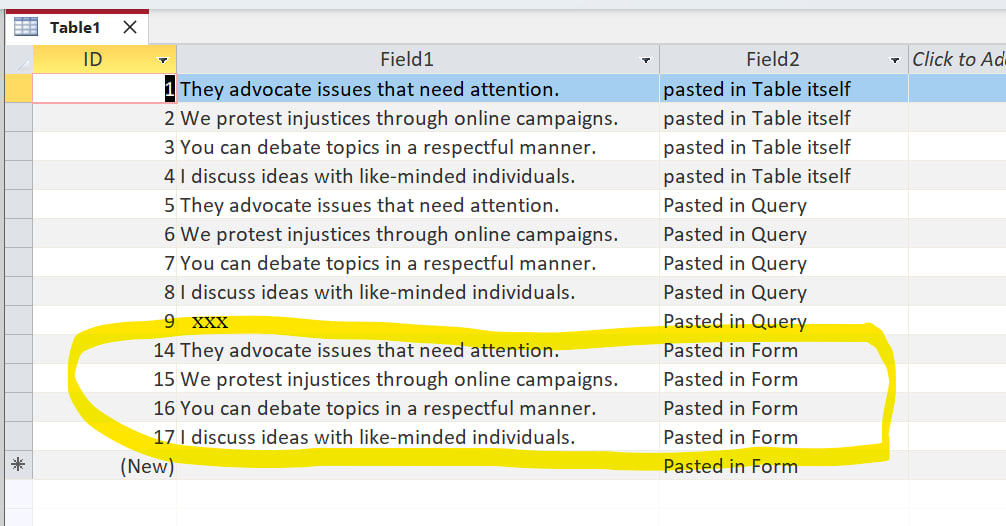
1 - the result in the table. First 4 records were pasted directly into the Table; Record 5 thru 8, directly into the Query; 9 thru 13, into the Form. All of them are alike, without the formatting (bold in some words) that was used to paste into these objects.

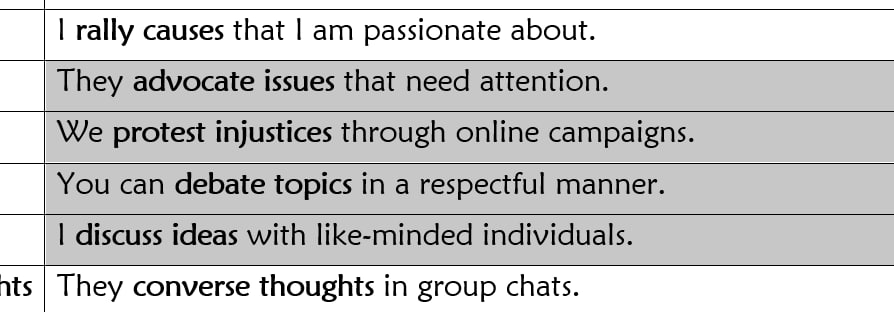
2- The original formatted text (from  MS Word) pasted into the objects;

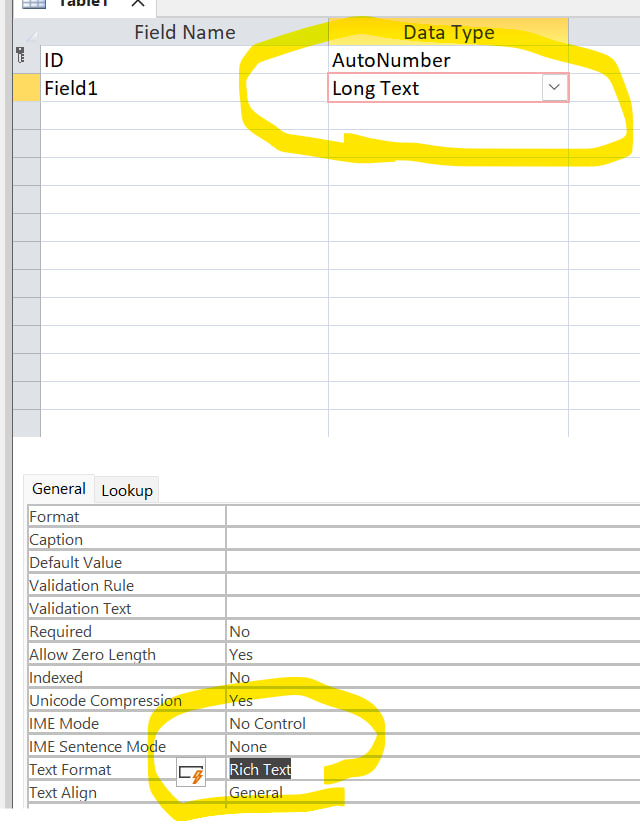
3- The configuration of the Table;

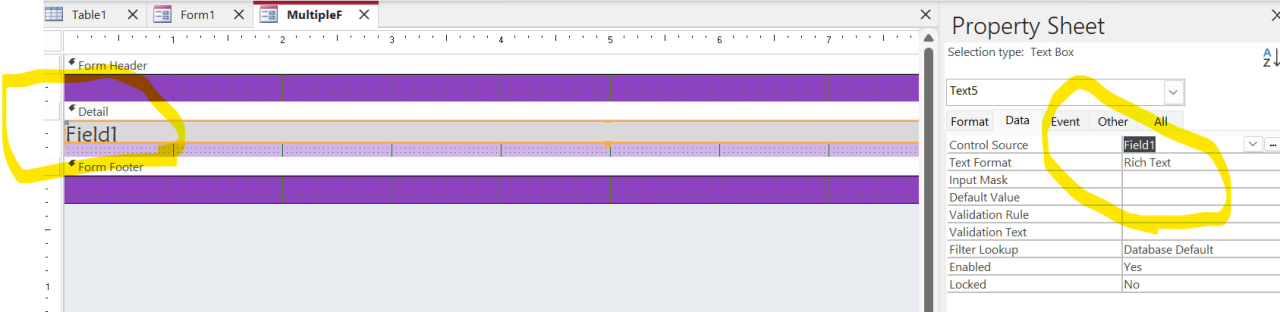
4- The configuration of the Form, which was with Data Entry set to Yes;

5- The Form after the pasting of the formatted text.

In none of the ways I pasted was the formatting preserved.

This is my doubt: how to paste two or more formatted paragraphs from Word into two or more records in Access?
Mauro Rotenberg OP  @Reply  
    
2 years ago
* paste them preserving the formatting?
Alex Hedley  @Reply  
            
2 years ago
Have you got a screenshot of when you just paste one and it retains the formatting?
Mauro Rotenberg OP  @Reply  
    
2 years ago
I do not have at the moment, for this reason: although I remember getting a formatted result when pasting into only one record in the past, now I tried and it didn't retain the formatting in any of the objects I pasted into (Table, Query and Form).

I will keep on looking for the form or table that was able to retain the format, because I am sure it happened different times before.

For now, sorry my vague response. I'll reach back as soon as I find evidence of what you are asking.
Mauro Rotenberg OP  @Reply  
    
2 years ago
Here you are, Alex. The first record in the table retained the format, when I pasted only into one record at a time.
Mauro Rotenberg OP  @Reply  
    
2 years ago

Kevin Yip  @Reply  
     
2 years ago
Hi Mauro, you can paste multiple rows from one Access table to another Access table and retain formatting.  You can also paste multiple rows from an Access table to Word or Excel and retain formatting.  But any other scenario doesn't work.  There are limitations on how you can paste data onto Access.  Certain things just can't be pasted onto Access tables.
Mauro Rotenberg OP  @Reply  
    
2 years ago
Thank you, Kevin.
If that many-record, formatted pasting from Word were possible, it would be quite useful for me. So that's what I feared, that it is not possible.

Thank you again, and thank you all.
Kevin Yip  @Reply  
     
2 years ago
Word and Excel documents can contain formatting codes, but Access tables can only contain plain data (even in rich text fields, which actually contain formatting codes in plain text).  This is basically the reason why Access (and database software in general) has this limitation.
Alex Hedley  @Reply  
            
2 years ago
Correct me if I'm wrong but doesn't it usually put the RTF/HTML encoding into the record in the table?
Kevin Yip  @Reply  
     
2 years ago
Copying/pasting from Word to Access does not always carry over everything in Word.  I imagine it's because Access can't (properly) convert certain elements in Word into their Access counterparts.  For instance, the paragraph marks the OP tries to paste from Word are not properly converted into the equivalent in Access: the paragraphs are correctly converted into rows, but not the formating used inside the paragraphs.  Pasting from Access to Word or Access to Excel both work because Word and Excel can handle the elements in Access.

This thread is now CLOSED. If you wish to comment, start a NEW discussion in Access Forum.
 

Next Unseen

 
New Feature: Comment Live View


The following is a paid advertisement
Computer Learning Zone is not responsible for any content shown or offers made by these ads.
 

Learn
 
Access - index
Excel - index
Word - index
Windows - index
PowerPoint - index
Photoshop - index
Visual Basic - index
ASP - index
Seminars
More...
Customers
 
Login
My Account
My Courses
Lost Password
Memberships
Student Databases
Change Email
Info
 
Latest News
New Releases
User Forums
Topic Glossary
Tips & Tricks
Search The Site
Code Vault
Collapse Menus
Help
 
Customer Support
Web Site Tour
FAQs
TechHelp
Consulting Services
About
 
Background
Testimonials
Jobs
Affiliate Program
Richard Rost
Free Lessons
Mailing List
PCResale.NET
Order
 
Video Tutorials
Handbooks
Memberships
Learning Connection
Idiot's Guide to Excel
Volume Discounts
Payment Info
Shipping
Terms of Sale
Contact
 
Contact Info
Support Policy
Mailing Address
Phone Number
Fax Number
Course Survey
Email Richard
[email protected]
Blog RSS Feed    YouTube Channel

LinkedIn
Copyright 2026 by Computer Learning Zone, Amicron, and Richard Rost. All Rights Reserved. Current Time: 5/2/2026 3:43:10 AM. PLT: 0s