Free Lessons
Courses
Seminars
TechHelp
Fast Tips
Templates
Topic Index
Forum
ABCD
 
Home   Courses   TechHelp   Forums   Help   Contact   Merch   Join   Order   Logon  
 
Back to Access Forum    Comments List
Upload Images   @Reply   Bookmark    Link   Email   Next Unseen 
Windows 10 End Of Life
David Clement 
      
2 years ago
Hello Richard and Moderators.

This is not an actual Access question up front, but may involve Access down the road.

I have a relatively newer PC that I built myself and has served me very well.It is running Windows 10 PRO. It does not have that chip that I do not remember the name of, but it doesn't have it, therefore Windows 11 is NOT supported on my PC. This PC is a work horse. It serves as my movie server, and other tasks it performs really well. In this economy, I can not really afford to build a new PC just to have Windows 11. This now leads me to the Access question. Will my current Access databaes even run on Windows 11?

Maybe that was a dumb question as I do have a Microsoft 365 subscritption.but you never know.

Do any of you guys have any suggestions for this situation?

I am quite sure I am not the only facing this issue.'

I know there is a little bit of time before Windows 10 is for all intents and purposes, deactivated.

Maybe there is a video that I don't know about?
Thank you!


Ludwig Willems  @Reply  
      
2 years ago
I think Windows 10 will end on October 15, 2025. Apparently Windows 12 will be released at the end of August. a good question, I am also still using Windows 10 and according to Windows my PC is not able to run on Windows 11. Apparently you can bypass this and still install Windows 11. Does anyone have any ideas about the settings....
Ludwig Willems  @Reply  
      
2 years ago
I also have Microsoft 365 subscription, so I assume it will still continue to run....
Ludwig Willems  @Reply  
      
2 years ago
Wouldn't it be better if we waited for Windows 12 and installed it, then we would have peace of mind for many years to come. But if all the settings are on your trusted PC with the necessary licenses, I don't think it is obvious to just buy a new PC.
Jeffrey Kraft  @Reply  
      
2 years ago
There reportedly is a bypass - Microsoft has killed it once but the work around is available on a certain website you can watch Access Learning .... com on.  I sure hope/wish Microsoft would stop doing the Android maneuver where they update the O/S every few years and stop supporting older chip sets.  I have phone that is only 3 years old but Apps won't run because my Android devices doesn't support Android 9... rant done.  This computer and my Microsoft Surface both have 11.  My older one is 10.... and I'd never force it to use 11.
Kevin Yip  @Reply  
     
2 years ago
Hi David, Richard records all his videos in Windows 11, so obviously Access works with Win11.  But of course, you need to have Win11 running before your Access DB can run on it.

Double check your PC's compatibility, since your decision depends entirely on that, and you don't want to be wrong about that.  The "chip" you refer to may be TPM 2.0 (trusted platform module).  Use the "PC Health Check" to check compatibility -- type "PC Health Check" on the search bar on the lower left corner of your screen to run it.

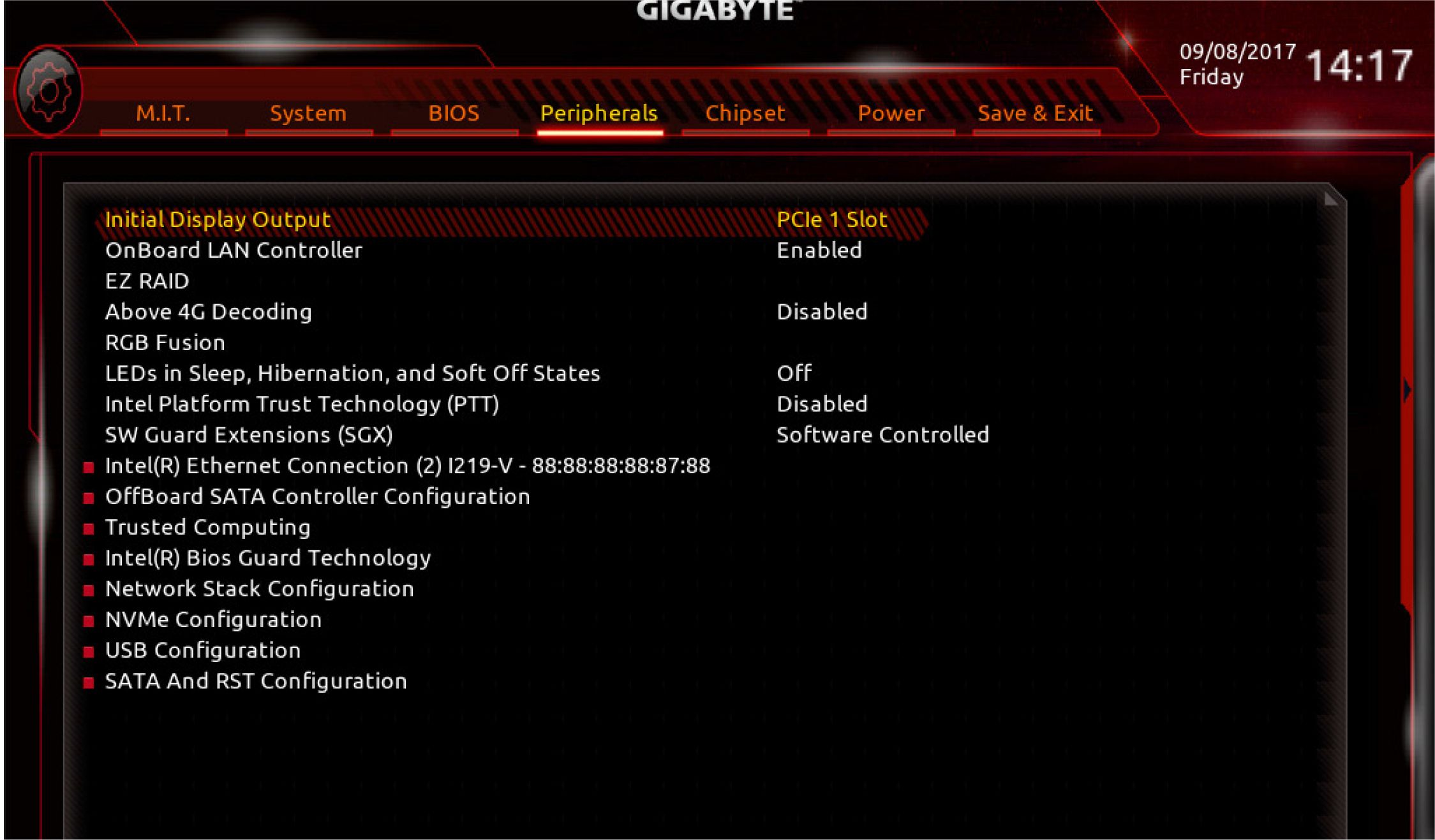
Your PC may already have TPM 2.0, but maybe (1) it is called by a different name, and (2) it is disabled by default.  So make sure if that's the case.  On my 5-year-old motherboard's BIOS, the feature is known as "Intel Platform Trust Technology (PTT)" (see picture below) and was disabled by default.  That is in fact TPM 2.0.  I turned it on, and PC became Win11-compatible.  Check your motherboard's documentation.  The feature may not even be called TPM, so the original documentation may not help.  So you may also need to ask for an updated word from your mobo's manufacturer.  This is likely a FAQ so manufacturers should have this info prominently displayed on their websites.
Kevin Yip  @Reply  
     
2 years ago

Richard Rost  @Reply  
           
2 years ago
Microsoft will officially end support for Windows 10 on October 14, 2025. This means that after this date, Windows 10 will no longer receive security updates, bug fixes, or new features from Microsoft. The final version of Windows 10 is 22H2, which will continue to receive monthly security updates until the end-of-support date.

Now, that doesn't mean that Windows 10 is just going to magically stop working in October of next year. That just means Microsoft's not going to release any new updates or fixes for it. But if you've got a machine that's working fine, I always say if it ain't broke, don't fix it. You'll be just fine. If that's your workhorse and you're happy with the way it's working now, then keep it and keep Windows 10. I kept Windows 7, and before that, Windows XP, for a long, long time after it was out of support because I had machines that it just worked on, and it was great. The only reason I upgraded to the latest and greatest is because I kind of have to for my videos.

I always say don't worry about it. When a new version of something comes out that you absolutely have to have the new updated features, then at that point consider upgrading. Don't upgrade just to upgrade.
David Clement OP  @Reply  
      
2 years ago
Thank you. That works for me.
Dan Jackson  @Reply  
            
2 years ago
Just putting this out there... There are alternatives to windows which... Yes, makes running access difficult, but not impossible.

I grew up with windows, and was definitely the easiest and most intuitive os ever made... One upon a time, but with each version release, the screw ups and the bloating of it (not too mention all the spyware and extras steps you have to take to achieve something simple in previous versions) just proves that Windows will inevitably die.

Forcing people to upgrade machines unnecessarily is pure extortion and environmentally/economically stupid.

Anyhoo, apologies for the rant. I do agree with Richard though. If you're happy using your windows 10 machine, keep using it until you physically can't. It might be nice not getting "updates" thrown at you every day lol 😆
Kevin Yip  @Reply  
     
2 years ago
I've used all Windows versions since the early 90s, and the positives of a new version always outweighed the negatives of having to adjust to the new habits and idiosyncrasies of a new version.  As an IT person (in my old job), my job was to recognize no software was perfect, and to "shield" my users from as many of the negatives as possible and help them with the positives.

I don't know how long ago the "easy and intuitive" Windows versions you refer to, but this is an OS that used to be filled with horrible bugs: Win95 adjusted daylight saving time by changing 2am to 1am, then an hour later, changing 2am to 1am again, an hour later, again, etc.
Krzysztof Kaminski  @Reply  

2 years ago
If You would like to install Windows 11 on a PC that is apparently not "supported" You need to download Windows 11 instalation ISO, mount it and run setup.exe from command line like this:
setup.exe /product server
It will update Your Windows 10 to 11 and meanwhile it might inform You that it is installing Windows Server but ofcourse it isn't. I have done that on 2 PC's already, everything works fine so far.

This thread is now CLOSED. If you wish to comment, start a NEW discussion in Access Forum.
 

Next Unseen

 
New Feature: Comment Live View


The following is a paid advertisement
Computer Learning Zone is not responsible for any content shown or offers made by these ads.
 

Learn
 
Access - index
Excel - index
Word - index
Windows - index
PowerPoint - index
Photoshop - index
Visual Basic - index
ASP - index
Seminars
More...
Customers
 
Login
My Account
My Courses
Lost Password
Memberships
Student Databases
Change Email
Info
 
Latest News
New Releases
User Forums
Topic Glossary
Tips & Tricks
Search The Site
Code Vault
Collapse Menus
Help
 
Customer Support
Web Site Tour
FAQs
TechHelp
Consulting Services
About
 
Background
Testimonials
Jobs
Affiliate Program
Richard Rost
Free Lessons
Mailing List
PCResale.NET
Order
 
Video Tutorials
Handbooks
Memberships
Learning Connection
Idiot's Guide to Excel
Volume Discounts
Payment Info
Shipping
Terms of Sale
Contact
 
Contact Info
Support Policy
Mailing Address
Phone Number
Fax Number
Course Survey
Email Richard
[email protected]
Blog RSS Feed    YouTube Channel

LinkedIn
Copyright 2026 by Computer Learning Zone, Amicron, and Richard Rost. All Rights Reserved. Current Time: 5/1/2026 5:41:15 PM. PLT: 0s