Free Lessons
Courses
Seminars
TechHelp
Fast Tips
Templates
Topic Index
Forum
ABCD
 
Home   Courses   TechHelp   Forums   Help   Contact   Merch   Join   Order   Logon  
 
Back to Access Forum    Comments List
Upload Images   @Reply   Bookmark    Link   Email   Next Unseen 
Add New Record Conundrum
David Yeager 
     
2 years ago
I've created a form that is bound to a query, the query draws from 3 tables.  I want to be able to add new records to one of those tables without opening a new form and I'm not sure the best way to go about it.

I thought using  Recordset.Addnew would be the way to go but I immediately ran into a problem where Recordset was not an available method.  (I start typeing Rec and Rectangle is the only related option in the reference list.)  Dim rs as Recordset returns "User-defined type not defined" when I debugged.

My experience with using recordsets begins and ends with the Tech Help video.  First of all am I barking up the wrong tree or what?  If not, where could I be going wrong?
David Yeager OP  @Reply  
     
2 years ago

Kevin Robertson  @Reply  
          
2 years ago
If Recordset isn't being recognised you are probably missing a Reference.
Since your Query brings 3 tables together I am assuming the recordset is Not Updateable.
To insert a new record I would use some SQL.

INSERT INTO statements are covered in Access SQL Seminar Part 2
Have you considered basing the main Form of of a single Table and using a Couple of Subforms for the rest of the data?

David Yeager OP  @Reply  
     
2 years ago
No, I can make updates.  I just can't add a new contact.

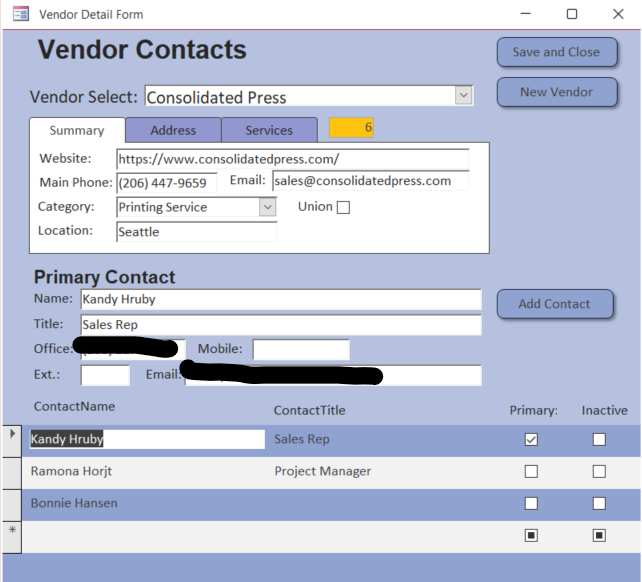
The upper half is the Vendor detail from my vendors table, it includes the category from the 3rd table (tblServiceCat).  For this part I'm fine with a separate form to add new vendors.  There's a lot more info involved and we rarely add new vendors.

The bottom half is the contacts available with a lot less info.  I can quickly switch between them by selecting one from the continuous form in the detail section and make updates to their role, phone, or email.  Sometimes all I have is a name and email/phone.  Some of my vendors have high turnover so I frequently need to add people and I'd prefer it be quick and easy.

I just tried swapping the Vendor info to a subform but it won't let me add a subform to a continuous form.  Maybe 2 subforms in one unbound form?  I'll look into the SQL options first though.  Thanks.
John Davy  @Reply  
         
2 years ago
It may not solve your problem, but you can add a subform to a continuous form. Access will change the continuous form to a single form,. Simply change it back to a continuous form.

John
John Davy  @Reply  
         
2 years ago
Hi David, If I were you, I would heed Kevin's advice.  John
Richard Rost  @Reply  
          
2 years ago
Richard Rost  @Reply  
          
2 years ago
Don't make a form based on multiple tables. Usually a bad idea.
David Yeager OP  @Reply  
     
2 years ago
Thanks, all.  Insert Into is doing the job I was looking for for now.  Rick, I'll check out the video and consider your advice.  I'm just trying to find ways to cut the number of forms users need to open.  In some cases I'm using a subform and changing the source with a button click.

This thread is now CLOSED. If you wish to comment, start a NEW discussion in Access Forum.
 

Next Unseen

 
New Feature: Comment Live View


The following is a paid advertisement
Computer Learning Zone is not responsible for any content shown or offers made by these ads.
 

Learn
 
Access - index
Excel - index
Word - index
Windows - index
PowerPoint - index
Photoshop - index
Visual Basic - index
ASP - index
Seminars
More...
Customers
 
Login
My Account
My Courses
Lost Password
Memberships
Student Databases
Change Email
Info
 
Latest News
New Releases
User Forums
Topic Glossary
Tips & Tricks
Search The Site
Code Vault
Collapse Menus
Help
 
Customer Support
Web Site Tour
FAQs
TechHelp
Consulting Services
About
 
Background
Testimonials
Jobs
Affiliate Program
Richard Rost
Free Lessons
Mailing List
PCResale.NET
Order
 
Video Tutorials
Handbooks
Memberships
Learning Connection
Idiot's Guide to Excel
Volume Discounts
Payment Info
Shipping
Terms of Sale
Contact
 
Contact Info
Support Policy
Mailing Address
Phone Number
Fax Number
Course Survey
Email Richard
[email protected]
Blog RSS Feed    YouTube Channel

LinkedIn
Copyright 2026 by Computer Learning Zone, Amicron, and Richard Rost. All Rights Reserved. Current Time: 6/16/2026 7:33:42 PM. PLT: 0s