Free Lessons
Courses
Seminars
TechHelp
Fast Tips
Templates
Topic Index
Forum
ABCD
 
Home   Courses   TechHelp   Forums   Help   Contact   Merch   Join   Order   Logon  
 
Back to Access Forum    Comments List
Upload Images   @Reply   Bookmark    Link   Email   Next Unseen 
Navigation Pane Find by Date
Jeffrey Kraft 
      
2 years ago
Oh Dear Navigation Pane Gods' Or Access Gods'

Why can't you make it easier to find Reports, Queries, Tables, and Forms.  Specifically by date.  I can't recall the name of the (Table, Form, Query) but I can somewhat recall when I created it.

I have a lot of forms and queries.  I know I can right click on the objects properties and get the date that way, but there has to be another way.  A Form with some VBA & SQL.  The point is I need Help!?  I did do some digging and found the following.  

SQL code:

SELECT Name, DateCreate
FROM MSysObjects
WHERE Type IN (1, 5, -32768, -32764)
ORDER BY DateCreate DESC;

1 is a Table, 5 is a Query, -32768 is Form, -32764 is Report.

I know that Access stores objects in a hidden system table called "MSysObjects" but it's the steps before and after I need a lot of help on.

I officially jumped into the deep end of the pool and I forgot my AFD. (Access Floatation or Functioning Device).
Kevin Robertson  @Reply  
          
2 years ago
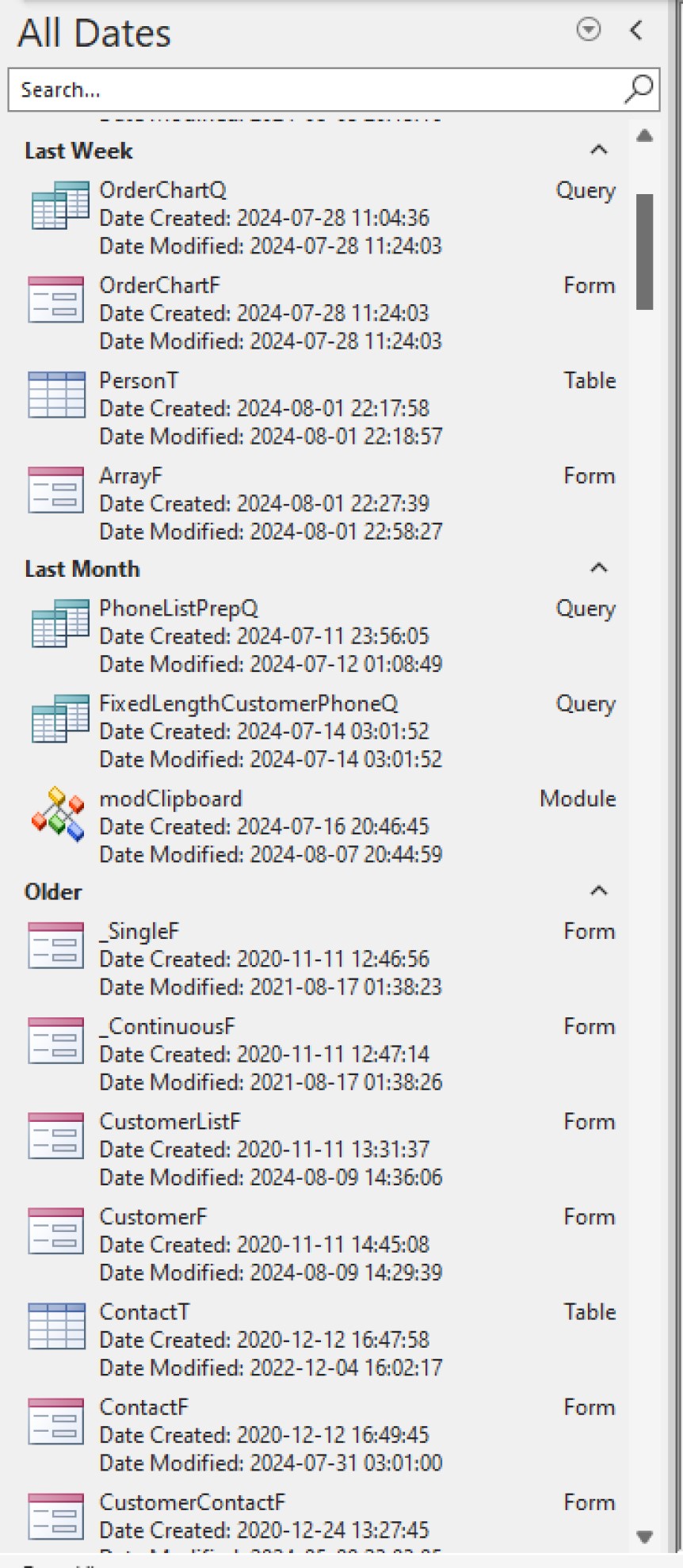
Drop down the Dropdown List at the top of the Navigation Pane and select Created Date.
Right click on the Navigation Pane - View By - Details.
Right click on the Navigation Pane - Sort By - Created Date.
Kevin Robertson  @Reply  
          
2 years ago

Jeffrey Kraft OP  @Reply  
      
2 years ago

Jeffrey Kraft OP  @Reply  
      
2 years ago
I got what I wanted for the most part.  I'm the only one that uses this thing anyways.  But I'm always losing my file names --- and yes I've written them down paper, but my handwriting... Some days... lets not type about it.
Kevin Yip  @Reply  
     
2 years ago
OneNote is part of Office, and it's a great note-taking tool.  You need great note-taking skills to be a developer due to the mountain of information you always have to deal with, and no one has perfect memory.
Jeffrey Kraft OP  @Reply  
      
2 years ago
OneNote(ed) ... pun intended.  I've never really used it, but might now.  Instead I would stuff notes (sometimes) into a Word Document and hopefully know what I was "trying to say" if opened ever again.  The purpose of the form I did was for something I did many many many moons ago (5 + years) Older machine is no longer with us - went to the PC Gods instead.  I wasn't able transfer everything off of before the drive failed.  The backup software was no longer supported nor would work on current release of Windows unless I paid for the new version.
  The Access project was saved while it's notes went ... Hasta La Vista.
Kevin Robertson  @Reply  
          
2 years ago
Jeffrey,

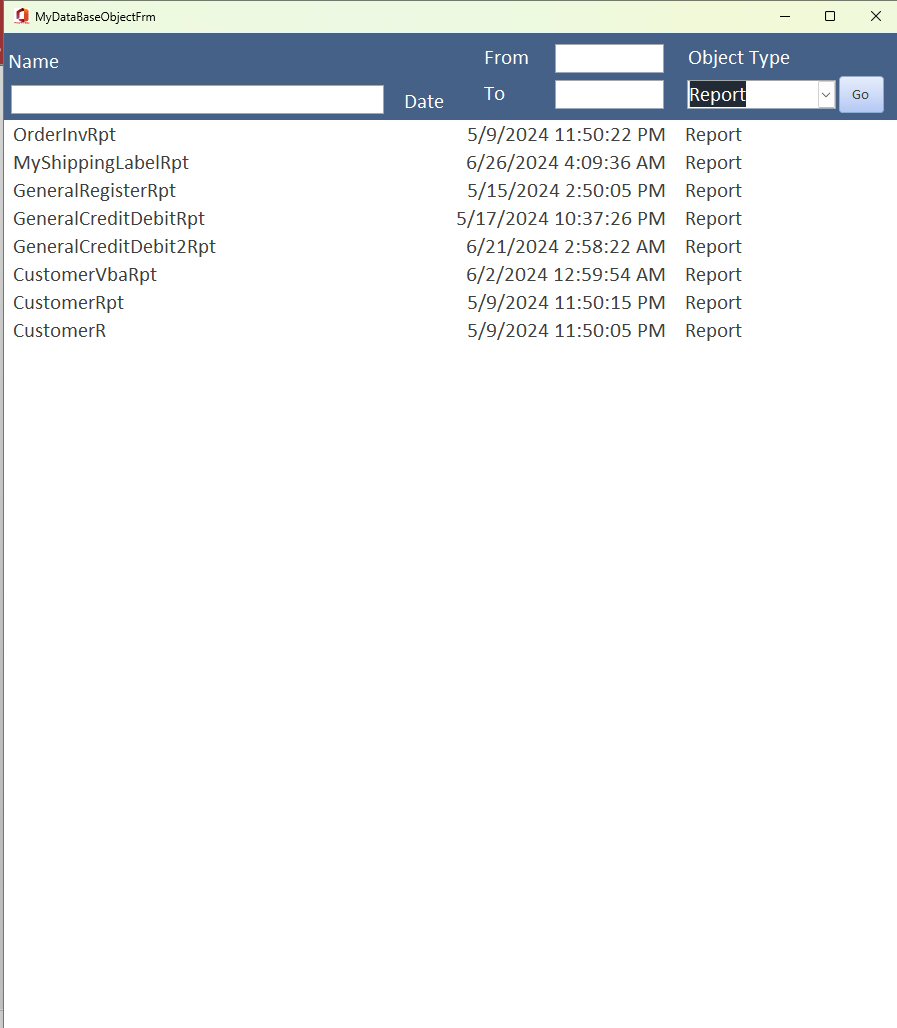
I liked the look of your form so I decided to do my own. Very pleased with the results.
Kevin Robertson  @Reply  
          
2 years ago

Jeffrey Kraft OP  @Reply  
      
2 years ago
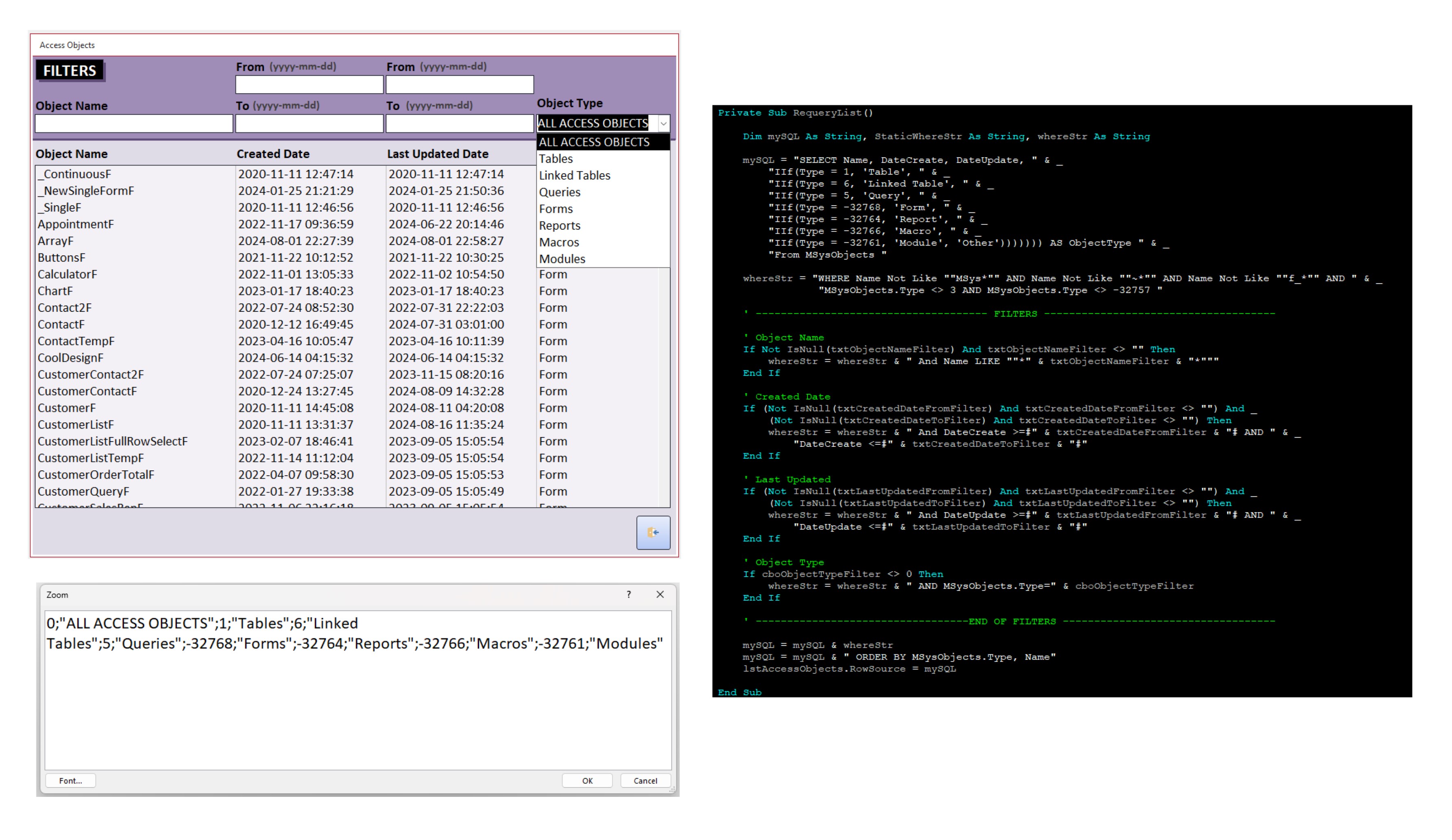
I almost added the last updated part.  And I still might in the future.

This thread is now CLOSED. If you wish to comment, start a NEW discussion in Access Forum.
 

Next Unseen

 
New Feature: Comment Live View


The following is a paid advertisement
Computer Learning Zone is not responsible for any content shown or offers made by these ads.
 

Learn
 
Access - index
Excel - index
Word - index
Windows - index
PowerPoint - index
Photoshop - index
Visual Basic - index
ASP - index
Seminars
More...
Customers
 
Login
My Account
My Courses
Lost Password
Memberships
Student Databases
Change Email
Info
 
Latest News
New Releases
User Forums
Topic Glossary
Tips & Tricks
Search The Site
Code Vault
Collapse Menus
Help
 
Customer Support
Web Site Tour
FAQs
TechHelp
Consulting Services
About
 
Background
Testimonials
Jobs
Affiliate Program
Richard Rost
Free Lessons
Mailing List
PCResale.NET
Order
 
Video Tutorials
Handbooks
Memberships
Learning Connection
Idiot's Guide to Excel
Volume Discounts
Payment Info
Shipping
Terms of Sale
Contact
 
Contact Info
Support Policy
Mailing Address
Phone Number
Fax Number
Course Survey
Email Richard
[email protected]
Blog RSS Feed    YouTube Channel

LinkedIn
Copyright 2026 by Computer Learning Zone, Amicron, and Richard Rost. All Rights Reserved. Current Time: 5/6/2026 6:57:14 AM. PLT: 1s